Microcomputer Games · Strategy
Midway Campaign
Midway Campaign, naval strategy from Microcomputer Games for DOS. An English-language copy with GW-BASIC, text commands and carrier-based aviation.
Strategy game by Microcomputer Games for MS-DOS, in English. Playable in your browser or downloadable.
— no rating yet
THE CLABA ARCHIVE
Inside the game.
Its history, its ideas and the reasons to come back.
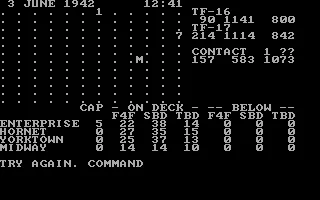
Midway Campaign puts you in command of the American forces around Midway. TF-16 brings together the Enterprise and the Hornet; TF-17, the Yorktown. You also have the aircraft based on the island. The computer moves the Japanese forces and resolves operations while you decide courses, patrols and attacks.
This DOS copy, from Microcomputer Games and Avalon Hill, uses GW-BASIC and text commands. The campaign begins on June 3, 1942, at 12:00. The screen combines a dot map, the positions of your forces, the contacts you have located and the status of your aircraft. Below that appears COMMAND, where you type your next order.
Prepare first, advance the clock afterward
The preparation commands let you change a naval force's course, assign fighters to patrol or bring aircraft up to the deck. Each operation asks brief questions: which force, which carrier or how many aircraft. When you finish adjusting the situation, you enter how many hours you want the simulation to advance.
That advance can stop earlier than requested if a contact or another relevant event appears. The clock, the positions and the alerts let you reconstruct what happened. The map offers partial information about the enemy: finding its ships and getting close enough matters as much as assembling aircraft to attack.
A carrier's deck also demands decisions
The table distinguishes fighters on patrol, aircraft readied on deck and reserves that remain below. The F4F, SBD and TBD groups serve different roles. An offensive formation uses up aircraft that you might also need to protect the carrier; CAP patrols provide that defense.
The screen and the program identify the game as Midway Campaign. The original download is preserved, with its BASIC files and the included interpreter. The screenshots and the background of this page come from that same DOS copy.
EVERY PIXEL COUNTS
The game in pictures.
Explore the screenshots and open every detail at full size.
GET READY FOR YOUR NEXT GAME
Choose your download.
Format, compatibility and server. All in view.
Clicking opens the CLABA loading area and, in a few seconds, your download. If a link fails, let us know via Contact or in the forum.
Your game starts here
Play in your browser.
Pick, press and go back to the classics without leaving the game page.
RetrogamingRight in your browserNo installation
MS-DOSIn your browser
Midway Campaign
Online play uses the MS-DOS version; the game page and main download remain the PC one.
- 68 KB · downloads on click
- Save the game's files
- Keyboard, controller or touch
Controls
Click the game to use the keyboardOn mobile, play with the on-screen controller- T
- course
- CA
- patrol
- A
- prepare attack
- L
- launch
- CL
- clear deck
Type and press Enter. Number: hours to wait. ?: help.
- Full screen
Use the button on the bar. Esc returns to the game page; “Exit” closes the game.
- Saves
Save keeps the files the game creates, not the exact moment. Save inside the game, then press Save.
- Mobile and tablet
Press Controls during the game to show buttons and keyboard. Gamepad support depends on the browser.
Saves live in this browser and device. Clearing the site data deletes them too.
THE SECRET SIDE OF THE GAME
Tips, tricks and secrets.
A hint at the right time. A code that changes everything.
Tip: keep fighters for patrol
Before concentrating all your aircraft in an attack, check the CAP column. CA lets you assign fighters to protect the chosen carrier. The table shows how many remain available afterward.
Tip: advance time in short steps
A long wait order lets both sides act. Start with short periods and read the contact alerts before preparing another move. The program may interrupt the wait to give you back control.
Tip: check the distance before launching
L requires an available contact and a prepared formation. If the target is too far away, the program tells you. Adjust the naval force's course and check the new contacts after advancing the clock.
Tip: tell reserve and deck apart
Aircraft listed under BELOW are still in reserve; ON DECK corresponds to the deck. A prepares a formation and CL clears the deck. Check those columns before repeating an order that already has aircraft assigned.
No matches. Try another effect or code.
THE NEXT STEP, CLEARER
Guides to move forward.
From the first installation to that mission that won't give in.
Startup and first commands
Wait for the Avalon Hill introduction to finish and the map with COMMAND to appear. Type a command and press Enter. The program accepts command letters without your having to hold Shift. To see the short list, you can enter ? and confirm. Read the next question before typing any other data.
Changing a naval force's course
Enter T and Enter. At WHICH TASK FORCE, type 16 or 17 and confirm. Then give the new course: 0 or 360 is north, 90 east, 180 south and 270 west. The course appears next to the corresponding force. Positions change when you advance the time.
Assigning a CAP patrol
Type CA and confirm. WHICH CARRIER asks for a letter: E for Enterprise, H for Hornet, Y for Yorktown or M for Midway. Enter the number of F4F fighters you want to assign and press Enter. The CAP column shows the patrol and the fighter reserve is updated. For example, assigning five to the Enterprise separates those five from its available aircraft.
Preparing and launching an attack
A starts preparing a formation. Choose the carrier and answer the F4F,SBD,TBD prompt with the corresponding quantities, separated by commas. CL lets you return the formation occupying the deck to reserve. L requests launching an attack: the program checks that there are aircraft ready, a valid contact and sufficient distance. If arming is still pending, advance the time before trying again.
Advancing the simulation
At COMMAND, enter a number of hours and confirm with Enter. An order of 1 requests up to one hour of operations. If the program detects a relevant event, it may return to COMMAND before completing that hour. Check the clock, the contacts and the map when you regain control. The map and the status remain visible in this IBM PC edition.
Manual, download and images
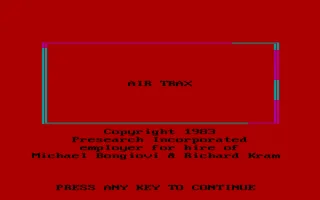
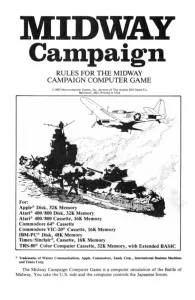
The shared original manual from 1983 lists IBM PC among the compatible machines. It contains instructions for several computers; the commands described here are also cross-checked against the DOS program and its help. The introduction of this copy shows a 1982 copyright. The title image reproduces the manual's cover, not a DOS-exclusive box. The background and the screenshots are taken from the original game.
The original download preserves its four files. The browser runs GWBASIC.EXE MIDWAY.BAS with CGA graphics, 500 cycles and 4 MB of memory. To use the folder on your own computer, see DOSBox from scratch (in Spanish).
Something wrong?
Give us a hint.
A broken link, a detail to correct or a game that won't start. Your report helps keep this game page up to date.
Get in touchReport an issue with this game Discuss it in the forumCLABA ARCADE ROOM
This one and 250 more
play here.
When you finish your game, the room has other machines switched on.
Enter the roomTHE CLABA APP1.0 RC 1
Take the archive
with you.

Game pages, online play and your shelf on Android. Free, no sign-up.
ARCHIVE SECRETS
Did you know?
- The included program is written in BASIC and runs with GW-BASIC, which also comes in the download.
- The introduction shows an Avalon Hill copyright from 1982. The shared manual linked on this page carries a 1983 copyright and expressly includes IBM PC.
- The manual specifies a grid of 12 by 12 points, spaced 100 nautical miles apart.
- On the IBM PC, the island is marked with an M. The manual uses an asterisk for Midway in other versions.