Wizard Soft · Strategy
Primitive Wars
Primitives, elves, mutant dinosaurs and demons across 48 missions. A Korean RTS with dinosaur hunting and units that level up, in Spanish.
Strategy game by Wizard Soft (2001) for PC, in Spanish. Available to download.
4.7 6 votes
THE CLABA ARCHIVE
Inside the game.
Its history, its ideas and the reasons to come back.
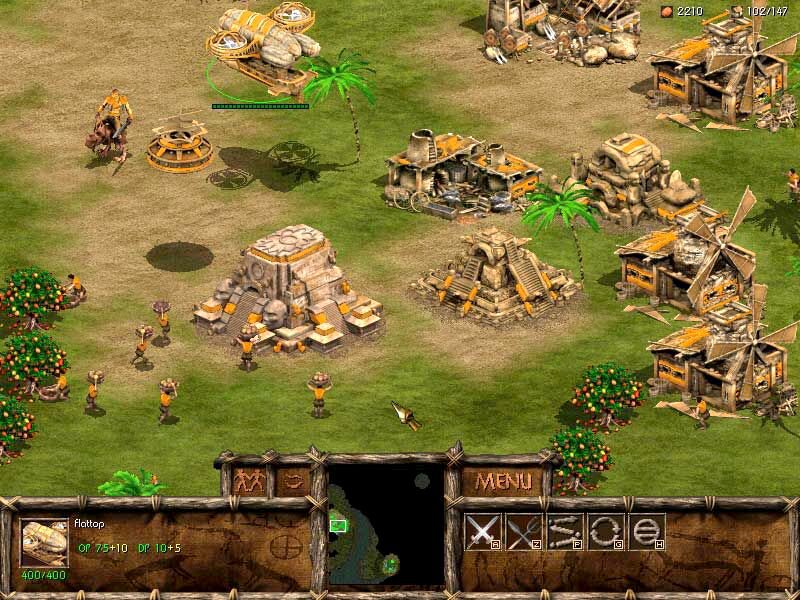
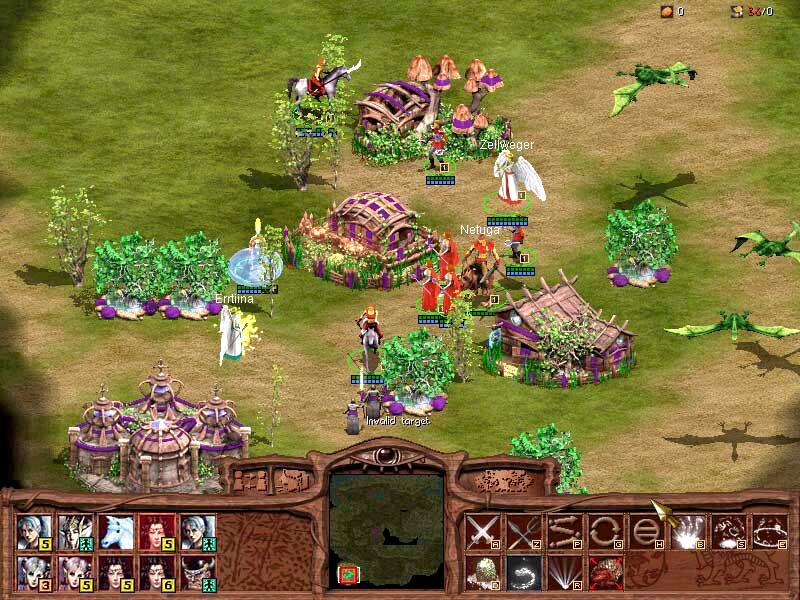
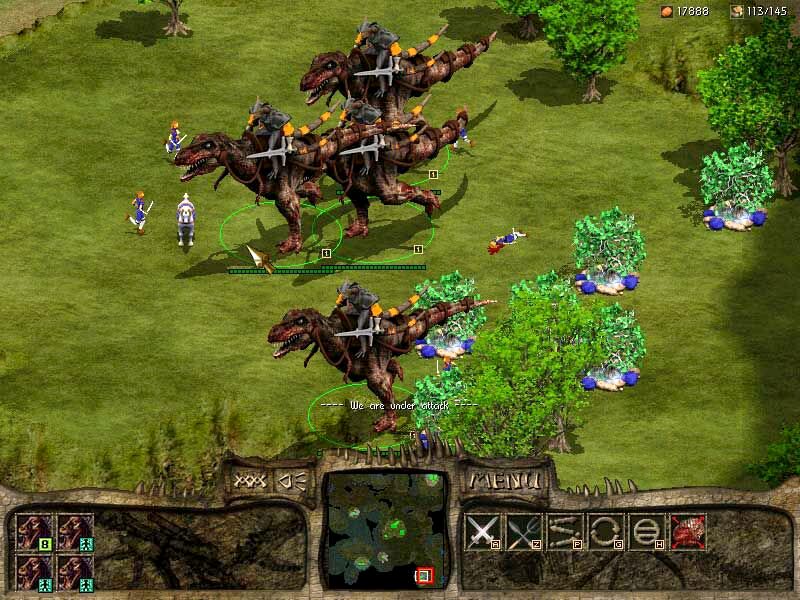
A mutant tyrannosaur that obeys a shaman, female elves who hurl lightning, loincloth-wearing warriors who go out hunting dinosaurs to heal their wounds and, in the background, an army of skeletons in the service of Satan. Primitive Wars is the European version of Jurassic War 2, a real-time strategy game from the South Korean studio Wizard Soft that Arxel Tribe published in Europe in late 2001.
Primitive Island
Eight tribes live in peace on Primitive Island after the «Second Battle of Blood,» until Great Chief Ruwata dies under mysterious circumstances. Suspicion falls on the sorcerers, the powerful Stuma ends up banished to the land of darkness, and the young heir fails to assert himself. Meanwhile, Deka, defeated in a duel, sells his soul to Satan to take revenge. Out of that chaos come the game’s four factions: the Primitives, the Elves, the Tyranos (mutated dinosaurs who follow the Pica-Tyrano) and the Demons. Each has its own campaign of twelve missions, 48 in all.
How it plays
Anyone coming from StarCraft or Warcraft II will feel at home: workers who gather and build, buildings that produce troops, attack and defense upgrades, and an army to crush the rival. The economy is simple, with a single resource, the berries from fruit trees, and a population limit. The four races play very differently: the elves don’t eat and depend on their trees; the Tyranos breed eggs and can fuse units; the demons raise the dead.
The big novelty is hunting. Dinosaurs roam the map and combat units can go out to hunt them: the meat becomes food that each soldier carries and uses to heal, and each kill grants experience. With levels, units gain strength and new abilities, such as the elves’ spells or the primitive chief’s «Fall Out,» which leaves the enemy with one hit point. Also, if you select a mixed group, the panel shows the special abilities of all of them at once.
What made it special
Wizard Soft acknowledged that its inspiration was StarCraft and its Brood War expansion, and afterward Age of Empires. In Korea, in the middle of the online strategy craze, the game was very successful, and in Europe it was played over the Internet on Wizard Soft Net, with statistics and rankings. The European press was less kind: Clubic dismissed it as a Warcraft II clone with graphics limited to 800×600 and clumsy AI, although it credited the multiplayer. It came with a map editor and supported games of up to eight players over a local network or the Internet.
The edition we offer
This is the Spanish release, with the game in Spanish. In Downloads you will find two options, both flagged for Windows XP, 7 and 10: a repack, the most convenient way to play today, and the original disc image, for anyone who wants to preserve it. The game came on two CDs: the first for installing and the second, the play disc, which had to be in the drive to play. The official server shut down many years ago, so multiplayer is left to the local network. If you like the strategy games of the time, continue with Tzar or KKND, and if something fails on your Windows, check our tutorial on Windows XP classics on Windows 10 and 11. In Guides and Tips & tricks you will find shortcuts and official tips for each race.
EVERY PIXEL COUNTS
The game in pictures.
Explore the screenshots and open every detail at full size.
GET READY FOR YOUR NEXT GAME
Choose your download.
Format, compatibility and server. All in view.
Download Repack
COMPATIBILITYWindows XP / 7 / 10 ✓ At no cost✓ No sign-up Download www.mediafire.com · New tab MediaFire02 ISODownload ISO
COMPATIBILITYWindows XP / 7 / 10 ✓ At no cost✓ No sign-up Download www.mediafire.com · New tabClicking opens the CLABA loading area and, in a few seconds, your download. If a link fails, let us know via Contact or in the forum.
THE SECRET SIDE OF THE GAME
Tips, tricks and secrets.
A hint at the right time. A code that changes everything.
How to enter them · no reliable codes
The official site published a cheat file in 2002, but its contents have not survived and we have not found two sources that agree on any code. That is why there are no codes here: what follows are tips, many of them from the official strategy guide itself.
Tip · hunt to level up
As soon as you have good units, send them hunting with the Z key. While hunting they don’t attack nearby enemies unless attacked, but they gain experience and build up food to heal. At the start of each mission, locate where the biggest animals are.
Tip · share out the food
The first unit to pick up the meat keeps all of it. Select the group and use the food-sharing icon so everyone has something to heal with.
Tip · watch your population
Each player has a maximum of 150 upkeep points, and large units take up between 4 and 18. If you hit the cap and want something stronger, sacrifice small units or a worker.
Tip · secure the area before building
Before setting up the base, clear the camp’s surroundings of enemies with a few troops. In some missions it is enough to eliminate one specific enemy: find him and you’ll finish sooner.
Tip · winning combinations
The official guide recommended: demons, gargoyles with demons; Tyranos, Tyranos with Trices or with Mutants; elves, dragons with angels; primitives, Flat-tops with chiefs. And upgrade your ground and air units as early as possible.
No matches. Try another effect or code.
THE NEXT STEP, CLEARER
Guides to move forward.
From the first installation to that mission that won't give in.
Start here · first launch on a current PC
- Download the repack from Downloads: it is the option prepared for Windows XP, 7 and 10.
- Install it in a short path, outside
Program Files, for exampleC:\Juegos\PrimitiveWars, to avoid permission problems when saving. - If the game doesn’t start or stays on a black screen, try Windows XP compatibility mode from the shortcut’s properties and check our tutorial on Windows XP classics on Windows 10 and 11.
- Before changing machines, back up your save games by following the tutorial on copying and restoring save games.
The disc image is for preserving the original edition. Remember that the game came on two CDs: it was installed from the first and to play you had to have the second in the drive. Saved games keep the language of the version they were made with.
Controls · shortcuts from the manual
- A: attack. B: build. T: advanced buildings. W: produce a worker or unit.
- H: stop or resume. P: patrol. Z: hunt.
- Ctrl + number: create a group. Alt + number: recall it.
- Shift + command: chain commands. Space bar: go to the last alert. Arrow keys: scroll the map.
- + and –: game speed. Enter: message window.
- F1 help, F2 save, F3 load, F4 options and F10 menu.
With the mouse, right-click the berries to gather and an enemy or a dinosaur to attack it.
First steps · an orderly game
- Produce workers from the very start: without them gathering and production suffer.
- Gather berries: moving the cursor close to a tree shows how many it has left.
- Build houses (or the equivalent for your race) to raise the population limit.
- Each building lets you queue up to five units.
- Send a first combat group out to hunt dinosaurs and clear the surroundings.
- Upgrade weapons and armor as soon as you can and get flying units to explore faster.
In the first missions of each race you won’t have all the buildings: they unlock as the campaign progresses. Only some main characters keep their experience from one mission to the next.
Technical notes
It required Windows 95, 98, Me or 2000, a 266 MHz Pentium with MMX (550 MHz recommended), 64 MB of RAM (128 recommended), a 16-bit graphics card capable of 800×600, a Sound Blaster-compatible sound card, DirectX 8.0a and 800 MB of disk space. It runs at 800×600, with no other resolutions.
- For a black screen on startup, official support recommended checking in
dxdiagthat DirectDraw, Direct3D and sound acceleration were enabled. - It included a map editor, with its manual in the game’s help.
- Multiplayer supported up to eight players through Wizard Soft Net, direct IP connection or IPX local network. The official server no longer exists; on a local network, IPX today needs third-party tools.
Sources
- European edition manual (Internet Archive): story, installation, resources, hunting, experience, abilities, shortcuts, unit names, multiplayer, races and units.
- Official European site · FAQ: Korean origin, inspiration, 48 missions, eight players, editor, two CDs, support in Spain and the fix for the black screen.
- Official site · strategy tips and downloads and requirements: hunting, food sharing, population, combinations and the 2002 cheat file.
- MobyGames: Wizard Soft, Arxel Tribe, distributors and scores from GameStar, PC Games and Gamezone.
- Clubic (in French) · review (January 2002): reception, success in Korea, single resource, 800×600 and AI.
- GRYOnline (in Polish): full title, European date (November 30, 2001) and publishers.
- PCGamingWiki: requirements and 32-bit executable.
Something wrong?
Give us a hint.
A broken link, a detail to correct or a game that won't start. Your report helps keep this game page up to date.
Get in touchReport an issue with this game Discuss it in the forumCLABA ARCADE ROOM
251 classics
without installing anything.
Don't feel like installing? These play right in your browser.
Enter the roomTHE CLABA APP1.0 RC 1
Take the archive
with you.

Game pages, online play and your shelf on Android. Free, no sign-up.
ARCHIVE SECRETS
Did you know?
Korean in origin. In its home country it was called Jurassic War 2. The European website clarified in its FAQ that it was not a European game but one by Wizard Soft, and that it had been a hit in Korea.
Admitted inspiration. Asked about their references, those responsible cited StarCraft and Brood War first and Age of Empires after.
New Year cheats. In early 2002 the official site published a small file with cheat codes as a «gift from the Primitive team»; we have not been able to recover that file.
Troops with names of their own. By selecting a unit or a building, pressing Enter and typing «!» followed by a name, the game names it; it also works with several units at once.
Poorly received in Germany. GameStar gave it 38 out of 100 and PC Games, 54; in France, Clubic compared it to a Warcraft II from six years earlier.