MicroProse · Strategy
X-COM: UFO Enemy Unknown
Run X-COM, the secret organization that fights the 1999 alien invasion: base management and turn-based combat. Six downloads.
Strategy game by MicroProse (1993) for MS-DOS (in Spanish and English), Amiga and Amiga CD32. Available to download.
Choose your version 3 platforms
No computer handy? Play one of the 251 classics online right now
4.9 9 votes
THE CLABA ARCHIVE
Inside the game.
Its history, its ideas and the reasons to come back.
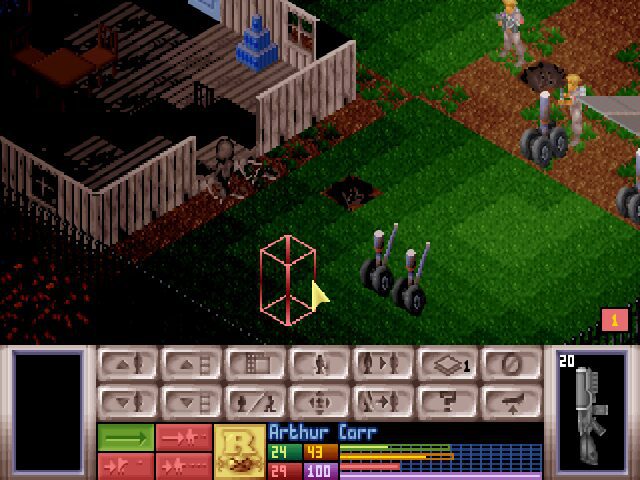
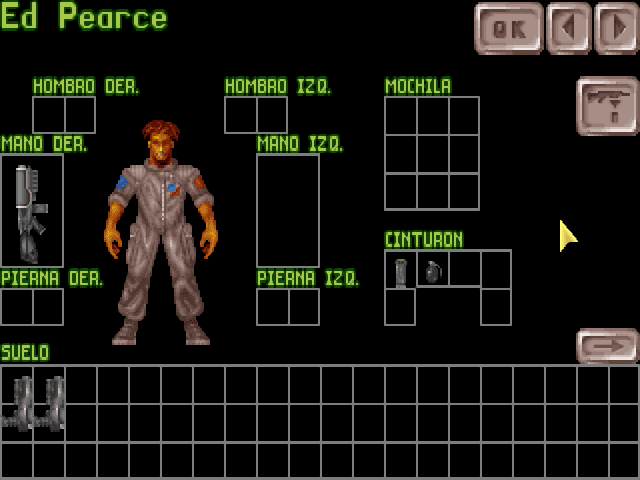
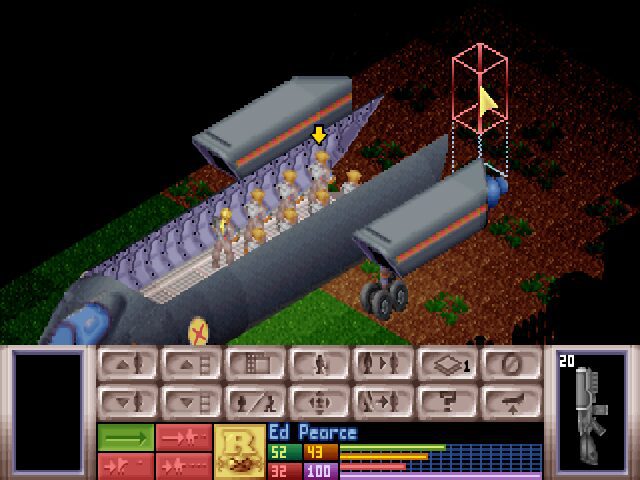
1999: lights appear in the sky, rumors of abductions circulate, and the world’s governments meet in secret to create an organization that does not exist. You run it. UFO: Enemy Unknown, known in the United States as X-COM: UFO Defense, came out in 1994 from Mythos Games, brothers Julian and Nick Gollop, and MicroProse. It combines the management of a secret base with turn-based combat in which every soldier counts, and does it so well that it is still cited among the best strategy games.
Two games in one
Everything revolves around two screens. The Geoscape is the globe seen from space: you choose where to build your first base, detect UFOs, send out interceptors, buy equipment, hire soldiers, scientists and engineers, and decide what to research or manufacture. Every month, the nations funding X-COM give you their verdict in the form of money, and if a government falls into the invaders’ hands, it abandons the project.
The Battlescape appears when your soldiers land next to a crashed ship or in the middle of an attack. It is turn-based combat with time units, limited vision, fog of war and destructible environments. If you reserve time units, your soldiers get reaction fire during the enemy turn, and the aliens have theirs; a single shot can kill a veteran soldier. Capturing an alien alive or recovering its technology opens up new lines of research, and with them better weapons, armor and even psychic warfare, because some enemies are able to control your soldiers’ minds. Nothing is safe here, not even victory.
From Laser Squad to X-COM
According to Julian Gollop, the project began as «Laser Squad II», a demo for the Atari ST with isometric combat. MicroProse, which wanted something on the scale of Civilization, proposed the UFO theme and the Gollops devised the strategic side. Gollop recalls that many people single out the suspense of hearing something you cannot see, a simple device that works. And the UFOpaedia, the in-game encyclopedia, explains every object or alien you research.
The edition we offer
In Downloads there are six options: a repack in English and Spanish prepared for Windows XP and later; two CD images (versions 1.0 and 1.4) and three original copies for MS-DOS (1.2 in English and 1.3 and 1.4 in Spanish). If you want to play with DOSBox, there is DOSBox from scratch; if you prefer Windows, How to play your Windows XP classics on Windows 10 and 11. In Guides and Tips & tricks we give you the setup and advice for surviving the first month.
The series continued with X-COM: Terror from the Deep and X-COM: Apocalypse. If you like MicroProse’s style and a dark future, also try Syndicate.
ONE GAME, 3 PLATFORMS
Versions.
3 platforms1994
Pick a platform: the screenshots, downloads and online game on this page switch with it.
- Year
- 1994
- Port by
- Mythos Games / MicroProse
- Downloads
- 6
- Screenshots
- 3
This is the original PC version (MS-DOS, March 1994), the one programmed by the Gollop brothers. The page offers a repack in English and Spanish, CD images and original copies of versions 1.0, 1.2, 1.3 and 1.4.

- Year
- 1994
- Port by
- Nick Gollop / MicroProse
- Downloads
- 2
- Screenshots
- 1
Amiga conversion of the same UFO: Enemy Unknown, released in 1994 in several editions (OCS/ECS, AGA and CD32). According to Wikipedia, it was made by Nick Gollop, and on OCS/ECS Amigas the graphics are of lower quality than on PC and the light-source shading is missing from the combat missions, although the sound is improved. The AGA versions have better graphics.

- Year
- 1994
- Port by
- Nick Gollop / MicroProse
- Downloads
- 1
- Screenshots
- 1
CD edition for the Amiga CD32 of the same game, reviewed in the specialist press from late 1994. According to Wikipedia, it shares the improved graphics of the AGA versions and debuts a soundtrack composed by Matthew Simmonds, different from the PC's MIDI music.
EVERY PIXEL COUNTS
The game in pictures.
Explore the screenshots and open every detail at full size.
GET READY FOR YOUR NEXT GAME
Choose your download.
Format, compatibility and server. All in view.
Version
SELECTED VERSIONMS-DOS1994 · 6 files
Download Repack
COMPATIBILITYWindows XP / 7 / 10 ✓ At no cost✓ No sign-up Download www.mediafire.com · New tab MediaFire02 MS-DOS · ISODOWNLOAD CD
COMPATIBILITYMS-DOS 6.22+ ✓ At no cost✓ No sign-up Download www.mediafire.com · New tab MediaFire03 MS-DOS · ISODOWNLOAD CD
COMPATIBILITYMS-DOS 6.22+ ✓ At no cost✓ No sign-up Download www.mediafire.com · New tab MediaFire04 MS-DOS · OriginalDOWNLOAD ORIGINAL
COMPATIBILITYMS-DOS 6.22+ ✓ At no cost✓ No sign-up Download www.mediafire.com · New tab MediaFire05 MS-DOS · OriginalDOWNLOAD ORIGINAL
COMPATIBILITYMS-DOS 6.22+ ✓ At no cost✓ No sign-up Download www.mediafire.com · New tab MediaFire06 MS-DOS · OriginalDOWNLOAD ORIGINAL
COMPATIBILITYMS-DOS 6.22+ ✓ At no cost✓ No sign-up Download www.mediafire.com · New tabSELECTED VERSIONAmiga1994 · 2 files
Download for hard disk
COMPATIBILITYRequires an emulator ✓ At no cost✓ No sign-up Download BoxSharer server · New tab BoxSharer02 Amiga · Floppy disksDownload original floppy disks
COMPATIBILITYRequires an emulator ✓ At no cost✓ No sign-up Download BoxSharer server · New tabSELECTED VERSIONAmiga CD321994 · 1 file
Clicking opens the CLABA loading area and, in a few seconds, your download. If a link fails, let us know via Contact or in the forum.
HIT PLAY
The game in motion.
Trailers and videos to see it in action.
-
Amiga CD32 · How it plays
A game of X-COM: UFO Enemy Unknown on the Amiga CD32.
THE SECRET SIDE OF THE GAME
Tips, tricks and secrets.
A hint at the right time. A code that changes everything.
Tip · about cheats
The game includes no documented official codes, and any list of passwords that circulates is unreliable. These tips, taken from the manual and from verified guides, will serve you better than a cheat.
Tip · kneel to aim
The manual explains that accuracy increases when the soldier fires from a kneeling position and drops if he is wounded or tries to use a two-handed weapon, such as a rifle or a rocket launcher, with one hand.
Tip · choose the shot type wisely
The aimed shot costs more time units but is the most accurate. The snap shot only pays off at very short range or with powerful weapons, and the auto shot fires three bullets, useful up close, but not every weapon has it.
Tip · proximity grenades, always thrown
Proximity grenades have no timer: they explode when something moves nearby, including your own soldiers. The manual recommends always throwing them to avoid accidental detonations. Regular grenades and explosive charges are set from 0 to 23 turns.
Tip · watch the morale
A soldier’s morale drops when combat turns ugly for your side; below 50%, according to the manual, he may panic. Do not throw a rookie to the front with his comrades dying around him.
Tip · capture aliens alive
Interrogating a captured extraterrestrial and recovering its equipment opens new research. Items can be sold on the black market to fund the base. There are non-lethal weapons designed precisely for capturing them.
Tip · if it seems too easy
If you play the original DOS version, remember the bug documented on PCGamingWiki: the game behaves as if on Beginner difficulty even if you choose another. The Collector’s Edition and OpenXcom fix it, and XcomUtil also patches it on DOS.
No matches. Try another effect or code.
THE NEXT STEP, CLEARER
Guides to move forward.
From the first installation to that mission that won't give in.
Start here · first launch
- Choose in Downloads: the repack (English and Spanish) is the most convenient on Windows XP or later; the original copies and the CD images are for those who want to keep each version (1.0, 1.2, 1.3 or 1.4) and use them with DOSBox.
- Install or unzip into a short path, for example
C:\Juegos\XCOM, outsideProgram Files. - With the repack, launch the shortcut it comes with; with the DOS copies, mount the folder in DOSBox and run
UFO(the manual says the program is called that). Step by step in DOSBox from scratch. - If the game asks you for a number from the manual, that is the copy protection: according to PCGamingWiki, an unofficial «UFO 1.4» patch removes it.
- Save often in different slots. To make backups, see Your save games deserve another life.
Controls
- Mouse: the game requires a mouse and keyboard. Almost everything is done with the mouse.
- Geoscape: from the globe you manage bases, craft and interceptions, and from each base’s menus, personnel, research and manufacturing.
- Battlescape: the bottom panel brings together the controls to go up or down a level, open the map, select the next soldier, center the view, kneel or stand, reserve time units, open the inventory and options, and end the turn.
- Weapons: click the left-hand or right-hand slot and choose the shot type.
- Options: scroll speed and the speed of allied and alien movement, to make the game move along faster.
First steps · the first month
- Choose carefully where you build the first base: its radars have a limited range (300 nautical miles for short-range ones and 450 for long-range ones, according to the manual).
- Put your scientists to work on research before you run short of money; recovered items open up new paths.
- Equip your interceptors: shooting down a UFO leaves a crashed ship and a chance to recover technology.
- On the ground, advance under cover, light up night missions with flares and do not leave anyone alone facing an unknown alien.
- Check the monthly report: if a country reduces its aid, it has lost confidence in you.
The UFOpaedia explains what everything you research does. Consult it.
Technical notes
The manual of PowerPlus’s German edition calls for a PC with an 80386 processor, 2 MB of RAM, VGA, a mouse, DOS 5.0 or higher and about 12 MB of disk space; it supports the internal speaker, AdLib, Sound Blaster compatibles and Roland LAPC-1. On a modern machine the usual setup is DOSBox with Sound Blaster audio.
PCGamingWiki states that DOS version 1.4 can hang if the MT-32 is enabled without the updated driver, and that the difficulty bug is only fixed in the Collector’s Edition and in OpenXcom, an open source engine that requires the game’s original data. Steam and GOG sell the title with the DOS 1.4 and CE versions.
Sources
- PowerPlus German manual (Internet Archive) (in German): requirements, installation, number-based copy protection, weapons, morale and the Battlescape panel.
- PCGamingWiki: X-COM: UFO Defense: versions, difficulty bug, patches, OpenXcom, MT-32 and stores.
- Interview with Julian Gollop (Eurogamer, 2010): origin of the project, Pete Moreland, John Broomhall, platforms and sales.
- Hall of Light: UFO: Enemy Unknown (Amiga): OCS/ECS, AGA and CD32 versions and their 1994-1995 reviews.
- Wikipedia (in English): development context and conversions, for orientation only.
Something wrong?
Give us a hint.
A broken link, a detail to correct or a game that won't start. Your report helps keep this game page up to date.
Get in touchReport an issue with this game Discuss it in the forumCLABA ARCADE ROOM
251 classics
without installing anything.
Don't feel like installing? These play right in your browser.
Enter the roomTHE CLABA APP1.0 RC 1
Take the archive
with you.

Game pages, online play and your shelf on Android. Free, no sign-up.
ARCHIVE SECRETS
Did you know?
From Laser Squad II to X-COM. Julian Gollop told Eurogamer that the seed was a demo for the Atari ST, then called Laser Squad II. MicroProse asked for something bigger, and Pete Moreland proposed the UFO theme.
A bug that made it easy. According to PCGamingWiki, the original DOS version always played on Beginner difficulty, whichever one you chose. Nobody noticed until the Collector’s Edition, and the complaints about how easy it was are said to have influenced the design of the sequel.
Heard, not seen. Gollop explained that many people single out the game’s suspense because you hear things you cannot see. The music and sound were handled by MicroProse musician John Broomhall.
Half a million copies. Gollop estimated that physical sales were around half a million across PC, Amiga, CD32 and PlayStation; he himself was surprised that it worked on a console.
Two names. The game was called UFO: Enemy Unknown in Europe and X-COM: UFO Defense in North America; the American version arrived already with patch 1.2, according to PCGamingWiki.