Bady · Strategy
The Battle on the Black Sea
The Battle on the Black Sea, Bady's June 1992 Battleship game for DOS. An English-language copy you can play against the computer in your browser.
Strategy game by Bady (1992) for MS-DOS, in English. Playable in your browser or downloadable.
— no rating yet
THE CLABA ARCHIVE
Inside the game.
Its history, its ideas and the reasons to come back.
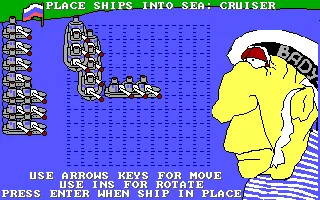
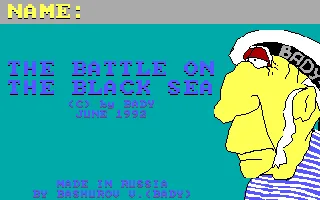
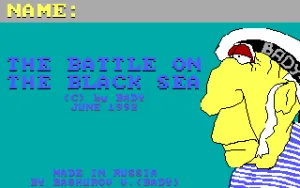
The Battle on the Black Sea is an adaptation of Battleship for DOS, signed by Bady in June 1992. First you place your ships; then you hunt for the computer's fleet with a crosshair and shots on a grid. The presentation also credits Bashurov V. and uses a portrait of a sailor to accompany the first screens.
The game is played with the keyboard. The arrow keys move the ship you are placing or the attack crosshair, Insert rotates pieces during deployment, and Enter confirms the position or fires. The game keeps its instructions in English at the bottom of the screen.
Ten ships before the first shot
The fleet includes one battleship, two cruisers, three destroyers and four torpedo boats. The ships appear one at a time so you can decide their positions. You can keep them vertical or rotate them before confirming; the name of the type you are placing appears above the board.
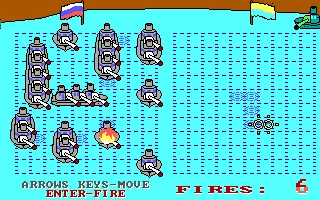
When deployment is finished, your own fleet stays visible on the left and the enemy field takes up the right. The shot markers and fire animations let you follow the battle. The FIRES counter accompanies the action: it pays to look at the board before wasting another shot on a square you have already explored.
A 1992 presentation
Before you place ships, a statistics sheet and a map of the Black Sea appear, with the labels and ports used by the program. The screenshots on this game page come from the original DOS copy. The presentation image is also used as the cover of this game page.
EVERY PIXEL COUNTS
The game in pictures.
Explore the screenshots and open every detail at full size.
GET READY FOR YOUR NEXT GAME
Choose your download.
Format, compatibility and server. All in view.
Clicking opens the CLABA loading area and, in a few seconds, your download. If a link fails, let us know via Contact or in the forum.
Your game starts here
Play in your browser.
Pick, press and go back to the classics without leaving the game page.
RetrogamingRight in your browserNo installation
MS-DOSIn your browser
The Battle on the Black Sea
Your next game starts here.
- 39 KB · downloads on click
- Save the game's files
- Keyboard, controller or touch
Controls
Click the game to use the keyboardOn mobile, play with the on-screen controller- ↑←↓→
- move
- Enter
- place or fire
- Space
- continue through the opening screens
Name and Enter. Insert: rotate when placing.
- Full screen
Use the button on the bar. Esc returns to the game page; “Exit” closes the game.
- Saves
Save keeps the files the game creates, not the exact moment. Save inside the game, then press Save.
- Mobile and tablet
Press Controls during the game to show buttons and keyboard. Gamepad support depends on the browser.
Saves live in this browser and device. Clearing the site data deletes them too.
THE SECRET SIDE OF THE GAME
Tips, tricks and secrets.
A hint at the right time. A code that changes everything.
Tip: rotate before confirming
Insert changes the ship's orientation while you are placing it. Check its length and position before pressing Enter. A horizontal cruiser may fit in a space that doesn't work for a vertical one.
Tip: spread out your fleet
Use different areas of the board when placing the ten ships. Leaving the whole fleet concentrated makes it easier for a series of nearby shots to hit several pieces. Check each position before moving on to the next ship.
Tip: look at the squares you've already explored
The markers left on the enemy field help you remember where you have fired. Before confirming another attack, check the position of the crosshair and the previous results.
Tip: follow up on a hit
When you find part of a ship, explore the nearby squares instead of abandoning the area. Think about the two orientations you used when deploying your own fleet.
No matches. Try another effect or code.
THE NEXT STEP, CLEARER
Guides to move forward.
From the first installation to that mission that won't give in.
Name and first screens
Type a name when NAME appears and press Enter. The program shows the player's statistics sheet. Press Space to continue to the map and press it again to reach ship placement.
Placing the fleet
Use the arrow keys to move each ship and Enter to set it in place. Insert lets you rotate it. The battleship takes up four squares, the cruisers three, the destroyers two and the torpedo boats one. Repeat the process until all ten pieces are placed. The game then moves on to combat.
Firing and reading the board
Your own fleet stays on the left. Move the crosshair over the field on the right with the arrow keys and press Enter to fire. Wait for the animation to finish before choosing the next target. The FIRES counter updates during the turns and the computer responds against your fleet.
An example to get started
You can place the first battleship vertically and rotate one of the cruisers with Insert to lay it out horizontally. Finish distributing the other ships before attacking. In combat, try a shot, move the crosshair to another square and confirm another: that way you can get to know the markers and the counter before looking for more specific targets.
Download and use in DOSBox
The original download preserves SEA.EXE, SEA.LIB and SEA.PIC. Keep the three files together and run SEA.EXE in DOSBox. To set up the emulator on your computer, see DOSBox from scratch. The browser package adds a VGA configuration, 3,000 cycles and 4 MB of memory without modifying the three original files.
Credits and image provenance
The title, the Bady signature, the Bashurov V. credit and the June 1992 date can be read in the presentation of the program. The placement and firing instructions appear in the game itself. The cover of this game page is a screenshot of that presentation; the gallery also shows deployment and a real combat. No generated illustration has been used.
Something wrong?
Give us a hint.
A broken link, a detail to correct or a game that won't start. Your report helps keep this game page up to date.
Get in touchReport an issue with this game Discuss it in the forumCLABA ARCADE ROOM
This one and 250 more
play here.
When you finish your game, the room has other machines switched on.
Enter the roomTHE CLABA APP1.0 RC 1
Take the archive
with you.

Game pages, online play and your shelf on Android. Free, no sign-up.
ARCHIVE SECRETS
Did you know?
- The presentation expressly shows JUNE 1992 and Bady's copyright.
- The author also signs as BASHUROV V. (BADY) in the program itself.
- The copy we offer has three files: SEA.EXE, SEA.LIB and SEA.PIC. All three are preserved in the download.
- The English names of the four classes are Torpedo-boat, Destroyer, Cruiser and Battle-ship.