Electronic Arts · Action-adventure
Harry Potter and the Philosopher's Stone
Harry Potter and the Philosopher's Stone for PC, KnowWonder's adventure in Spanish. Repack, CD, install guides and play-in-browser access.
Action-adventure game by Electronic Arts (2002) for PC, in Spanish and other languages. Playable in your browser or downloadable.
4.5 86 votes
THE CLABA ARCHIVE
Inside the game.
Its history, its ideas and the reasons to come back.
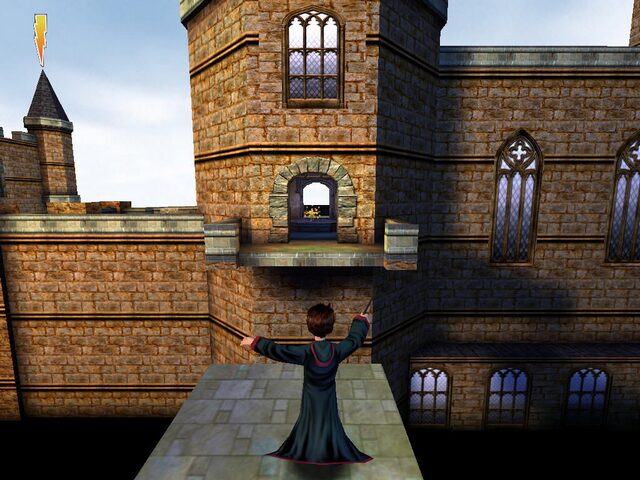
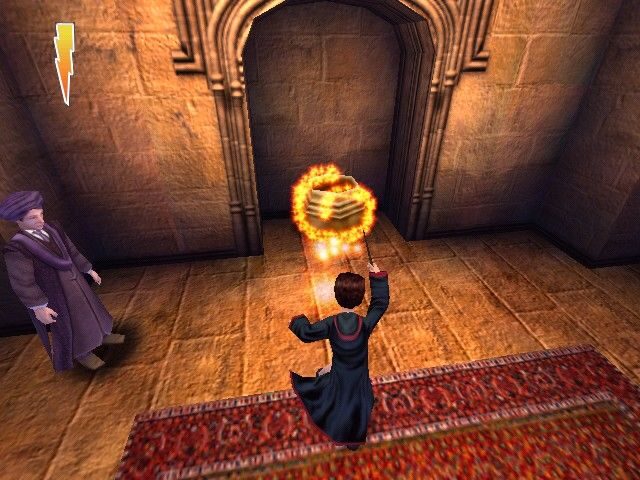
Professor Quirrell draws a shape in the air and you have to repeat it with the mouse before time runs out; if your stroke strays from the line, there is no spell. That is how Harry learns magic in Harry Potter and the Philosopher's Stone for PC, the Windows version that KnowWonder built on the Unreal engine and that Electronic Arts released in November 2001, alongside the film. It is not the PlayStation game or the Game Boy ones, which came out at the same time under the same name: it is a different adventure, in third person and designed for mouse and keyboard.
First year at Hogwarts
The story follows Harry's first year at school: the classes, the run-ins with Draco Malfoy and his gang, the suspicions about Snape, Hagrid's dragon and, at the end, the challenges that protect the stone. Everything revolves around the House Cup: every lesson done well and every challenge star you find earns points for Gryffindor, and the standings against Slytherin, Hufflepuff and Ravenclaw can be checked on the report card that appears when you press Esc.
Around the castle there are Bertie Bott's Every Flavor Beans, which serve as currency for trading with other students for Famous Witches and Wizards cards, and Chocolate Frogs that restore energy, shown as a lightning bolt. If it runs out, Harry faints and you return to the last save point: thick books scattered along the corridors that save your game as soon as you walk over them.
Wand, broom and a bit of stealth
To cast a spell you've already learned, you hold down the left button, aim with a cursor of sparks and, when the stroke appears over the target, release. With Flipendo, Wingardium Leviosa or Lumos you solve the challenge zones, which mix jumps, levers and blocks. There are also simple duels, a stealth stage with the invisibility cloak dodging the caretaker and his cat, which GameSpot compared to Metal Gear Solid, and broom flights. After the first Quidditch match, a league against increasingly tough teams opens up in the main menu.
A success with caveats
Critics found it easy for seasoned players: a six- or seven-hour adventure, with repetitive puzzles and an optional auto-jump that removes almost all the difficulty. In return, they praised the use of the Unreal engine to recreate the look of the film and Jeremy Soule's music. The public responded: in November 2001 it was the second best-selling PC game in the United States, and with just two months in stores it closed the year as the third.
Download Harry Potter and the Philosopher's Stone for PC in Spanish
This is the Windows edition in Spanish, with text and voices in Spanish. In Downloads you have the repack to install and play, which according to the note on our forum (in Spanish) already includes update 1.1, and the CD image. The forum thread also collects two useful fixes for Windows 10, which we explain step by step in Guides. The hidden codes, including the one that rescues a rebellious platform, are in Tips & tricks, and for compatibility questions there is our tutorial on Windows XP classics on Windows 10 and 11.
You can also play Harry Potter and the Philosopher's Stone online: this opens the Spanish PC version in its own player. It requires a computer with WebGPU. The repack and the CD in Downloads are alternatives for playing outside the browser; you don't need to download them to open the online game.
The series continues on PC with Chamber of Secrets and Prisoner of Azkaban, also by KnowWonder, and goes on with Goblet of Fire, Order of the Phoenix and Half-Blood Prince.
EVERY PIXEL COUNTS
The game in pictures.
Explore the screenshots and open every detail at full size.
GET READY FOR YOUR NEXT GAME
Choose your download.
Format, compatibility and server. All in view.
Download Repack
COMPATIBILITYWindows XP / 7 / 10 ✓ At no cost✓ No sign-up Download www.mediafire.com · New tab MediaFire02 ISODownload ISO
COMPATIBILITYWindows XP ✓ At no cost✓ No sign-up Download www.mediafire.com · New tabClicking opens the CLABA loading area and, in a few seconds, your download. If a link fails, let us know via Contact or in the forum.
THE GAME STARTS HERE
Play in your browser.
Get your controls ready and go back to the classics.

PC · SPANISH · CLABA PLAYER 1.1
Harry Potter and the Philosopher's Stone
Your next game starts here.
Play nowThe game opens in its own screen. It needs a computer with WebGPU and a 425 MB first download. Saved games stay in this browser.
THE SECRET SIDE OF THE GAME
Tips, tricks and secrets.
A hint at the right time. A code that changes everything.
How to enter them
Codes are typed on the keyboard during play, without opening any text box. When debug mode is activated, some letters appear at the top of the screen; F7 deactivates it and they disappear. From what is said on our forum (in Spanish), the jump codes need debug mode to be active.
Debug mode
HarryDebugModeOn: activates debug mode. With it active, according to community documentation: F2, F3 and F4 take Harry to fixed points in the level, F5 to a random one, F8 toggles camera modes and F11 shows the counters for challenge stars and Gryffindor points. F7 turns it off.
Jumps
HarrySuperJump: Harry makes enormous jumps. HarryNormalJump: back to the normal jump.
Energy
HarryGetsFullHealth: restores all your energy.
Tip · the gargoyle platform
In the gargoyle mission, after learning Lumos, one of the yellow platforms, the one that leads to the star, can end up at a different height and there is no way to reach it. The fix from our forum: type HarryDebugModeOn, then HarrySuperJump, jump across the area and press F7 to leave debug mode.
Tip · beans and cards
Collect every bean you see: they are the currency other students accept in exchange for Famous Witches and Wizards cards. The cards can be viewed in the Folio Magi, from the report card (Esc), and the best-hidden ones are the real challenge for completists.
No matches. Try another effect or code.
THE NEXT STEP, CLEARER
Guides to move forward.
From the first installation to that mission that won't give in.
Start here · first launch
- In Downloads, choose the repack: it installs and plays, and already includes update 1.1.
- Install it to a short path, such as
C:\Juegos\HarryPotter1, outsideProgram Files. - Launch the game once: it creates the
Documents\Harry Potterfolder, with the configuration (HP.iniandUser.ini) and, inSave, your save games. Copy it before reinstalling, as we explain in the tutorial on copying and restoring save games. - If the characters' glasses or some transparencies look wrong on Windows 10, open
HP.ini, findUsePrecache=Trueand change it toUsePrecache=False. - If "General protection fault" appears at startup, add
-windowedto the end of the shortcut's target, launch, and switch to fullscreen with Alt+Enter.
The CD image is for preserving the edition: the original disc uses SafeDisc 2, whose driver Windows 7 disabled and Windows 10 removed, so on a current machine the convenient route is the repack.
Another option is to play in the browser: open Play online to access the Spanish PC player. You need a computer with WebGPU, and saves stay in this browser and device. This option is independent of installing the repack or mounting the CD image.
Controls
- Arrow keys: move Harry. Mouse: look around.
- Ctrl or right click: jump. To climb, walk into the obstacle.
- Hold left click: ready the wand; aim with the cursor of sparks and release to cast the spell.
- To talk or use something, just walk up to it.
- Esc: pause and report card.
- On the broom: A accelerates, Z brakes and the arrow keys steer. In Quidditch, Ctrl or right click catches the Snitch.
All the keys can be changed in Options, where you'll also find auto-jump, mouse sensitivity and flight inversion. To use a controller, PCGamingWiki says to set UseJoystick=True in HP.ini.
First steps · how to pass the year
- In class, start the stroke at the marked point and don't stray from the white shape: the more precise you are, the more points you get. If you struggle, lower the mouse sensitivity.
- Pass by every save book you see: if Harry faints, you go back to the last one.
- Look for the challenge stars in each trial; they add points for the House Cup.
- The Chocolate Frogs hop away: catch them when you're hurt, because they only give energy if yours isn't full.
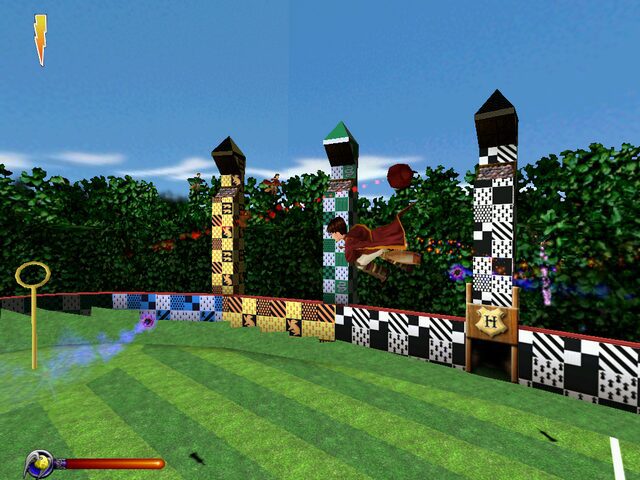
- In Quidditch, follow the Snitch's golden trail and pass through its rings to fill the bar; avoid the Bludgers' blue trail. With the bar full, get close and catch it, or it will escape and you'll have to start the chase again.
- If you faint in the Quidditch league, your team loses the match.
Technical notes
Original requirements: Windows 95, 98, 2000, Me or XP (it doesn't support NT or Windows 95A), a 266 MHz Pentium II, 32 MB of RAM (64 MB on Windows 2000 and 128 MB on XP), a 4 MB DirectX 8.0-compatible video card and 500 MB of available disk space. Recommended: a 400 MHz processor, 128 MB of RAM (256 MB on XP) and a 32 MB 3D accelerator.
On current machines, PCGamingWiki records several problems: at high frame rates the physics and cutscenes break, cutting off the voices, so it is best to cap it at 60; if the game runs slowly or the brightness doesn't respond, dgVoodoo 2 or DDrawCompat help; and if the sound fails in Quidditch, launch HP.exe on a single core with start /affinity 1 hp.exe from the System folder. There is a community mod for widescreen and an optional DirectX 11 renderer. If the game runs slowly on Windows 10, on our forum they suggest adding an antivirus exclusion for the game folder and restarting the computer.
Sources
- PC manual and installation guide (Internet Archive): controls, spells, beans, cards, saving, Quidditch, options, requirements and credits.
- PCGamingWiki: KnowWonder and Unreal Engine 1, date, US version, SafeDisc 2, configuration and save paths, UsePrecache, -windowed, controller, frame rates, Quidditch sound and mods.
- GameSpot · review by Gerald Villoria (2001): length, auto-jump, stealth stage, Quidditch, illustrations shared with PlayStation and GBA, Jeremy Soule's music.
- NPD Group · press release from February 2002 and GameSpot · November 2001 sales: sales.
- Macworld (February 2002): Aspyr's Mac version and the film's box office.
- PC Games (December 2001) (in German), Harry Potter Unreal Wiki and our forum (in Spanish): codes, debug mode keys and Windows 10 fixes.
Something wrong?
Give us a hint.
A broken link, a detail to correct or a game that won't start. Your report helps keep this game page up to date.
Get in touchReport an issue with this game Discuss it in the forumCLABA ARCADE ROOM
This one and 540 more
play here.
When you finish your game, the room has other machines switched on.
Enter the roomTHE CLABA APP1.0 RC 1
Take the archive
with you.

Game pages, online play and your shelf on Android. Free, no sign-up.
ARCHIVE SECRETS
Did you know?
Third of the year in two months. According to the research firm NPD, the game reached stores in November 2001 and, with only two months on sale, ended the year as the third best-selling PC game in the United States.
Same illustrations, different game. The introduction, with ink drawings on parchment, uses the same art as the PlayStation and Game Boy Advance versions, although the game that follows doesn't resemble the ones on those consoles.
Philosopher's Stone or Sorcerer's Stone. In the United States it was titled Sorcerer's Stone, and according to PCGamingWiki that version is an updated compilation, with small differences from the European one.
A debug mode in plain sight. In December 2001 the German magazine PC Games was already publishing the code that activates the debug mode the programmers left in, with keys to teleport Harry between points in the level or change cameras.
Mac a few months late. The Mac version was published by Aspyr Media, which put it on sale in February 2002, when the film had already passed 900 million dollars at the box office.