Blue Byte · Strategy
Battle Isle 2
Battle Isle 2, a 1994 Blue Byte strategy game for DOS: play online with English menus and German mission text.
Strategy game by Blue Byte (1994) for MS-DOS, in English and German. Playable in your browser or downloadable.
— no rating yet
THE CLABA ARCHIVE
Inside the game.
Its history, its ideas and the reasons to come back.
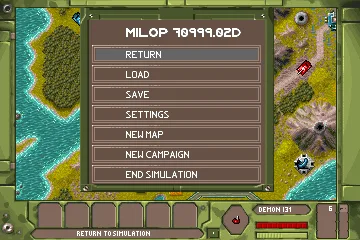
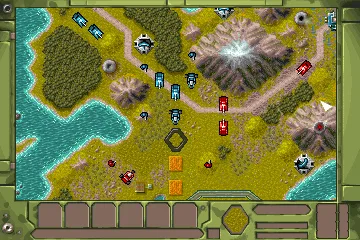
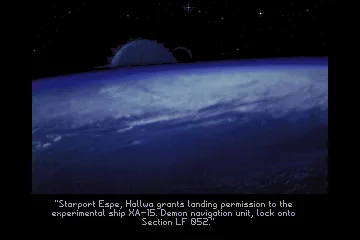
Battle Isle 2 takes the wars of Chromos to a wider command screen. Blue Byte released this second installment for DOS in 1994; in the United States it was called Battle Isle 2200. Units still advance across hexagons, but now you can move a vehicle and use its weapons during your turn. Clashes are shown as three-dimensional combat scenes.
The MilOp console brings together the terrain, the troops, and the available orders. A reconnaissance unit finds enemies; an armored formation has a different combat capability; transports, engineers, and buildings sustain the advance. Before attacking, it pays to check ammunition, fuel, and experience. A cut road or a supply depot out of reach can wreck an offensive that looked easy.
War is also won by keeping supplies flowing
The manual devotes separate sections to building roads, railways, bridges, and fortifications. Factories produce units, and buildings consume materials and energy when providing their services. Weather and reconnaissance shape what you know about the map. The information you remember about an explored area may have changed since your last visit.
The campaign chains missions together and lets you distribute the experience earned among your units. The independent maps mode offers other battles and settings for sides and alliances. The game itself includes four difficulty levels: Training, Easy, Difficult, and Expert. To get started, the SIEBENA map that this copy loads lets you practice selecting, moving, and ending a turn without sitting through the whole introduction.
This is the collection's DOS copy, with menus and introduction in English and mission text in German. The online launch uses the official FAST parameter. The installed download keeps the game's resources, unpacks the files the way the original installer does, and leaves Sound Blaster Pro configured. The original installer is also kept unchanged.
EVERY PIXEL COUNTS
The game in pictures.
Explore the screenshots and open every detail at full size.
GET READY FOR YOUR NEXT GAME
Choose your download.
Format, compatibility and server. All in view.
Download Portable
COMPATIBILITYMS-DOS 6.22+ ✓ At no cost✓ No sign-up Download BoxSharer server · New tab BoxSharer02 OriginalDownload Original
COMPATIBILITYMS-DOS 6.22+ ✓ At no cost✓ No sign-up Download BoxSharer server · New tabClicking opens the CLABA loading area and, in a few seconds, your download. If a link fails, let us know via Contact or in the forum.
Your game starts here
Play in your browser.
Pick, press and go back to the classics without leaving the game page.
RetrogamingRight in your browserNo installation
MS-DOSIn your browser
Battle Isle 2
Your next game starts here.
- 4 MB · downloads on click
- Save the game's files
- Keyboard, controller or touch
Controls
Click the game to use the keyboardOn mobile, play with the on-screen controller- ↑←↓→
- cursor
- Space
- select and confirm orders
- F1
- menu
- Esc
- cancel
Hold Space and use left/right to change icon.
- Full screen
Use the button on the bar. Esc returns to the game page; “Exit” closes the game.
- Saves
Save keeps the files the game creates, not the exact moment. Save inside the game, then press Save.
- Mobile and tablet
Press Controls during the game to show buttons and keyboard. Gamepad support depends on the browser.
Saves live in this browser and device. Clearing the site data deletes them too.
THE SECRET SIDE OF THE GAME
Tips, tricks and secrets.
A hint at the right time. A code that changes everything.
Tip · Check your fuel before advancing
A short route across the map can leave the vehicle far from support. Check its fuel and locate a building that can resupply it before moving it away from the rest of the army.
Tip · Look at the weapon before choosing a target
The symbols A, B, C, and D correspond to different weapon systems. Check the unit's information and the weapons manual to confirm whether it can attack the type of target in front of you.
Tip · Keep your reconnaissance information
The map remembers explored terrain even after your troops withdraw. That picture may be out of date: scout bridges and roads again before trusting a route the enemy may have changed.
Tip · Spend a turn learning the command bar
The available icons change depending on the selected tile and unit. Hold Space and scroll through them until you read the name of the action; release the key when you have chosen the one you want.
No matches. Try another effect or code.
THE NEXT STEP, CLEARER
Guides to move forward.
From the first installation to that mission that won't give in.
Starting on SIEBENA and opening the menu
The online game uses FAST, a parameter of the original program that skips the introduction. When it loads, the SIEBENA map appears. The blue troops are yours and the red ones belong to the opponent. Press F1 to open the MilOp menu. With the arrow keys and Enter you can select an option; Return goes back to the map.
This copy combines English menus with German mission text. The original README gives AMPORGE as the first campaign code, which is entered from New Campaign. SIEBENA is the preset starting scenario that the manual also describes.
Selecting a unit and moving it
Move the cursor with the arrow keys to a blue unit. Hold Space to show the orders and use left or right until you choose MOVE; release Space to activate it. Place the cursor on a permitted destination and press Space to move the unit. A unit that has already moved may keep other actions available.
If you opened an attack or another order by mistake, Esc lets you cancel it. The orders in this second installment work differently from the phases of the first Battle Isle.
Ending your turn and letting the opponent play
Place the cursor on open terrain. Hold Space and press right until the bar shows CHANGE MODE, next to the double-arrow icon. Release Space. A confirmation appears with the double arrow and an X: press Space to accept, or cancel if you still have pending orders.
The opponent carries out its actions, and three-dimensional combats may appear. Wait for it to finish. Movement and the computer's response were checked on this copy; the test does not cover the complete campaign.
Installed download and original installer
The Installed DOS download includes the unpacked files as Blue Byte's installer produces them, with Sound Blaster Pro configured. Extract the ZIP into a folder, mount that folder as C in DOSBox, and run BI2. To go straight to the map, run BI2 FAST. The configuration used online allots 16 MB of memory and 20000 CPU cycles.
The Original installer download keeps the collection's ZIP. That copy contains compressed resources and requires running INSTALL before playing; launching BATTLE2.EXE directly is not enough. The tutorial DOSBox from scratch (in Spanish) explains how to mount a folder and start a program.
Original manuals and provenance
The Battle Isle 2200 Manual section keeps Blue Byte's original manual in English. Printed pages 8–11 explain the menu and the campaigns; 14–18, the bar and the keys; 22, changing turns; 27, movement. It also includes the weapons catalog and the installation card.
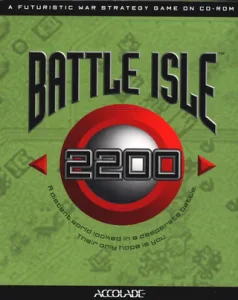
You can also consult the original manual in German. The 1994 copyright, the credits, and the collection's own README support the details on this game page. The cover is the Battle Isle 2200 box; the background and the gallery are actual screenshots taken while testing this edition.
Something wrong?
Give us a hint.
A broken link, a detail to correct or a game that won't start. Your report helps keep this game page up to date.
Get in touchReport an issue with this game Discuss it in the forumCLABA ARCADE ROOM
This one and 250 more
play here.
When you finish your game, the room has other machines switched on.
Enter the roomTHE CLABA APP1.0 RC 1
Take the archive
with you.

Game pages, online play and your shelf on Android. Free, no sign-up.
ARCHIVE SECRETS
Did you know?
- Battle Isle 2200 is the U.S. title of Battle Isle 2. The cover art kept on this game page uses that name.
- The game's console identifies itself as MILOP 70999.02D. From its menu you can load, save, set up the game, and open maps or campaigns.
- The manual separates the general rules from the weapons catalog: each unit can carry different weapons and requires fuel and ammunition.
- The original README, dated February 23, 1994, gives AMPORGE as the first campaign code and explains the FAST parameter for skipping the introduction.