Blue Byte · Strategy
The Settlers III
Three peoples, their gods and an economy of hundreds of settlers, now with no roads and an army under your command. Spanish Gold Edition with both expansions.
No computer handy? Play one of the 251 classics online right now
4.7 7 votes
THE CLABA ARCHIVE
Inside the game.
Its history, its ideas and the reasons to come back.
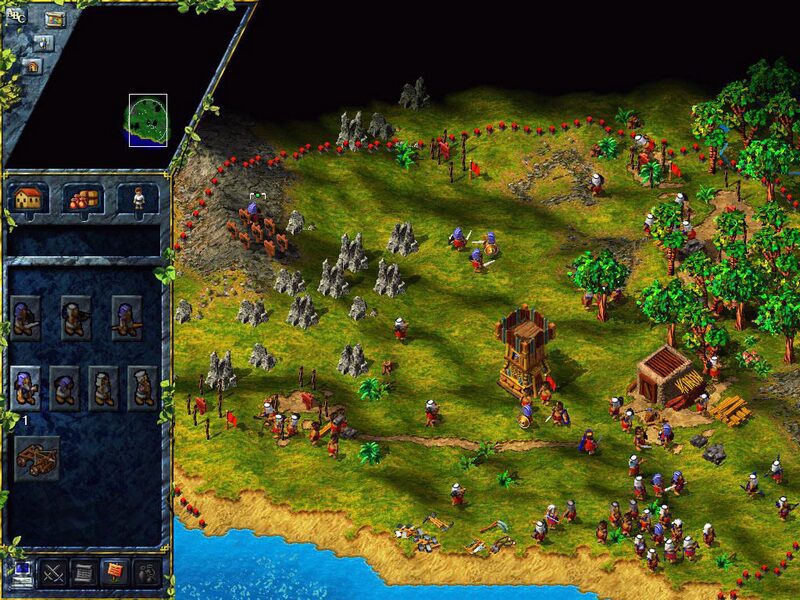
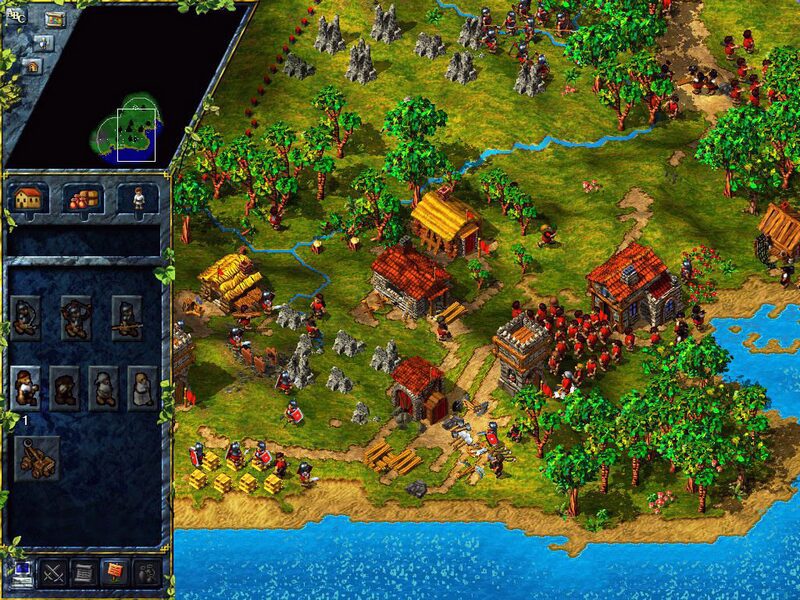
The gods are partying and the boss has had enough. HE, the supreme god, makes Jupiter, Horus and Ch’ih-Yu each pick a champion and pit their peoples against one another: the two that lose will end up painting the universe white. With that decidedly unsolemn excuse begins The Settlers III (Die Siedler III), the building and strategy game that Blue Byte released in November 1998.
Romans, Egyptians and Asians
As in the first The Settlers and its sequel, the economy is what matters. Every building needs something that another one makes: the woodcutter feeds the sawmill, the farmer the mill, the mill the bakery, and the bakery feeds the miners who dig out the coal and iron from which weapons are forged. Everything is moved by hundreds of settlers animated one by one, and a good part of the charm lies in watching how that chain works.
Each people has its own economy. The Romans spend wood and stone in equal parts, the Egyptians rely more on stone and the Asians on wood. With mana and priests, each can ask its god for miracles, different for each people: converting enemy soldiers, turning fish into meat or giving extra strength to the troops.
What changed from the earlier games
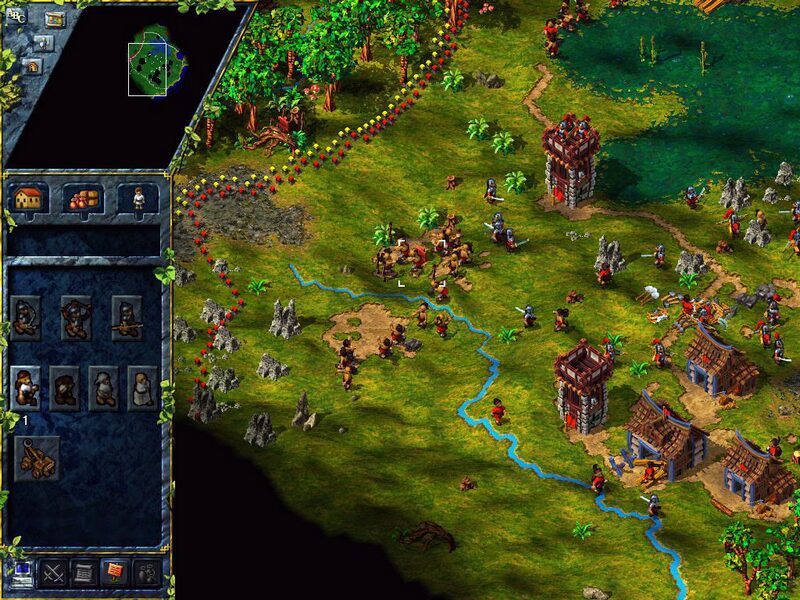
Volker Wertich, creator of the first Settlers, designed this installment and removed two things that defined the series. You no longer have to build roads: the settlers walk across all your territory. And the army is controlled directly, by selecting swordsmen, archers and pikemen and sending them to attack. Territory grows with garrisoned military buildings or with pioneers, and one rule governs war: on your land your soldiers always fight at one hundred percent, but outside it their strength depends on the gold you have stored.
It was also the first in the series with games over the Internet. Critics liked its graphics and animations and the complexity of its economy, although many found it too similar to what came before. Its community is still alive: since 2007 fans have maintained the aLobby, which replaces the official servers, now shut down.
The Gold Edition
In 1999 two expansions arrived: the Mission CD, with new campaigns and maps and an editor, and Quest of the Amazons, which adds a fourth people, the Amazons, with a story set centuries earlier. In June 2000 Blue Byte bundled them with the base game in the Gold Edition, already updated to the last official patch, 1.60.
The edition we offer
This is that Gold Edition in Spanish, in the images of its two CDs, which you will find in Downloads, marked for Windows XP. It also runs on Windows 10 and 11 with a few tweaks: in Guides we explain the installation, the known fixes and how to start without running out of wood. In Tips & tricks there is advice from veterans. If you are left wanting more city management, try Caesar III, Pharaoh or ANNO 1404, and if you prefer castles, Stronghold.
EVERY PIXEL COUNTS
The game in pictures.
Explore the screenshots and open every detail at full size.
GET READY FOR YOUR NEXT GAME
Choose your download.
Format, compatibility and server. All in view.
DOWNLOAD CD1
COMPATIBILITYWindows XP ✓ At no cost✓ No sign-up Download www.mediafire.com · New tab MediaFire02 ISODOWNLOAD CD2
COMPATIBILITYWindows XP ✓ At no cost✓ No sign-up Download www.mediafire.com · New tabClicking opens the CLABA loading area and, in a few seconds, your download. If a link fails, let us know via Contact or in the forum.
THE SECRET SIDE OF THE GAME
Tips, tricks and secrets.
A hint at the right time. A code that changes everything.
Before you start · there are no reliable codes
We have not found cheat codes for The Settlers III documented in reliable sources. The lists in circulation with commands starting with «!», such as !win, are from The Settlers IV. What follows are tips from veteran players and from Blue Byte itself.
Tip · change the resolution on the fly
During the game, F1, F2 and F3 switch between 640 × 480, 800 × 600 and 1024 × 768. With the highest you see a lot more of the map.
Tip · gold wins battles
On your territory soldiers always fight at 100%, but outside it their strength depends on stored gold. According to community tests, up to 50% rises quickly, every 12 bars give 10% more; beyond that it costs much more. The Egyptians value gems more: they count double and gold counts half.
Tip · reposition the forester's work area
The forester plants from the inside out and does not return to the nearest area until the farthest is full, so he wastes time walking. If you reset his work area at the same point every time a few trees have been felled, he starts again from the center and you produce more wood. The same goes for the woodcutter.
Tip · the AI's weakness
When you attack a tower, nearby enemy soldiers run toward it and do not defend themselves until they arrive. Veteran players knock on the door with a few soldiers to draw them out and wait for them with the rest lined up: that is how you win against more numerous rivals.
Tip · a single tower against the computer
If you have no direct border with your rival, a classic tactic is to keep just a single tower and gather your soldiers around it. The AI attacks when it feels stronger, and that gives you time to build up the economy before going on the offensive.
No matches. Try another effect or code.
THE NEXT STEP, CLEARER
Guides to move forward.
From the first installation to that mission that won't give in.
Start here · first launch on a current PC
- Download the images of the two Gold Edition CDs from Downloads.
- Mount the CD1 image (on Windows 10 and 11, double-click the image file) and launch the installation. Install in a short path, such as
C:\Juegos\Settlers3, rather than inProgram Files. - No patching is needed: the Gold Edition already comes with version 1.60, the last official one.
- If the process starts but no window appears, back up
winmm.dllin the game folder and replace it with the one from ogg-winmm, a community fix. - If the videos show black with sound, run
s3.exein Windows XP SP3 compatibility mode.
Save games are stored in the game’s Save folder; copy it from time to time following our tutorial on copying and restoring save games. If you prefer the original environment, you can install it on Windows XP or on a retro PC with 86Box; for compatibility settings, see our tutorial on Windows XP classics on Windows 10 and 11.
Controls
- Everything is handled with the mouse: you choose the building in the side menu and place it on the terrain; the settlers take care of the rest.
- Soldiers are selected and sent to their destination, as in a real-time strategy game. Veterans use Ctrl + right click to pull them away from the door of an enemy tower.
- F1, F2 and F3 change the resolution during the game.
- Keys cannot be remapped and the game does not support gamepads.
First steps
- First, a medium residence: you will soon need more carriers, diggers and builders. This is what BB_Caesar, Blue Byte’s Roman specialist, recommended.
- Then, everything that secures building materials: woodcutters, foresters, a sawmill and stonecutters.
- Don’t spend the starting resources on smelting and smithing too soon: if wood and stone run out, the colony grinds to a halt.
- Build farms early: they take about ten minutes to yield the first grain and then produce every few minutes.
- Send a pioneer to gain ground from the first minute: the territory it wins is noticeable in the long run.
- Adjust the percentages of carriers, diggers and builders with care: an abrupt change unbalances the economy.
Technical notes
It required Windows 95, 98 or NT 4.0, a 100 MHz Pentium (166 MHz recommended), 32 MB of RAM (64 recommended), 2 MB of video memory and DirectX 6; it uses DirectDraw and a 32-bit executable.
- KERNEL32.DLL error at startup on Windows XP: Blue Byte released a corrected executable, which is now in Ubisoft’s patch repository.
- The music stops after the first track: there is a community music patch, linked from PCGamingWiki.
- Multiplayer: on a local network it supports up to eight players. The official service shut down; for the Internet there are the aLobby and Settlers United, which also fix bugs and add widescreen and windowed mode.
- The retail edition used ProtectDISC copy protection.
Sources
- PCGamingWiki: date, copy protection and pigs, Gold Edition contents and patch 1.60, missing videos, Windows 10 fixes, F1-F3 resolutions, controls, network and requirements.
- Blue Byte official site (copy on siedler3.net): BB_Caesar’s tips for the Romans and the October 1998 interview with Thomas Hertzler.
- Siedler 3 Wiki · community tips: gold and combat strength, foresters, AI weaknesses, single-tower strategy, farms and pioneers.
- LaunchBox Games Database: Gold Edition date, no road building, direct army control and copy protection.
- GOG · Ultimate Collection: HE’s plot and his gods, current edition.
- aLobby and Settlers United: community projects for online play and fixes.
Something wrong?
Give us a hint.
A broken link, a detail to correct or a game that won't start. Your report helps keep this game page up to date.
Get in touchReport an issue with this game Discuss it in the forumCLABA ARCADE ROOM
251 classics
without installing anything.
Don't feel like installing? These play right in your browser.
Enter the roomTHE CLABA APP1.0 RC 1
Take the archive
with you.

Game pages, online play and your shelf on Android. Free, no sign-up.
ARCHIVE SECRETS
Did you know?
Pigs instead of iron. The copy protection of the retail edition sabotaged pirated copies: the smelters produced pigs instead of iron, so there was no way to make weapons.
«Maybe Volker will give me cheats.» In an October 1998 interview on the official site, Thomas Hertzler, president of Blue Byte, joked that he would have to ask Volker Wertich for cheats so as not to lose in Internet games.
Before the settlers, tennis. In that same interview, Hertzler recalled that Blue Byte’s first finished game was Great Courts, a 1989 tennis simulator, when the company consisted of only him and his partner Lothar Schmitt.
Half-resolution videos. The Gold Edition does not include the 640 × 480 versions of the base game’s videos, only the 320 × 240 ones, and mistakenly replaces an Egyptian cutscene with the victory one.
A community that doesn’t give up. Since 2007 the aLobby has made it possible to keep playing over the Internet, and the Settlers United project adds fixes, widescreen resolutions and windowed mode, compatible with the Gold Edition.