Epyx · Strategy
Battle Bugs
Command a squad of insects, fight over food and pause the clock to plan your orders. Epyx tactics with 56 battles and online play in English.
Strategy game by Epyx (1994) for MS-DOS, in English. Playable in your browser or downloadable.
— no rating yet
THE CLABA ARCHIVE
Inside the game.
Its history, its ideas and the reasons to come back.
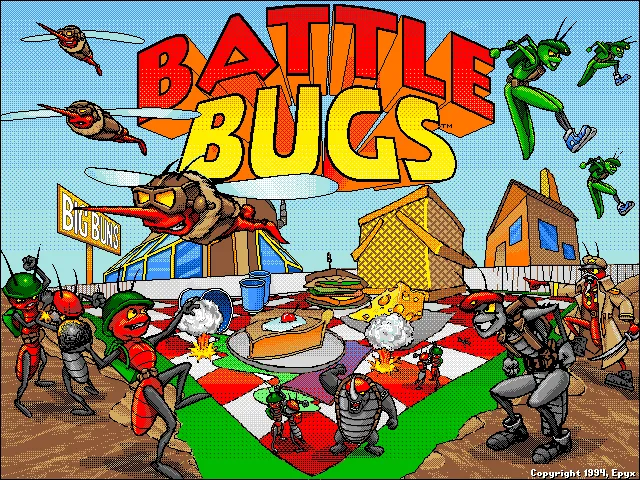
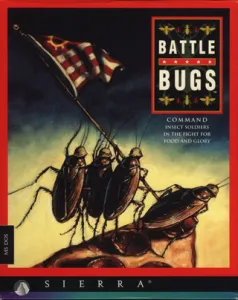
A picnic table can be a battlefront if you're small enough. In Battle Bugs, ants, wasps, beetles and other insects form armies that fight over food and territory. Epyx developed this tactics game for DOS, and Sierra On-Line published it in 1994. Its campaign includes 56 battles and 22 types of insect, each with different roles and abilities.
The action takes place in real time, but you can stop the clock to examine the situation and issue orders. Routes, target selection and mutual support between units all matter. Victory conditions depend on each scenario: the first exercises teach you how to move your soldiers before you face larger battles.
A command post with antennas
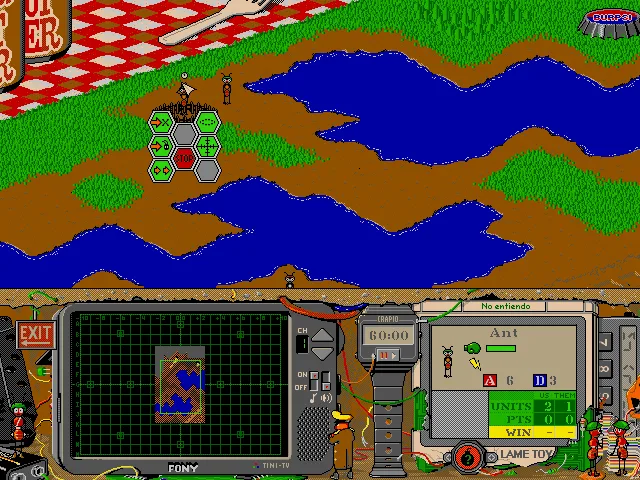
The interface combines the battlefield with a five-channel television and an information screen for the selected insect. From there you can check the map, unit characteristics, options and help. The humor shows up in the uniforms, the recruitment office and the names of its characters; the orders and the clock still demand your attention.
The online game uses the English DOS copy. The downloads also preserve the German copy from our collection.
EVERY PIXEL COUNTS
The game in pictures.
Explore the screenshots and open every detail at full size.
GET READY FOR YOUR NEXT GAME
Choose your download.
Format, compatibility and server. All in view.
Download Original
COMPATIBILITYMS-DOS 6.22+ ✓ At no cost✓ No sign-up Download BoxSharer server · New tab BoxSharer02 OriginalDownload Original
COMPATIBILITYMS-DOS 6.22+ ✓ At no cost✓ No sign-up Download BoxSharer server · New tabClicking opens the CLABA loading area and, in a few seconds, your download. If a link fails, let us know via Contact or in the forum.
Your game starts here
Play in your browser.
Pick, press and go back to the classics without leaving the game page.
RetrogamingRight in your browserNo installation
MS-DOSIn your browser
Battle Bugs
Online play uses the MS-DOS version; the game page and main download remain the PC one.
- 3 MB · downloads on click
- Save the game's files
- Keyboard, controller or touch
Controls
Click the game to use the keyboardOn mobile, play with the on-screen controller- Esc
- release mouse
- P
- pause the game
- F1
- help
DOS in English. Click: activate mouse and select. 1–5: channels. See the manual for the startup symbols.
- Full screen
Use the button on the bar. Esc returns to the game page; “Exit” closes the game.
- Saves
Save keeps the files the game creates, not the exact moment. Save inside the game, then press Save.
- Mobile and tablet
Press Controls during the game to show buttons and keyboard. Gamepad support depends on the browser.
Saves live in this browser and device. Clearing the site data deletes them too.
THE SECRET SIDE OF THE GAME
Tips, tricks and secrets.
A hint at the right time. A code that changes everything.
Tip: give orders with the clock stopped
Use P to stop or resume the action. Examine the positions and prepare your orders before letting the clock run; that way you don't have to decide everything while the insects are moving.
Tip for the first exercise: concentrate the attack
The manual's tutorial suggests sending your two ants against the enemy ant. Giving them the same target lets them support each other, instead of sending just one to fight while the other waits.
Tip: check the unit's information
Channel 2 of the television shows information about the selected insect. Check its characteristics before assigning it a task; not all units have the same mobility or are suited to the same kind of combat.
Tip: open help during the mission
Channel 5 and F1 give access to the game's help. It's a useful reference for identifying the orders and the panel elements without leaving the battle.
No matches. Try another effect or code.
THE NEXT STEP, CLEARER
Guides to move forward.
From the first installation to that mission that won't give in.
First launch and manual symbols
Click inside the game to capture the mouse. Space or Enter lets you move from the title to the manual check. Open the original Epyx manual and look for the printed number shown on the screen: it isn't necessarily the page number in the PDF viewer. Press the four symbols on that page, in order, and then Done. Back Up removes the last symbol if you make a mistake.
For example, printed page 4 —the seventh page of the PDF— shows a stone, a cross, a star and a key. Use that combination only if the screen asks for page 4.
Creating a general and starting the campaign
At the recruitment office, press Enlist, type your general's name and confirm with Enter. Select the name in the list and go into Begin Campaign. The first exercise is Boot Camp 1: Dirt Simple. Close the help notice with Enter and review your troops before starting the clock.
Mouse, pause and command panel
Click inside the screen to activate the captured mouse; Esc releases it so you can return to the site's buttons. The left click selects insects and options. P stops or resumes the clock. The 1–5 keys select television channels and F1 opens help. To give an order, first select one of your insects and choose the action from its menu; then indicate the target it asks for.
On a touchscreen, open Controls in the player to use its virtual mouse. The Pause, Mute, Full screen, Restart and Exit buttons are on the player bar.
Original downloads and DOSBox
The files with Inglés (English) and Alemán (German) in the name are two DOS copies of the same game. The online game uses the English one. To play outside the site, keep the files of each copy together and use a compatible DOS environment. The English configuration points to C:\SIERRA\BUGS; the German one, to C:\OLDGAMES\BBUGS.
If you need to set up DOSBox, see DOSBox from scratch. The README of the original copy explains the sound setup and recommends selecting standard Sound Blaster if the game stops responding when you confirm the manual screen.
Documentation for this edition
The date, the campaign and the number of insect types were checked against Epyx's page for the game. The original manual explains recruitment, the symbols and the orders. The configuration and language differences were checked in the files of the two copies.
Something wrong?
Give us a hint.
A broken link, a detail to correct or a game that won't start. Your report helps keep this game page up to date.
Get in touchReport an issue with this game Discuss it in the forumCLABA ARCADE ROOM
This one and 250 more
play here.
When you finish your game, the room has other machines switched on.
Enter the roomTHE CLABA APP1.0 RC 1
Take the archive
with you.

Game pages, online play and your shelf on Android. Free, no sign-up.
ARCHIVE SECRETS
Did you know?
- The campaign has 56 battles, from the initial exercises to larger scenarios, according to Epyx's documentation.
- Its 22 types of insect have different abilities: the comic look doesn't mean all the units serve the same purpose.
- The command panel uses a five-channel television, instead of gathering all the information in a single window.
- At startup, two guard beetles ask for a sequence of symbols from the printed manual. The page requested may change from game to game.