General Quarters Software · Strategy
Battleship Bismarck
Battleship Bismarck by General Quarters for DOS: turn-based naval strategy, 2nd Edition in English with tactical and strategic modes. Play online.
Strategy game by General Quarters Software (1987) for MS-DOS, in English. Playable in your browser or downloadable.
— no rating yet
THE CLABA ARCHIVE
Inside the game.
Its history, its ideas and the reasons to come back.
Battleship Bismarck is a turn-based naval strategy game from General Quarters Software. Set in May 1941, Operation Rhine pits the Bismarck and the Prinz Eugen against British forces. You can direct maneuvers and gunnery in a tactical battle, or choose the strategic simulation of the Atlantic.
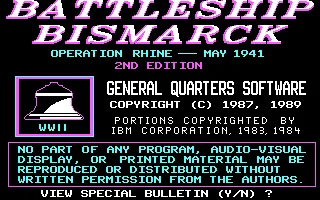
The first edition of the manual is dated August 1987. The DOS copy preserved here presents itself as 2nd Edition, shows 1987 and 1989 copyright notices, and is in English. Its startup bulletin describes an expansion that lets you give orders to the computer-controlled ships and adjust how they follow their strategy.
Setting up a tactical battle
At the start you can load a saved game or create a new one, choose the tactical or strategic level, and decide which side to control. The screen offers solitaire games and a two-player option. For a single-player tactical game, you can control the Germans and leave the British ships to the computer.
The length of the tactical battle is chosen from 40, 60 and 80 turns. You can also select the ships that take part or accept the suggested lineup. The initial combination brings the Bismarck and the Prinz Eugen up against the Hood and the Prince of Wales. Each ship has a letter that identifies it during orders: B and P for the two Germans, H and L for those two British ships.
One order for each ship
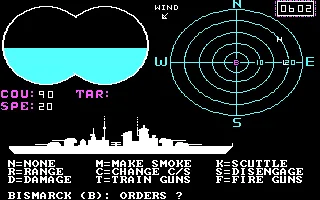
The name of the ship awaiting instructions appears at the bottom. C opens the course and speed order. The course is entered in degrees, from 0 to 360, and speed has the limit the game itself indicates for that ship. Numeric entries are completed with Enter.
The panel shows COU for course, SPE for speed and TAR for target. After you give an order to the Bismarck, the game moves on to the Prinz Eugen; check the name before reading COU and SPE or sending another order. N keeps the current orders of the ship that is waiting.
The radar represents relative positions and helps you follow the movements. Orders change course and speed as the turn advances. Check where your companion ship is before changing your path: the game also records collisions between ships on the same side.
Aim before you fire
T lets you train the guns on a target. The game asks for its symbol among the available ships. If you choose H for the Hood, the panel shows TAR: H and the binoculars display the target's silhouette. F orders the guns to fire when it is again the turn of the ship that has that assignment.
Aiming and firing are separate orders. The manual adds restrictions on range and gun status, so a fire order does not guarantee a hit. The messages identify which ship is firing; check the name to tell your actions apart from the computer's.
The strategic level
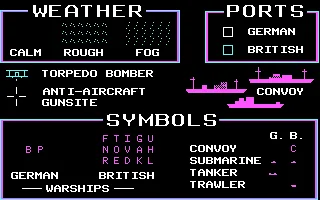
The strategic simulation expands the operation to a map of the Atlantic with ports, convoys, submarines, aircraft and weather conditions. Its manual explains naval and air search, fuel and repairs. The introduction shows the legend for those symbols, including the sea conditions calm sea, rough sea and fog.
The image on this game page and the background use the original title screen of this copy. The gallery includes the legend and a tactical game with executed orders. The download preserves the owner's files and its text manual.
EVERY PIXEL COUNTS
The game in pictures.
Explore the screenshots and open every detail at full size.
GET READY FOR YOUR NEXT GAME
Choose your download.
Format, compatibility and server. All in view.
Clicking opens the CLABA loading area and, in a few seconds, your download. If a link fails, let us know via Contact or in the forum.
Your game starts here
Play in your browser.
Pick, press and go back to the classics without leaving the game page.
RetrogamingRight in your browserNo installation
MS-DOSIn your browser
Battleship Bismarck
Your next game starts here.
- 149 KB · downloads on click
- Save the game's files
- Keyboard, controller or touch
Controls
Click the game to use the keyboardOn mobile, play with the on-screen controller- C
- course and speed
- T
- aim
- F
- fire
- N
- no change
Target letters per the list. Numbers and Enter for values.
- Full screen
Use the button on the bar. Esc returns to the game page; “Exit” closes the game.
- Saves
Save keeps the files the game creates, not the exact moment. Save inside the game, then press Save.
- Mobile and tablet
Press Controls during the game to show buttons and keyboard. Gamepad support depends on the browser.
Saves live in this browser and device. Clearing the site data deletes them too.
THE SECRET SIDE OF THE GAME
Tips, tricks and secrets.
A hint at the right time. A code that changes everything.
Tip: read the name before giving the order
Instructions are requested for one ship at a time. Look at the bottom line: Bismarck and Prinz Eugen have their own panels. Wait for the order prompt for your ship to appear again before sending another letter.
Tip: watch how close your allies are
The radar also shows the other German ship. Before changing course and speed, check its position. The game may warn of proximity and record collisions between ships on the same side.
Tip: prepare the target with T
Select the enemy ship's letter when the game asks you to train the guns. Check TAR on the next turn and use F when it asks for orders for that ship again. Range and damage affect the result.
Tip: tell letters and numeric values apart
One-letter orders usually respond without Enter. Course and speed require typing the full number and confirming. Follow the on-screen prompt so that a digit does not end up in the next menu.
No matches. Try another effect or code.
THE NEXT STEP, CLEARER
Guides to move forward.
From the first installation to that mission that won't give in.
Starting up and answering the password prompt
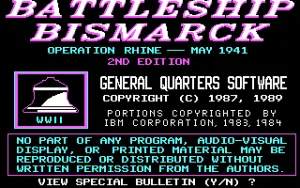
The first message lets you view the second edition's bulletin with Y or continue with N. Then a Greek code appears and the corresponding password is requested. The original manual included in the download preserves this table:
- Alpha:
SPEED8TOWN. - Beta:
WINDS2PASS. - Gamma:
STAND3CODE. - Delta:
PLANT7BOOK. - Epsilon:
COVER5HEAD.
Type the letters in uppercase, keep the number, and press Enter. The password may stay hidden while you enter it. Answer the graphics and music options in the introduction; Enter lets you continue from its screens through to the setup.
Creating the tested tactical game
Select N for New Game, T for Tactical Level, S for Solitaire Game and G to control the Germans. Option 1 chooses 40 turns; 2 and 3 show 60 and 80. Choose sound or silence and answer N to Repeat Options to continue.
Answer N to Select German Warships and to Select British Warships to accept the suggested ships. With the introduction enabled, the silhouettes appear before you reach the battle. Wait for the bottom panel to ask for orders for the ship.
Changing course and speed
When Bismarck (B): Orders appears, press C. Type the course in degrees and confirm with Enter; then enter a speed within the limit shown and press Enter. COU and SPE let you check the order when you return to that ship. Course 90 and speed 20 are valid values for the Bismarck at the start, although whether they are advisable depends on the position of the other ships.
The next order may belong to the Prinz Eugen. N keeps its maneuver. The counter and the radar change when the orders are executed and the computer completes its actions. If a message appears asking for Enter, answer it before sending another order.
Choosing a target and using the guns
Press T during the ship's order turn. Choose a letter from the target list; H corresponds to the Hood in the initial lineup. Check TAR: H. When the same ship asks for orders again, F fires its guns.
Let the opponent's messages finish before sending another letter. The name that accompanies Firing Main Armaments lets you recognize the firing ship. The manual explains the ranges, the damage to each section and the available reports.
Controls and player bar
Click inside the game to give it focus. The controls offer Maneuver, Aim, Fire, No change and Confirm. To enter the course, the speed or a target letter, use the keyboard. The bar lets you pause, mute, enter or exit full screen, restart and close the game. Restart repeats the startup and the game setup.
Download and documentation for this edition
The download preserves the 20 files of the original ZIP, including BISMARCK.TXT. To play on your computer, keep them together and follow the ACTION instructions in the manual. The program needs to find its library BASRUN.EXE; the browser package prepares drive A and starts the original executable without modifying it. See DOSBox from scratch (in Spanish) to set up the emulator.
The controls and passwords come from the included manual; the identification of the second edition and its expansion are checked against the game's title screen and bulletin. Computer Gaming World, September 1990, page 62, credits the design to Owen P. Hall, Jr. and the publication to General Quarters Software.
Something wrong?
Give us a hint.
A broken link, a detail to correct or a game that won't start. Your report helps keep this game page up to date.
Get in touchReport an issue with this game Discuss it in the forumCLABA ARCADE ROOM
This one and 250 more
play here.
When you finish your game, the room has other machines switched on.
Enter the roomTHE CLABA APP1.0 RC 1
Take the archive
with you.

Game pages, online play and your shelf on Android. Free, no sign-up.
ARCHIVE SECRETS
Did you know?
- The copy in the collection identifies itself as 2nd Edition and shows 1987 and 1989 copyright notices.
- The second edition's bulletin explains new orders for the computer's ships.
- The British selection screen presents fifteen candidate ships for the tactical battle.
- Computer Gaming World credits the design to Owen P. Hall, Jr. in its September 1990 issue.