William Soleau · Strategy
Battle for Atlantis
Battle for Atlantis, a strategy game by William Soleau for DOS (1990). Version 2.0 in English: conquer eight islands against three computer rivals.
Strategy game by William Soleau (1990) for MS-DOS, in English. Playable in your browser or downloadable.
— no rating yet
THE CLABA ARCHIVE
Inside the game.
Its history, its ideas and the reasons to come back.
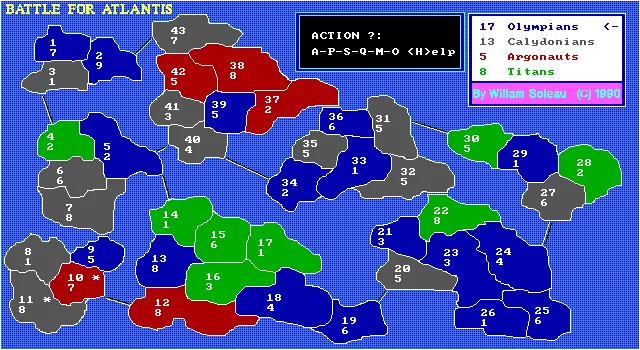
Battle for Atlantis divides 43 cities among eight islands and four armies. You lead the Olympians; the computer controls the Calydonians, Argonauts and Titans. William Soleau wrote this version 2.0 for DOS in 1990, with EGA graphics and commands entered from the keyboard.
The goal is to conquer the entire archipelago. At the start of each turn you receive reinforcements based on the territory you hold, with a minimum of two armies. Controlling a complete island adds troops: it is worth closing off a small region before spreading across several coasts.
Cities, reinforcements and attacks
Each territory shows two figures. The upper one identifies the city; the lower one indicates how many armies defend it. That distinction matters because the commands ask for city numbers. First you choose where to place the reinforcements, and then you decide whether to attack, move troops or pass the turn.
Attacks take place between neighboring cities. The lines that cross the sea allow you to move from one island to another. The game resolves battles through internal rolls: you can keep attacking or stop after each result. A tie favors the defender, and pressing an offensive until you are down to a single army can also cost you the city you attacked from.
A map that can change during the game
Earthquakes, floods and rebellions alter the situation on the board. Some cities have an asterisk: they are production centers, where good weather can double the troops present. Keep an eye on those squares both when distributing reinforcements and when looking for targets.
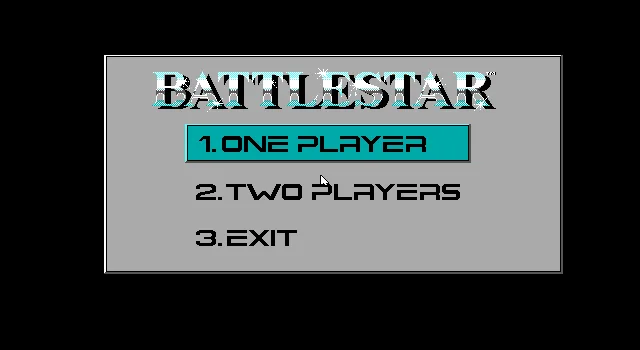
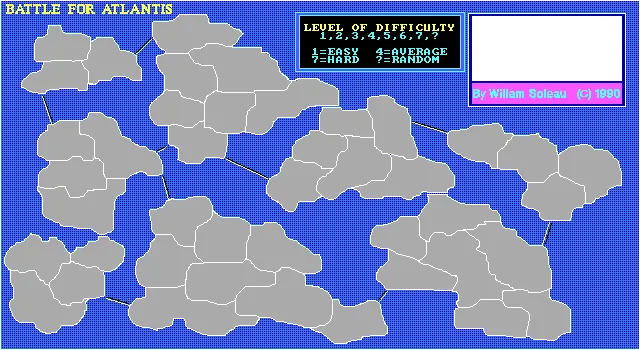
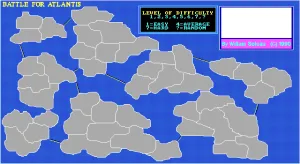
The download preserves the ATLANTIS.DOC document, which explains the rules and its author's shareware system. The introductory image on this game page comes from the game's opening screen; the screenshots show a game of this same version. The background also uses a real screenshot.
EVERY PIXEL COUNTS
The game in pictures.
Explore the screenshots and open every detail at full size.
GET READY FOR YOUR NEXT GAME
Choose your download.
Format, compatibility and server. All in view.
Clicking opens the CLABA loading area and, in a few seconds, your download. If a link fails, let us know via Contact or in the forum.
Your game starts here
Play in your browser.
Pick, press and go back to the classics without leaving the game page.
RetrogamingRight in your browserNo installation
MS-DOSIn your browser
Battle for Atlantis
Online play uses the MS-DOS version; the game page and main download remain the PC one.
- 121 KB · downloads on click
- Save the game's files
- Keyboard, controller or touch
Controls
Click the game to use the keyboardOn mobile, play with the on-screen controller- A
- attack
- P
- pass
- M
- move
- H
- help
- O
- options
- Q
- exit menu
1–7: difficulty. Numbers and Enter: cities and troops.
- Full screen
Use the button on the bar. Esc returns to the game page; “Exit” closes the game.
- Saves
Save keeps the files the game creates, not the exact moment. Save inside the game, then press Save.
- Mobile and tablet
Press Controls during the game to show buttons and keyboard. Gamepad support depends on the browser.
Saves live in this browser and device. Clearing the site data deletes them too.
THE SECRET SIDE OF THE GAME
Tips, tricks and secrets.
A hint at the right time. A code that changes everything.
Tip: gather your reinforcements at a useful border
Before distributing troops, find one of your cities next to a weak rival. Reinforcing that position lets you attack during the same turn. Make sure you don't leave the sea connections unprotected.
Tip: keep room to retreat
After a roll, AGAIN? Y/N lets you continue or stop. The manual warns that reducing the attacking army to one means also losing the city you are attacking from. Stop an offensive that is consuming too many troops.
Tip: complete an island
Isolated territories increase your presence, but a whole island adds a reinforcement bonus. Compare the cost of conquering its last city with the cost of opening another front.
Tip: watch the asterisks
The asterisk identifies a production center. When the good weather event occurs, the troops in those centers can double, including the computer's.
No matches. Try another effect or code.
THE NEXT STEP, CLEARER
Guides to move forward.
From the first installation to that mission that won't give in.
Starting up and choosing the difficulty
The opening screen asks for LEVEL OF DIFFICULTY. Press a number from 1 to 7: 1 is the easy level and 7 the hard one. The ? sign selects a random difficulty. Then enter the initial maximum number of armies per city, between 1 and 8. The program distributes the cities and asks for a key to decide who goes first. Wait through the computer's turns until the arrow points to the Olympians.
Placing reinforcements
ARMIES indicates how many reinforcements remain to be distributed. At DEST/CITY, enter the upper number of one of your cities and press Enter; then type how many armies you want to send and confirm. Repeat until all available armies are placed. The lower figure of that city shows the new total.
Attacking a neighboring city
At ACTION, press A. CITY/ATTACK first asks for the destination enemy city; CITY/FROM then asks for your own city from which you attack. Enter each number and confirm with Enter. The cities must be adjacent or connected by a sea route, and the attacking force must equal or exceed the defending one. At AGAIN? Y/N you decide whether to continue. After conquering the destination, the game asks how many troops to move.
Action keys and ending your turn
A attacks and P passes to the next player. M lets you move a group of troops to a neighboring city at the end of the turn; that move also gives up the turn. S changes the speed. H shows help. O opens the options and Q offers the actions to quit or start another game. Read each question before confirming: the same keys can have different functions inside those menus.
Original files and running them in DOS
The download preserves the six original files, including ATLANTIS.DOC. The browser uses ATLANTIS.EXE with EGA graphics, 3000 cycles and 4 MB of memory. The original document requires an EGA-compatible machine. If you want to mount the folder on your own computer, see DOSBox from scratch (in Spanish).
Manual and origin of the images
The main source is ATLANTIS.DOC, included in the original ZIP. Its instructions identify the author, the version, the year and the rules. The images on this game page are our own screenshots of that program. The initial image is used as the introduction and background; it is not presented as a commercial box.
Something wrong?
Give us a hint.
A broken link, a detail to correct or a game that won't start. Your report helps keep this game page up to date.
Get in touchReport an issue with this game Discuss it in the forumCLABA ARCADE ROOM
This one and 250 more
play here.
When you finish your game, the room has other machines switched on.
Enter the roomTHE CLABA APP1.0 RC 1
Take the archive
with you.

Game pages, online play and your shelf on Android. Free, no sign-up.
ARCHIVE SECRETS
Did you know?
- The included document identifies this copy as Version 2.0 and carries William Soleau's 1990 copyright.
- The map has 43 cities spread across eight islands; occupying a complete island provides additional reinforcements.
- The manual distinguishes seven difficulty levels and a random choice, marked with the question mark.
- The author distributed the game as shareware and asked for a contribution of 12 dollars from those who wanted to register it.