
Strategic Simulations Inc. · Strategy
Battles of Napoleon
SSI's Battles of Napoleon for DOS (1989), English version 1.1: turn-based strategy with a scenario editor. You can play it online in your browser.
Strategy game by Strategic Simulations Inc. (1989) for MS-DOS, in English. Playable in your browser or downloadable.
— no rating yet
THE CLABA ARCHIVE
Inside the game.
Its history, its ideas and the reasons to come back.
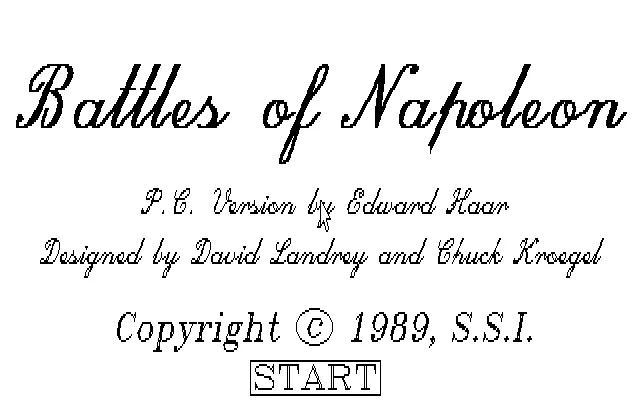
Battles of Napoleon is a turn-based strategy game from Strategic Simulations, Inc. about the battles of the Napoleonic Wars. The DOS edition in this collection is in English and identifies itself as version 1.1. Its title screen credits the PC conversion to Edward Haar and the design to David Landrey and Chuck Kroegel, and it shows an SSI copyright of 1989.
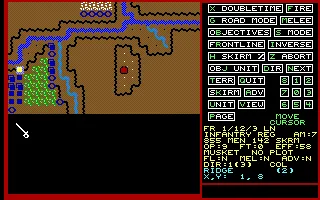
The map brings together regiments, cavalry, and artillery on a terrain made up of squares. Rivers, elevations, and forests affect your orders. Each unit has men, ammunition, a status, and operation points: moving a counter consumes resources that may later be missing for other actions.
Four battles and an editor
The menu lets you choose Waterloo, Borodino, Quatre Bras, and Auerstadt. It also offers to create a random situation, generate a scenario, edit it, or load a save game. The copy also preserves scenario files with names such as Albuera, Marengo, Eylau, Wagram, Leipzig, and Ligny, along with their historical documents.
Borodino is a good way to learn how to move through the panels. Before you reach the map, you choose the sides and the battle settings; after that, the force and objective summaries appear. Sound On turns the sound on, and the timer lets you adjust how long messages stay on screen. The game separates leader command, objectives, operations, and combat.
Objectives for leaders, orders for units
In the Leader Objective Phase, you can cycle through the leaders with N. The panel shows the assigned objective and the cursor coordinates. Move that cursor and press O to set a different objective. When you return to the same leader, you can check the new destination. E moves you on to the next phase.
During the Movement Phase, the cursor moves around the map without moving the soldiers. You have to place it over one of your own units and press G to select it. Its name, men, weapon, formation, direction, and operation points then appear. The same direction keys now give orders to that unit.
The test with the French 1/12/3 LN regiment shows the difference: a move north changes its position from (1, 9) to (1, 8) and reduces its operation points from 11 to 8. Z lets you abort a move order and restore the previous situation. It is worth checking the position and the available points before leaving the unit or moving on to combat.
Read the map before ending the phase
O switches between the general map and the tactical map. The first makes it easier to follow the distribution of forces; the second shows the nearby terrain better. The panel describes the square and its elevation, so you can check what is under the cursor before attempting a move.
The Standard layout uses the numbers on the top row with its own compass: 1 for north, 3 for east, 5 for south, and 7 for west. The diagonals appear on the on-screen compass. Do not read these numbers as the usual layout of a numeric keypad. The other layout is chosen at startup.
C requests the end of the movement phase and brings up a confirmation. That step is no longer an individual order: it lets the battle move forward. Check the units you want to use first, because not every order on the panel has the same effect in every phase.
EVERY PIXEL COUNTS
The game in pictures.
Explore the screenshots and open every detail at full size.
GET READY FOR YOUR NEXT GAME
Choose your download.
Format, compatibility and server. All in view.
Clicking opens the CLABA loading area and, in a few seconds, your download. If a link fails, let us know via Contact or in the forum.
Your game starts here
Play in your browser.
Pick, press and go back to the classics without leaving the game page.
RetrogamingRight in your browserNo installation
MS-DOSIn your browser
Battles of Napoleon
Your next game starts here.
- 321 KB · downloads on click
- Save the game's files
- Keyboard, controller or touch
Controls
Click the game to use the keyboardOn mobile, play with the on-screen controller- G
- select unit
- Q
- exit
- O
- map
- C
- combat
2: EGA. 1: standard mouse and keyboard. 1/3/5/7: north/east/south/west.
- Full screen
Use the button on the bar. Esc returns to the game page; “Exit” closes the game.
- Saves
Save keeps the files the game creates, not the exact moment. Save inside the game, then press Save.
- Mobile and tablet
Press Controls during the game to show buttons and keyboard. Gamepad support depends on the browser.
Saves live in this browser and device. Clearing the site data deletes them too.
THE SECRET SIDE OF THE GAME
Tips, tricks and secrets.
A hint at the right time. A code that changes everything.
Tip: start with a single regiment
Select a unit, read its coordinates and operation points, and give it a short move. Compare the result before moving on to the next one; that way you can tell cursor movement apart from an order to the soldiers.
Tip: check the compass in this edition
With Standard, the main directions are 1, 3, 5, and 7 on the number row. Look at the compass on the panel for the diagonals. The alternative layout offered at startup uses a different arrangement.
Tip: check what changed after giving an order
After setting an objective with O, cycle through the leaders with N until you return to the same one. The Objective field keeps the assigned coordinates. For a unit, check its position and its operation points.
Tip: tell aborting apart from ending the phase
Z aborts an order in progress; C requests the end of the movement phase. Read the confirmation before answering. In a turn-based game, you can take your time to review the panel.
No matches. Try another effect or code.
THE NEXT STEP, CLEARER
Guides to move forward.
From the first installation to that mission that won't give in.
First startup and manual check
When you start the DOS copy, press 2 for Enhanced Graphics Adapter and 1 for Standard mouse. Enter takes you from the title screen to the manual check. The game asks for the first word of a section of its Rulebook: consult the original SSI manual, type the word, and press Enter. For example, for section 5.12 the word is Directly.
Then choose 1 for the Standard keyboard layout. The manual question may vary between startups; the example above applies only to the section indicated.
Choosing Borodino and reaching the map
In the main menu, P opens Play a scenario and B selects Borodino. Review the human or computer controls for each side and the difficulty levels. Space continues. Advance with Space through the force and objective summaries, answer Y or N to Sound On, and use E to leave the timer setting.
The Command Control and Operation Points screens come before the map. Wait while the game is calculating, and press Space when it prompts you to continue. E lets you leave the Leader Transfer Phase and move on to the objectives.
Assigning an objective to a leader
In the Leader Objective Phase, N selects the next leader. Look at Objective and the cursor coordinates. With the Standard layout, press 3 to move the cursor one square east and O to set the new objective. N lets you return to that leader and verify the coordinates. E ends this phase.
Selecting and moving a unit
In the Movement Phase, move the cursor to one of your own units and press G. Its counter shows the name and operation points. Use the compass to order a move and check the change in coordinates. Q lets you exit the unit; Z aborts an order in progress. If you try to end on a square that is too crowded, the game requires you to keep moving or abort: look for an unoccupied square. O changes scale when you are in the cursor menu.
C opens the confirmation to end the movement phase. Answer N to keep reviewing orders or Y to advance; when Commence Combat appears, press Space. The meaning of a letter depends on the current panel: G also appears in other functions once you have a unit selected.
Using the browser player
Click the game to give it focus. The control buttons offer the four main Standard directions, Select unit, and Exit unit. For the other orders, use the letters shown in green on the panel. The player bar lets you pause, mute, switch to full screen, restart, or exit. Restart boots the copy again and repeats its initial setup.
Download, editing, and sources
The download keeps the 60 original files from the ZIP. To play on your computer, keep them together and run START.EXE in DOSBox. The browser package adds an EGA configuration with 3000 cycles and 4 MB of memory. See DOSBox from scratch (in Spanish) if you need to set up the emulator.
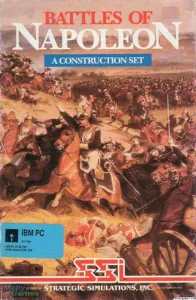
The credits and the year are those shown in the presentation of this PC copy. The original 1988/89 SSI catalog describes its four battles and the editor; the original manual explains the phases and the rules. The box and the screenshots come from the owner's collection.
Something wrong?
Give us a hint.
A broken link, a detail to correct or a game that won't start. Your report helps keep this game page up to date.
Get in touchReport an issue with this game Discuss it in the forumCLABA ARCADE ROOM
This one and 250 more
play here.
When you finish your game, the room has other machines switched on.
Enter the roomTHE CLABA APP1.0 RC 1
Take the archive
with you.

Game pages, online play and your shelf on Android. Free, no sign-up.
ARCHIVE SECRETS
Did you know?
- The PC version is credited to Edward Haar; David Landrey and Chuck Kroegel are listed as designers.
- The four battles in the menu are Waterloo, Borodino, Quatre Bras, and Auerstadt.
- Startup offers two number layouts for moving the cursor and the units.
- The collection preserves additional scenarios and historical documents alongside the game files.


