Strategic Simulations Inc. · RPG
Eye of the Beholder
Beneath Waterdeep, four adventurers, twelve levels and a beholder at the bottom. The 1991 Westwood and SSI classic, in Spanish and ready for Windows.
Role-playing game by Strategic Simulations Inc. (1990) for PC (in Spanish) and Amiga. Playable in your browser (PC) or downloadable.
Choose your version 2 platforms
— no rating yet
THE CLABA ARCHIVE
Inside the game.
Its history, its ideas and the reasons to come back.
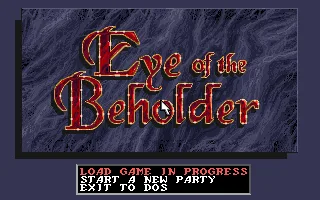
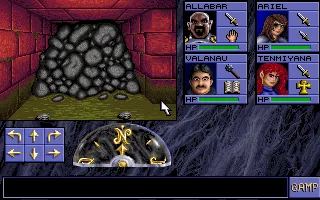
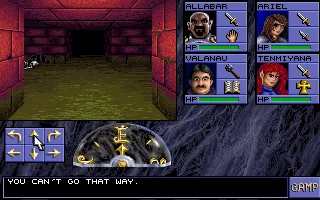
A damp sewer, a cave-in behind you and four adventurers with a letter from the Lords of Waterdeep as their only safe-conduct. That is how Eye of the Beholder begins, the game with which Westwood Associates and SSI brought the rules of Dungeons & Dragons into a first-person labyrinth. It came out in 1991 for MS-DOS and Amiga, and in April 1991 it topped the Software Publishers Association’s list of best-selling MS-DOS games.
Beneath Waterdeep
The lords of the city of Waterdeep commission you to find out what evil is rising from the depths. Beyond the sewers there are clans of dwarves and drow, kenku, skeletons and, at the bottom, the lair of Xanathar, the beholder that gives the game its name. There are twelve levels of corridors explored square by square, with secret doors, levers, pressure plates, pits and teleporters, and each one hides a small optional quest in addition to the main path.
How it plays
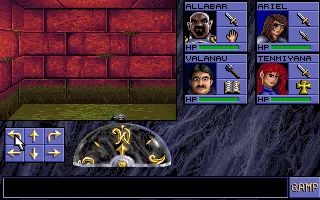
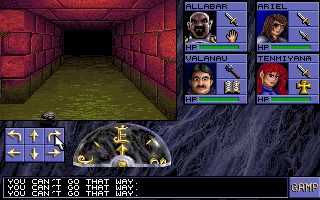
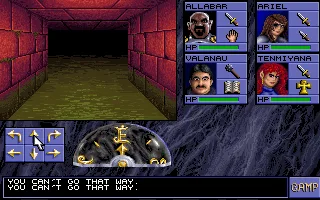
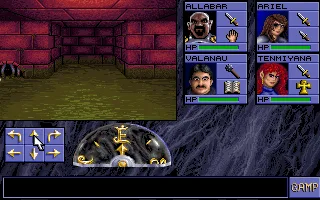
You control a party of four characters created with the AD&D rules (six races and six classes, with combinations), which can grow to six if you pick up two non-player characters. Everything happens in real time and with a single click: the mouse is king, but almost everything can also be done with the keyboard. You attack by clicking a character’s weapon, which then needs a moment to recover, and only the two in front can fight in melee. To recover spells you have to rest, and resting consumes food.
What made it special
The formula owes a lot to Dungeon Master, and critics from back then and today admit it openly. What it added was the AD&D license, VGA graphics, the sound of the cards of the day and a very well achieved dungeon atmosphere: Computer Gaming World wrote that PC users finally had a game on a par with Dungeon Master. Dragon gave it five stars out of five, and SSI went on to sell more than 150,000 copies in a few months. Its success led to The Legend of Darkmoon and Assault on Myth Drannor. Anyone who wants to keep going down that road can try Lands of Lore, also from Westwood, or jump to the modern era with Baldur’s Gate and Neverwinter Nights.
The edition we offer
In Downloads there is a repack of the first game, marked as Spanish-language and prepared for Windows XP, 7 and 10. If you prefer to have everything together, there is the page for the complete trilogy. The original is an MS-DOS program, so if you want to understand how it works inside or play it on a current PC on your own, the tutorial on DOSBox from scratch will help. In Guides and Tips & tricks you will find the first launch, the controls and several tips for surviving the twelve levels.
ONE GAME, 2 PLATFORMS
Versions.
2 platforms19911 playable online
Pick a platform: the screenshots, downloads and online game on this page switch with it.
- Year
- 1991
- Developer
- Strategic Simulations Inc.
- Downloads
- 1
- Screenshots
- 10
The original MS-DOS version by Westwood Associates and SSI, with VGA graphics and sound cards such as AdLib, on which the rest of the conversions are based. The edition on this page is a repack marked as Spanish-language for Windows.
- Year
- 1991
- Downloads
- 1
- Screenshots
- —
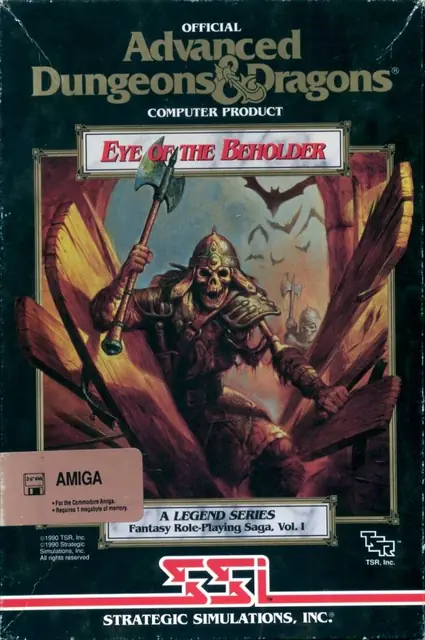
Amiga conversion also published by SSI in 1991. It keeps the level design and the mouse controls, and its ending is animated, unlike the text window of the DOS version. The magazine The One gave it 92%.
EVERY PIXEL COUNTS
The game in pictures.
Explore the screenshots and open every detail at full size.


GET READY FOR YOUR NEXT GAME
Choose your download.
Format, compatibility and server. All in view.
Version
SELECTED VERSIONPC1991 · 1 file · also playable online
Clicking opens the CLABA loading area and, in a few seconds, your download. If a link fails, let us know via Contact or in the forum.
Your game starts here
Play in your browser.
Pick, press and go back to the classics without leaving the game page.
Version
MS-DOSIn your browser
Eye of the Beholder
MS-DOS version. Your next game starts here.
- 2 MB · downloads on click
- Save the game's files
- Keyboard, controller or touch
Controls
Click the game to use the keyboardOn mobile, play with the on-screen controllerTeclado del ordenador. En pantallas táctiles, abre Controles durante la partida para ver botones y teclado.
- Full screen
Use the button on the bar. Esc returns to the game page; “Exit” closes the game.
- Saves
Save keeps the files the game creates, not the exact moment. Save inside the game, then press Save.
- Mobile and tablet
Press Controls during the game to show buttons and keyboard. Gamepad support depends on the browser.
Saves live in this browser and device. Clearing the site data deletes them too.
The Amiga version can't be played in the browser yet.
You can download it or play another version now:
HIT PLAY
The game in motion.
Trailers and videos to see it in action.
-
Amiga · How it plays
A game of Eye of the Beholder on Amiga.
THE SECRET SIDE OF THE GAME
Tips, tricks and secrets.
A hint at the right time. A code that changes everything.
How to enter them
This game has no cheat console or documented keyboard codes. What follows are gameplay tips and verified details. If you’d rather cheat, your progress is saved in a file called EOBDATA.SAV, and some community guides say they edited that file to regain health; make a backup first.
Tip · the ideal party
Several guides agree: you need at least one cleric and one mage. A paladin or a fighter in the front row works well, and it helps if one of the characters has a lot of Strength to force one particular door. Gnomes can’t be mages.
Tip · recruit the two extras
You can reach six characters. In the dwarf areas there is a cleric who resurrects the bones of fallen adventurers so that they join the party, and throughout the game you can recruit non-player characters. Who joins doesn’t change the plot.
Tip · the rock trick
To close a pit with a pressure plate on the other side, throw a rock (or any object) onto the plate from where you stand. You can pick up rocks as early as the first level.
Tip · watch the food
Each character has their own food gauge, which drops with every action. Food is limited, so don’t rest more than you need to. Kenku eggs work as food, but keep one or two for a bribe on level 7.
Tip · a special quest per level
Each level has an optional quest, for example «Daggers In, Rations Out» on level 2, where the slots in the wall accept daggers and open remote areas.
Tip · try the keyboard and the mouse
Everything can be done with either. Try both on the first level and stick with whichever you find more comfortable.
No matches. Try another effect or code.
THE NEXT STEP, CLEARER
Guides to move forward.
From the first installation to that mission that won't give in.
Start here · first launch on a current PC
- Download the repack from Downloads; the game page marks it as Spanish-language and for Windows XP, 7 and 10.
- Extract it outside
Program Files, to a short path such asC:\Juegos\EyeOfTheBeholder. - Launch the repack’s shortcut. The original game is an MS-DOS program, so if you prefer to run it on your own, there is the tutorial on DOSBox from scratch.
- With the game running, create your party and save often.
The original edition asked you to answer a question from the manual at startup, as copy protection. If the repack asks you one, you should look it up in the original manual. Back up your saves with our tutorial on backing up and restoring save games.
Controls · mouse or keyboard
You can play entirely with the mouse or entirely with the keyboard. With the mouse, click the movement arrows to move forward, turn or strafe; right-click a character’s weapon to attack or use an item, and left-click to pick up and drop things. On the keyboard you have the same movements, and the options let you turn off the music without losing the sound effects.
First steps · how to survive the first level
- Build a balanced party: two fighters in front, a cleric and a mage behind. Those in the back can throw items and projectiles.
- Pick up everything you see: rocks, daggers and lockpicks will help you solve puzzles.
- Explore every square of every level, because the important items and the food are in fixed places.
- Rest only when needed, since restoring spells uses up food.
- Save before every suspicious door. Some fights are brutal.
Technical notes
According to PCGamingWiki, the game required MS-DOS 2.1, an 8088 and 640 KB of RAM, and supported CGA, EGA, Tandy and VGA graphics. It doesn’t allow key remapping or a windowed mode by itself, and it doesn’t support gamepads. Saves and configuration are stored together in EOBDATA.SAV. There is a community program, The All-Seeing Eye, that adds things like an automap and save backups to the DOS version under DOSBox.
Sources
- The CRPG Addict · Game 189: comparison with Dungeon Master, character creation, controls and food.
- PCGamingWiki: requirements, saves, copy protection and The All-Seeing Eye.
- RPG Gamers · Walkthrough: party, recruits, kenku eggs and special quests.
- Wikipedia: dates, sales, the Beholder Bonus contest and reception.
Something wrong?
Give us a hint.
A broken link, a detail to correct or a game that won't start. Your report helps keep this game page up to date.
Get in touchReport an issue with this game Discuss it in the forumCLABA ARCADE ROOM
This one and 540 more
play here.
When you finish your game, the room has other machines switched on.
Enter the roomTHE CLABA APP1.0 RC 1
Take the archive
with you.

Game pages, online play and your shelf on Android. Free, no sign-up.
ARCHIVE SECRETS
Did you know?
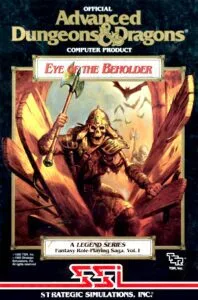
An award-winning cover. In January 1991, Jeff Easley’s illustration won Computer Gaming World’s readers’ ad contest, although the magazine disagreed with the design.
The «Beholder Bonus». From February to October 1991, SSI ran a contest in which you had to find a surprise hidden in each of the twelve levels; the first hundred players, 50 on PC and 50 on Amiga, received prizes worth $100.
Music and noise, separately. It was one of the first role-playing games to let you turn off the music without silencing the sound effects, according to The CRPG Addict’s analysis.
The same party across three games. You can import your party from this game into The Legend of Darkmoon and from that one into the third, and finish the trilogy with the same characters.
A spartan ending. On DOS, defeating Xanathar only brought up a small blue window with some text. The animated ending arrived with the Amiga version.