Strategic Simulations Inc. · Strategy
Battle of Antietam
SSI's Battle of Antietam for DOS, PC Version 1.1 in English: turn-based strategy with Union and Confederate forces. Playable in your browser.
Strategy game by Strategic Simulations Inc. for MS-DOS, in English. Playable in your browser or downloadable.
— no rating yet
THE CLABA ARCHIVE
Inside the game.
Its history, its ideas and the reasons to come back.
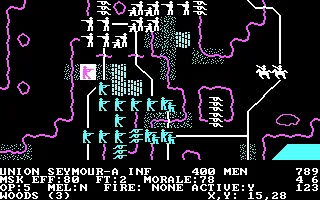
Battle of Antietam is a turn-based strategy game from Strategic Simulations, Inc. about the fighting around Sharpsburg, Maryland. The map brings together Union and Confederate troops, roads, woods, and water crossings. Each unit has its own position and resources: getting it to the right place means checking its status before giving it orders.
The DOS edition preserved here is presented as PC Version 1.1. The screen credits the design to Chuck Kroegel and David Landrey and the PC conversion to Edward Haar. It shows copyright dates of 1985 and 1986. Its menus are in English and let you choose which side a person controls and which one is left to the computer.
Setting up the battle before you start
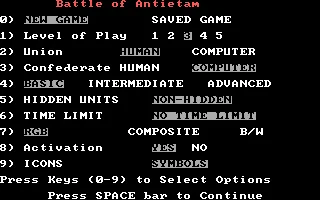
The opening menu combines five difficulty levels with Basic, Intermediate, and Advanced rules. It also offers hidden or visible units, a time limit, and activation options. You can start with the basic rules and raise the difficulty once you know the map. The same panel distinguishes the human and computer controls for both sides.
This version offers two numeric keypad layouts and several settings for monitors of the period. During play, the compass and the messages below the map help you see what each screen allows. Moving the cursor lets you inspect a square; selecting a unit with Space opens its orders.
The information that comes with each unit
The game shows data on the men and guns alongside the result of the battle. During operations, a unit's information lets you review its ability to move and fight. Terrain shapes its options: a bridge and a forest call for different decisions. The original tables explain the costs of actions and the effects of terrain.
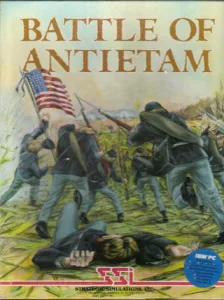
The download preserves the sixteen files of the original copy, including START.DOC with the notes on compatible computers and monitors. The cover art carries the IBM PC badge. The background of this game page reproduces the authentic menu from that same edition, with its original graphics.
EVERY PIXEL COUNTS
The game in pictures.
Explore the screenshots and open every detail at full size.
GET READY FOR YOUR NEXT GAME
Choose your download.
Format, compatibility and server. All in view.
Clicking opens the CLABA loading area and, in a few seconds, your download. If a link fails, let us know via Contact or in the forum.
Your game starts here
Play in your browser.
Pick, press and go back to the classics without leaving the game page.
RetrogamingRight in your browserNo installation
MS-DOSIn your browser
Battle of Antietam
Your next game starts here.
- 79 KB · downloads on click
- Save the game's files
- Keyboard, controller or touch
Controls
Click the game to use the keyboardOn mobile, play with the on-screen controller- Space
- select or continue
- Esc
- exit the color adjustment
Numbers: options and directions according to the compass. Shift+E: exit the delay setting.
- Full screen
Use the button on the bar. Esc returns to the game page; “Exit” closes the game.
- Saves
Save keeps the files the game creates, not the exact moment. Save inside the game, then press Save.
- Mobile and tablet
Press Controls during the game to show buttons and keyboard. Gamepad support depends on the browser.
Saves live in this browser and device. Clearing the site data deletes them too.
THE SECRET SIDE OF THE GAME
Tips, tricks and secrets.
A hint at the right time. A code that changes everything.
Tip: start with the basic rules
Choose Basic while you learn to select units and read their data. The menu also offers Intermediate and Advanced. Raising the rules changes the decisions you'll have to handle during operations.
Tip: check who controls each side
Before continuing, look at the Union and Confederate rows. For a single-player game, leave one side on Human and the opposing side on Computer. The 3 key lets you change the Confederate selection in this copy's menu.
Tip: tell the cursor and the unit apart
The numbers move the cursor when you're in the inspection view. Space selects the unit on the square. Check that its name and data appear before ordering a move.
Tip: check the terrain
Read the terrain and the coordinates shown below the map. The manual and the table card detail the costs of actions. Having a square nearby doesn't mean every unit can cross it in the same way.
No matches. Try another effect or code.
THE NEXT STEP, CLEARER
Guides to move forward.
From the first installation to that mission that won't give in.
Starting the DOS edition
Press any key at the title screen. In the menu, use the number keys to change options and Space to continue. Choose keyboard layout 2 if you want the usual numeric arrangement, with 8 for up and 2 for down. If the color adjustment appears, Esc lets you continue. After the initial results screen, press another key. Shift+E exits the delay settings. When the computer controls the opponent, a delay panel for its moves also appears; press Shift+E again to reach the map.
Setting up a game against the computer
On the start menu, leave Union set to Human and Confederate set to Computer. The 3 key toggles control of the Confederacy. Check both rows before pressing Space. Keep Basic selected to familiarize yourself with the orders. The message delay lets you read what happens during resolution.
Selecting and checking units
Move the cursor with the numbers according to the compass you chose. The bottom of the screen identifies the terrain and the coordinates of the square. Press Space on one of your own units to access its orders. For example, on the first turn you can find Seymour A at 15,29, press Space, and advance north with 8. Its position changes to 15,28 and its operation points drop from ten to five. H shows the unit's orders and Q returns to the cursor.
Movement and combat by phase
The manual distinguishes the operations phase from combat resolution. Check the operation points and the terrain before moving. When you finish giving your orders, C moves on to combat from the cursor view. Review what happened before starting another round of decisions. The linked tables help you understand the costs and the results.
Download and use in DOSBox
The original download contains sixteen files. START.EXE launches PC Version 1.1. The browser copy adds a CGA configuration, 3,000 cycles, and 4 MB of memory without changing the game files. To use the folder on your own computer, see DOSBox from scratch (in Spanish). Keep the START.DOC notes alongside the program.
Manual, map, and provenance
The original SSI manual explains the rules for several computers. The map and table card is a separate document. The startup and keys described here were checked against the DOS copy; other platforms may use different menus. The title screen shows copyright dates of 1985 and 1986, without specifying a release date. The screenshots are taken from this copy of the game.
Something wrong?
Give us a hint.
A broken link, a detail to correct or a game that won't start. Your report helps keep this game page up to date.
Get in touchReport an issue with this game Discuss it in the forumCLABA ARCADE ROOM
This one and 250 more
play here.
When you finish your game, the room has other machines switched on.
Enter the roomTHE CLABA APP1.0 RC 1
Take the archive
with you.

Game pages, online play and your shelf on Android. Free, no sign-up.
ARCHIVE SECRETS
Did you know?
- The PC title screen credits Edward Haar as responsible for this conversion and shows PC Version 1.1.
- The game lets you assign human or computer control to each side from the start menu.
- The keyboard selector offers two number layouts for giving directions. It's best to pick one and follow its compass throughout the game.
- START.DOC includes a warning from the period: when restoring a game with a composite or black-and-white monitor, you had to choose the monitor type again.