William J. Piazza · Platformer
Bert and the Snake
Game of skill by William J. Piazza for PC, from 1983. Jump along four diagonals, change the squares' colors and avoid the snake in this English-language DOS copy.
Platform game by William J. Piazza (1983) for MS-DOS, in English. Playable in your browser or downloadable.
— no rating yet
THE CLABA ARCHIVE
Inside the game.
Its history, its ideas and the reasons to come back.
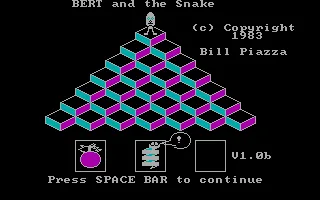
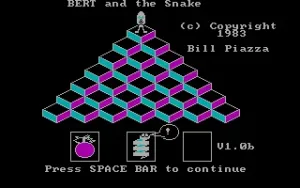
Bert and the Snake is a game of skill by William J. Piazza for the PC, dated 1983. The title screen signs the program as Bill Piazza and identifies version 1.0b. Bert moves across a pyramid of squares and changes their color by jumping onto them. A snake and falling objects complicate the route.
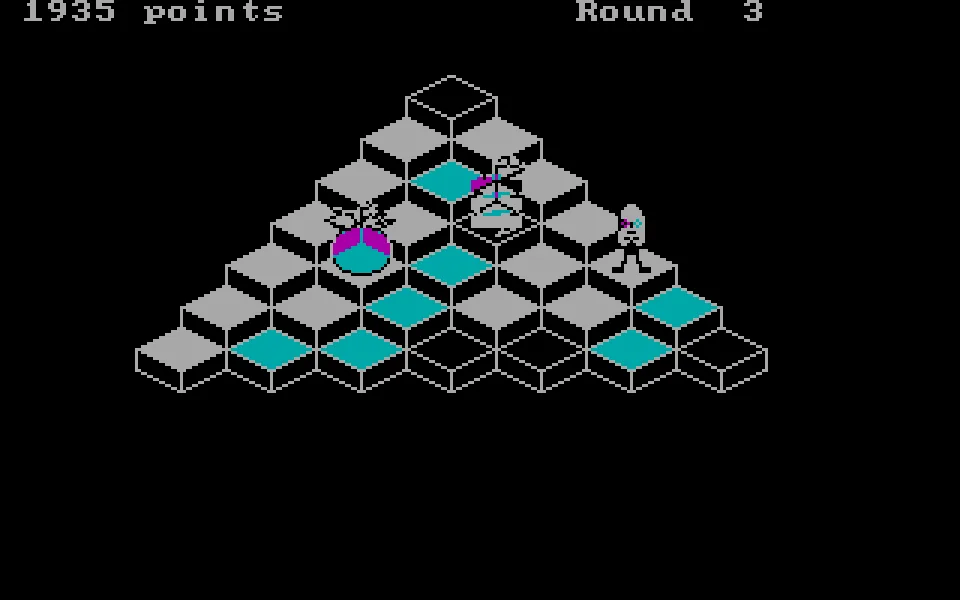
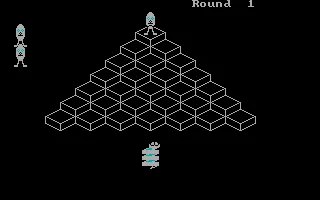
The DOS copy is in English and uses CGA graphics. The board occupies the center of a 320 by 200 pixel screen. The score and the round appear at the top. The Bert figures along the side show the remaining tries. The identifying image and the background of this game page come from the program's original title screen.
A pyramid crossed on the diagonal
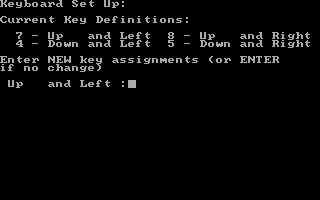
The squares form steps. To move from one to another, you have to choose one of the four diagonals. Moving up and to the left uses 7, and up and to the right uses 8. To go down, you use 4 for the left and 5 for the right. These are the assignments shown in the Keyboard Set Up section of this copy.
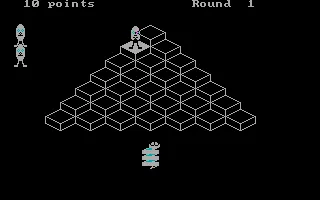
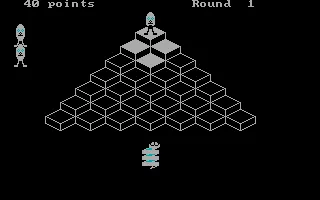
The numbers can be pressed on the top row of the keyboard. In the game we tested, you start at the top with zero points. A jump with 4 changes the first square and adds ten points. The sequence 4, 5, 8 and 7 covers all four directions and returns to the top. The screenshots preserve the start and the result of forty points.
It is best to press one key at a time and wait for the jump to finish. The tilt of the board forces you to recognize the diagonals from the very first move. At the edge, a wrong direction can send Bert off the pyramid. Moving across the squares near the center lets you test the response before approaching the corners.
From the title screen to the game
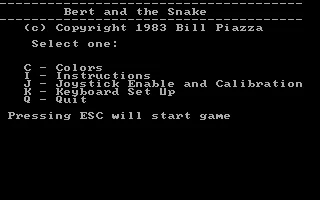
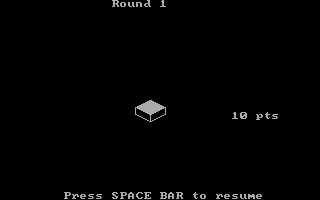
Space lets you continue from the title and open the menu. There you will find the options for colors, instructions, joystick, keyboard setup and exit. Esc starts the game from that menu. Before the first round, a square is shown with its value in points, along with a message asking for Space to continue.
That second press of Space takes you to the board. The new game begins at Round 1. The zero-point label and the squares not yet visited let you recognize the start. Jumps must be made after that introduction. The gallery includes both screens so you can tell the round announcement from the active board.
During a game, Esc pauses the game. The message at the bottom asks for Space to resume. The program's own pause lets you stop and look at the board. The player also has its own pause button, in addition to the full-screen and restart controls.
The snake and the falling objects
The snake chases Bert around the pyramid. The falling objects descend from the top and can hit the characters. The instruction text included in the executable explains that they can also knock down the snake. The layout of the squares and the position of these hazards force you to change your planned route.
The game is organized in rounds. The program presents the value of the squares at the start of each one and shows the remaining tries at the side. To advance, you have to complete the color change of the board. In the first jumps it is easy to focus only on the score, although keeping a route back also matters when the snake appears.
Testing of this adaptation covers the start of a game and the four diagonal moves. The original keys have been preserved. You can check Keyboard Set Up from the menu to see them or change them. Shift and K opens that section with the keyboard in the tested session.
A small program with its own instructions
The ZIP in the collection contains a single file, bert.exe. The help, the options and the game's images are all part of the program. The download keeps that executable intact. To play in the browser, a DOS configuration and a launcher that runs it directly are added.
The gallery keeps the screenshot from the collection and adds the title, the menu, the round introduction and several images from the controlled game. The setup screen lets you check how the numbers correspond to each diagonal. The image used on the game page is an identifying screen from the program.
EVERY PIXEL COUNTS
The game in pictures.
Explore the screenshots and open every detail at full size.
GET READY FOR YOUR NEXT GAME
Choose your download.
Format, compatibility and server. All in view.
Clicking opens the CLABA loading area and, in a few seconds, your download. If a link fails, let us know via Contact or in the forum.
Your game starts here
Play in your browser.
Pick, press and go back to the classics without leaving the game page.
RetrogamingRight in your browserNo installation
MS-DOSIn your browser
Bert and the Snake
Your next game starts here.
- 33 KB · downloads on click
- Save the game's files
- Keyboard, controller or touch
Controls
Click the game to use the keyboardOn mobile, play with the on-screen controllerSpace opens the menu and confirms the round. Esc starts and pauses. 7/8 move up diagonally. 4/5 move down diagonally. Space resumes.
- Full screen
Use the button on the bar. Esc returns to the game page; “Exit” closes the game.
- Saves
Save keeps the files the game creates, not the exact moment. Save inside the game, then press Save.
- Mobile and tablet
Press Controls during the game to show buttons and keyboard. Gamepad support depends on the browser.
Saves live in this browser and device. Clearing the site data deletes them too.
THE SECRET SIDE OF THE GAME
Tips, tricks and secrets.
A hint at the right time. A code that changes everything.
Tip for learning the diagonals
Think of two rows. 7 and 8 go up to the left and right. 4 and 5 go down to the left and right. Try one key press per jump to recognize each direction.
Tip for starting the round
Esc starts from the menu. Then the Round 1 introduction appears with the value of one square. Press Space to reach the board before using the movement keys.
Tip for approaching an edge
Look at which square lies on the diagonal you choose. From a corner, several directions send Bert off the board. Practice a short loop near the top first.
Tip for stopping
Esc pauses during the game and shows the message Press SPACEBAR to resume. Space lets you continue. You can also use the player's pause button.
No matches. Try another effect or code.
THE NEXT STEP, CLEARER
Guides to move forward.
From the first installation to that mission that won't give in.
Starting a game with the original keys
Press Space when the title appears. In the menu, Esc starts the game. The Round 1 screen presents a square and its score. Press Space again to continue.
Wait until you see the board with zero points. Bert appears at the top. Use 4 to go down to the left and 5 to go down to the right. A short press makes each jump.
Trying the four directions
From the start, the sequence 4, 5, 8 and 7 covers a short loop. The first two jumps go down the board and the next two bring you back to the top.
In the game shown in the gallery, that sequence changes four squares and adds forty points. Make the moves before the snake gets close. The position of the hazards can change while you play.
Checking Keyboard Set Up
From the menu, press Shift and K to open Keyboard Set Up. The screen shows 7 for Up and Left, 8 for Up and Right, 4 for Down and Left and 5 for Down and Right.
The program asks one question for each direction. Enter keeps the current assignment. Four presses of Enter keep the original keys and take you back to the menu.
Pausing and returning to the beginning
During the game, Esc stops the game and asks for Space to resume. To start again from the title screen, use Restart in the player and confirm the action.
The original title contains Bill Piazza's signature and version 1.0b. Space opens the options menu. The download includes the same executable preserved in the collection.
Something wrong?
Give us a hint.
A broken link, a detail to correct or a game that won't start. Your report helps keep this game page up to date.
Get in touchReport an issue with this game Discuss it in the forumCLABA ARCADE ROOM
This one and 250 more
play here.
When you finish your game, the room has other machines switched on.
Enter the roomTHE CLABA APP1.0 RC 1
Take the archive
with you.

Game pages, online play and your shelf on Android. Free, no sign-up.
ARCHIVE SECRETS
Did you know?
- The title identifies version 1.0b and Bill Piazza's 1983 copyright.
- The four original keys are 7, 8, 4 and 5, arranged as two pairs for going up and down.
- The preserved ZIP contains a single executable with the game and its instructions.
- The menu offers color settings and a separate setup for the four diagonals.