
Riedel Software Productions · Shooter
Beetlejuice in Skeletons in the Closet
1990 DOS arcade game from Riedel Software Productions and Hi Tech Expressions. Steer Beetlejuice, shoot the skeletons, and protect Lydia.
Shooter by Riedel Software Productions (1990) for MS-DOS, in English. Playable in your browser or downloadable.
— no rating yet
THE CLABA ARCHIVE
Inside the game.
Its history, its ideas and the reasons to come back.
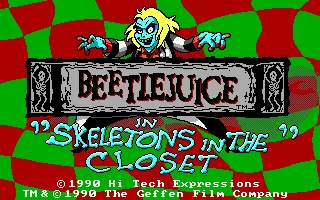
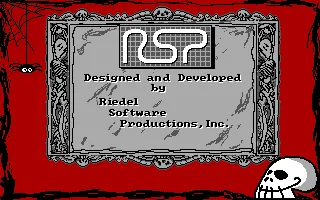
Beetlejuice in Skeletons in the Closet is a DOS arcade game developed by Riedel Software Productions and published by Hi Tech Expressions. The intro keeps the 1990 copyright and includes a separate screen with the Riedel credit. Beetlejuice and Lydia appear together on raised-perspective platforms, surrounded by a red and green landscape. The menus in this copy are in English.
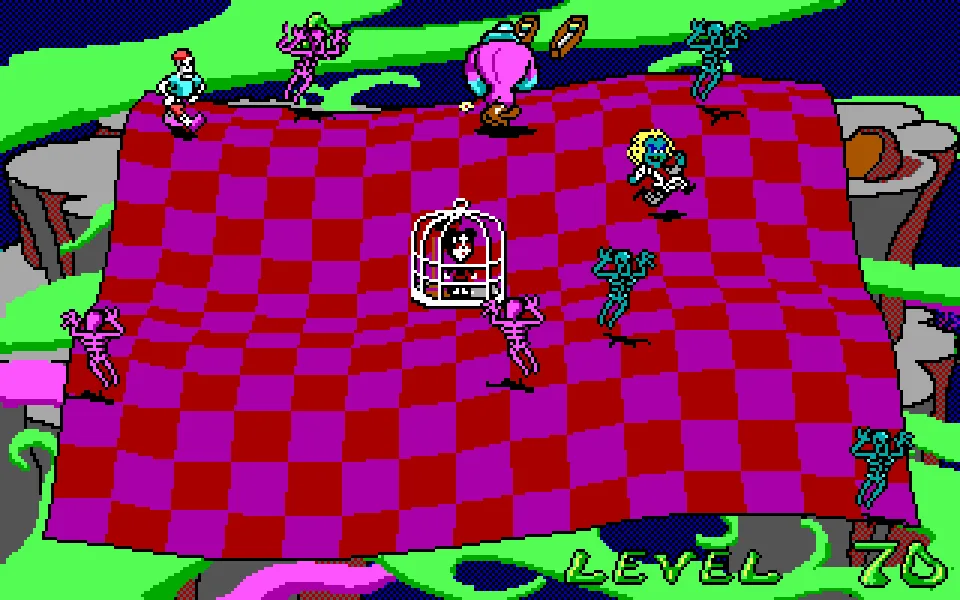
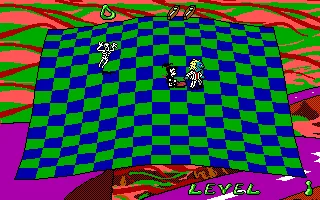
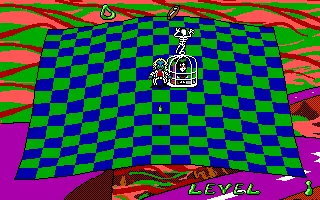
Skeletons walk across the platform while you steer Beetlejuice and fire green projectiles. Lydia takes part by collecting the remains with her vacuum cleaner, as the original advertising explains. Enemies can trap her in a cage. The gallery shows the first level, the character's movement, and a projectile separated from its shadow.
Keyboard, sound, and first game
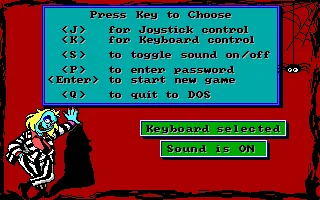
The menu lets you choose between joystick and keyboard. K selects the keyboard, and the Keyboard Selected label confirms the choice. Enter starts a new game. S toggles the sound, and its state is written below the menu. During testing, it was switched between Sound is OFF and Sound is ON before starting.
The first level is recognizable by its large platform of blue and green squares and by the number 1 in the lower-right corner. Beetlejuice and Lydia start near the center. The skeletons come in and move around the scene. The perspective lets you see the floor, the edges, and the gap between the characters.
Moving and firing
The arrow keys steer Beetlejuice. In the game that was tested, holding the right arrow moved him from the center toward that side of the platform. Space fires. The consecutive screenshots show a green projectile traveling along the floor and a shadow that makes it possible to follow its path.
To follow a shot, watch the space in front of the character after pressing Space. The projectile can move away from the body before you look at Beetlejuice again. The gallery image was taken during that trajectory. The skeletons and Lydia also move around the scene, so it helps to tell each element apart before changing direction.
The design combines shooting, movement, and protecting Lydia. The box describes special powers and critters that alter the game. The advertisement in the 1990 Electronics Boutique Christmas catalog explains that Lydia sweeps up the remains of defeated skeletons. Worms also appear among the game's hazards.
The look of the DOS edition
The copy that was tested uses a 320 by 200 pixel image. The platform of squares warps toward the edges, and the background uses highly contrasting color stripes. The header gathers the status icons. The floor takes up almost the whole screen, and the level indicator stays at the lower right.
The PC box carries the title Adventures of Beetlejuice and the subtitle Skeletons in the Closet. The program's opening screen reads Beetlejuice in Skeletons in the Closet. Both forms identify this edition. The development credit appears after the title, inside a gray frame with the RSP logo.
The download keeps the four files of the collection, including high.dat. The executable is bj.exe. The browser package adds a separate DOSBox configuration and a CLABA.BAT launcher. The original menu is used as the background of this page, and the cover art comes from a scan of the PC box.
EVERY PIXEL COUNTS
The game in pictures.
Explore the screenshots and open every detail at full size.
GET READY FOR YOUR NEXT GAME
Choose your download.
Format, compatibility and server. All in view.
Clicking opens the CLABA loading area and, in a few seconds, your download. If a link fails, let us know via Contact or in the forum.
Your game starts here
Play in your browser.
Pick, press and go back to the classics without leaving the game page.
RetrogamingRight in your browserNo installation

MS-DOSIn your browser
Beetlejuice in Skeletons in the Closet
Your next game starts here.
- 158 KB · downloads on click
- Save the game's files
- Keyboard, controller or touch
Controls
Click the game to use the keyboardOn mobile, play with the on-screen controller- K
- select keyboard
- Enter
- start
- ↑←↓→
- move Beetlejuice
- Space
- fire
- S
- toggle sound in the menu
Pause from the player bar.
- Full screen
Use the button on the bar. Esc returns to the game page; “Exit” closes the game.
- Saves
Save keeps the files the game creates, not the exact moment. Save inside the game, then press Save.
- Mobile and tablet
Press Controls during the game to show buttons and keyboard. Gamepad support depends on the browser.
Saves live in this browser and device. Clearing the site data deletes them too.
THE SECRET SIDE OF THE GAME
Tips, tricks and secrets.
A hint at the right time. A code that changes everything.
Tip · Starting with the keyboard
Press K and check for the Keyboard Selected label. Then press Enter to start a game. Wait for the platform and the level indicator to appear before moving.
Tip · Recognizing the shot
Press Space and follow the green projectile in front of Beetlejuice. Its shadow travels separately along the floor. The screenshot of the shot on this page lets you see both elements.
Tip · Checking the sound
S toggles the sound in the original menu. Sound is ON and Sound is OFF confirm the chosen state. The player's sound button lets you mute the browser output during the game.
Tip · Pausing the game
Use the pause button on the player bar when you need to stop playing. That way you can halt the emulator while you review the instructions. Resume from the same button to carry on with the game controls.
No matches. Try another effect or code.
THE NEXT STEP, CLEARER
Guides to move forward.
From the first installation to that mission that won't give in.
Opening the first level and learning its controls
In the original menu, select the keyboard with K. Check for Keyboard Selected and press Enter. The first level shows a blue and green platform, the two characters near the center, and the number 1 at the bottom.
Use the arrow keys to move Beetlejuice. The gallery test includes a move to the right. Space fires a green projectile. Check its trajectory before changing direction, and also watch the positions of Lydia and the skeletons.
Options in the original menu
S turns the sound on or off. The menu shows the resulting state in a box. K selects the keyboard, and J identifies the joystick option. The game tested for this page uses the keyboard.
P opens the password entry and shows What’s the password?. That panel belongs to the program's menu. To interrupt the game, use the pause on the player bar. The player's reset lets you start again from the original opening screen and menu.
Running the download in DOSBox
Keep bj.exe, cell1.001, cellb.001, and high.dat together. Open bj.exe inside a DOS environment. The browser package keeps those four files and adds its own configuration.
The configuration that was tested uses VGA/SVGA video compatible with the program's EGA image, a normal CPU at 10,000 cycles, and 16 MB of memory. The tutorial DOSBox from scratch (in Spanish) explains how to mount a folder and run a DOS game.
Credits and period documents
The program's title screen credits Hi Tech Expressions with a 1990 copyright. The next screen identifies the design and development by Riedel Software Productions. Both are included in the gallery, along with screenshots from the game that was tested.
Page 48 of the 1990 Electronics Boutique Christmas catalog advertises the game for IBM and a 3.5-inch floppy disk. The box used as the cover art is preserved at LaunchBox Games Database. These documents make it possible to cross-check the title and the PC edition.
Something wrong?
Give us a hint.
A broken link, a detail to correct or a game that won't start. Your report helps keep this game page up to date.
Get in touchReport an issue with this game Discuss it in the forumCLABA ARCADE ROOM
This one and 250 more
play here.
When you finish your game, the room has other machines switched on.
Enter the roomTHE CLABA APP1.0 RC 1
Take the archive
with you.

Game pages, online play and your shelf on Android. Free, no sign-up.
ARCHIVE SECRETS
Did you know?
- The intro devotes an entire screen to the Riedel Software Productions credit.
- The title's copyright reads 1990, and the game already appears in that year's Electronics Boutique Christmas catalog.
- The PC box uses Adventures of Beetlejuice, while the program's title uses Beetlejuice in Skeletons in the Closet.
- The menu confirms the keyboard selection and the sound state in writing.


