
Infogrames · Other
Disney’s Beauty and the Beast
Five Infogrames activities in the Beast’s castle. English-language DOS copy, with Lumière, Chip and the stained-glass window for choosing rooms.
Game by Infogrames for MS-DOS, in English. Playable in your browser or downloadable.
— no rating yet
THE CLABA ARCHIVE
Inside the game.
Its history, its ideas and the reasons to come back.
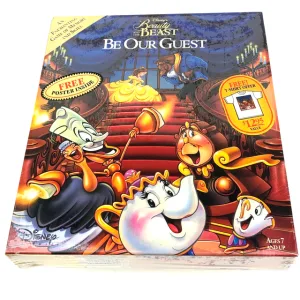
Disney’s Beauty and the Beast for DOS brings together five Infogrames activities in the Beast’s castle. Chip accompanies the presentation, and the servants take part in the preparations for a ball. The preserved copy is in English. The PC box art uses the name Be Our Guest, while the program’s title screen shows Beauty and the Beast.
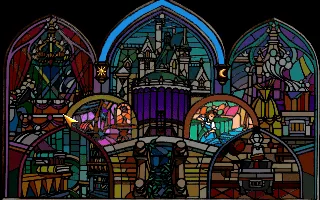
The castle’s stained-glass window is used to choose an activity. Its pictures represent the rooms and their characters. You can move the cursor with the mouse or the keyboard arrow keys. The left button and the spacebar let you select. The gallery shows the stained-glass window as it appears when this copy is run.
Choosing the difficulty and entering the castle
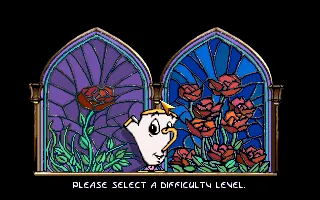
The first panel belongs to the Infogrames launcher. F1 selects Game, and Enter lets you start with the preserved configuration. After the presentation, two windows with roses appear for choosing the difficulty. Select one and wait for the approach to the castle to finish. Space lets you advance through the dialogue.
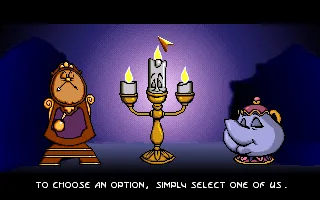
Cogsworth, Lumière and Mrs. Potts appear together on the menu. In the tested session, Cogsworth opened the practice activity selection. His reply invites you to choose a picture in the stained-glass window. Lumière’s show opens from the upper-left window. Before it starts, an introduction shows the stage and the cake.
Lumière and the cherries on the cake
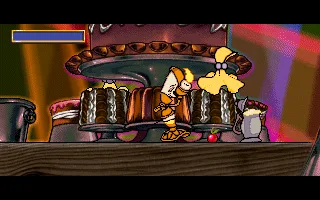
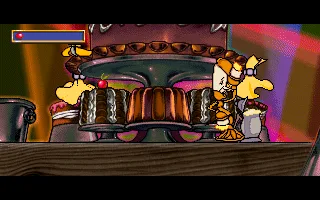
In the show, you have to direct Lumière while the stage’s cutlery moves around. The cherries appear on the cake. The counter in the upper-left corner records the ones you collect. The test for this page includes moving to the right, collecting the first cherry, and the next one appearing.
With the keyboard, hold down an arrow key and Space to move. In the tested game, moving right made it possible to reach the cherry on the first tier. After collecting it, a red mark appeared on the indicator and a new cherry appeared on the left, at another point on the cake. The two gameplay screenshots show that change.
It is best to wait for the stage introduction to finish before you start moving. When the activity begins, the cherry indicator appears. Watch Lumière’s position and the cutlery before choosing which way to go. If he stumbles, the character comments on the attempt and sets up the scene again.
The other tasks in the castle
The original manual also describes the laundry room, the garden, the kitchen and the library. Their exercises use color combinations, pairs of flowers, routes for eggs and sequences to remember. Each has its own area in the stained-glass window. In the menu you can choose between practice and adventure.
P lets you interrupt an activity. In the tested show, Chip appears in the lower-left corner. Selecting him returns you to the stained-glass window. To continue the show from that pause, click elsewhere on the screen. These options let you stop the scene and go back to the room selection.
The player adds its own controls for pause, sound, fullscreen, capture and reset. The mouse on this page uses pointer capture. Click on the game to control it and press Esc to release the browser cursor. The game’s instructions and the dialogue in this copy remain in English.
The download keeps the sixteen files of the collection. The browser package adds a DOSBox configuration and a launcher for beauty.com. The background of this page comes from the game’s stained-glass window. The photograph of the box keeps its original design and labels.
EVERY PIXEL COUNTS
The game in pictures.
Explore the screenshots and open every detail at full size.
GET READY FOR YOUR NEXT GAME
Choose your download.
Format, compatibility and server. All in view.
Clicking opens the CLABA loading area and, in a few seconds, your download. If a link fails, let us know via Contact or in the forum.
Your game starts here
Play in your browser.
Pick, press and go back to the classics without leaving the game page.
RetrogamingRight in your browserNo installation
MS-DOSIn your browser
Disney’s Beauty and the Beast
Your next game starts here.
- 2 MB · downloads on click
- Save the game's files
- Keyboard, controller or touch
Controls
Click the game to use the keyboardOn mobile, play with the on-screen controllerF1 and Enter start. Mouse or arrow keys and Space select. Lumière moves with an arrow key plus Space. P pauses and Chip returns to the castle. Esc releases the mouse.
- Full screen
Use the button on the bar. Esc returns to the game page; “Exit” closes the game.
- Saves
Save keeps the files the game creates, not the exact moment. Save inside the game, then press Save.
- Mobile and tablet
Press Controls during the game to show buttons and keyboard. Gamepad support depends on the browser.
Saves live in this browser and device. Clearing the site data deletes them too.
THE SECRET SIDE OF THE GAME
Tips, tricks and secrets.
A hint at the right time. A code that changes everything.
Tip for starting the show
Wait for the camera to finish presenting the cake. The indicator in the upper-left corner appears when the activity begins. At that point you can direct Lumière by holding an arrow key and Space.
Tip for recognizing a collected cherry
Check the red indicator and the cherry’s new position. The gallery game collects the one on the first tier by moving to the right. Then another appears toward the left of the stage.
Tip for returning to the rooms
During the show, press P. When Chip appears at the bottom left, select him to return to the stained-glass window. You can also move the cursor with the arrow keys and select with Space.
Tip for controlling the browser cursor
Click inside the game to capture the mouse. Esc releases the pointer. Click inside the screen again when you want to keep using the game’s mouse.
No matches. Try another effect or code.
THE NEXT STEP, CLEARER
Guides to move forward.
From the first installation to that mission that won't give in.
From the launcher to the stained-glass window
In the Infogrames launcher, press F1 for Game and confirm with Enter. Advance through the presentation and select one of the two windows with roses. Wait for the arrival at the castle to finish. Dialogue can be advanced with Space.
In the menu with the three characters, select Cogsworth to practice. The stained-glass window with the activities will appear. The upper-left window opens Lumière’s show. Let the presentation of the cake finish before you direct him.
Collecting Lumière’s first cherry
When the show begins, identify Lumière, the cherry on the first tier and the indicator at the top left. Hold down the right arrow key and Space to advance toward that cherry. Release the keys to stop the movement command.
The tested run collects one cherry, adds a red mark to the indicator and shows the next one in another place on the cake. Watch the cutlery before attempting the next move. P opens the activity’s pause, and Chip lets you return to the rooms.
Using the DOS download
Keep all sixteen files from the ZIP together. The launcher for this copy is beauty.com. The browser uses a separate copy with DOSBox, VGA/SVGA video, 16 MB of memory and a mouse. The original sound configuration makes it possible to reach the game and the tested show.
The tutorial DOSBox from scratch (in Spanish) explains how to mount a folder in a DOS environment. The launcher’s sound selection belongs to the original program.
Manual, images and preserved edition
The instructions for the activities are checked against the original Disney and Infogrames manual, preserved at Abandonware France. The PC box can be seen in the listing for the photograph used. The gallery screenshots come from running our copy.
The launcher shows an Infogrames copyright of 1993. This page uses the title that appears in the game.
Something wrong?
Give us a hint.
A broken link, a detail to correct or a game that won't start. Your report helps keep this game page up to date.
Get in touchReport an issue with this game Discuss it in the forumCLABA ARCADE ROOM
This one and 250 more
play here.
When you finish your game, the room has other machines switched on.
Enter the roomTHE CLABA APP1.0 RC 1
Take the archive
with you.

Game pages, online play and your shelf on Android. Free, no sign-up.
ARCHIVE SECRETS
Did you know?
- The PC box includes the name Be Our Guest and credits development to Infogrames and publication to Walt Disney Computer Software.
- The stained-glass window represents the activities as rooms in the castle.
- The gallery lets you see the counter change when you collect Lumière’s first cherry.
- The manual distinguishes between practice and adventure modes.


