
Amber Company · Racing
Beregis Avtomobilya!
Amber's 1998 racing game for PC. This Russian DOS copy features cars, tracks, and a training mode you can play with the keyboard arrow keys.
Racing game by Amber Company (1998) for MS-DOS, in Russian. Playable in your browser or downloadable.
— no rating yet
THE CLABA ARCHIVE
Inside the game.
Its history, its ideas and the reasons to come back.
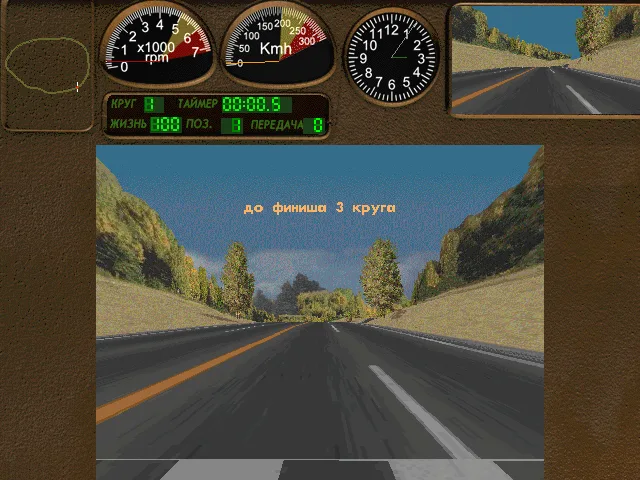
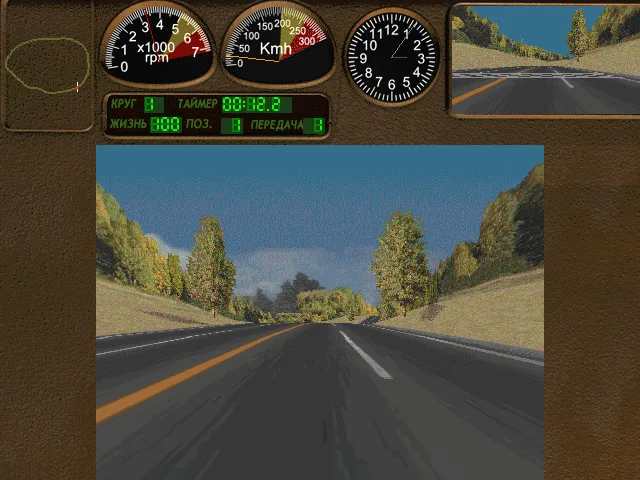
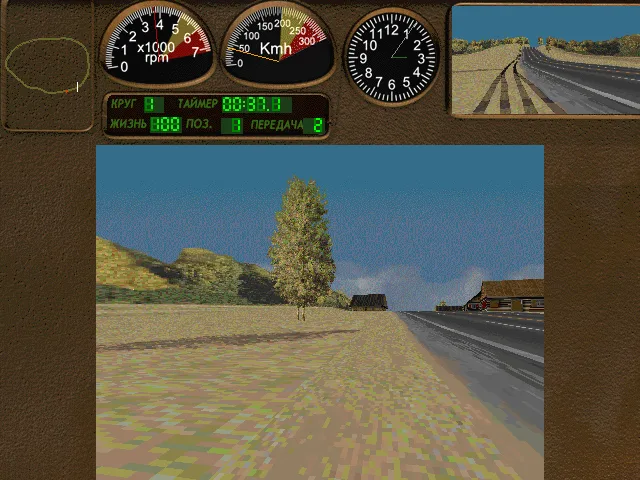
Beregis Avtomobilya!, whose Russian title is Берегись автомобиля!, is a racing game from Amber for PC, released in 1998. The preserved DOS copy is in Russian. It lets you drive from an interior view, with the dashboard in front of you and a small rearview mirror at the top right. Here you can enter the training mode and drive the car with the keyboard arrow keys.
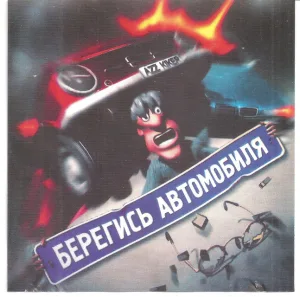
The cars are the heart of the game. The box presents Russian-made vehicles against foreign cars and advertises ten models and nine summer and winter tracks. On screen, the road takes up a good part of the view. The steering wheel sits outside the initial frame, while the instruments show the RPM, the speed, and a clock.
Recognizing the Russian menus
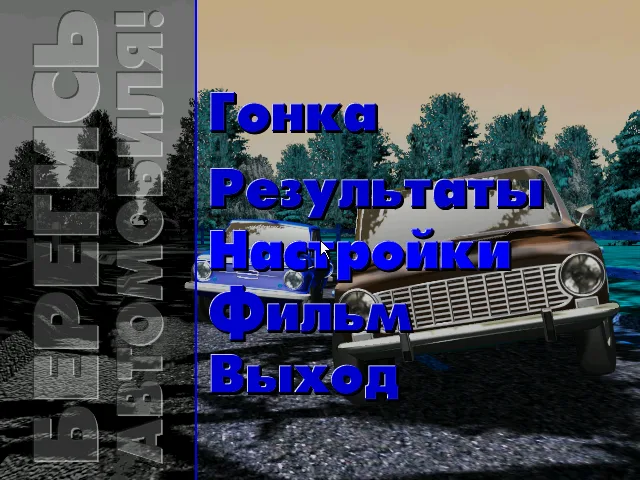
The first screen lets you choose a name. Then the main menu appears, laid over a photograph of a car. The word Гонка opens the races. Результаты leads to the results and Настройки to the settings. There is also a movie option and another to exit. The gallery preserves the look of this menu so you can find the options before you start.
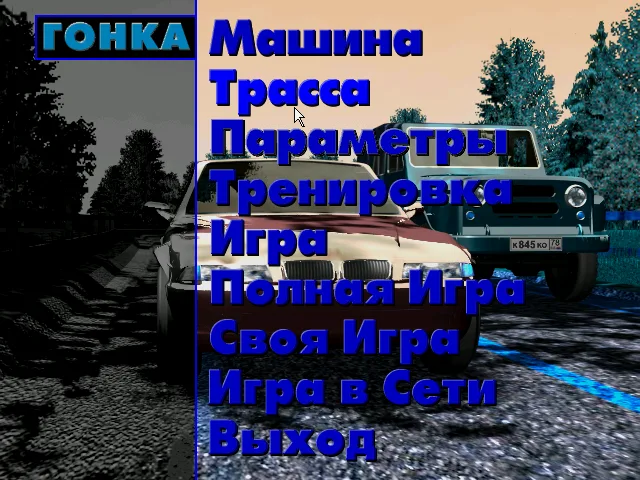
Inside Гонка you will find the car and track choices, the parameters, and the game modes. Машина means the car and Трасса the track. To try out the controls you can use Тренировка, the training mode. It is the fourth entry in that second menu. The game shown in the screenshots begins with the choices the installation offers.
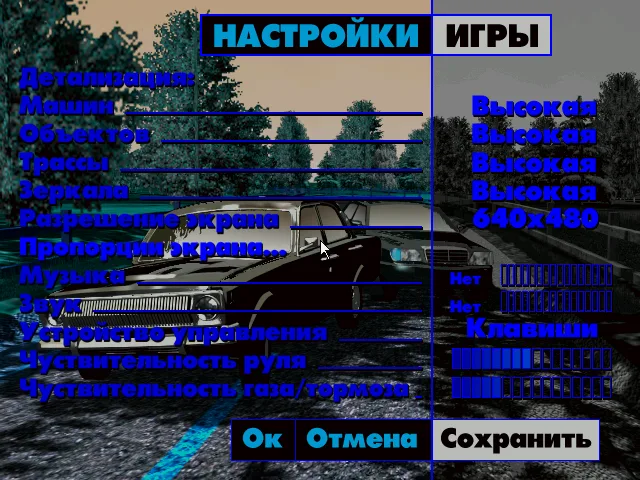
These words help you find your way while the Cyrillic alphabet is still hard to read. Entering Настройки lets you see the graphics settings and the control device. The configuration tested uses the keyboard. The game keeps its original labels, which also appear in the instructions on this game page.
The first few meters
Once the track has loaded, hold the up arrow to accelerate. The tachometer and speedometer respond as the stretch of road ahead of you changes. The left and right arrows steer the car. Down lets you slow down. In testing, we checked forward movement, a turn to the left, and braking.
It is best to start with gentle presses. The dashboard occupies the top strip and leaves a wide view of the curves, the shoulder, and the terrain. If the car ends up off the asphalt, its position is visible both in the front view and in the rearview mirror. Releasing the accelerator and correcting little by little makes it easier to recognize the direction of the road again.
Training lets you observe that response before choosing a race. On the tested route, trees, slopes, and houses appear beside the road. The opening screenshot and the driving ones come from actions performed with the keyboard. The stopwatch and the instruments stay visible throughout the drive.
A DOS game from 1998
The program belongs to a late stage of the DOS catalog. Its original installer creates a game folder on the hard drive and keeps the main data on the CD drive. The browser setup reproduces that arrangement. That way the official launcher finds both the game's resources and the local configuration files.
The copy includes eighteen original files. The main data file is called netracer.all. The executable and the launcher generated by the installation identify the Russian version from June 1998. The download keeps the collection's ZIP intact. The package used for playing adds the DOS configuration and the files created by the original installer.
The cover and its back identify the company Amber. The name Watcom that appeared in the collection's data belongs to the programming tools included in the executable. This game page lists Amber as the developer and uses the year confirmed by the box and the program files.
The background comes from the main menu of this same copy. The other images show the race menu, the training mode, and the settings. You can compare the labels in the gallery with those that appear when you open the player and follow the first steps without changing the program's language.
EVERY PIXEL COUNTS
The game in pictures.
Explore the screenshots and open every detail at full size.
GET READY FOR YOUR NEXT GAME
Choose your download.
Format, compatibility and server. All in view.
Clicking opens the CLABA loading area and, in a few seconds, your download. If a link fails, let us know via Contact or in the forum.
Your game starts here
Play in your browser.
Pick, press and go back to the classics without leaving the game page.
RetrogamingRight in your browserNo installation
MS-DOSIn your browser
Beregis Avtomobilya!
Your next game starts here.
- 39 MB · downloads on click
- Save the game's files
- Keyboard, controller or touch
Controls
Click the game to use the keyboardOn mobile, play with the on-screen controllerRussian. Click captures the mouse. Гонка opens the races, Тренировка is training. Up accelerates, left/right steer, down brakes. Esc releases the pointer.
- Full screen
Use the button on the bar. Esc returns to the game page; “Exit” closes the game.
- Saves
Save keeps the files the game creates, not the exact moment. Save inside the game, then press Save.
- Mobile and tablet
Press Controls during the game to show buttons and keyboard. Gamepad support depends on the browser.
Saves live in this browser and device. Clearing the site data deletes them too.
THE SECRET SIDE OF THE GAME
Tips, tricks and secrets.
A hint at the right time. A code that changes everything.
Tip for your first run
Choose Тренировка inside Гонка. Press up to accelerate and use the side arrows with short presses. Watch the speedometer and the car's position relative to the shoulder.
Tip for finding your way around the menus
Гонка opens the races. Машина selects the car and Трасса the track. Настройки corresponds to the settings. The gallery shows those original menus so you can find them on screen.
Tip for when you leave the asphalt
Brake with down and correct your steering little by little. The rearview mirror lets you see where the road is while the car moves across the terrain at the side.
Tip for using the mouse
Click on the game image to capture the pointer, then move the mouse to the option. Esc releases the cursor to the browser. While the cursor is captured, that first press can be used to get it back.
No matches. Try another effect or code.
THE NEXT STEP, CLEARER
Guides to move forward.
From the first installation to that mission that won't give in.
Creating a profile and entering training
Wait for the name selection. The Новое Имя option creates a profile. Type the name and confirm with Enter. Select the profile and use Ок to continue when necessary.
In the main menu choose Гонка. In the next menu, Тренировка is the fourth entry. Wait for the transition to finish and for the road and the dashboard to appear.
Accelerating, steering, and braking
Click on the game to give it focus. Hold the up arrow to accelerate. Left and right steer the car. Down slows you down. Check the response in training before changing the vehicle or the track.
The tachometer and the speedometer let you see the effect of the accelerator. For a curve, release up and correct with short presses. The test of this copy includes moving forward, turning, and braking.
Opening the original settings
The Настройки entry (Russian for "Settings") in the main menu shows the graphics detail level, the resolution, and the control device. The tested game session uses the keyboard and a 640 by 480 pixel image.
Esc releases the mouse captured by the browser. To keep using the menus, click the game again. Transitions may take a few seconds.
Menu transitions may leave graphical artifacts on the side background. Entering the training mode refreshes the scene. Testing of this copy covered the training mode and the driving controls. Sound playback remains pending review.
Files and provenance
The download keeps the eighteen files from the original ZIP. The browser setup uses the launcher generated by the original installer and its hard drive and CD structure.
The identification of Amber and the year 1998 are checked against the original box. The gallery uses screenshots taken while running this copy. Original box front and back preserved at Old-Games.ru.
Something wrong?
Give us a hint.
A broken link, a detail to correct or a game that won't start. Your report helps keep this game page up to date.
Get in touchReport an issue with this game Discuss it in the forumCLABA ARCADE ROOM
This one and 250 more
play here.
When you finish your game, the room has other machines switched on.
Enter the roomTHE CLABA APP1.0 RC 1
Take the archive
with you.

Game pages, online play and your shelf on Android. Free, no sign-up.
ARCHIVE SECRETS
Did you know?
- The original box advertises ten cars and nine tracks with summer and winter settings.
- The title appears in Russian as Берегись автомобиля!, a warning that can be translated as “beware of the car.”
- The files in the copy identify a Russian version from June 1998.
- The training mode shows a rearview mirror next to the speedometer and the tachometer.


