Simulmondo · Simulation
Big Game Fishing
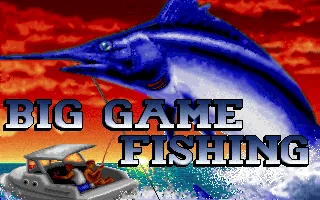
A 1991 deep-sea fishing simulation for MS-DOS. Get your boat ready in Mauritia, set a course on the chart, and head out to fish.
Simulation game by Simulmondo (1991) for MS-DOS, in Italian. Playable in your browser or downloadable.
— no rating yet
THE CLABA ARCHIVE
Inside the game.
Its history, its ideas and the reasons to come back.
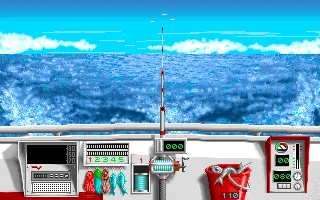
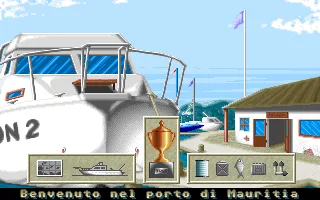
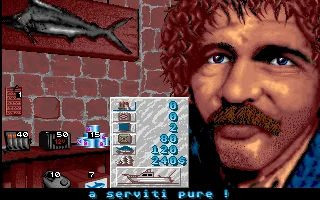
A motorboat in Mauritia harbor is the starting point of Big Game Fishing. Simulmondo’s 1991 MS-DOS game spends part of each day on decisions you make ashore. The shop lets you check the price of supplies. At the dock you can review your catches and open the nautical chart.
Before choosing a course, check how much fuel you have left and what equipment you’re carrying. A good day’s fishing pays for the next trip, but distance matters on the return journey too. At sea, the fish pulls on the line while you try to bring it closer to the boat. The manual gives the example of easing the tension when a catch puts up a fight.
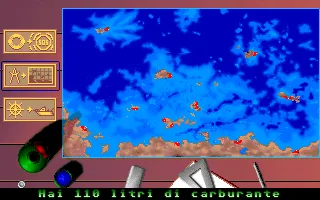
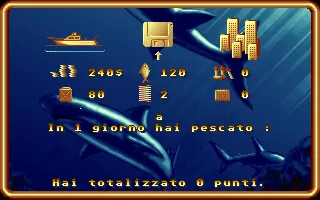
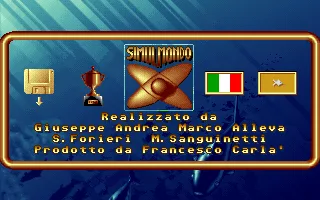
The gallery shows the DOS edition from RetroBat, with screenshots taken from its title, credits, harbor, shop, statistics, and chart. The test run used VGA mode and explored the harbor with the keyboard. The screens from that session display Italian text.
EVERY PIXEL COUNTS
The game in pictures.
Explore the screenshots and open every detail at full size.
GET READY FOR YOUR NEXT GAME
Choose your download.
Format, compatibility and server. All in view.
Clicking opens the CLABA loading area and, in a few seconds, your download. If a link fails, let us know via Contact or in the forum.
Your game starts here
Play in your browser.
Pick, press and go back to the classics without leaving the game page.
RetrogamingRight in your browserNo installation
MS-DOSIn your browser
Big Game Fishing
Your next game starts here.
- 1 MB · downloads on click
- Save the game's files
- Keyboard, controller or touch
Controls
Click the game to use the keyboardOn mobile, play with the on-screen controller3 selects VGA. Arrows and Shift navigate menus. On the chart, Enter picks a destination and S confirms the route. On the boat, Space puts out sardines.
- Full screen
Use the button on the bar. Esc returns to the game page; “Exit” closes the game.
- Saves
Save keeps the files the game creates, not the exact moment. Save inside the game, then press Save.
- Mobile and tablet
Press Controls during the game to show buttons and keyboard. Gamepad support depends on the browser.
Saves live in this browser and device. Clearing the site data deletes them too.
THE SECRET SIDE OF THE GAME
Tips, tricks and secrets.
A hint at the right time. A code that changes everything.
Allow fuel for the return trip
Check the gauge before leaving Mauritia behind. When you choose a destination on the chart, leave enough fuel to make it back.
No matches. Try another effect or code.
THE NEXT STEP, CLEARER
Guides to move forward.
From the first installation to that mission that won't give in.
Head out to fish in the browser
When DOS starts, press Enter through to the graphics selection and press 3 for VGA. Press Shift to start and enter a name. In the harbor, select the boat with the left arrow and Shift. Open the middle chart icon, move the crosshair out to sea, and confirm the destination with Enter. Answer S to «Confermi questa rotta?» to set off.
Once you’re on the boat, Space puts sardines into the water. The bucket counter shows how many you have left.
Get ready to leave
In the harbor, use the arrow keys to move the selection and confirm with Shift. Visit the shop to check quantities and prices. Open the chart to see the coast and check how much fuel you have.
Look up the fishing controls
The Big Game Fishing manual explains how to cast and reel in the line. The instructions cover harbor and deep-sea fishing controls separately.
Something wrong?
Give us a hint.
A broken link, a detail to correct or a game that won't start. Your report helps keep this game page up to date.
Get in touchReport an issue with this game Discuss it in the forumCLABA ARCADE ROOM
This one and 274 more
play here.
When you finish your game, the room has other machines switched on.
Enter the roomTHE CLABA APP1.0 RC 1
Take the archive
with you.

Game pages, online play and your shelf on Android. Free, no sign-up.
ARCHIVE SECRETS
Did you know?
- The DOS credits name Giuseppe, Andrea, and Marco Alleva alongside Stefano Forieri and Michele Sanguinetti.
- The RetroBat copy includes assets for CGA, EGA, and VGA.
- There were also versions for Amiga, Atari ST, and Commodore 64.