Raven Software · RPG
X-Men Legends II: Rise of Apocalypse
The X-Men and Magneto's Brotherhood unite against Apocalypse: four-mutant teams, dozens of powers and four-player co-op in Beenox's PC version.
Role-playing game by Raven Software (2005) for PC (in Spanish and English), GameCube and PSP. Available to download.
Choose your version 3 platforms
No computer handy? Play one of the 251 classics online right now
4.2 11 votes
THE CLABA ARCHIVE
Inside the game.
Its history, its ideas and the reasons to come back.
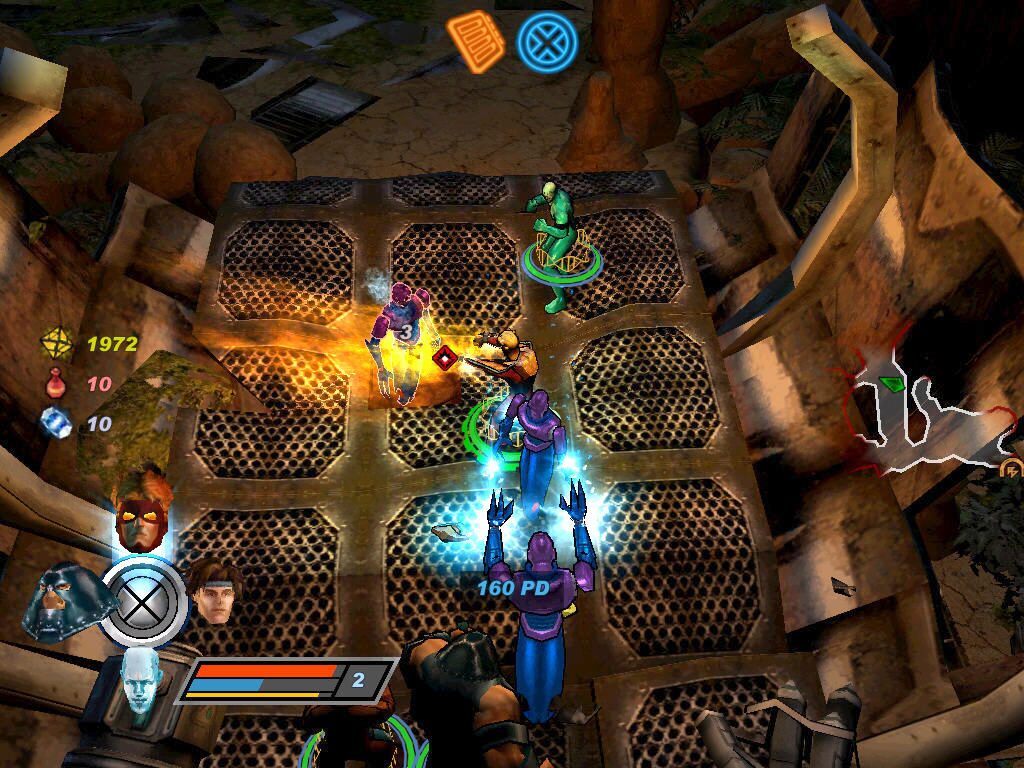
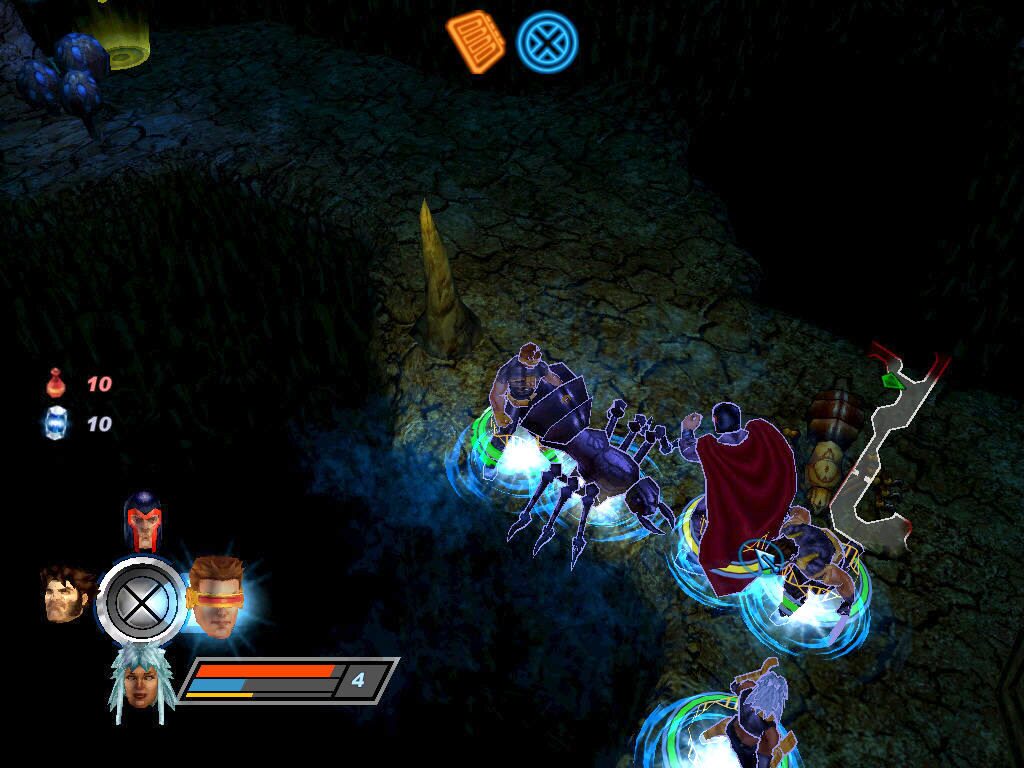
Magneto and Professor Xavier on the same side. Wolverine fighting shoulder to shoulder with Juggernaut. It takes a truly enormous threat to get the X-Men and the Brotherhood of Mutants to shake hands, and Apocalypse is one. X-Men Legends II: Rise of Apocalypse is an action RPG from Activision released in September 2005: Raven Software made it for the consoles, and the studio Beenox handled the PC version.
Enemies forced to understand each other
According to the manual, it all begins with a strange disturbance that Cerebro detects in Egypt. While a team of X-Men investigates in the desert, Xavier and Polaris are kidnapped. Behind it is Apocalypse, the oldest mutant, with his four Horsemen and an army of more than a hundred types of enemies. Neither the X-Men nor Magneto’s Brotherhood can beat him alone, so they have to cooperate. Along the way, old acquaintances from the comics turn up, such as Omega Red, Lady Deathstrike, Sugar Man and Mister Sinister.
Four mutants at once
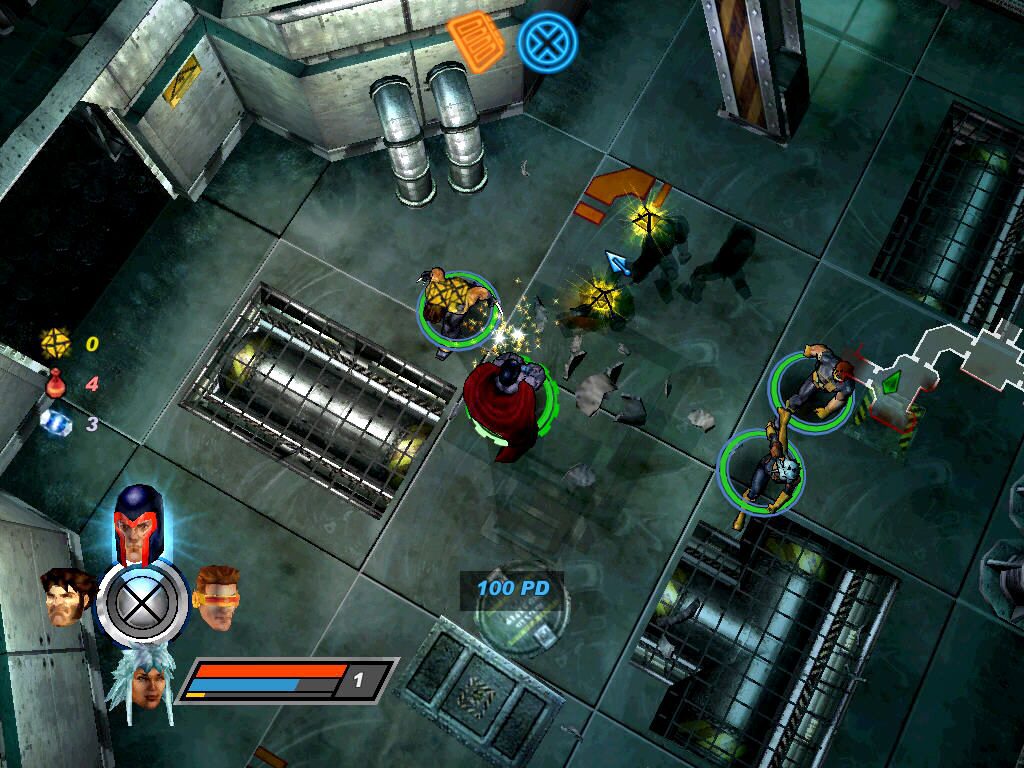
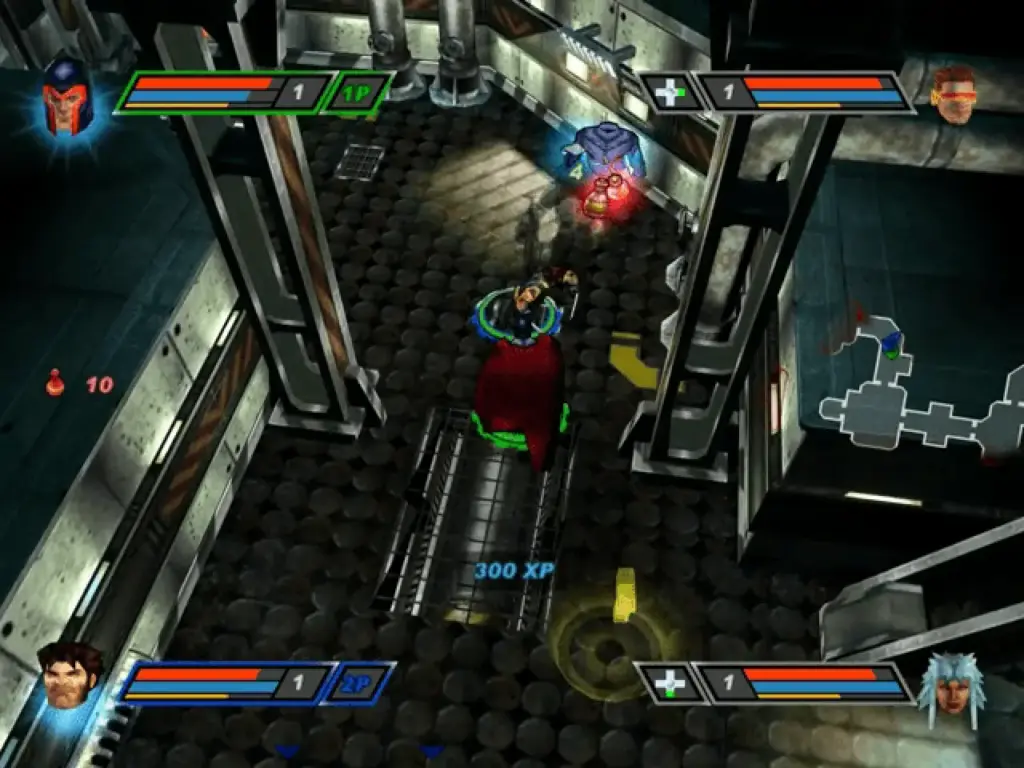
You control a team of four characters, though you only handle one at a time: the artificial intelligence (or your friends) runs the rest, and you switch heroes with a key. When you level up, you distribute points among attributes (body, focus, strike and speed) and powers, which range from bolts and ranged attacks to group boosts, traps and teleportation. With four Xtreme tokens you unleash the ultimate attacks, and if two characters combine their powers on the same enemy, they deal extra damage and earn more experience.
Each chapter has a base where you receive missions, talk to other characters and buy gear from Forge and Beast in exchange for tech pieces. Comics, sketches and Danger Room discs are hidden throughout the levels, and the extraction points are used to save, change your team and travel between zones.
Bigger than the first
GameSpy summed it up in its review of the PC version as «more, more and more»: seventeen characters from the start and three to unlock, many more powers and more cameos from the Marvel universe. The big new feature was online multiplayer: up to four players could play the entire campaign together, saving the game to continue another day. The drawback, according to the same magazine, was the keyboard and mouse controls, somewhat clumsy for a game designed for a gamepad.
The edition we offer
This is the PC version. In Downloads there are two options: a repack in English and Spanish, ready to install and play on Windows XP, 7 and 10, and the DVD image, in English with the Spanish translation included, marked for Windows XP. The disc uses SafeDisc protection, which Windows 10 and 11 no longer support, so on a current computer the easiest option is the repack. If you need help with compatibility, see our tutorial on Windows XP classics on Windows 10 and 11 (in Spanish).
In Guides you will find the first launch, the controls and the known fixes; in Tips & tricks, advice on building a good team. If you like this style of action RPG, try Diablo II, Dungeon Siege II or Titan Quest. Raven Software is also the studio behind Heretic and Hexen, and if you want more mutants, there is X-Men Origins: Wolverine.
ONE GAME, 3 PLATFORMS
Versions.
3 platforms2005
Pick a platform: the screenshots, downloads and online game on this page switch with it.
- Year
- 2005
- Developer
- Raven Software
- Downloads
- 2
- Screenshots
- 3
The PC version is the one this page covers: the information, review and main screenshots are from this platform.
- Year
- 2005
- Port by
- Raven Software
- Downloads
- 1
- Screenshots
- 1
This edition brings to GameCube the action-RPG campaign in which the X-Men and the Brotherhood unite against Apocalypse. The team is formed of four characters, whose abilities can be combined during combat. This page corresponds to the US release for GameCube; the game also came out on other consoles and PC. Contemporary release information distinguishes this version from the PS2 and Xbox editions: the GameCube game does not include the online co-op play announced for those platforms.

- Year
- 2005
- Port by
- Vicarious Visions
- Downloads
- 1
- Screenshots
- 1
The PSP version adds nine comic-book missions and four unlockable characters compared with the home-console editions. It also allows co-op for up to four players over ad hoc or infrastructure connection. The adventure keeps the team of four mutants, and you can switch between them during combat.
EVERY PIXEL COUNTS
The game in pictures.
Explore the screenshots and open every detail at full size.

GET READY FOR YOUR NEXT GAME
Choose your download.
Format, compatibility and server. All in view.
Version
SELECTED VERSIONPC2 archivos
SELECTED VERSIONGameCube2005 · 1 file
Clicking opens the CLABA loading area and, in a few seconds, your download. If a link fails, let us know via Contact or in the forum.
HIT PLAY
The game in motion.
Trailers and videos to see it in action.
-
GameCube · How it plays
X-Men Legends II: Rise of Apocalypse gameplay on GameCube.
-
PSP · Gameplay
X-Men Legends II: Rise of Apocalypse gameplay on PSP.
THE SECRET SIDE OF THE GAME
Tips, tricks and secrets.
A hint at the right time. A code that changes everything.
Tip · no reliable codes on PC
The button codes that circulate for this game are from the console versions, and we have not been able to confirm with two sources that they work on the PC one. That is why you will only find tips here. What you do unlock by playing is three hidden characters, plus comics, sketches and scenes in the review section.
Tip · combine powers
With the key for calling your allies, your teammates attack your target with the power you have assigned to them. If two powers coincide on the same enemy, you get a combo with extra damage and experience. The manual gives two examples: Telekinesis + Slowing Bolt and Savage Slash + Ignition.
Tip · use the extraction points
The blue X marks are the extraction points: there you save the game, change your team lineup and instantly travel to any other active point. There isn’t one on every corner, so change teams before entering a new zone.
Tip · tune your teammates
In team management you can decide when the AI uses health packs (never, below 20, 40 or 80% health) and how it fights (aggressive, normal or defensive). Setting it to defensive for the fragile characters and aggressive for the tanks avoids many casualties.
Tip · don't overfill your inventory
PCGamingWiki records game crashes when the inventory and the stash are full or nearly so: the game doesn’t know what to do with the next item an enemy drops. Sell or toss what you don’t use every time you pass through the base.
Tip · Danger Room discs
The Danger Room discs are hidden throughout the levels. Use them on the computer in the base: their challenges give experience, items and attribute boosts for the whole group, even for those not playing at that moment. Each reward is given only once.
Tip · tech pieces
Forge and Beast craft gear in exchange for the tech pieces you collect. Belts and armor raise defense, and gloves raise attack. Rare and unique items give the best bonuses, so save pieces for when they show up in the shop.
No matches. Try another effect or code.
THE NEXT STEP, CLEARER
Guides to move forward.
From the first installation to that mission that won't give in.
Start here · first launch on a current PC
- Download the repack from Downloads: it is in English and Spanish and ready for Windows XP, 7 and 10. The DVD image is for preserving the edition or for installing it on Windows XP or in a virtual machine, because its SafeDisc protection doesn’t work on Windows 10 and 11.
- Install it in a short path outside
Program Files, for exampleC:\Juegos\XMenLegends2. - The game needs DirectX 9.0c. If at launch you see the warning «DirectX 9.0c is not installed on this computer», install Microsoft’s DirectX package.
- If it won’t start or closes right after opening, PCGamingWiki points to a wrong value in the registry: open the registry editor, go to
HKEY_CURRENT_USER\SOFTWARE\Activision\X-Men Legends 2\Settings\Displayand set Resolution to your desktop resolution, for example1920x1080. You only need to do it once. - Connect the gamepad before opening the game and configure it in Options > Advanced Options.
Save games are stored in Documents\Activision\X-Men Legends 2\Save. Copy them from time to time by following our tutorial on copying and restoring save games (in Spanish).
Controls
With the mouse, according to the manual:
- Left-click on the ground or on an object to go there; hold it down to keep moving toward the cursor. With left Shift held down, you walk.
- Left- or right-click on an enemy to approach and attack; hold the button to chain blows.
- Right-click on a nearby object to use it. With left Ctrl held down, you attack breakable objects.
- Click on a character’s face on the scoreboard to take control of them, and on the health packs and energy packs to use them.
- Space bar, while holding the power key: Xtreme attack.
GameSpy and other reviews agree that it feels somewhat clumsy with keyboard and mouse and recommend a USB gamepad. All keys and buttons can be remapped in Advanced Options. Gamepad movement is not analog, and several players report that the characters only advance in a few fixed directions; rotating the camera helps to face them.
First steps · build your team
- Mix roles: someone who holds up on the front line, someone who deals ranged damage and someone who slows down or stuns the enemies.
- Set up automatic level-up when the game offers it, or distribute the points yourself in the team menu; you can change it whenever you want.
- Invest early in the powers you use most and in the passive ones that improve energy, because powers drain it fast.
- Smash walls, crates and pipes: they hide health packs, energy packs, tech pieces and collectibles.
- Go back to the base through the portal when you are running low on health packs or have pieces to spend.
- From level 15, the Xtreme powers unlock: save them for the bosses.
Technical notes
Minimum requirements according to PCGamingWiki: Windows 98, Pentium III at 1.2 GHz or Athlon XP 1500+, 256 MB of RAM, a GeForce 2 or Radeon 7500 card with 64 MB, 2.5 GB of disk space and DirectX 9.0c. A Pentium 4 at 2 GHz, 512 MB and a GeForce 3 or Radeon 8500 were recommended.
- Widescreen: the game supports widescreen and high resolutions without patches, and has edge smoothing (FSAA) in Advanced Options. If the smoothing doesn’t stay enabled, it can be forced from the graphics card’s control panel. It runs at a maximum of 60 frames per second.
- Skipping the startup videos: in
Scripts\menus\intro_normal.py, inside the game folder, delete the lines that start withstartMovieandwaitsignal(make a backup first). - Multiplayer: online play used GameSpy, a service that has since shut down. Local four-player co-op on the same PC, each with their own gamepad, still works.
- Crashes when picking up items: they are usually due to a full inventory. Empty the stash at the base.
For any other problem on Windows 10 or 11, see our tutorial on Windows XP classics (in Spanish).
Sources
- PC manual, on Internet Archive: installation, DirectX, CD 1 as key, mouse controls, team, extraction points, attributes, Xtreme powers, gear and tech pieces, Danger Room, online play and Beenox and Raven credits.
- Official BradyGames guide (consoles), on Internet Archive: unlockable characters, Danger Room, 250 trivia questions.
- Activision press release (October 2005): the studio behind each version (Raven, Vicarious Visions and Beenox), more than a hundred types of enemies and the four Horsemen.
- PCGamingWiki: date, SafeDisc, save game path, widescreen, startup videos, registry fix, inventory crashes, requirements, GameSpy.
- GameSpy · PC version review (2005): starting and unlockable characters, online multiplayer, keyboard and mouse controls.
- RPGFan: Pyro and Sabretooth, PC exclusives.
- IGN · console review (2005): playable characters on console and Sabretooth as a non-playable character.
- Steam forum: Pyro and Sabretooth as PC exclusives, and complaints about diagonals with a gamepad.
- Gaming Pastime · PC review (2021): gamepad on a current computer and smoothing forced from the driver.
Something wrong?
Give us a hint.
A broken link, a detail to correct or a game that won't start. Your report helps keep this game page up to date.
Get in touchReport an issue with this game Discuss it in the forumCLABA ARCADE ROOM
251 classics
without installing anything.
Don't feel like installing? These play right in your browser.
Enter the roomTHE CLABA APP1.0 RC 1
Take the archive
with you.

Game pages, online play and your shelf on Android. Free, no sign-up.
ARCHIVE SECRETS
Did you know?
Three studios, one game. According to Activision’s press release, Raven Software made the console versions, Vicarious Visions the PSP one and Beenox the PC one.
Two villains only on PC. The PC version added Pyro and Sabretooth as playable characters. On consoles, Sabretooth appears only as a story character, and the PSP had its own exclusive characters.
Babies in the credits. The Raven Software credits in the manual include a section with the names of the babies born to the team during the game’s development.
The disc was the key. In the CD edition, the manual warns that the first disc works as the game’s key: you had to have it in the drive to play.
A trivia game of two hundred and fifty questions. The bases have a quiz about the X-Men, and each base brings its own batch. The official BradyGames guide includes all 250 answers.