Nival Interactive · RPG
Rage of Mages 2: Necromancer
Nival's tactical RPG in the world of the allods: warrior or mage hero, mercenaries and 43 missions against necromancers. Repack with the Clan DLAN translation.
Role-playing game by Nival Interactive (1999) for PC, in English. Available to download.
— no rating yet
THE CLABA ARCHIVE
Inside the game.
Its history, its ideas and the reasons to come back.
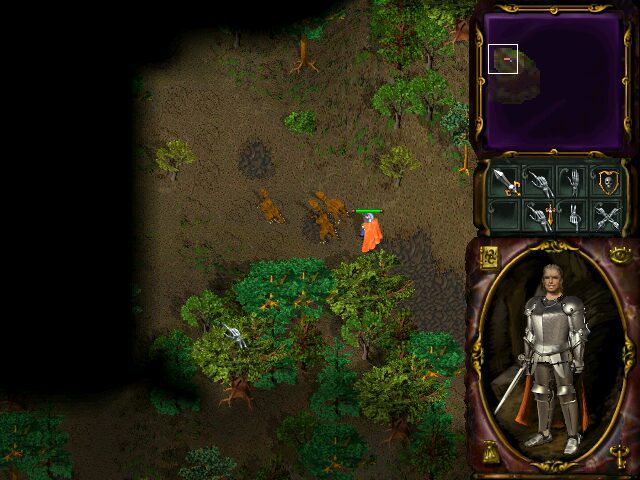
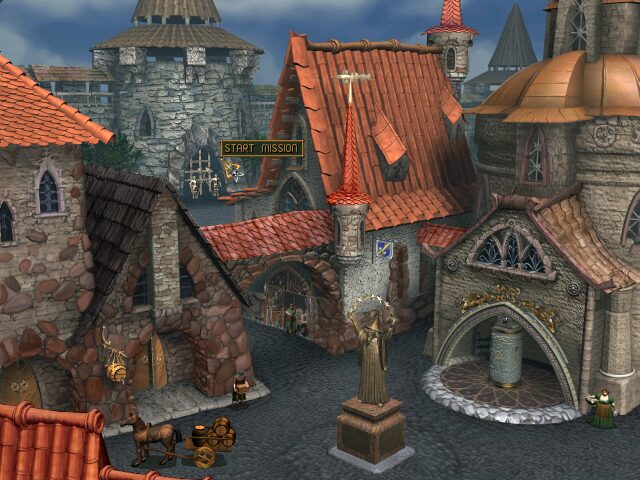
A desert with Arabian-flavored cities, druid villages in the forests and, underground, an order of necromancers that has spent years raising the dead without anyone noticing. Rage of Mages II: Necromancer is the second visit to the world of Allods, the tactical role-playing series that made the Russian studio Nival Interactive known outside its own country. In Russia it came out in April 1999 as Allods 2: Master of Souls («Аллоды 2: Повелитель душ»), and that same year Monolith published it in English.
A world broken into islands
The premise is one you do not forget: centuries ago a catastrophe shattered the world into hundreds of islands, the allods, which float apart from one another in the astral, a substance that disintegrates whatever it touches. Each allod stays up thanks to a Great Mage who is at once its guardian and its prisoner. After the events of the first Rage of Mages, the action jumps to another allod, with a new story, characters and enemies: orc shamans who use magic, druids and, above all, the necromancers of the title.
How it plays
At the start you choose your hero, warrior or mage, and there is no turning back: the mage carries no weapons or armor and lives off his spellbook; the warrior specializes in swords, axes, maces, spears or ranged weapons. Magic is divided into five spheres (fire, air, water, earth and astral), with spells ranging from the fireball to animating the dead.
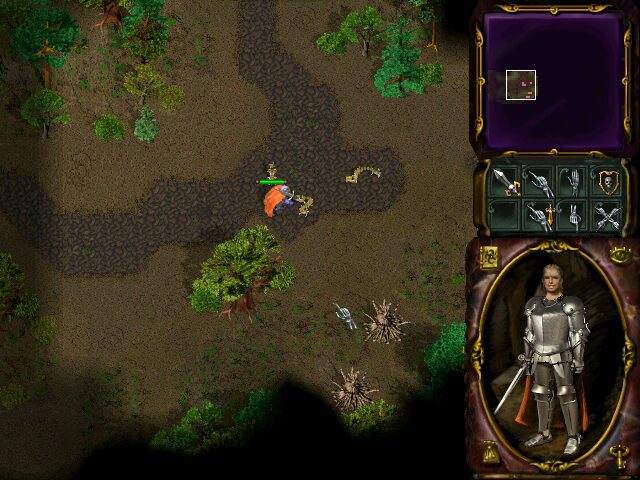
The top-down view and mouse control recall Warcraft II, but here there are no bases to build or resources to gather. Missions are picked up by talking to the people at the inn; then you hire mercenaries, choose the job you prefer and head out onto the map with a small party. Protecting a flock from wolves, putting a broken artifact back together, facing dragons or helping some carnivorous squirrels get back home: there are 43 missions, and Nival advertised them as nonlinear and branching. One rule sets the pace: if one of your heroes dies, the mission is considered lost, so it pays to save often.
What made it special
Mixing real-time strategy and role-playing was not common in 1999, and the critics did not agree. GameSpot faulted it for being too similar to the first game, but praised its campaign, open and well woven; GameSpy missed more strategy and more genuine role-playing. What nobody disputed was how addictive it was: more than 400 weapons, items and spells, a character who grows from mission to mission and a multiplayer mode for up to 16 people, with a map editor included. And it keeps a loyal following: more than twenty-five years later, the Russian community maintains a server for playing it online.
The edition we offer
The game was never officially translated into Spanish. In Downloads you have two options, both marked for Windows XP, 7 and 10. The repack, ready to install and play, is in English and includes the Spanish translation by Clan DLAN, made by fans. The CD image is the original English edition; according to the forum thread (in Spanish), the team later added that translation to it as well. To play on a current PC, the convenient route is the repack, and our tutorial on Windows XP classics on Windows 10 and 11 helps if you run into trouble.
In Guides you will find the first launch, the keys and how to survive the first missions; in Tips & tricks, the console codes and how to activate them. If you are left wanting more from Nival, years later the studio developed Heroes of Might and Magic V; and if you are into role-playing with plenty of loot, try Diablo II.
EVERY PIXEL COUNTS
The game in pictures.
Explore the screenshots and open every detail at full size.
GET READY FOR YOUR NEXT GAME
Choose your download.
Format, compatibility and server. All in view.
Download Repack
COMPATIBILITYWindows XP / 7 / 10 ✓ At no cost✓ No sign-up Download www.mediafire.com · New tab MediaFire02 ISODownload ISO
COMPATIBILITYWindows XP / 7 / 10 ✓ At no cost✓ No sign-up Download www.mediafire.com · New tabClicking opens the CLABA loading area and, in a few seconds, your download. If a link fails, let us know via Contact or in the forum.
THE SECRET SIDE OF THE GAME
Tips, tricks and secrets.
A hint at the right time. A code that changes everything.
How to enter them
Once on a map, press Enter to open the message line at the bottom left, type #Coward and press Enter again. Cheat guides point out that some versions require ##Coward, with two hash signs: if one does not work, try the other. From then on, each code is typed the same way (Enter, code, Enter). Cheat mode lasts until you restart or load a game.
Invincible hero and all spells
#modify self +god: your hero becomes invulnerable. #modify army +god: the same for your whole party. #modify self +spells: you learn all spells. #modify self +knowledge: all knowledge.
Gold and items
#create 5000 gold: creates that amount of gold (change the number to whatever you want). With #create followed by the exact name of an item in English, such as #create Very Rare Crystal Long Sword, that item appears.
Map and combat
#show map: shows the entire map; #hide map hides it again. #killall: eliminates the enemies. #pickup all: picks up all the sacks on the ground. #victory: you win the mission.
Tip · before using them
Save your game before trying codes. #victory skips whatever happens during the mission, and with #create it is easy to break the game’s economy, which is a good part of its appeal. Use them to get out of a jam, not for the whole campaign.
Tip · the hero cannot die
If one of your heroes falls, the mission ends. Pull back in time anyone who is in bad shape (R key, flee), always carry something to heal and do not skimp on mercenaries for the hard jobs: a good party saves you a lot of reloads.
No matches. Try another effect or code.
THE NEXT STEP, CLEARER
Guides to move forward.
From the first installation to that mission that won't give in.
Start here · first launch
- In Downloads, choose the repack: it is ready to install and play on Windows XP, 7 and 10, and includes the Spanish translation by Clan DLAN.
- Install it in a short path outside
Program Files, for exampleC:\Juegos\RageOfMages2. According to PCGamingWiki, save games are stored in the game’s own folder, so Windows needs to let you write to it. - The game supports three resolutions: 640×480, 800×600 and 1024×768. In the original edition they are chosen from the CD’s startup menu; the higher the resolution, the more of the map you see.
- Create your hero, warrior or mage, and pick the difficulty: easy, medium or hard. Medium already poses serious challenges.
The CD image is the original English edition and is meant to be preserved or installed on Windows XP or in a virtual machine. Back up the game folder from time to time by following our tutorial on copying and restoring save games.
Controls · mouse and keyboard
- Mouse: it works like the real-time strategy games of the era: you select your units and give orders on the map.
- Orders: M move, A attack, G guard, D defend, R flee and P to have the hero pick up all the sacks in the area.
- Groups: Ctrl + number saves a selection and the number recalls it. They carry over from one mission to the next.
- Shortcuts: Ctrl + F4…F12 assigns a spell to that key and Shift + F4…F12, an inventory item; after that you just press the function key.
- Menu and saves: Esc menu, F1 help, F2 save, F3 load, I inventory.
First steps · surviving the first missions
- Before heading out, talk to everyone at the inn: that is where jobs are handed out, and you can often choose among several.
- Spend wisely. Money is scarce, and a mercenary at the right moment is usually worth more than a slightly better sword.
- Save at the start of every mission and before every big fight. You can save whenever you like.
- Focus your attack: throw the whole party at one target and take out enemy archers and mages first, since they punish you hard from a distance.
- If you are a mage, turn on automatic casting for your attack spell and stay behind the warriors.
- If a mission gives you trouble, the game lets you abandon it and try again later with better gear.
Technical notes
It required Windows 95, 98 or NT, a 133 MHz Pentium (200 MHz recommended), 32 MB of RAM, DirectX 5 or higher and about 130 MB of disk space. It is a 32-bit 2D game with no controller options; PCGamingWiki states that widescreen resolutions can be forced by following the game’s entry on WSGF, without official support.
About the translation: in the forum thread (in Spanish) a user reported that with a different translation the game froze at startup. The one by Clan DLAN, which is the one our downloads include, does work. If the game still does not start on Windows 10 or 11, try Windows XP compatibility mode, as our tutorial on Windows XP classics on Windows 10 and 11 explains.
Sources
- Nival · Rage of Mages 2: 43 missions, setting, more than 400 items, 80 enemies, 16-player multiplayer, map editor and requirements.
- Nival · Russian Allods 2 site (Wayback Machine): launch with 1C in April 1999, the world of the allods and its Great Mages, new factions and the Pocket PC version.
- GameSpot · 1999 review: inn and missions, mercenaries, hero death, abandoning missions, shortcuts and groups.
- GameSpy · 1999 review: comparison with real-time strategy and criticism of its role-playing side.
- Manual of the Brazilian CD Expert edition (Internet Archive): classes, magic spheres, difficulty, resolutions and keys.
- PCGamingWiki: requirements, save game location, widescreen and the Clan DLAN translation.
- GameRevolution · cheats and Cyberly · cheats: activation and codes.
- rom2.ru: community server and the server reconstruction project.
Something wrong?
Give us a hint.
A broken link, a detail to correct or a game that won't start. Your report helps keep this game page up to date.
Get in touchReport an issue with this game Discuss it in the forumCLABA ARCADE ROOM
541 classics
without installing anything.
Don't feel like installing? These play right in your browser.
Enter the roomTHE CLABA APP1.0 RC 1
Take the archive
with you.

Game pages, online play and your shelf on Android. Free, no sign-up.
ARCHIVE SECRETS
Did you know?
In Russia it had a different name. There the series is Allods: the first game was «Allods: The Seal of Mystery» and this one «Allods 2: Master of Souls,» published by Nival and 1C in April 1999. Rage of Mages is the name Western publishers gave it.
Mages who cannot leave. According to Nival itself, each allod exists only because a Great Mage holds it up, who is at once its protector and its prisoner.
Squirrels with a bad temper. Among the missions there is one about returning a pack of carnivorous squirrels to their home. GameSpot mentioned it in its 1999 review, and GameSpy was already wondering in its subhead what rabid squirrels were doing there.
A multiplayer mode that has not been switched off. The game supported matches of up to 16 players. In 2026, the Russian community still maintains a server with rankings and seasons, and is working on rebuilding the server code from the original executable.
In the palm of your hand too. In September 2005, Nival announced a Pocket PC version of Allods 2, handled by its mobile games division.