BioWare · RPG
Baldur’s Gate
Real-time AD&D RPG with pause: create your hero, form a party of six and unravel the Sword Coast's iron crisis. Multilingual DVD with Spanish voices.
Role-playing game by BioWare (1998) for PC, in Spanish. Available to download.
4.4 11 votes
THE CLABA ARCHIVE
Inside the game.
Its history, its ideas and the reasons to come back.
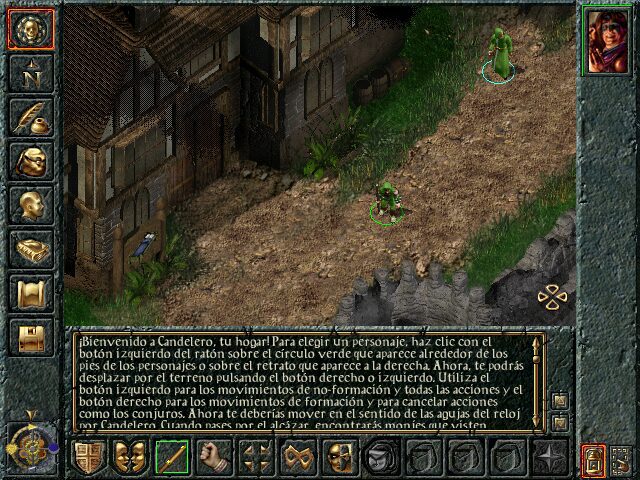
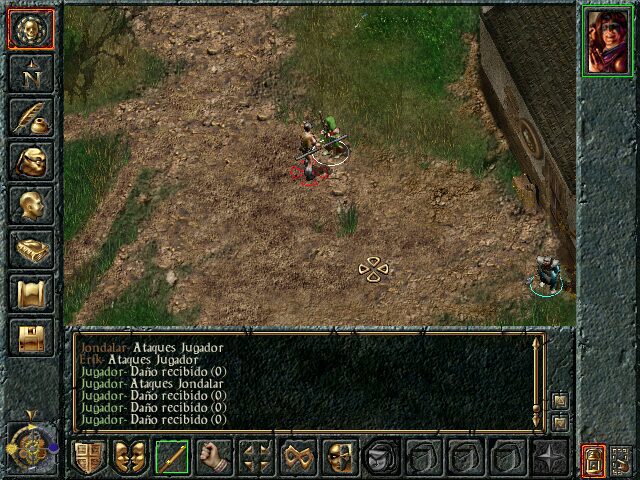
You grew up among the books of Candlekeep, a library-fortress on the Sword Coast, under the guardianship of the mage Gorion. One night, without explanation, he hurries you out of there, and before dawn a warrior in black armor blocks your way. That is how Baldur’s Gate begins, the game with which BioWare, then a little-known Canadian studio, brought computer RPGs back to the top of the charts in late 1998.
An iron crisis in the Forgotten Realms
The adventure takes place in the Forgotten Realms, the most popular campaign setting of Advanced Dungeons & Dragons. In the region, iron is rotting for no apparent reason: weapons snap, tools break, bandits raid the caravans and the city of Baldur’s Gate eyes the neighboring kingdom of Amn warily as war seems inevitable. From the mines of Nashkel to the inns of Beregost, you will pull on the thread of that conspiracy over a prologue and seven chapters, with dozens of side quests that weave in and out of the main plot.
How it plays
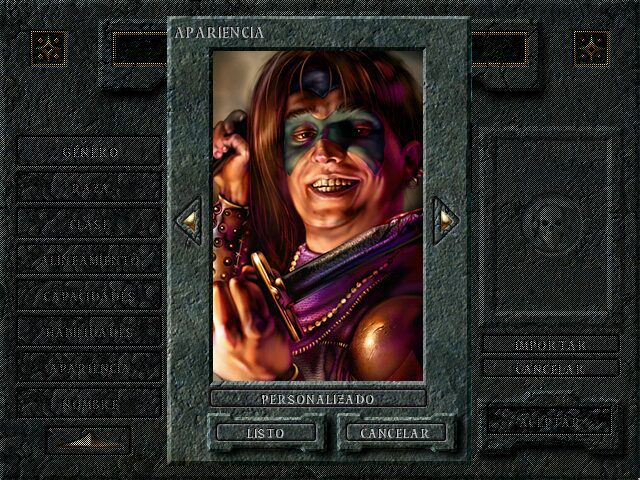
First you create your protagonist using the rules of the second edition of AD&D: human, elf, half-elf, dwarf, gnome or halfling; fighter, mage, cleric, thief, ranger, paladin, druid or bard, plus multiclass combinations, and an alignment that affects how the world treats you. Then you recruit companions until you form a party of six, each with their own personality. Some will leave if they do not like your reputation, and others cannot stand each other.
Combat is in real time, but with a tactical pause. Each character acts in six-second rounds and, with the space bar, you freeze the action to give orders at your leisure. You can also set the game to pause by itself when something important happens. That mix came out of an internal argument: James Ohlen, the lead designer, preferred real-time strategy and Ray Muzyka, turns. The pause was the way for both of them to win.
What made it special
BioWare was founded by three doctors, Ray Muzyka, Greg Zeschuk and Augustine Yip, and almost no one on the team had made a video game before. It all started from Battleground: Infinity, a technical demo by Scott Greig that turned into the Infinity engine, and from the AD&D license that Interplay held. The Black Isle veterans acted as mentors. The result filled five CDs with almost ten thousand screens.
It was an instant hit. According to Interplay, it passed 175,000 copies in its first two weeks, topped the charts in the United Kingdom, France and Germany and broke the company’s records, which until then were held by Fallout 2. The Infinity engine was later used for Icewind Dale and Planescape: Torment, and BioWare made the leap to 3D with Neverwinter Nights.
The edition we offer
In Downloads you will find a DVD image with the game in several languages, Spanish included, with Spanish text and voices. It is the format that Black Isle introduced in June 1999: the complete game on a single disc, with no need to swap CDs when moving from one area to another. It is marked as compatible with Windows XP, 7 and 10, and our tutorial on Windows XP classics on Windows 10 and 11 helps if something gives you trouble. So you do not lose a hundred hours of adventure, take a look at the one on copying and restoring save games too.
In Guides you have the installation, the controls and advice for surviving the first chapter; in Tips & tricks, the cheat console and how to activate it. If you are left wanting more Forgotten Realms, try the Eye of the Beholder trilogy or Pool of Radiance: Ruins of Myth Drannor; and if action RPGs are more your thing, Diablo.
EVERY PIXEL COUNTS
The game in pictures.
Explore the screenshots and open every detail at full size.
GET READY FOR YOUR NEXT GAME
Choose your download.
Format, compatibility and server. All in view.
Clicking opens the CLABA loading area and, in a few seconds, your download. If a link fails, let us know via Contact or in the forum.
THE SECRET SIDE OF THE GAME
Tips, tricks and secrets.
A hint at the right time. A code that changes everything.
How to activate them
Make a copy of baldur.ini, in the game folder, and open it with Notepad. Under the [Game Options] section add the line Cheats=1 and save. In game, press Ctrl + Tab to open the console, type the code matching the capitalization exactly and press Enter. If you installed it in Program Files, Windows may be using a second copy of baldur.ini in the VirtualStore folder of your user profile: edit that one.
Gold and first aid
Cheats:Midas(); gives 500 gold pieces. Cheats:FirstAid(); adds to your inventory five healing potions, five antidotes and a stone to flesh scroll.
Map
Cheats:ExploreArea(); fully reveals the map of the area you are in.
Special guests
Cheats:DrizztDefends(); makes Drizzt Do’Urden appear on your side, and Cheats:DrizztAttacks();, against you. Cheats:TheGreatGonzo(); summons ten friendly chickens that fight at your side.
Custom items
CLUAConsole:CreateItem(«code»); creates the indicated item, and by adding a quantity, for example CLUAConsole:CreateItem(«AROW02»,20);, it creates several at once. The codes are internal to the game and, if you type one that does not exist, nothing appears.
Tip · before you reach for the console
The guides themselves admit that these codes do not always respond the same way in every area. Save your game before using them, especially Cheats:CriticalItems();, which hands you all the key plot items at once and can throw the story off.
Tip · the inventory does not stop the clock
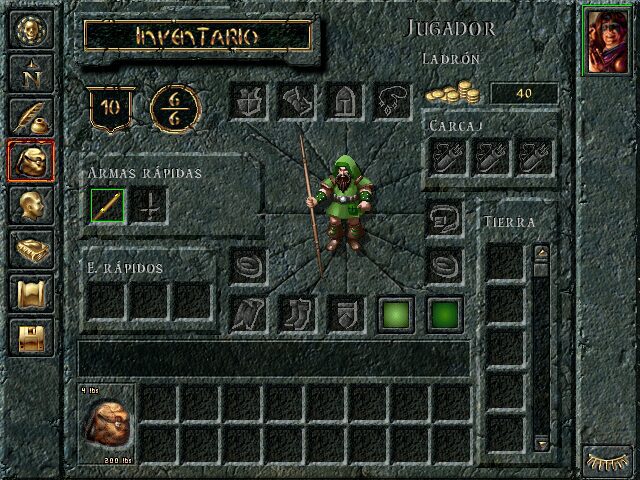
The manual warns about it: opening the inventory does not pause the game, to simulate how costly it is to change equipment in the middle of a fight. Pause with the space bar before rummaging through the backpack.
No matches. Try another effect or code.
THE NEXT STEP, CLEARER
Guides to move forward.
From the first installation to that mission that won't give in.
Start here · installing on a current PC
- Download the DVD image from Downloads and unzip it. If it is an
.isofile, Windows 10 and 11 mount it as a drive with a double click; with other formats, use a virtual drive program. - Run the installer on the disc (if it asks for the language, choose Spanish). Install it in a short path, such as
C:\Juegos\BaldursGate: according to PCGamingWiki, if the paths inbaldur.iniare very long, the game closes after the intro videos. - If the image flickers, runs slowly or fails when switching windows with Alt + Tab, copy the cnc-ddraw wrapper into the game folder, which also lets you play in a window.
- On very large hard drives, the game may complain that there is no space left and close: PCGamingWiki links a compatibility fix for that case.
- The final version of the base game is 1.1.4315; if yours is older, install that official patch.
Save games are stored in the game’s Save folder: back them up following our tutorial on copying and restoring save games. If something gives you trouble on Windows 10 or 11, see the one on Windows XP classics on Windows 10 and 11.
Controls
- Space bar or click on the clock: pauses and resumes the action. With the game paused you can give orders to each character.
- Left click: selects characters, moves, talks, attacks or picks up. Combined with Shift or Ctrl, it adds or removes characters from the selection; you can also drag a box.
- Right click: cancels the action in progress. Held and dragged over the terrain, it rotates the party’s formation.
- Quick formation buttons: with right click you choose the formation of each button and with left click you apply it, to put the warriors in front.
- In Options you can configure auto-pause, so the game stops by itself at certain events and nothing catches you off guard.
Keyboard shortcuts are changed with Config.exe, in the game folder. If you want to assign quick load to a key, do it from there.
First steps · surviving the first chapter
- In Candlekeep, talk to everyone before leaving: there are small errands, equipment and advice.
- Accept Imoen as soon as she offers: she is the first companion and a very useful thief for traps and locks.
- At low level any fight can be deadly. Use ranged weapons, put the fighters in the front row and the mages behind.
- Pause at the start of every fight, assign targets and save often, especially before entering new areas.
- Rest at inns whenever you can: in the open, your sleep can be interrupted by an attack.
- Take care of your reputation. Killing anyone or stealing in front of witnesses sinks it, makes shops more expensive and scares off good-hearted companions. Donating at temples helps restore it.
- Talking is usually better than fighting: if you kill everyone you meet, there will be nobody to give you the clues you need.
Technical notes
The game required Windows 95, a 166 MHz Pentium, 16 MB of RAM (32 recommended), a 2 MB card, DirectX 5 and between 300 and 600 MB of disk space depending on the installation. Its interface is designed for 640 × 480: the community offers a widescreen mod, but you should try it on a copy. It is capped at 30 frames per second and, although you can raise it in the .ini, the game clock is tied to them, so you would speed everything up.
Cooperative multiplayer supports up to six players on a local network or by direct IP; the online service of the time has closed. To fix bugs and text there is the community package Baldurdash, and Clan DLAN published a revised Spanish translation. The expansion Tales of the Sword Coast was sold separately.
Sources
- Baldur’s Gate manual (Internet Archive): races, classes, six-second rounds, pause, inventory without pause, reputation, formations, auto-pause and Config.
- Interplay · launch (December 21, 1998), number one in sales (January 14, 1999) and DVD version (June 10, 1999): five CDs, ten thousand screens, prologue and seven chapters, sales, European charts, records, DVD and 700,000 copies.
- Eurogamer · How BioWare revolutionised the RPG: founders, Battleground: Infinity, Black Isle as mentor, tactical pause, Imoen, trilogy and experience cap.
- lua-l mailing list · Cameron Tofer (BioWare), 1999: Lua as a debugging console.
- PCGamingWiki: requirements, languages, patch 1.1.4315, Baldurdash, Clan DLAN, cnc-ddraw, long paths, disk space, 640 × 480, 30 FPS, Config.exe, Save and multiplayer.
- Redump: DVD editions with Spanish.
- GameSpot · cheats, University at Buffalo cheat guide and GOG forum: Cheats=1, Ctrl + Tab, codes and the VirtualStore copy.
Something wrong?
Give us a hint.
A broken link, a detail to correct or a game that won't start. Your report helps keep this game page up to date.
Get in touchReport an issue with this game Discuss it in the forumCLABA ARCADE ROOM
251 classics
without installing anything.
Don't feel like installing? These play right in your browser.
Enter the roomTHE CLABA APP1.0 RC 1
Take the archive
with you.
Game pages, online play and your shelf on Android. Free, no sign-up.
ARCHIVE SECRETS
Did you know?
It began as something else. The seed was Battleground: Infinity, a technical demo of an engine created by Scott Greig. When Interplay proposed using its Dungeons & Dragons license, that project became Baldur’s Gate and its engine, the Infinity engine.
Imoen has a familiar face. The artist Dean Andersen said that his wife posed as the model for Imoen’s portrait. She thought nothing of it until, years later, a fan recognized her at a convention.
The cheat console speaks Lua. Cameron Tofer of BioWare explained in 1999 that the Lua language was used in Baldur’s Gate as a debugging tool, with a command line inside the game. The commands of its cheat console still carry the prefix CLUAConsole.
Designed for a trilogy. James Ohlen explained that they wanted the character to last across several games, so they could not let you reach every level in the first one. That is why it has an experience cap and lets you export the hero to carry on with him.
From disc five to DVD. Six months after release, Black Isle launched a DVD version so you would not have to swap discs. By then, according to Interplay, it had sold close to 700,000 copies worldwide.