Sonic Team · Platformer
Sonic the Hedgehog 3
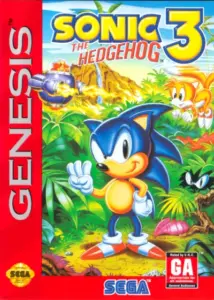
Angel Island, Knuckles, three elemental shields and blue sphere stages: the 1994 Sonic for Mega Drive (Genesis), with game saving and a flying Tails.
Platform game by Sonic Team (1994) for Mega Drive, in English. Playable in your browser or downloadable.
— no rating yet
THE CLABA ARCHIVE
Inside the game.
Its history, its ideas and the reasons to come back.


The Death Egg was damaged at the end of Sonic the Hedgehog 2 and went on to crash at a place called Angel Island. There lives Knuckles, a red echidna who, tricked by Robotnik, believes that Sonic and Tails are the thieves of the Chaos Emeralds. That is how Sonic the Hedgehog 3 begins; it came out in North America on February 2, 1994, dubbed «Hedgehog Day» in the advertising, according to Hardcore Gaming 101.
Six zones like a single world
The game keeps the formula of the second, with each zone divided into two acts, but it adds a mini-boss at the end of each act and chains the acts to one another with small cutscenes that give the feeling that Angel Island is a single place. The zones are Angel Island, Hydrocity, Marble Garden, Carnival Night, Ice Cap and Launch Base, where Robotnik awaits you. In addition, the arrangement of the zone’s music changes in each act.
Shields, Tails and blue spheres
The single shield of the first game becomes three elemental ones: fire, water (bubble) and electric, each with its own special move. Sonic is controlled with the Spin Dash and, according to the manual, an «insta-shield» that is activated by pressing the jump button twice. You can play as Sonic, as Tails, or with both at once, and for the first time Tails can fly or swim for a while by pressing jump twice. The hidden giant rings lead to the blue sphere special stages, in which you have to run around a gridded planet and turn all the blue spheres red. Each emerald brings you closer to Super Sonic.
What made it special
It was the first Sonic with game saving on the cartridge, with six slots in the data menu, according to the manual. Its soundtrack was no longer by Masato Nakamura and was composed by several musicians, among them Jun Senoue and Howard Drossin; and ever since it has been debated whether Michael Jackson, who does not appear in the credits, contributed music, an issue that Hardcore Gaming 101 leaves open. And it was the «incomplete» game: according to that source, it was split into two parts and the second came out later as Sonic & Knuckles.
The edition we offer
This is the Mega Drive (Genesis) «USA» game image, in English. This page is only for Sonic 3: it does not include the connection with the Sonic & Knuckles cartridge. You can play online in your browser or download the game image in Downloads. If you want to keep going with the hedgehog, there are Sonic the Hedgehog 2 and the first 8-bit Sonic. In Guides you will find the controls and in Tips & tricks, the level select.
EVERY PIXEL COUNTS
The game in pictures.
Explore the screenshots and open every detail at full size.


GET READY FOR YOUR NEXT GAME
Choose your download.
Format, compatibility and server. All in view.
Clicking opens the CLABA loading area and, in a few seconds, your download. If a link fails, let us know via Contact or in the forum.
Your game starts here
Play in your browser.
Pick, press and go back to the classics without leaving the game page.
RetrogamingRight in your browserNo installation
Mega DriveIn your browser
Sonic the Hedgehog 3
Your next game starts here.
- 1 MB · downloads on click
- Save states in this browser
- Controller, keyboard or touch
Controls
Click the game to use the keyboardOn mobile, play with the on-screen controllerUse the game menu, with the gamepad icon, to view and change the buttons.
- Full screen
Use the button on the bar. Esc returns to the game page; “Exit” closes the game.
- Saves
Save State, in the game's menu, keeps the exact moment. Load brings it back when you return.
- Mobile and tablet
Press Controls during the game to show buttons and keyboard. Gamepad support depends on the browser.
Saves live in this browser and device. Clearing the site data deletes them too.
THE SECRET SIDE OF THE GAME
Tips, tricks and secrets.
A hint at the right time. A code that changes everything.
How they are entered
The level select code is entered during the startup sequence: press the D-pad quickly as the Sega logo fades and Sonic begins to appear. In the player, the arrow keys are the D-pad. If a chime sounds, the code has gone in; if not, reset with the player’s reset button and try again.
Level select
Press Up, Up, Down, Down, Up, Up, Up, Up when Sonic begins to appear and before the screen flashes white. Then, on the title screen, highlight «Sound Test» and press Start (GameGenie.com).
All the emeralds
With the select active, highlight «Special Stage», press C and Start (Z and Enter), get the emerald, press A and Start (S and Enter) and repeat until you have them all (GameGenie.com).
Advanced pause
With the level select active, during the game pause with Start and press A to restart the stage, B for slow motion and C to advance frame by frame (GameGenie.com).
Tip · lives in Launch Base
In the first act of Launch Base, trigger the first alarm and Spin Dash into the Flybots inside it: the value of each one rises to 10,000 points and you can pile up lives (GameGenie.com).
Tip · insta-shield and Tails' flight
Pressing A, B or C twice with Sonic generates a shield for an instant. With Tails, pressing it twice makes him fly or swim for a limited time (Sega manual).
No matches. Try another effect or code.
THE NEXT STEP, CLEARER
Guides to move forward.
From the first installation to that mission that won't give in.
Start here · first launch
Online: open Play online and press Play. The game starts in the browser, with nothing to install. Press Enter on the title screen; in the data menu choose a new slot («NEW»), or «No Save» to play without saving, and confirm with Enter. Then there is a cutscene of about 25 seconds: do not press Enter during the level, because that is pause. Use the player’s save game and load game to keep your progress whenever you like. The full screen button enlarges the picture and the Controls one lets you change the keys.
On your computer: download the game image from Downloads (ZIP with the USA game image) and open it with an emulator. In RetroArch the Genesis Plus GX core works: load the core, choose «Load Content» and select the file.
Controls
- D-pad: move; hold left or right to speed up; down to crouch and, while moving, roll into a ball; up to look up (manual).
- Buttons A, B or C (S, X and Z in the player): jump. Hold down and press one several times for the Spin Dash; release down and you shoot off (manual).
- Start (Enter): start, pause and resume.
- The player’s «Controls» button lets you change the keys.
First steps
- Choose a character: Sonic, Tails, or both together (the second controller handles Tails).
- Look for the hidden giant rings: they lead to the blue sphere stages and the emeralds.
- Try each shield: the fire one is launched forward, the water one bounces and lets you breathe underwater, and the electric one attracts rings (Hardcore Gaming 101).
- The red and white barrels in Carnival Night are operated with up and down, with a rocking motion (Hardcore Gaming 101).
Technical notes
- It is the «USA» game image, the North American edition of the cartridge, in English.
- The game’s save is cartridge-based; also use the player’s save and load.
- This page does not include Sonic & Knuckles or its connection to the cartridge.
Sources
Something wrong?
Give us a hint.
A broken link, a detail to correct or a game that won't start. Your report helps keep this game page up to date.
Get in touchReport an issue with this game Discuss it in the forumCLABA ARCADE ROOM
This one and 250 more
play here.
When you finish your game, the room has other machines switched on.
Enter the roomTHE CLABA APP1.0 RC 1
Take the archive
with you.

Game pages, online play and your shelf on Android. Free, no sign-up.
ARCHIVE SECRETS
Did you know?
Hedgehog Day. In North America it came out on February 2, 1994, and Sega renamed Groundhog Day «Hedgehog Day» for the launch (Hardcore Gaming 101).
A game split in two. Sega did not announce it at the time, but Sonic 3 was divided into two parts; the second is Sonic & Knuckles. The level select points to stages that do not exist and there is unused music (Hardcore Gaming 101).
Six save slots. The data menu has six slots and lets you erase saves (Sega manual).
The music controversy. The music is credited to several composers; Michael Jackson does not appear in the credits, but it has been debated for years whether he contributed anything (Hardcore Gaming 101).
Knuckles, only in two-player. He is not playable in the main story, but he can be seen on the end-of-act sign and does appear in competition mode (Hardcore Gaming 101).