Titus Interactive · Platformer
PreHistorik 2
Titus's 1993 sequel: a caveman with a club, huge levels, bosses, bonuses and hidden passwords. English repack to play on Windows.
Platform game by Titus Interactive (1993) for PC, in English.
3.7 14 votes
THE CLABA ARCHIVE
Inside the game.
Its history, its ideas and the reasons to come back.
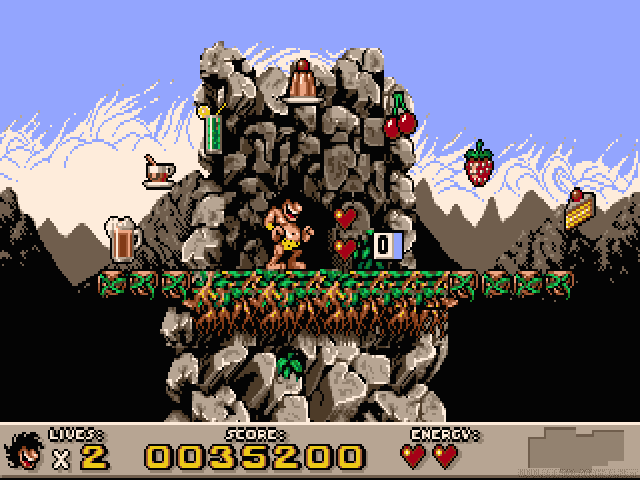
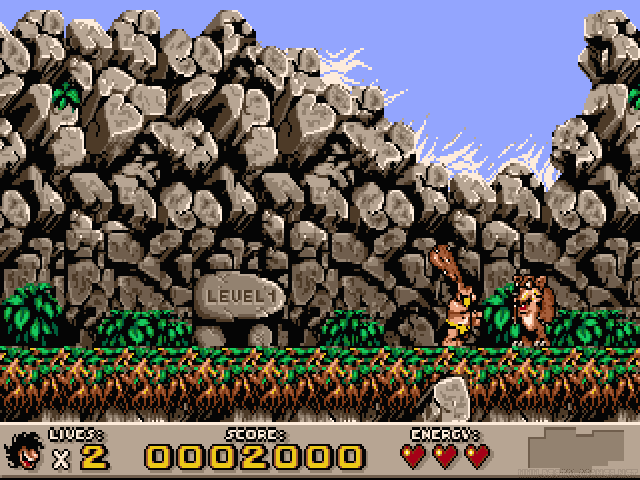
A caveman with unruly hair, a club and a hunger that never ends. Two years after the first Prehistorik, Titus came back in 1993 with a much bigger, harder sequel packed with more secrets. Prehistorik 2 came out for MS-DOS and Amstrad CPC, and it remains one of the most fondly remembered platformers on early-nineties PCs.
One caveman, many levels
You walk, jump and hit every living critter with your club. When they fall, animals usually drop food and other items: according to MobyGames, you no longer have to collect a minimum amount of food to move on to the next stage, as in the original. The game has ten levels and three bonus ones, with bosses every few stages, multiple exits and hidden levels. The levels, considerably larger than those of the first game, scroll horizontally and vertically, and hide passages that you discover by hitting parts of the scenery.
Visually it looks like the original, with recycled sprites and backgrounds, but there are corners that shine: the forest of autumn leaves, the crystal caves and a final stage that looks like a medieval castle full of demon statues, spikes and a minotaur as the last enemy (Hardcore Gaming 101). The music improves, too, although the new effects, such as the slurp when eating, get a bit grating.
What changed from the first game
Hardcore Gaming 101 highlights several novelties. There is no longer a hunger bar, and you don’t devour enemies: they fall off the screen when hit, and you can also jump on their heads to use them as trampolines. If you defeat the enemy that has just hurt you, it drops some bones which, when picked up, give you back the energy point you lost. And the game becomes more arcade-like: jumping on an enemy several times in a row multiplies its points, finishing a stage without dying doubles the bonuses in the final tally, and the letters of the word BONUS, if you gather them all, make a refrigerator worth 100,000 points appear.
There are two difficulty levels, Beginner and Expert, but the first one doesn’t let you reach the last stage. And then there are the passwords, the most controversial point: you aren’t given them when you finish a level, but they are written inside the levels themselves, and in the biggest levels it is easy to let them slip by.
A sequel with no siblings
This Prehistorik 2 should not be confused with Prehistorik Man, a later installment of the series for Nintendo consoles, which is a different game. From the same company you have on our site The Blues Brothers, another Titus platformer.
The edition we offer
In Downloads there is an English repack, marked as compatible with Windows XP and later. The original game is for DOS, so if something doesn’t start, the DOSBox from scratch tutorial (in Spanish) explains how to get it going. If your computer is modern, how to play your Windows XP classics on Windows 10 and 11 (in Spanish) will be useful.
In Guides you will find the first launch, the controls and the technical notes, and in Tips & tricks, the tips that earn the most points and how the passwords work.
EVERY PIXEL COUNTS
The game in pictures.
Explore the screenshots and open every detail at full size.
GET READY FOR YOUR NEXT GAME
Choose your download.
Format, compatibility and server. All in view.
Clicking opens the CLABA loading area and, in a few seconds, your download. If a link fails, let us know via Contact or in the forum.
THE SECRET SIDE OF THE GAME
Tips, tricks and secrets.
A hint at the right time. A code that changes everything.
Tip · there are no reliable cheat codes
We haven’t found any cheat code documented in two independent sources, so we aren’t listing any. What there are, are level passwords, which work differently, and several gameplay tricks.
Level passwords
Passwords aren’t shown when you finish a stage: they are written inside the levels and you have to find them (Hardcore Gaming 101). Also, according to MobyGames, they are different on every computer, so the ones another player noted down on their machine won’t work for you. Write yours down as soon as you see them.
Tip · pick Expert to see the ending
The Beginner difficulty doesn’t let you enter the last stage, according to Hardcore Gaming 101. If you want to see the end of the game, start on Expert.
Tip · the BONUS refrigerator
The letters of the word BONUS are scattered through the levels. If you gather them all, a refrigerator worth 100,000 points appears (Hardcore Gaming 101). It is worth exploring every corner of the scenery with your club.
Tip · bounce off enemies
Jumping on an enemy several times in a row multiplies the points you get for defeating it, and it works as a trampoline to reach high areas or out-of-the-way bonuses (Hardcore Gaming 101). Use them as a platform.
Tip · recover energy with bones
If you defeat the enemy that has just hurt you, it drops bones; pick them up and you recover the lost energy (Hardcore Gaming 101).
Tip · sound
PCGamingWiki states that sound is turned on and off with the F3 key.
No matches. Try another effect or code.
THE NEXT STEP, CLEARER
Guides to move forward.
From the first installation to that mission that won't give in.
Start here · first launch
- Download the English repack from Downloads; it is a
.rar, so you need 7-Zip or similar. - Unzip it in a short path, for example
C:\Juegos\Prehistorik2, outsideProgram Files. - Run the launcher included in the folder. The game is for DOS; if it doesn’t start directly, mount it in DOSBox with the help of DOSBox from scratch (in Spanish).
- If you use Windows 10 or 11, see the tutorial for Windows XP classics (in Spanish).
- We haven’t downloaded the repack to inspect it, so we can’t describe what it includes. If something fails, tell us on the forum (in Spanish) on this game page.
Controls
We haven’t found an official control scheme for the DOS version. According to PCGamingWiki, the game supports keyboard and gamepad, doesn’t use the mouse, and doesn’t allow remapping the keys. Check the game’s options screen when you start. The basics are walking, jumping and hitting with the club; the F3 key turns sound on or off.
First steps · how to progress
- Play on Expert if you want to see the ending; on Beginner the last stage stays closed.
- Explore: the levels are big and there are multiple exits, passages and hidden stages.
- Hit the scenery with your club: there are food and bonuses hidden in seemingly empty spots.
- Write down the passwords as soon as you find them; they are inside the levels.
- Watch out for spikes and enemies that appear suddenly: a slip costs you energy.
Technical notes
According to PCGamingWiki, the game required MS-DOS 3.0, 512 KB of RAM and VGA, and the version sold today runs it through DOSBox. It is capped at 24 frames per second, so its smoothness is not that of a modern platformer. To save your configuration or copy save games, see how to copy and restore your save games (in Spanish).
There is also an Amstrad CPC version, discussed in Hardcore Gaming 101; it is not part of this game page.
Sources
- Hardcore Gaming 101: Prehistorik 2: novelties, difficulty, passwords, bonuses and the Amstrad version.
- Internet Archive, MS-DOS entry (text from MobyGames): developer, year, per-computer passwords and Amstrad CPC Plus.
- PCGamingWiki: Prehistorik 2: requirements, 24 fps, gamepad, sound, GOG and Steam.
- Steam: Prehistorik 2: official description and date.
- Wikipedia: Prehistorik 2: platforms and relationship to Prehistorik Man.
Something wrong?
Give us a hint.
A broken link, a detail to correct or a game that won't start. Your report helps keep this game page up to date.
Get in touchReport an issue with this game Discuss it in the forumCLABA ARCADE ROOM
251 classics
without installing anything.
Don't feel like installing? These play right in your browser.
Enter the roomTHE CLABA APP1.0 RC 1
Take the archive
with you.

Game pages, online play and your shelf on Android. Free, no sign-up.
ARCHIVE SECRETS
Did you know?
No beard. Hardcore Gaming 101 points out that the protagonist lost his beard between one game and the next, but gains a wild mane and a lolling tongue.
A 100,000-point refrigerator. Gathering the scattered letters of the word BONUS makes a refrigerator worth 100,000 points appear, according to Hardcore Gaming 101.
Different passwords on every computer. MobyGames warns that each level’s passwords are found written in the levels and are different on every computer, so the lists that circulate on the internet are useless.
A CPC Plus pushed to the limit. The Amstrad version is, according to MobyGames, one of the few games that take advantage of the CPC Plus’s colors and sprites and has full parallax scrolling; according to Hardcore Gaming 101, it has only one tune and runs slowly when there is a lot on screen.
Another life in 2015. According to PCGamingWiki, the game went on sale again on May 21, 2015 on GOG, alongside the first one and with DOSBox underneath, and today it is also on Steam.