Crystal Dynamics · Platformer
Gex
The most televisual gecko of the nineties in its 1996 Windows version: 24 levels, sticky feet, a whip tail, passwords and cheat codes.
Platform game by Crystal Dynamics (1996) for PC, in English. Available to download.
4.6 5 votes
THE CLABA ARCHIVE
Inside the game.
Its history, its ideas and the reasons to come back.
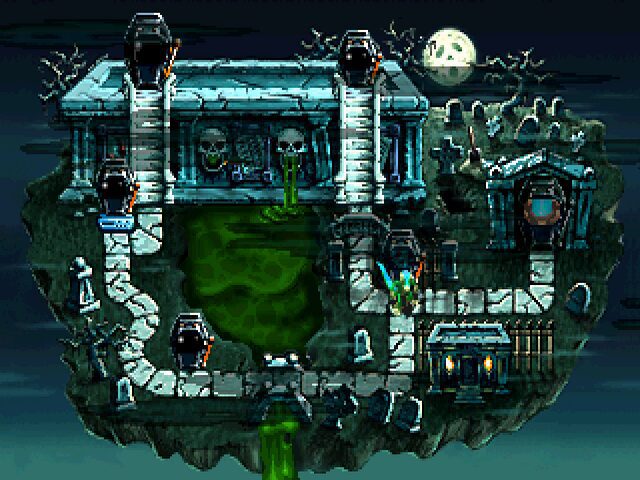
A TV-addicted gecko with a big mouth and a wisecrack for every occasion. That is how Gex was introduced, Crystal Dynamics’ bid for a mascot of its own that could look Mario and Sonic in the eye. It was born on the 3DO in 1995, jumped to PlayStation and Saturn and reached Windows PCs on November 7, 1996, courtesy of Microsoft.
Trapped inside the television
Gex lives alone, watches TV around the clock and accidentally swallows a fly that is really a spy drone belonging to Rez, the lord of the Media Dimension. Rez pulls him into the set to turn him into the new mascot of his network, and the only way out is to travel through that televised universe and find the remote controls that destroy the TVs blocking the way.
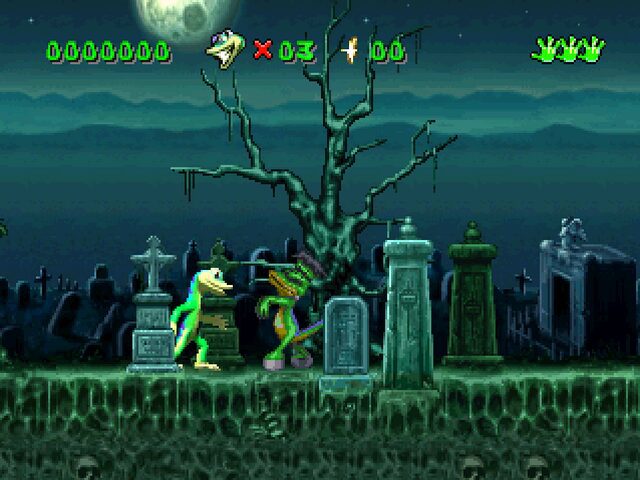
The journey is organized into 24 levels spread over five channels (among its worlds are the Cemetery, Jungle Isle, New Toonland, Kung Fuville and Rezopolis), reached from a map. Each channel has its platforming stages and ends with a boss. In each stage you have to find hidden remotes, and every one has a hidden portal leading to a bonus stage: completing it 100% earns a piece of the remote for Planet X, an optional secret world.
How it plays
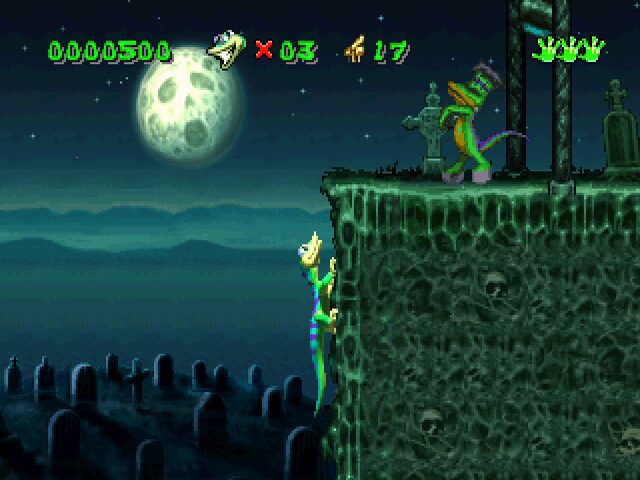
What sets it apart from other platformers of the era is that Gex really takes advantage of being a gecko. He can run and jump, but also stick to walls and ceilings with the suction pads on his feet and climb along them, which gives the levels an unusual verticality. He attacks with his tail, which spins in a circle to hit enemies, trigger switches and send projectiles back, and he can coil it like a spring to bounce. Along the way he picks up power-ups, such as the fireflies that give him fire, ice or electricity.
It was a hit with critics at the time, who praised its abilities and the voice of comedian Dana Gould, whose jokes about TV shows and movies are part of the charm. If you like jumping with personality, Sonic the Hedgehog and Super Mario Bros. 3 are close at hand. Crystal Dynamics also published Legacy of Kain: Blood Omen, of a very different tone.
The edition we offer
This is the 1996 Windows version, in English. In Downloads you have two options: a repack ready to install and play, and the ISO image of the CD for those who want to keep the original edition as it was. As with the console versions other than the 3DO, there is no memory card here: you resume your game with passwords that the game gives you when you beat a boss or find hidden videotapes.
In Guides you will find the first launch, the controls and the patches that are useful for playing on a current computer, and in Tips & tricks the codes typed in while the game is paused. If your system gives you trouble, the tutorial on playing Windows XP classics on Windows 10 and 11 (in Spanish) walks you through it step by step.
EVERY PIXEL COUNTS
The game in pictures.
Explore the screenshots and open every detail at full size.
GET READY FOR YOUR NEXT GAME
Choose your download.
Format, compatibility and server. All in view.
Download Repack
COMPATIBILITYWindows XP / 7 / 10 ✓ At no cost✓ No sign-up Download www.mediafire.com · New tab MediaFire02 ISODownload ISO
COMPATIBILITYWindows XP ✓ At no cost✓ No sign-up Download www.mediafire.com · New tabClicking opens the CLABA loading area and, in a few seconds, your download. If a link fails, let us know via Contact or in the forum.
THE SECRET SIDE OF THE GAME
Tips, tricks and secrets.
A hint at the right time. A code that changes everything.
How to enter them
In the game, press Pause and type the cheat word; the effects apply when you resume. Title screen codes are typed on that screen, and those for the map are typed with the controller menu open and the password screen showing. All of them are in English and, according to fans, power-ups and invincibility are lost when you finish the level.
Lives and invincibility
iwillneverdiebungholio: 99 lives. drunkenmaster: invincibility (the caterpillar).
Power-ups
secondhandsmoke: red firefly (fire). ihaveshrinkage: blue firefly (ice). thentherewaslight: yellow firefly (electricity). grandenonwalter: super speed (the centipede). itsagasgasgas: super jump (the grasshopper).
Level select
On the map, open the controller menu, go to the password screen and type hoosierbuddy to choose any level, or sofakingdom to unlock all the levels on the current map.
Title screen
On the title screen, partyatroswell opens the Planet X secret level select and imaloserbaby takes you to the bonus credits.
All-completed password
Type PZYPRXYL as a game password and the game marks all levels as cleared, including Planet X, according to Cheatbook. Cheatbook does not specify the version, so try it first on a game you don’t care about.
Tip · write down the passwords
If a boss is giving you trouble, use the password you got just before it to retry without replaying the level. And don’t forget that power-ups and invincibility are lost at the end of each stage.
No matches. Try another effect or code.
THE NEXT STEP, CLEARER
Guides to move forward.
From the first installation to that mission that won't give in.
Start here · first launch
- Choose in Downloads the repack if you want to play right away, or the ISO if you prefer to mount the CD just as it was released. Both are in English.
- Unzip the file and copy the game to a short path such as
C:\Juegos\Gex, outsideProgram Files. - Run the program and, if your system is modern, try Windows 95 or XP compatibility mode, as explained in the tutorial on Windows XP on Windows 10 and 11 (in Spanish).
- When you get a game password, write it down: it is the only way to save in this version.
Controls
- The game lets you remap the keys and controller buttons from its options; do it before your first game.
- Climbing: Gex sticks to walls and ceilings with his suction pads; jump against a wall and follow the route.
- Tail: strikes in a circle; it is used to defeat enemies, press switches and send projectiles back.
- Spring: coiling the tail lets you bounce and reach high platforms.
- With a controller, the community digital controls patch lets you use the D-pad (see «Technical notes»).
First steps · remotes and portals
- The goal of each stage is to find the remote control and exit; the remotes you collect open more levels on the map.
- Don’t rush: each stage has a hidden portal to a bonus stage, and completing it 100% earns a piece of the Planet X remote.
- The hidden videotapes give you a password. Grab them when you see them: they give you a chance to save.
- Bosses also give a password when you defeat them: write it down before leaving the game.
- Collect the colored fireflies: they give Gex’s attack fire, ice or electricity.
Technical notes
According to PCGamingWiki, this Windows version runs in a window and at a maximum of 60 frames per second, offers no widescreen resolutions and stores its settings in the Windows registry. Games are resumed by password, so there are no save files to copy; for the rest of the data, the tutorial on backing up and restoring save games (in Spanish) serves as a general guide.
The community offers a digital controls patch that lets you use a controller’s D-pad: unzip it into the game folder and run PatchGEX.exe. There is also a demo available at no cost. If the game gives you problems, GOG has sold an edition prepared for current systems since 2014.
Sources
- PCGamingWiki: Gex: history of the PC version, controls patch, settings, 60 fps and passwords.
- Gex Wiki: Cheats: codes for the PC version and notes on their scope.
- GameFAQs: Gex cheats for PC: cross-check of the lives, invincibility and level select codes.
- Cheatbook: Gex: level passwords, including the all-completed one.
Something wrong?
Give us a hint.
A broken link, a detail to correct or a game that won't start. Your report helps keep this game page up to date.
Get in touchReport an issue with this game Discuss it in the forumCLABA ARCADE ROOM
251 classics
without installing anything.
Don't feel like installing? These play right in your browser.
Enter the roomTHE CLABA APP1.0 RC 1
Take the archive
with you.
Game pages, online play and your shelf on Android. Free, no sign-up.
ARCHIVE SECRETS
Did you know?
A movie stuntman called Gecko X. Lyle Hall’s idea was different: a Hollywood stuntman with levels inspired by movie genres. It was dropped because the lead programmer thought such realistic settings would produce a pointless design, and the Media Dimension came out of that.
A million copies on the 3DO. The original version sold more than a million units, a notable figure for that console, and it was even bundled with some Panasonic models.
A comedian’s voice. Gex speaks with the voice of comedian Dana Gould, who is responsible for the jokes and comments with which Gex reacts to each level.
Microsoft bought the PC game. In January 1996 the company acquired the worldwide rights to the computer version, which came out that November; GOG put it back on sale in October 2014.
Only the 3DO saves games. The original edition lets you save your progress; all the others, including the Windows one, use passwords.