Eko · Platformer
Woody Woodpecker: Escape from Buzz Buzzard Park
A 2001 3D platformer with Woody, Buzz Buzzard and the kidnapped nephews. Spanish-language repack and tips for playing it on Windows today.
Platform game by Eko (2001) for PC, in Spanish. Available to download.
— no rating yet
THE CLABA ARCHIVE
Inside the game.
Its history, its ideas and the reasons to come back.
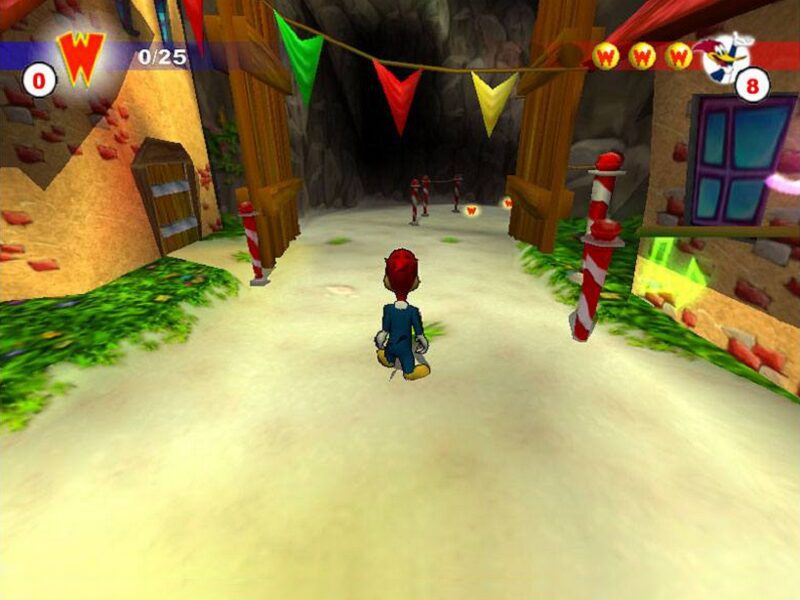
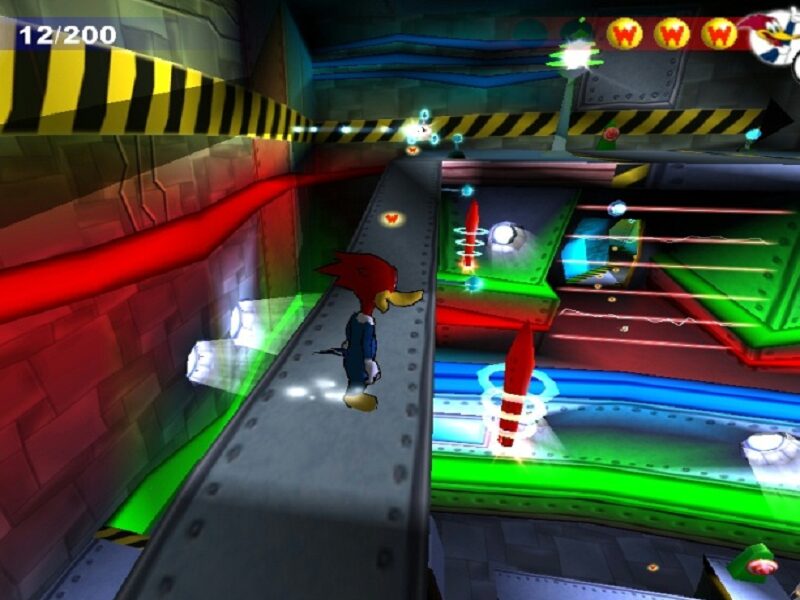
Woody’s nephews have been kidnapped, and the kidnapper is none other than his eternal enemy, Buzz Buzzard. The ransom he demands is a million euros; Woody, who neither has it nor plans to pay it, does what he does best: poking his beak into Buzz’s amusement park and taking it apart piece by piece. That is how Woody Woodpecker: Escape from Buzz Buzzard Park (known in Spanish as El Pájaro Loco) begins, a 2001 3D platformer that plays like a cartoon.
A cartoon you can control
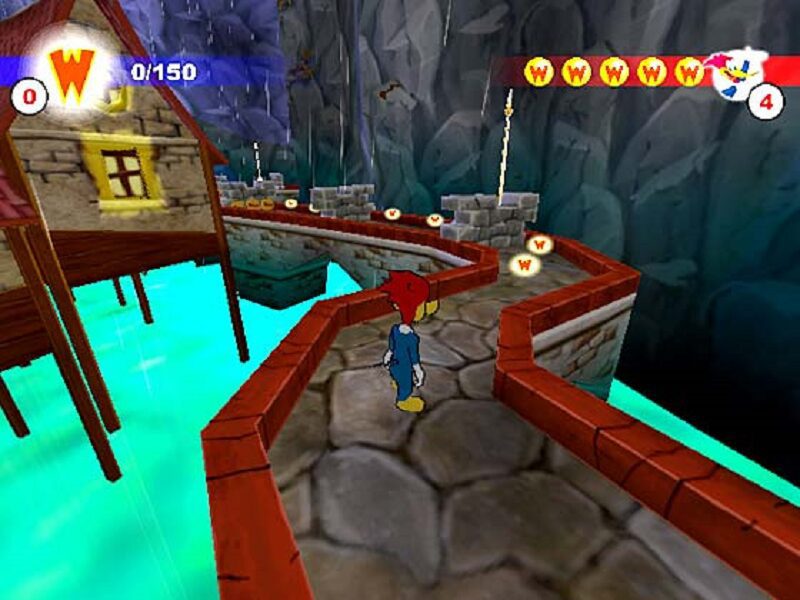
It was developed by Eko Software, the French studio that had already made Gift, and published by Cryo Interactive in Europe and DreamCatcher in North America. Here you control Woody in third person through the settings of Buzz’s park, with the camera almost always placed in just the right spot and, in some stretches, switching to a side view reminiscent of classic platformers. The look is that of the series: thick black outlines, cheerful colors and animations full of gags, such as the beak stuck in the ground when you miss your strike or the bird dozing if you leave him idle.
How it plays
Woody jumps, climbs wooden walls and uses his beak for everything: he fires it in a burst at Buzz’s henchmen, dives onto them like a dart, activates buttons and has special attacks. The jumps demand precision, sometimes down to the pixel, although a mark on the ground shows where he is going to land, a detail inherited from Gift that helps quite a lot. The pace changes between stages: surfing stretches and parts where you control Knothead and Splinter, each with a jump of their own, because one goes farther and the other higher. There are five bosses, according to the jeuxvideo.com entry, and the final fight with Buzz is the one people remember most.
What made it special
Woody Woodpecker did not invent anything, but it did it with charm. The French press of the time gave it 16 out of 20, praising the gameplay, both with keyboard and with gamepad, and the cartoon atmosphere; it faulted it for being too short and for repeating settings. The characters speak an invented language, subtitled, and Woody’s laugh is there too. The clearest complaint: only three different settings, space, the pirate ship and the haunted house. If you enjoyed Evil Twin, Donald Duck: Quack Attack or Croc, this is a very natural next stop.
The edition we offer
In Downloads you will find a Spanish-language repack, ready to install and play on Windows XP and later. It is a 2001 game made for Windows 95, 98, Me and XP, so on a current machine it is worth following the advice in Guides: compatibility mode, 60 Hz so the bosses do not go haywire and a few improvements for widescreen displays. If something does not start, our tutorial on Windows XP classics on Windows 10 and 11 (in Spanish) usually fixes it, and in Tips & tricks we have left useful advice instead of codes we cannot verify.
EVERY PIXEL COUNTS
The game in pictures.
Explore the screenshots and open every detail at full size.
GET READY FOR YOUR NEXT GAME
Choose your download.
Format, compatibility and server. All in view.
Clicking opens the CLABA loading area and, in a few seconds, your download. If a link fails, let us know via Contact or in the forum.
THE SECRET SIDE OF THE GAME
Tips, tricks and secrets.
A hint at the right time. A code that changes everything.
Tip · no reliable codes
We have not found any documented cheat codes for the PC version in the manuals, on DreamCatcher’s official page or on PCGamingWiki, so we list none.
Tip · use the mark on the ground
Woody casts a mark on the ground showing where he is going to land. Look at it before you release the jump, especially on small platforms: it is the best help in the game.
Tip · the beak does almost everything
Use the burst peck for nearby enemies, the dive for distant ones, and the beak for climbing wooden walls and pressing buttons.
Tip · Knothead and Splinter
When you play as the nephews, remember that Knothead jumps farther and Splinter higher. Choose according to the gap in front of you.
Tip · the bosses and 60 Hz
On fast monitors, the bosses attack more often than they should because their timers depend on frames per second. Enable vertical sync in the external video menu and set the monitor to 60 Hz: the fight with Buzz becomes fair.
Tip · save and retry
The game is saved in Woody.sav, inside the game folder. Make a backup before each boss if you are putting an afternoon’s progress at stake: our tutorial on copying and restoring save games (in Spanish) explains how.
No matches. Try another effect or code.
THE NEXT STEP, CLEARER
Guides to move forward.
From the first installation to that mission that won't give in.
Start here · first launch
- Download the repack from Downloads and unpack the
.rarwith 7-Zip or WinRAR. - Install or copy it to a short path, such as
C:\Juegos\Pajaro Loco, outsideProgram Files, so that it can write its configuration and save games. - Launch with
Woody.exe. If the game runs too fast, right-click, Properties, Compatibility, and check the Windows 98 / Me mode. - Video options are changed in
Detect.exe, the game’s external menu; if they are not respected, apply compatibility mode to this executable as well.
If anything else fails, see the tutorial on Windows XP classics on Windows 10 and 11 (in Spanish).
Controls
- The game is played with the keyboard and supports a gamepad; according to PCGamingWiki, the keys can be remapped and the mouse is not used during gameplay.
- The main actions are jumping, burst pecking, dive attacks, and using the beak to climb or activate buttons.
- With a gamepad, the contemporary press found it especially comfortable: if you have one, plug it in before opening the game.
We do not document specific keys because they may vary depending on the repack’s configuration: check them in the options menu.
First steps
- Watch for camera changes: some stretches switch to a side view, as in a two-dimensional platformer.
- Use the dive against distant enemies and the burst against nearby ones.
- On long jumps, check the mark on the ground before releasing the button.
- In the surfing stretches the pace changes: it is not a pure platformer, so take it easy.
- Against Buzz Buzzard, play at 60 Hz so that his attacks have the intended openings.
Technical notes
Requirements of the original game, according to DreamCatcher and the French press: Windows 95, 98, Me or XP, Pentium II at 300 MHz, 64 MB of RAM, an 8 MB DirectX-compatible card and a CD-ROM drive. It is a 32-bit executable that uses Direct3D 7.
According to PCGamingWiki: there is no windowed mode; at resolutions above 720p the image is stretched; a community patch (FOV fix) exists that corrects the aspect ratio on widescreen displays and can be combined with a DirectX wrapper such as dgVoodoo 2. The configuration is stored in Woody.cfg and save games in Woody.sav, both in the game folder. If the game runs too fast, or ignores your video settings, enable Windows 98 / Me compatibility mode.
Sources
- PCGamingWiki: configuration and save files, requirements, issues with speed, video and bosses.
- DreamCatcher Games (2003 copy): official synopsis, requirements and number of levels.
- jeuxvideo.com · 2001 review (in French): developer, mechanics, contemporary rating and comparison with Gift.
- Wikipedia: release dates and platforms (for orientation only).
Something wrong?
Give us a hint.
A broken link, a detail to correct or a game that won't start. Your report helps keep this game page up to date.
Get in touchReport an issue with this game Discuss it in the forumCLABA ARCADE ROOM
251 classics
without installing anything.
Don't feel like installing? These play right in your browser.
Enter the roomTHE CLABA APP1.0 RC 1
Take the archive
with you.

Game pages, online play and your shelf on Android. Free, no sign-up.
ARCHIVE SECRETS
Did you know?
Same studio as Gift. Eko Software, the game’s developer, came from creating Gift, another 3D platformer; the jeuxvideo.com review compared them explicitly and noted that the woodpecker’s was more accessible.
16 levels or 21? DreamCatcher’s page spoke of 16 levels; the French press and the jeuxvideo.com entry, of 21. We have not been able to verify the reason for the difference.
A million-euro ransom. According to the French review, Buzz Buzzard asks for a million euros for Knothead and Splinter, an amount Woody has no desire to raise.
Cartoon language. According to jeuxvideo.com, the characters speak an imaginary language, subtitled in the French edition, and the only recognizable voice is Woody’s laugh.
One game, three machines. Besides PC, it existed on PlayStation 2 and, with a different development team, on Game Boy Color.