Arc System Works · Fighting
Guilty Gear Isuka
Guilty Gear's strangest entry: up to four fighters, two combat planes, a turn-around button, GG Boost mode and Robo-Ky II's factory. In English, for Windows.
Fighting game by Arc System Works (2004) for PC, in English.
— no rating yet
THE CLABA ARCHIVE
Inside the game.
Its history, its ideas and the reasons to come back.
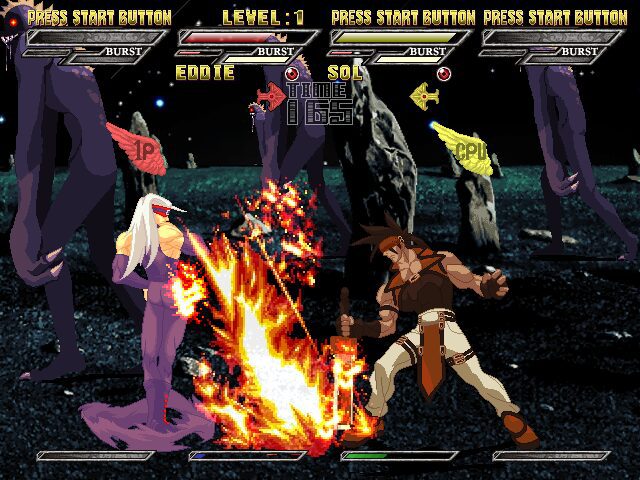
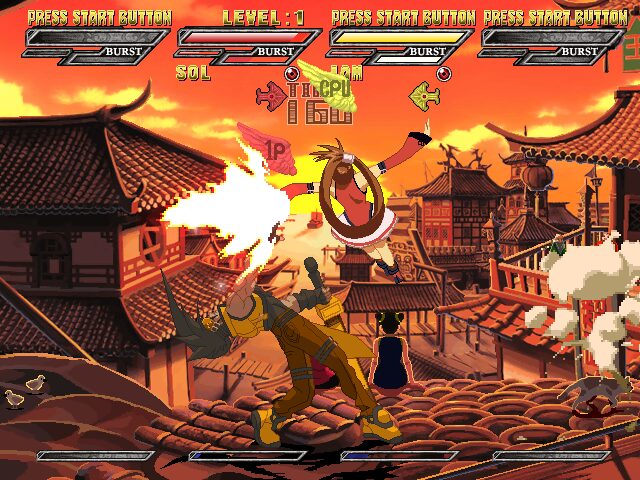
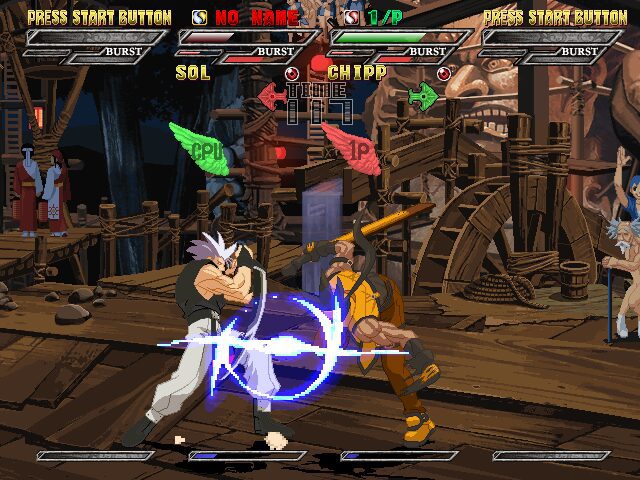
Four fighters on screen, electric guitars at full blast and a rival attacking you from behind while you keep looking straight ahead, because here, if you do not press the turn-around button, you do not turn around. Guilty Gear Isuka is the craziest experiment in the Arc System Works series: taking one of the most technical 2D fighting games of its day and turning it into a brawl of up to four players at once.
From Japanese arcades to the PC
Isuka debuted in Japanese arcades on December 17, 2003, on Sammy’s Atomiswave board. In 2004 it came to PlayStation 2 and Xbox, and in November 2005 Sourcenext published in Japan what it presented as its first PC conversion. In Europe, the Windows version was published by Zoo Digital Publishing in 2006. The home versions added a lot to the arcade game: to the arcade’s roster of twenty fighters, with Sol Badguy, Ky Kiske, May, Potemkin, Millia or Baiken, were added A.B.A, Robo-Ky and Robo-Ky II, and new modes appeared.
Two planes and a button to turn around
The foundation is the usual Guilty Gear one: punch, kick, slash and heavy slash, chains of attacks, the tension gauge for special attacks and the Burst to break your rival’s combo. What changes everything are two ideas. The first is that the stage has two planes, one in front and one behind, in the style of the early Fatal Fury games: you can switch planes to dodge or to go after another rival, and almost all attacks only reach whoever is on your same line. The second is that the character does not turn on his own: there is a specific button for turning around, and attacking from behind becomes one more strategy.
In addition, fights are not played in rounds. Each fighter has one or several souls: when the health bar empties, you lose one and the bar refills; when you have none left, you are out. You can play one-on-one, two-on-two, three-on-one or all against all, and whoever fights at a disadvantage gets more health to compensate.
More than a fighting game
The critics could not agree. GameSpot, IGN and GameSpy celebrated the ambition, Daisuke Ishiwatari’s soundtrack and the new stages, but found the two planes and the turn button chaotic, especially with four characters throwing attacks at once. GameSpy even gave it its tongue-in-cheek 2004 «It Sounded Good on Paper» award. Where nearly everyone agreed was on its extras. GG Boost turns the game into a classic one-against-the-neighborhood beat ‘em up, like Double Dragon or Streets of Rage 2: five stages and 25 zones that can be played in two-player co-op. With what you earn there, in Robo-Ky II’s factory you teach the robot throws and attacks from the other characters. And the color editor lets you repaint each fighter to your liking.
If you prefer classic one-on-one fighting, on ClaBa you have Super Street Fighter II Turbo, Virtua Fighter or Rival Schools.
The edition we offer
It is the Windows version, with English text. In Downloads you will find a CD image, marked as compatible with Windows XP, 7 and 10. According to PCGamingWiki, this PC version only runs at 640 × 480, supports windowed mode and controllers, and allows up to four players on the same computer, but has no online play. If you have compatibility problems, our tutorial on Windows XP classics on Windows 10 and 11 (in Spanish) will help.
In Guides you will find installation, the controls of the two-plane system and some first steps; in Tips & tricks, Isuka’s own techniques and some advice.
EVERY PIXEL COUNTS
The game in pictures.
Explore the screenshots and open every detail at full size.
GET READY FOR YOUR NEXT GAME
Choose your download.
Format, compatibility and server. All in view.
Clicking opens the CLABA loading area and, in a few seconds, your download. If a link fails, let us know via Contact or in the forum.
THE SECRET SIDE OF THE GAME
Tips, tricks and secrets.
A hint at the right time. A code that changes everything.
How to use these techniques
Isuka has no cheat codes: what counts are the techniques of its own system. The abbreviations are the game’s: P (punch), K (kick), S (slash), HS (heavy slash) and Turn, the turn-around button. Assign them as you like in the game’s configuration tool before you start.
Turning around
Press Turn to turn around. The character does not face the rival on his own when he gets behind you: if you forget, you will keep hitting thin air.
Plane change
Turn + HS takes you to the other plane of the stage, front or back. It is used to dodge or to go after another rival. It can also be done while blocking, but then it costs 25% of the tension gauge.
Attack from behind
K + S throws a backward strike without needing to turn around. It is the quick answer when someone sneaks up behind you in four-player fights.
Dust
The Dust attack, the series staple, is done with S + HS at the same time, because the old Dust button is now taken by the turn button.
Tip · hidden characters
Besides the 23 fighters available from the start, there are characters that are unlocked by playing, such as Leopaldon or the «Kakusei» versions of Sol and Ky. The guides that explain how to get them are from the PlayStation 2 and Xbox versions, and they do not agree with each other, so we cannot guarantee that they work the same way on PC.
No matches. Try another effect or code.
THE NEXT STEP, CLEARER
Guides to move forward.
From the first installation to that mission that won't give in.
Start here · first launch
- Download the CD image from Downloads and mount it in Windows with a double click, or burn it if you prefer the disc.
- Install the game in a short path outside
Program Files, for exampleC:\Juegos\GGIsuka. - Before your first game, open the configuration tool to assign keys or a controller. It is operated with the mouse.
- The settings and save games go to the
%APPDATA%\ZOO Digital Publishing\GuiltyGearIsukafolder in the European version. Back up from time to time with our tutorial on copying and restoring save games (in Spanish).
Watch out: the Esc key closes the game instantly, without asking.
Controls
- P, K, S and HS: punch, kick, slash and heavy slash. They chain from weakest to strongest.
- Turn: turn to face the other way.
- Turn + HS: change plane.
- K + S: backward strike.
- S + HS: Dust attack.
Keys and buttons can be remapped, and the game recognizes controllers; according to PCGamingWiki, it shows PlayStation button icons. To play with three or four on the same PC, the practical solution is to connect several controllers.
First steps
- Start with Training mode: you can display on screen the commands you press and practice turning and changing planes without pressure.
- In arcade mode you do not recover all your health between fights and sometimes another fighter bursts into the middle of the fight: manage your souls.
- In four-player fights, quick attacks work better than long combos, because while you punish one opponent you leave yourself exposed to the others.
- If a fight goes badly, change planes and catch your breath: almost all attacks only reach whoever is on your line.
- Play GG Boost to earn points and spend them at Robo-Ky II’s factory teaching him techniques from other characters.
Technical notes
The PC version required Windows 98 or later according to Sourcenext, and Windows XP, Vista or 7 according to the Steam re-release, with a 500 MHz Celeron (recommended, an 800 MHz Pentium III), 128 MB of RAM according to Sourcenext or 256 MB according to Steam, and a 3D card with 32 MB and DirectX 8.1. It uses Direct3D 8.
According to PCGamingWiki, it only runs at 640 × 480 and does not support widescreen resolutions; it has windowed mode and vertical sync, and has no online play, only games of up to four players on the same PC. The voices are in Japanese and the text is in English.
Sources
- Sourcenext · press release of 10/27/2005: first PC conversion, date and price in Japan, GG Boost, training, color editing and Robo-Ky II modes, and requirements.
- GameSpot · 2004 review: fights of two to four, turn button, two planes, arcade without health recovery, Boost mode and factory.
- Steam · Guilty Gear Isuka: 23 fighters, A.B.A and Robo-Ky II, GG Boost, Leopaldon, soundtrack and requirements.
- PCGamingWiki: publishers, resolution, controllers, Esc key, data folder, languages and requirements.
- Guilty Gear Wiki and Dustloop: plane change, attack from behind, Dust, souls and hidden characters.
- GameSpy · 2004 awards: the «It Sounded Good on Paper» award and the criticism of the turn button.
- Arc System Works · Isuka site (AW-NET): the arcade AW cards.
- GameSpot · PS2 unlockables: hidden characters on console.
Something wrong?
Give us a hint.
A broken link, a detail to correct or a game that won't start. Your report helps keep this game page up to date.
Get in touchReport an issue with this game Discuss it in the forumCLABA ARCADE ROOM
251 classics
without installing anything.
Don't feel like installing? These play right in your browser.
Enter the roomTHE CLABA APP1.0 RC 1
Take the archive
with you.

Game pages, online play and your shelf on Android. Free, no sign-up.
ARCHIVE SECRETS
Did you know?
A card for the arcade. In Japanese arcades, Isuka accepted Sammy’s 500-yen AW cards, which saved your results and gave you access from your mobile phone to your history, the national ranking and customization of your fighters.
PC debut for 3,970 yen. Sourcenext announced it in October 2005 as the first PC conversion of the arcade game, with the GG Boost, training and color editing modes, at a price of 3,970 yen.
A prize with a sting. GameSpy gave it a special award for the idea that «sounded good on paper,» because of how the two planes and the turn button worked in practice.
Signature heavy metal. The music is by Daisuke Ishiwatari, creator of the series, with Tetsuya Ohuchi and Yoshihiro Kusano. Those who bought it on Steam in 2014 got the soundtrack as a gift.
A giant boss. The final boss is Leopaldon, a gigantic Gear. In the console versions he could be unlocked for use in versus and training modes.