California Dreams · Other
Block Out
Tetris in three dimensions: a pit of layers, cube pieces that rotate on three axes and 11 levels. California Dreams' classic, as a repack and the DOS original.
Game by California Dreams (1989) for MS-DOS (in English), Amiga, Atari ST and three other platforms. Playable in your browser (Mega Drive) or downloadable.
Choose your version 6 platforms
— no rating yet
THE CLABA ARCHIVE
Inside the game.
Its history, its ideas and the reasons to come back.
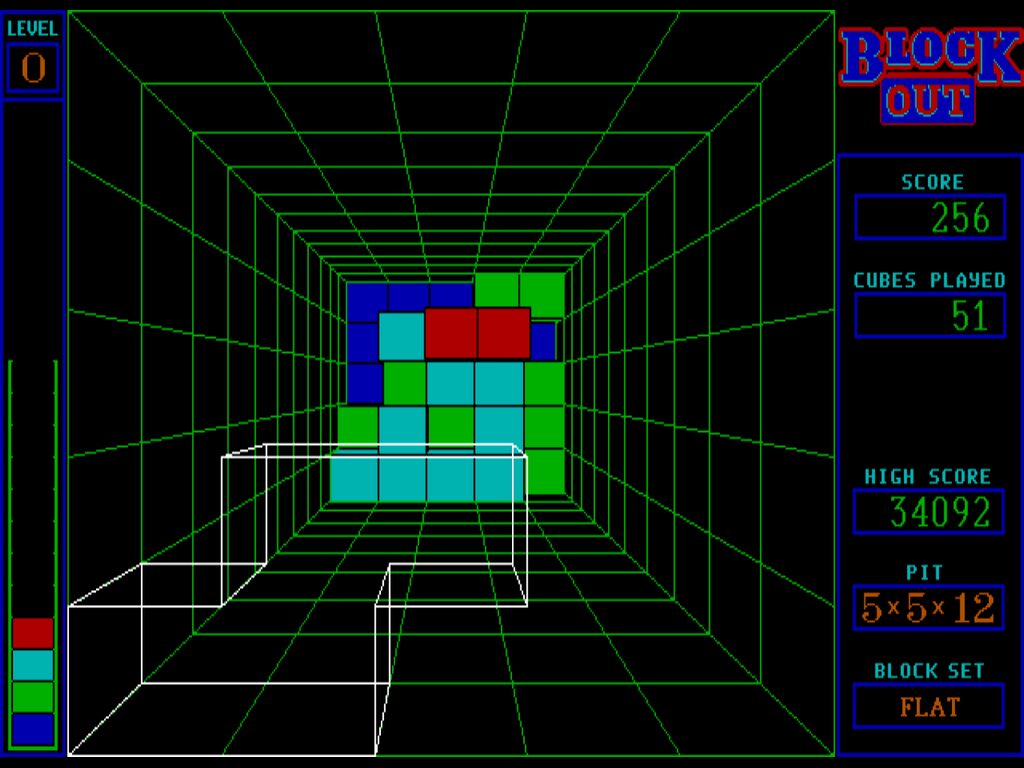
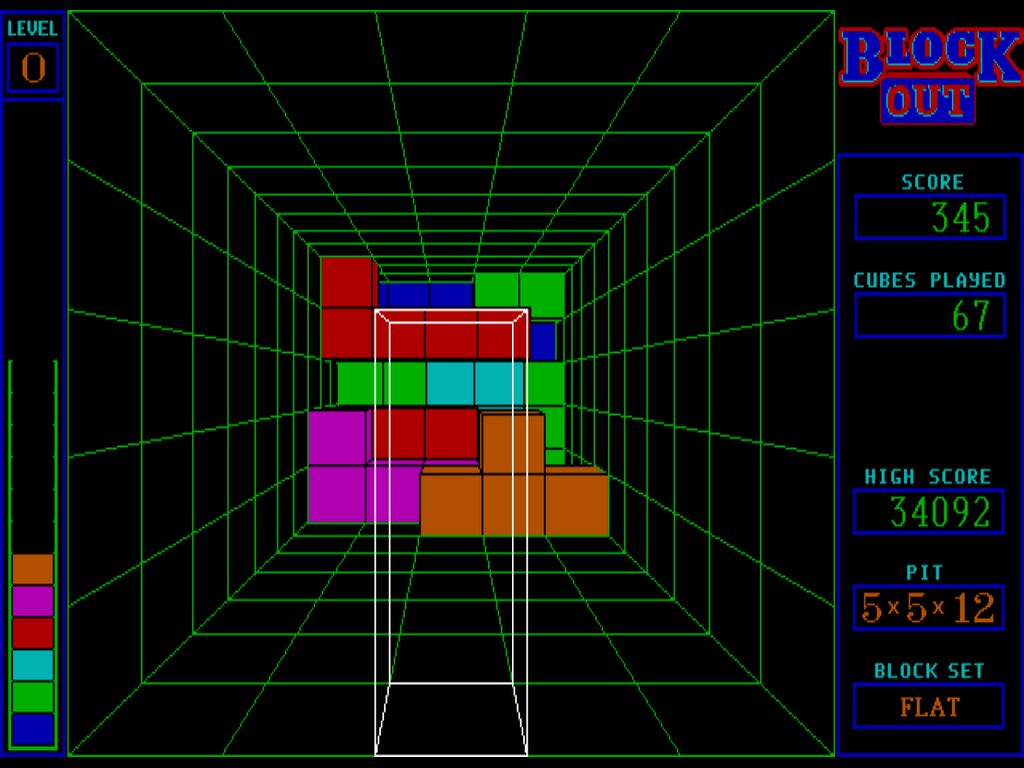


Imagine that Tetris stops being a flat corridor and becomes a pit you look into from above, with pieces made of cubes that fall while turning in three dimensions. That is Blockout, the 1989 puzzle game in which pieces are rotated along three axes. It was programmed in Poland by Aleksander Ustaszewski for the studio P.Z.Karen, and published by California Dreams, the software division of Logical Design Works.
A pit of layers, not lines
You look down into a rectangular pit. The pieces, made up of between one and five cubes, appear at the top and descend on their own; you move them, rotate them on all three axes and drop them to fill an entire layer with no gaps. When you manage it, the layer disappears and everything above drops one level. If the pieces reach the mouth of the pit, it is over. It is Tetris logic, but with one more dimension: placing a piece correctly requires imagining it from several angles before letting go.
The idea for the pieces goes back a long way. The manual says Ustaszewski was inspired by the Soma cube, a puzzle invented by the Danish mathematician Piet Hein, in which seven irregular shapes of three or four cubes fit together into a 3×3×3 cube. The name Blockout, in fact, is a trademark of Kadon Enterprises, which made a game of wooden polyhedra and granted permission to use it.
A thousand ways to play it
Its great virtue is how configurable it is. You can choose the size of the pit (width, length and depth), the set of pieces (flat, basic or extended) and the rotation speed, and save your favorite combinations. The game has 11 difficulty levels, which go up as cubes fall. The scoring rewards complex pieces, dropping them from higher up, high levels, small pits, and bonuses for completing several layers at once or emptying the whole pit.
From computer to arcade and console
It had a long life: it appeared on the Amiga, Atari ST, Commodore 64 and MS-DOS, had an arcade version from Technōs Japan, reached the Mega Drive in Japan in 1991 and the Atari Lynx. The press of the time received it well: Dragon gave the Lynx version the top score and Entertainment Weekly ranked it in 1991 as the seventeenth best game available. In 1993 a study even found that playing Blockout improved spatial visualization in kids aged 10 to 14. If you like the genre, also take a look at Super Tetris and Kubix.
The edition we offer
In Downloads you have the repack, set up for Windows XP, 7 and 10, and the original MS-DOS edition, both in English. The original is launched with DOSBox; our DOSBox from scratch tutorial will guide you, and the one on Windows XP classics on Windows 10 and 11 is useful if you prefer the repack. In Guides and Tips & tricks you will find the official keys and the strategy advice from the manual.
ONE GAME, 6 PLATFORMS
Versions.
6 platforms1989–19911 playable online
Pick a platform: the screenshots, downloads and online game on this page switch with it.
- Year
- 1989
- Port by
- P.Z.Karen / Logical Design Works
- Downloads
- 2
- Screenshots
- 3
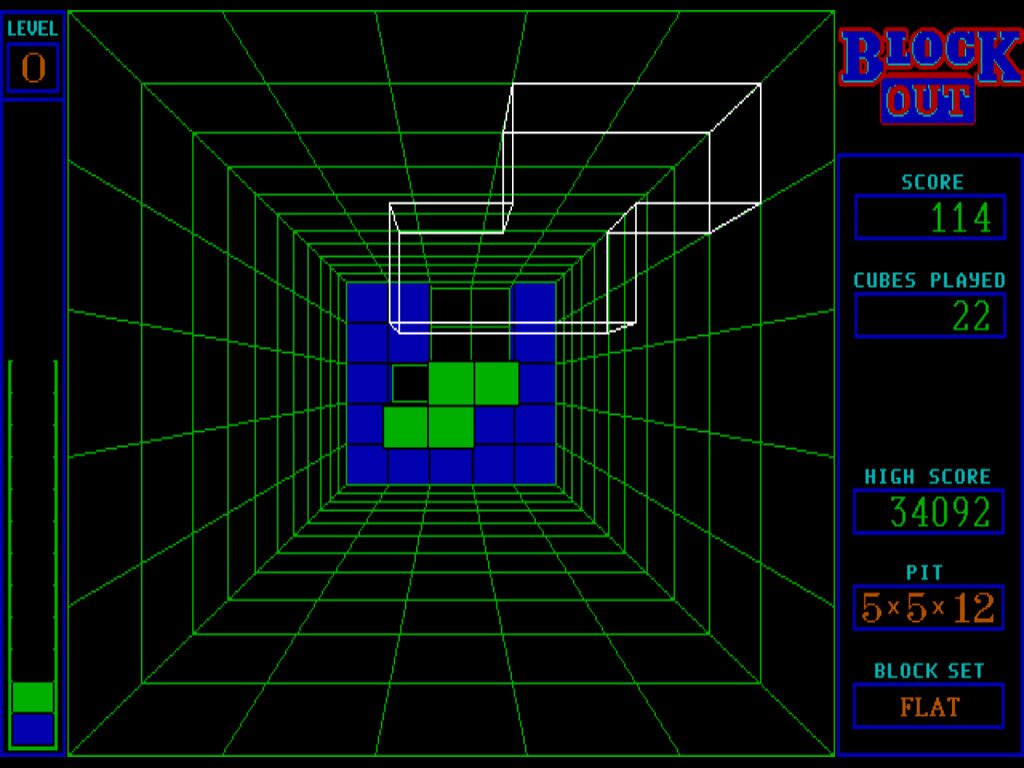
The California Dreams MS-DOS edition (1989) is launched with the bl command and offers Hercules, EGA, CGA and Tandy graphics modes. It is controlled with the keyboard alone: numeric keypad or cursor keys to move and Q, W, E, A, S, D to rotate.

- Year
- 1989
- Port by
- P.Z.Karen / Logical Design Works
- Downloads
- 2
- Screenshots
- 3
The Amiga version is part of California Dreams' original 1989 edition (a joint manual for Amiga, Atari ST, Macintosh and PC). It boots automatically from disk and, unlike the PC one, lets you move the piece with the mouse.
- Year
- 1989
- Port by
- P.Z.Karen / Logical Design Works
- Downloads
- 1
- Screenshots
- —
The Atari ST version is launched by double-clicking BLOCKOUT.PRG from the desktop, according to the California Dreams manual. It shares with the Amiga one the configuration menu and the use of the mouse to move the pieces.

- Year
- 1989
- Downloads
- 1
- Screenshots
- 3
The Commodore 64 is among the platforms on which Blockout appeared in 1989, according to the Logical Design Works list on Wikipedia. We have not located reviews or documentation specific to this version, so we do not detail differences.
- Year
- 1991
- Port by
- California Dreams / Atari Corporation
- Downloads
- 1
- Screenshots
- —
On the Atari Lynx, published by Atari, you drop the piece with the A button and hold B to rotate. It lets you choose three piece sets, the rotation speed and the dimensions of the pit. Dragon gave it the top score and IGN an 8 out of 10.

- Year
- 1991
- Downloads
- 1
- Screenshots
- 5
The Mega Drive and Genesis version came out in Japan on November 1, 1991, according to Wikipedia, and was published by companies such as Sega and Electronic Arts. We have not been able to verify differences in controls or content compared with the computer versions.
EVERY PIXEL COUNTS
The game in pictures.
Explore the screenshots and open every detail at full size.


GET READY FOR YOUR NEXT GAME
Choose your download.
Format, compatibility and server. All in view.
Version
SELECTED VERSIONMS-DOS1989 · 2 files
SELECTED VERSIONAmiga1989 · 2 files
Download for hard disk
COMPATIBILITYRequires an emulator ✓ At no cost✓ No sign-up Download BoxSharer server · New tab BoxSharer02 Amiga · Floppy disksDownload original floppy disks
COMPATIBILITYRequires an emulator ✓ At no cost✓ No sign-up Download BoxSharer server · New tabSELECTED VERSIONAtari ST1989 · 1 file
SELECTED VERSIONCommodore 641989 · 1 file
SELECTED VERSIONAtari Lynx1991 · 1 file
SELECTED VERSIONMega Drive1991 · 1 file · also playable online
Clicking opens the CLABA loading area and, in a few seconds, your download. If a link fails, let us know via Contact or in the forum.
Your game starts here
Play in your browser.
Pick, press and go back to the classics without leaving the game page.
Version
The MS-DOS version can't be played in the browser yet.
You can download it or play another version now:
The Amiga version can't be played in the browser yet.
You can download it or play another version now:
The Atari ST version can't be played in the browser yet.
You can download it or play another version now:
The Commodore 64 version can't be played in the browser yet.
You can download it or play another version now:
The Atari Lynx version can't be played in the browser yet.
You can download it or play another version now:
Mega DriveIn your browser
Block Out
Mega Drive version. Your next game starts here.
- 69 KB · downloads on click
- Save states in this browser
- Controller, keyboard or touch
Controls
Click the game to use the keyboardOn mobile, play with the on-screen controllerUse the game menu, with the gamepad icon, to view and change the buttons.
- Full screen
Use the button on the bar. Esc returns to the game page; “Exit” closes the game.
- Saves
Save State, in the game's menu, keeps the exact moment. Load brings it back when you return.
- Mobile and tablet
Press Controls during the game to show buttons and keyboard. Gamepad support depends on the browser.
Saves live in this browser and device. Clearing the site data deletes them too.
HIT PLAY
The game in motion.
Trailers and videos to see it in action.
-
Amiga · How it plays
A game of Block Out on the Amiga.
THE SECRET SIDE OF THE GAME
Tips, tricks and secrets.
A hint at the right time. A code that changes everything.
Tip · first of all: there are no codes
We have not found any reliable cheat code for Blockout. What there is, though, is the original manual, which gives hand-positioning and strategy advice. The following tips are taken from it.
Tip · a single set of rotation keys
Unless you have three hands, use only one group of keys to rotate: Q, W and E, or A, S and D, but not both. Put three fingers of your left hand on them and your right on the numeric keypad, and do not move them from there.
Tip · move toward the edge
If you have trouble seeing where the piece is inside the pit, move it up against a wall and place it from there carefully.
Tip · rotate to understand the shape
If you do not recognize the shape of the piece, rotate it into several positions: several views give you a better idea of what it looks like.
Tip · speed and height
The faster you place a piece and drop it, and the higher up you drop it from, the more points you earn. And even after you let it go, you still have a moment to move it if there is room.
Tip · practice and demo modes
If you are just starting out, watch the demo to see the computer play and use practice mode. To get the maximum score, start from a higher level.
No matches. Try another effect or code.
THE NEXT STEP, CLEARER
Guides to move forward.
From the first installation to that mission that won't give in.
Start here · first launch
- In Downloads, choose between the repack (Windows XP, 7 and 10) and the original MS-DOS version.
- Unzip it to a short path such as
C:\Juegos\Blockout. - For the original, use DOSBox with the help of the DOSBox from scratch tutorial; for the repack, see Windows XP classics on Windows 10 and 11.
- Back up your save games with our copying and restoring save games tutorial.
According to the manual, on MS-DOS it is launched with bl, and at the start you choose the graphics mode (Hercules, EGA, CGA or Tandy). The choice is saved in a blockout.set file. In the original, the copy protection consisted of identifying the color of a marked cube on a sheet in the manual.
Controls
- Move the piece: numeric keypad (8 up, 2 down, 4 left, 6 right and diagonals with 7, 9, 1 and 3) or cursor keys.
- Rotate counterclockwise: Q (x axis), W (y axis), E (z axis).
- Rotate clockwise: A, S and D, in the same order.
- Drop: space bar. Pause: P. Sound: O. Abort game: Esc.
These keys are the ones in the game’s manual and are confirmed by ClassicReload.
First steps · getting the hang of it
- Go into practice mode and go over the rotations one by one.
- Start at the lowest level; once you have mastered it, create new pit and piece configurations.
- Fill complete layers: gaps pile up at the bottom and cost you time.
- Learn to place pieces correctly first; speed and dropping from higher up give more points, but only once you control the rotations.
- Once you have the rotations down, move up a level to earn more points.
Technical notes
It is a 1989 game that today runs in browsers through DOS emulation, as in ClassicReload, and in DOSBox. The pit and piece options are saved in the blockout.set file with the save-configuration option. The manual says the PC version does not use a mouse, unlike the Amiga, Atari ST or Macintosh versions, which do use it to move the piece. If you have a keyboard without a numeric keypad (such as on a laptop), use the cursor keys to move the piece.
Sources
- Blockout original manual (Internet Archive): controls, scoring, levels, graphics modes and tips.
- ClassicReload: game keys and description.
- Retro Game Reviews: configuration options and the Lynx version.
- Wikipedia: developers, reception and platforms (for orientation only).
Something wrong?
Give us a hint.
A broken link, a detail to correct or a game that won't start. Your report helps keep this game page up to date.
Get in touchReport an issue with this game Discuss it in the forumCLABA ARCADE ROOM
This one and 250 more
play here.
When you finish your game, the room has other machines switched on.
Enter the roomTHE CLABA APP1.0 RC 1
Take the archive
with you.

Game pages, online play and your shelf on Android. Free, no sign-up.
ARCHIVE SECRETS
Did you know?
Inspired by a Danish puzzle. According to the manual, Aleksander Ustaszewski based it on the Soma cube, invented by the Dane Piet Hein: seven irregular pieces that form a 3×3×3 cube.
A borrowed name. «Blockout» is a trademark of Kadon Enterprises for its game of wooden polyhedra, and California Dreams used it with their permission.
Made in Poland. It was developed by Aleksander Ustaszewski and Mirosław Zabłocki, and published by California Dreams, the software division of Logical Design Works.
It was used to study the mind. A 1993 study found that playing Blockout improved spatial visualization in children aged 10 to 14.
It has an open spiritual sequel. Around 2007, Blockout II appeared, an authorized open-source continuation, and in 2021 an officially licensed browser version.