Logicware · Other
AstroRock
A 1996 Asteroids-style space arcade game with music as the star: an alien invasion in the year 9999. English-language repack for Windows.
Game by Logicware (1996) for PC, in English. Available to download.
— no rating yet
THE CLABA ARCHIVE
Inside the game.
Its history, its ideas and the reasons to come back.
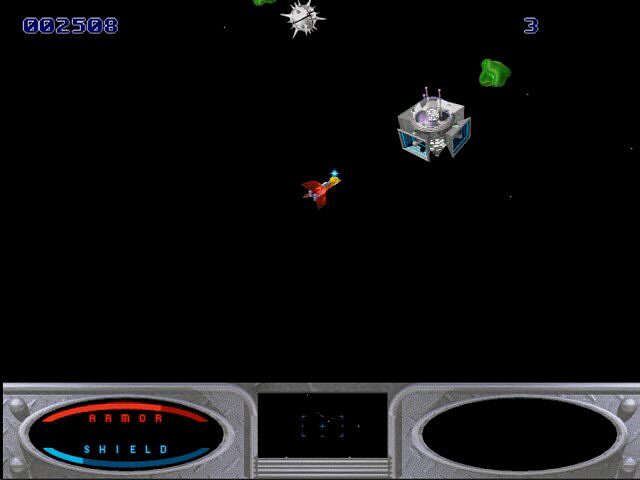
The year 9999. An invasion of mutant aliens threatens to silence rock and roll across the galaxy, and only a pilot with plenty of firepower can stop it. With that deliberately absurd plot, AstroRock makes its entrance, a 1996 space arcade game that takes the mechanics of Asteroids and mixes them with music. Giant Bomb describes it as a version of Asteroids focused on music, and the in-house pitch makes it clear: here shooting is not just survival, it is restoring the soundtrack of the universe.
What it is and where it comes from
AstroRock was developed by Logicware, Inc. and published by Atlantean Interactive Games in the United States; the Windows editions also appear under the SoftKey Multimedia label, a company known for its CD collections of programs. Abandonware catalogs classify it as a sci-fi arcade game with a top-down view and two-dimensional scrolling, that is, a ship game in which the screen fills with rocks, enemies and shots. In the introductory text a hero appears, Zed Nepher, who needs help to bring music back to his corner of space and, to do it, must face the «twisted bad guys» of a distant and unsettling zone.
The tone is parody: the description talks about the «interstellar vastness», a «Bee-Gee group» and getting ready «to launch… to fire», with a B-movie epic feel. Do not expect a deep story; the draw is to take off, shoot, dodge and get carried away by the music, which was also the main selling point of the CD edition.
Several versions, one game
According to the MyAbandonware catalog, the game was distributed in several versions: an MS-DOS version on CD with full music (about 39 MB), another MS-DOS version on floppy disks without music (about 3 MB), a Windows 95 one and a Macintosh one. Internet Archive also preserves the images of the 1997 SoftKey CD for Windows 95 and Macintosh, and the disc appears in the Redump catalog with several audio tracks, which fits with the prominence of the music. There is a sequel with a similar name, AstroRock 2000 (1997), but the abandonware listing describes it as a space combat game and not as an Asteroids game; it should not be confused with this one.
The edition we offer
In Downloads you have an English-language repack marked for Windows XP and later. We have not unpacked it and do not know which version it contains (DOS, Windows or with full music), so we do not claim anything. If the DOS original gives you trouble, DOSBox from Scratch and this tutorial on old programs cover the most common problems. In Guides you will find the first launch and the technical notes; in Tips & tricks, practical advice, because we have not found any documented codes.
EVERY PIXEL COUNTS
The game in pictures.
Explore the screenshots and open every detail at full size.
GET READY FOR YOUR NEXT GAME
Choose your download.
Format, compatibility and server. All in view.
Clicking opens the CLABA loading area and, in a few seconds, your download. If a link fails, let us know via Contact or in the forum.
THE SECRET SIDE OF THE GAME
Tips, tricks and secrets.
A hint at the right time. A code that changes everything.
How this section works
We have not found AstroRock cheat codes in reliable sources and we do not invent them. These are practical tips you can check for yourself.
Tip · pick the right version
If you can choose, the version with music is the one that makes sense of the game; the MS-DOS floppy disk one does not have it. If you hear nothing, it is not a problem with your sound: it may be the edition.
Tip · sound in DOSBox
In DOSBox, check the sound configuration before playing and use the default Sound Blaster settings; if the CD uses audio tracks, you have to mount the image with its CUE file and not just the BIN.
Tip · keep the ship moving
In arcade games that descend from Asteroids, standing still is the fastest way to lose. Keep the ship moving and fire in short bursts.
No matches. Try another effect or code.
THE NEXT STEP, CLEARER
Guides to move forward.
From the first installation to that mission that won't give in.
Start here · first launch on a current PC
- Download the repack from Downloads and unzip it to a short path such as
C:\Juegos\AstroRock. - Look inside for the executable or the launcher and run it. If the program is a Windows 95 one and it fails, turn on compatibility mode for Windows XP or 95 in its properties.
- If it is the MS-DOS version, use DOSBox: mount the folder and launch the program. This is explained in DOSBox from Scratch.
- If there is a sound configuration file, choose Sound Blaster.
- Check that you hear music: the floppy disk edition does not include it.
Controls
We have not found an official list of AstroRock controls in the sources consulted. As in games of the genre, the usual setup is to rotate the ship, thrust and fire; explore the options menu and assign comfortable keys before your first game. If you are in doubt, try each key in a practice game with no risk.
First steps · surviving the rock
- Learn how the ship moves before facing the big enemies.
- Fire in short bursts and avoid staying in the middle of the screen.
- Leave the music on, it is part of the game.
Technical notes
MyAbandonware lists the following downloads: DOS with CD (39 MB, with music), DOS on floppy disks (3 MB, without music), Windows 95 (38 MB) and Mac. A comment on that site warns that the DOS CD file was corrupt in their case, so it is worth checking the download. Internet Archive holds an MS-DOS version playable in the browser. To save your progress, see this tutorial.
Sources
- MyAbandonware: year, developer, publishers, versions, sizes and perspective.
- Giant Bomb: description as a music-focused Asteroids and the publisher Atlantean Interactive Games.
- Internet Archive (SoftKey CD, 1997): edition for Windows 95 and Macintosh.
- Internet Archive (MS-DOS): 1996 DOS version.
- MyAbandonware, AstroRock 2000: the 1997 sequel, distinct from this game.
Something wrong?
Give us a hint.
A broken link, a detail to correct or a game that won't start. Your report helps keep this game page up to date.
Get in touchReport an issue with this game Discuss it in the forumCLABA ARCADE ROOM
251 classics
without installing anything.
Don't feel like installing? These play right in your browser.
Enter the roomTHE CLABA APP1.0 RC 1
Take the archive
with you.

Game pages, online play and your shelf on Android. Free, no sign-up.
ARCHIVE SECRETS
Did you know?
Asteroids with a soundtrack. Giant Bomb describes it as a version of Asteroids focused on music; the CD edition includes the full music and the floppy disk one lacks it.
From floppy disk to CD. On DOS there was a version of about 3 MB without music and another on CD of about 39 MB with it, according to MyAbandonware.
A publisher of collections. The Windows editions are credited to SoftKey Multimedia, which distributed CDs of programs and games; Internet Archive holds its 1997 disc for Windows 95 and Macintosh.
A disc with audio tracks. The Redump entry for the AstroRock CD lists several audio tracks in addition to the game data.
It is not AstroRock 2000. The 1997 sequel is, according to the abandonware listing, a space combat game with a different approach.