
Interplay Entertainment · Board games
Battle Chess Collection
Interplay's Battle Chess games on a single CD: the original, the Enhanced edition, Chinese Chess and Battle Chess 4000, with animated combat.
Board game by Interplay Entertainment (1997) for MS-DOS, in English. Available to download.
— no rating yet
THE CLABA ARCHIVE
Inside the game.
Its history, its ideas and the reasons to come back.
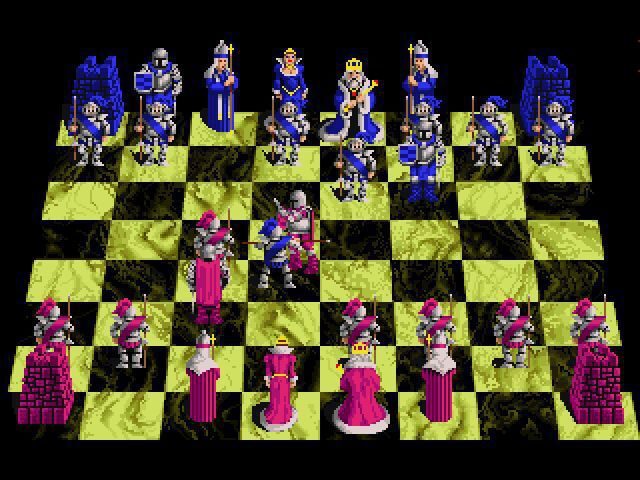
A rook that turns into a stone monster and crushes a pawn’s head, another that gobbles up the queen. Battle Chess turned chess into a cartoon spectacle and, years later, Interplay gathered almost the whole series on a single CD: Battle Chess Collection.
Four games in one
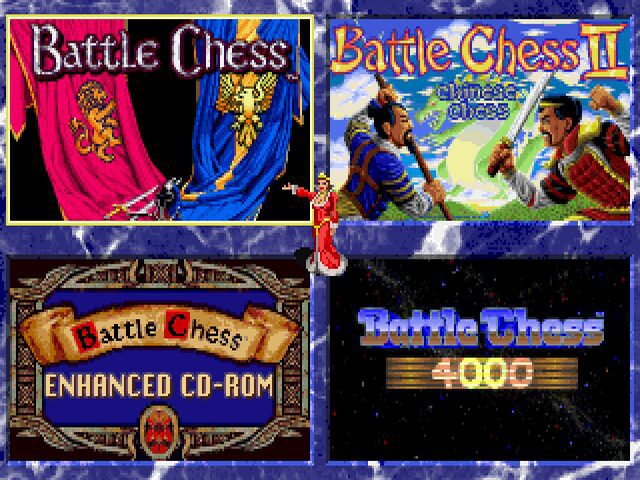
According to MobyGames, the compilation brings together four titles: the original Battle Chess from 1988, its Enhanced CD-ROM version from 1991, Battle Chess II: Chinese Chess and Battle Chess 4000. A note of caution: Lutris mentions only three of them, leaving out the second, so if you are buying or looking for a specific copy, check the contents of the disc. This game page follows the MobyGames list, with all four.
It was published by Interplay, first in 1994 according to MobyGames and with a re-release in 1997, which is why you will see both years depending on the source. For the collection, MobyGames credits R. Scott Campbell for the installer, Corey Comstock for a rendered introduction and Rebecca Ann Heineman (Becky Heineman) for the «rejuvenation» of the game.
What each one is about
The original Battle Chess follows the usual rules of chess, but each piece walks across the board and, when capturing, the two fight a different combat each time. With six types of piece per side and no possibility of one king capturing another, there are 35 animations. Some are nods: the duel between knights recalls the Black Knight from «Monty Python and the Holy Grail», and the king against a bishop parodies the swordsman scene from «Raiders of the Lost Ark». Its 1991 Enhanced version improved the graphics to 256-color SVGA and added a symphonic soundtrack on the CD.
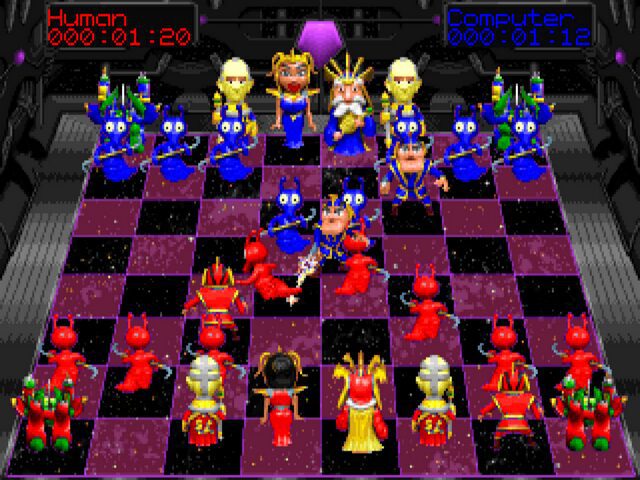
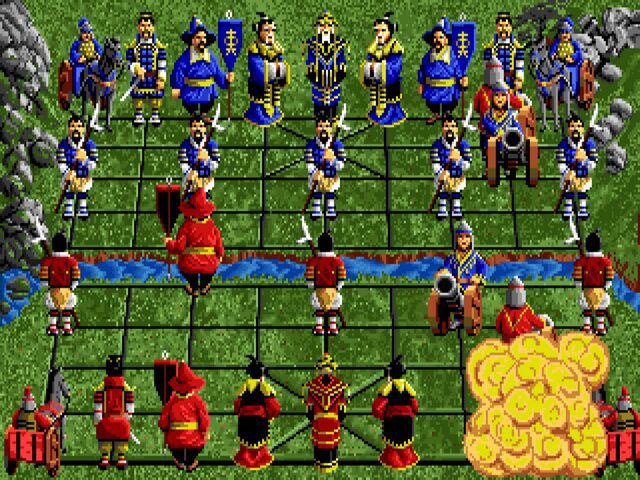
Chinese Chess carries the formula over to xiangqi, with a river, a palace and cannons, and Battle Chess 4000 takes it to a space station in the year 4000, with alien creatures as pieces, SVGA, a take-back function and an opening library of 300,000 moves.
What made it special
The original Battle Chess sold 250,000 copies by February 1993, won the Software Publishers Association award for best graphics in a non-graphics product, and Computer Gaming World inducted it into its Hall of Fame in 1994. It was not the strongest chess program on the market, and that is the charm: if you want a serious opponent, Chessmaster 3000 is ahead in pure play; if what you want is to watch the pieces brawl, you are at home here.
The edition we offer
It is in English. In Downloads there is a repack prepared for Windows XP and later, and the original CD image for MS-DOS. The image needs DOSBox: we explain it in our tutorial DOSBox from scratch (in Spanish); for the repack, see the one on Windows XP classics on Windows 10 and 11 (in Spanish).
In Guides there is a first launch and a rundown of each of the games, and in Tips & tricks, usage tips: we do not know of any codes for any of the four.
EVERY PIXEL COUNTS
The game in pictures.
Explore the screenshots and open every detail at full size.
GET READY FOR YOUR NEXT GAME
Choose your download.
Format, compatibility and server. All in view.
Download Repack
COMPATIBILITYWindows XP / 7 / 10 ✓ At no cost✓ No sign-up Download www.mediafire.com · New tab MediaFire02 ISODownload ISO
COMPATIBILITYMS-DOS 6.22+ ✓ At no cost✓ No sign-up Download www.mediafire.com · New tabClicking opens the CLABA loading area and, in a few seconds, your download. If a link fails, let us know via Contact or in the forum.
THE SECRET SIDE OF THE GAME
Tips, tricks and secrets.
A hint at the right time. A code that changes everything.
Tip · no codes, but there are shortcuts
No codes are known for any of the four games. The most useful thing is knowing how to switch off the spectacle: the original lets you play a 2D version without animations, and in Battle Chess II you switch from the 3D board to the 2D one from the settings menu.
Tip · the second game's menu
In Battle Chess II, F1 opens the menus from the keyboard (or the right mouse button). That is where you will find «Help Move», which marks the legal destinations in green, «Suggest Move» and «Take Back».
Tip · choose the game by what you are looking for
For chess with familiar rules and maximum help, the original or the Enhanced. For something different, Chinese Chess swaps the rules for those of xiangqi. And Battle Chess 4000 adds take-backs, Elo scoring through 24 problems and a larger opening library.
Tip · a game against a friend
The versions of the period supported a game between two people at the same PC (hot seat), or by modem and null-modem cable in some of the games. Today the convenient way is to play on the same screen.
Tip · try the Enhanced on CD
The 1991 Enhanced has 256-color graphics and symphonic music.
No matches. Try another effect or code.
THE NEXT STEP, CLEARER
Guides to move forward.
From the first installation to that mission that won't give in.
Start here · first launch
- In Downloads choose the repack to play directly in Windows, or the CD image for MS-DOS if you want the edition as it was.
- Unzip to a short path, for example
C:\Juegos\BCHESS, outsideProgram Files. - If you use the CD image, mount it in DOSBox with
imgmount d "C:\Juegos\BCHESS\disco.iso" -t iso(adjust the file name) and launch the installer from drive D. - Which menu appears depends on the edition. If you do not see a menu with the four games, look for each game’s executable in its folder.
The tutorial DOSBox from scratch (in Spanish) explains the mounting step by step.
Controls · what the series has in common
- Mouse: click the piece and click the destination.
- Keyboard: in Battle Chess II, arrow keys and Enter, and F1 for the menus.
- 2D board: the original and Battle Chess II have a mode without animations for faster play.
Each game has its own manual with details; the Battle Chess II one is linked in Sources.
First steps · which one to play first
- Start with the original Battle Chess or the Enhanced: it is chess as you have always known it and teaches you the series’ humor.
- Then move on to Battle Chess 4000, the longest and with the most options: take back moves and climb in Elo with the problems.
- Leave Chinese Chess for when you want to learn xiangqi: it has aids that mark the legal moves in green.
If you have not played in a while, start on the lowest level; you see the same fights again and again, and after a while you will want to switch to the 2D board.
Technical notes
It is a set of MS-DOS games: on Windows 10 and 11, DOSBox is the way to go, or the repack, which comes already set up. Battle Chess 4000, being SVGA, asks for a bit more machine than the original, but any current PC runs it with plenty to spare. In the MS-DOS version of the original, the sound of the fights comes out of the PC speaker, with no need for a sound card.
If something fails when launching one of the games, try running it directly from its folder instead of using the disc menu.
Sources
- MobyGames · Battle Chess Collection: contents of the four games, credits and the 1994 date.
- Lutris · Battle Chess: Collection: CD edition and list of games (differs from MobyGames on the contents).
- Internet Archive · Battle Chess and Battle Chess II (Interplay): Interplay’s double edition in two boxes.
- Battle Chess II manual (Internet Archive): controls and menus of the second game.
- Wikipedia · Battle Chess and Battle Chess 4000: animations, sales, awards and features (for orientation only).
Something wrong?
Give us a hint.
A broken link, a detail to correct or a game that won't start. Your report helps keep this game page up to date.
Get in touchReport an issue with this game Discuss it in the forumCLABA ARCADE ROOM
251 classics
without installing anything.
Don't feel like installing? These play right in your browser.
Enter the roomTHE CLABA APP1.0 RC 1
Take the archive
with you.

Game pages, online play and your shelf on Android. Free, no sign-up.
ARCHIVE SECRETS
Did you know?
35 different fights. With six types of piece per side and a king that cannot capture another king, the original Battle Chess has 35 capture animations.
Black Knights and movie pirates. The duel between knights refers to Monty Python’s Black Knight, and the king against the bishop imitates a scene from «Raiders of the Lost Ark».
The Atwood duck. According to a story that may be apocryphal, an animator hid a duck around the queen so that the producers would order it removed and leave the rest alone. It has been known ever since as the «Atwood duck».
No sound card needed. The MS-DOS version played digitized sound through the PC speaker in every fight, with no need for a Sound Blaster.
A collection with two dates. MobyGames gives 1994 as the release and there is a 1997 re-release; Interplay included four games from the series in it.


