MicroProse · Strategy
X-COM : Apocalypse
Mega-Primus, 1997: Mythos Games and MicroProse bring X-COM to a single city, with turn-based or real-time combat. In Spanish, with repack and CD.
Strategy game by MicroProse (1997) for PC, in Spanish. Available to download.
4.7 6 votes
THE CLABA ARCHIVE
Inside the game.
Its history, its ideas and the reasons to come back.
Earth, half a century after the last war against the aliens, is a wounded place. Humanity has taken refuge in megacities that depend on corporations, and one of them, Mega-Primus, built on the ruins of Toronto, is about to suffer an invasion. X-COM: Apocalypse, the third installment in the series, leaves behind the whole planet of UFO: Enemy Unknown and Terror from the Deep and concentrates the whole war in a single city. It was developed by Mythos Games, Julian Gollop's studio, and MicroProse published it in 1997.
A whole city to defend
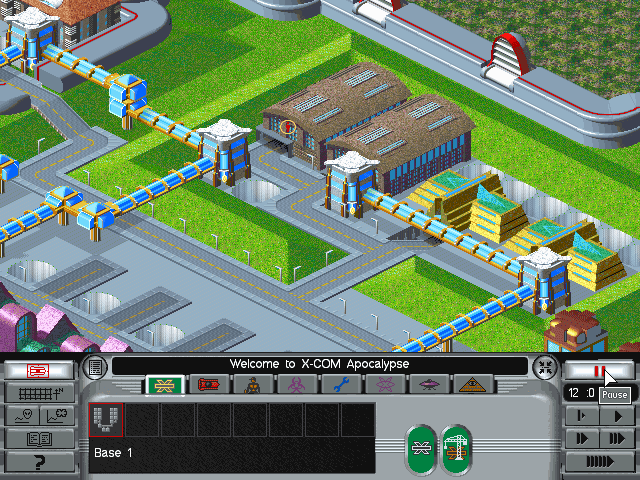
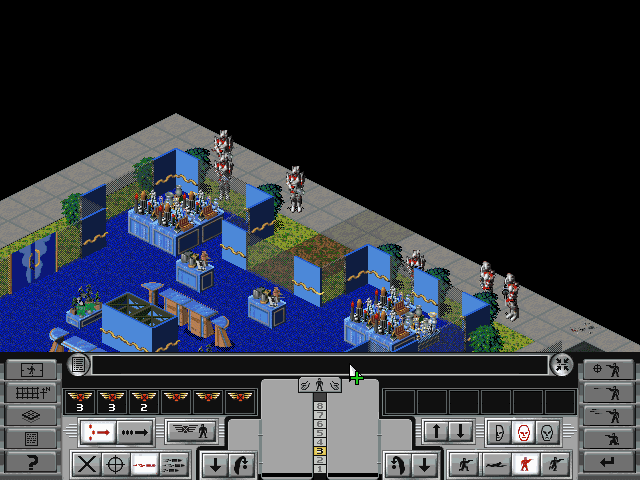
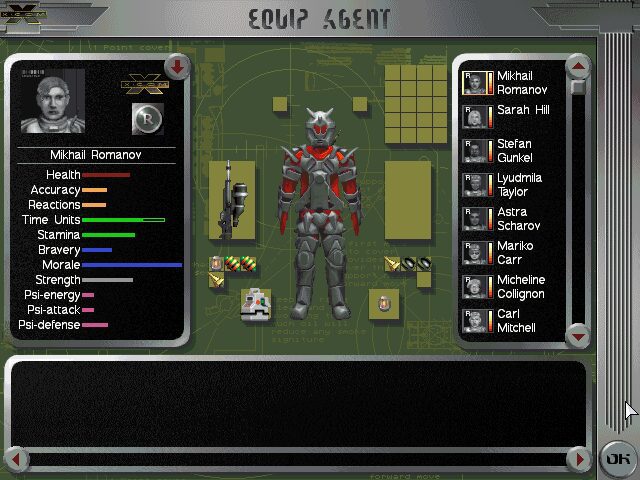
The game is split into two halves. In the Cityscape you run the organization: you buy equipment from the city's companies, research, manufacture, send interceptors against UFOs and look after your relations with the city's numerous corporations and political groups, who can support you, bill you for damages or attack you. In the Battlescape you lead your agents on isometric missions inside warehouses, factories and apartment blocks. The enemies are 14 races of extradimensional origin, with forms as unsettling as the Brainsuckers or the Micronoids, and a life cycle you will discover by researching corpses and prisoners.
Turn-based or real time
The big novelty was including a real-time combat mode alongside the classic turn-based one. It isn't pure real time: you can pause or slow the action to give orders, and missions go from lasting hours to lasting minutes. GameSpot scored it 8.6 in its 1997 review and praised the destructible buildings, although it complained about the garish colors of the city and about aliens that looked like they came out of "The Muppets". Another curious feature is its self-adjusting difficulty: if you play very well, enemy technology advances faster; if you play badly, it slows down.
A troubled development
Its ambition was enormous. Mythos wanted a sophisticated game and MicroProse took charge of a good part of the graphics, which mix rendered scenes with hand drawings in very different styles, and part of its peculiar look comes from that mix.
Gollop remembered the project as a disaster, with three years of work, five producers and friction with MicroProse. Even so, critics were favorable and today it has devotees who maintain projects such as OpenApoc, an open-source reimplementation that needs the original files. If you like the style, the site also has UFO: Extraterrestrials Gold, another game in the genre.
The edition we offer
This is the Spanish-language version of the DOS game. In Downloads you have a repack for Windows XP and later and the original CD image. In Guides we tell you about launching it, handling in combat and this title's known problems on current machines (video cutoffs, black screen, missing maps), and in Tips & tricks there is strategy advice. If you play it from the DOS CD, the DOSBox from scratch tutorial (in Spanish) will come in handy.
EVERY PIXEL COUNTS
The game in pictures.
Explore the screenshots and open every detail at full size.
GET READY FOR YOUR NEXT GAME
Choose your download.
Format, compatibility and server. All in view.
Download Repack
COMPATIBILITYWindows XP / 7 / 10 ✓ At no cost✓ No sign-up Download www.mediafire.com · New tab MediaFire02 ISODownload ISO
COMPATIBILITYWindows XP ✓ At no cost✓ No sign-up Download www.mediafire.com · New tabClicking opens the CLABA loading area and, in a few seconds, your download. If a link fails, let us know via Contact or in the forum.
THE SECRET SIDE OF THE GAME
Tips, tricks and secrets.
A hint at the right time. A code that changes everything.
Tip · no reliable codes
We haven't found a cheat code for this edition in two independent sources, so we don't list any. In exchange, here is advice checked against the documentation from UFOpaedia, GameSpot and PCGamingWiki.
Tip · choose your agents’ attitude
Each agent or group has an attitude that changes its behavior (UFOpaedia). Safe (blue): seeks cover and avoids combat. Cautious (green): attacks, takes cover when it receives fire and returns shots. Aggressive (red): obeys your orders without seeking cover. If an agent refuses to advance, it is probably in safe mode.
Tip · run, walk, crawl
Running is fast but prevents shooting and uses up stamina; walking allows shooting with less accuracy; crawling or lying down reduces the target to a minimum and greatly improves aim, but needs space. Kneeling also improves aim (UFOpaedia). To jump manually, press J and left-click.
Tip · real time can be paused
Even though it is called real time, you can pause or slow the action to give orders and then let everything resolve at once (GameSpot). Use it as soon as a new enemy appears.
Tip · buildings are a weapon too
Battles are fought in destructible buildings: machines explode, holes open in the floors and whole stories can fall on whoever is underneath (GameSpot). But beware: if you wreck other people's property, its owner will come to collect, in money or with attacks on your vehicles and bases.
Tip · mind the politics
The Mega-Primus corporations can withdraw their support or attack you if you anger them, and the government can cut your funding (Wikipedia). Keep track of your relations and remember that raids on other organizations' buildings are optional, but can be a way to obtain items.
No matches. Try another effect or code.
THE NEXT STEP, CLEARER
Guides to move forward.
From the first installation to that mission that won't give in.
Start here · first launch
- In Downloads, the repack is the most convenient option for Windows XP and later. Unzip it into a short path, for example
C:\Juegos\XCOM3. - If you use the CD, it is a DOS game: you will need DOSBox. Follow the DOSBox from scratch tutorial (in Spanish). PCGamingWiki advises using DOSBox 0.74 or later (the Steam edition ships 0.72).
- If you have problems on current Windows, see how to play your Windows XP classics on Windows 10 and 11 (in Spanish).
For your save games, there is a guide on how to copy and restore them (in Spanish).
Controls
- Mouse: select agents, give move and fire orders, and operate the Cityscape management screens.
- Attitude: safe, cautious or aggressive per agent or group.
- Movement: run, walk, crawl and kneel; J plus left click, to jump.
- Pause and speed: in real time you can pause or slow down combat.
See the game's manual for the full list of shortcuts; we haven't been able to check it.
First steps · how to begin
- Start in the Cityscape: review your base, the research available and the equipment the companies offer each week (stock is limited).
- Fight UFOs over the city with your interceptors to keep the aliens from arming their ships better.
- Try both combat modes. Real time is faster, turn-based is more tactical, and GameSpot took it for granted that you would end up alternating between the two.
- Capture corpses and prisoners: bioengineering turns them into technology.
Technical notes
Original game requirements (PCGamingWiki): 486 DX/4 at 100 MHz, 8 MB of RAM in DOS (16 MB in Windows 95), 20 MB of disk and SVGA graphics; recommended, a Pentium at 90 MHz.
Known community problems: choppy videos (there are patches and DOS32A is recommended); a black screen at startup on some SVGA cards (a specific patch exists that requires Windows and doesn't work inside DOSBox); and a hang when entering the alien dimension, because some versions were distributed without the maps for that stage. If it happens to you, see PCGamingWiki.
Sources
- GameSpot's 1997 review (Wayback Machine): combat, real time, city, aliens and rating.
- UFOpaedia: Controls (Apocalypse): attitudes, movement, jumping.
- PCGamingWiki: requirements, DOSBox and known problems.
- OpenApoc (GitHub): open-source reimplementation.
- Wikipedia: plot, races, self-adjusting difficulty and development (quotes from Julian Gollop).
Something wrong?
Give us a hint.
A broken link, a detail to correct or a game that won't start. Your report helps keep this game page up to date.
Get in touchReport an issue with this game Discuss it in the forumCLABA ARCADE ROOM
251 classics
without installing anything.
Don't feel like installing? These play right in your browser.
Enter the roomTHE CLABA APP1.0 RC 1
Take the archive
with you.

Game pages, online play and your shelf on Android. Free, no sign-up.
ARCHIVE SECRETS
Did you know?
Real time and turns. It was the first X-COM to let you choose between turn-based and real-time combat; GameSpot recalled in 1997 that purists had protested when they heard about it.
A nerve-racking development. Julian Gollop compared the work to the shoot of "Apocalypse Now": three years, five producers and plenty of tension with MicroProse over design and art.
Fourteen races, a cruel life. The aliens are 14 races, each with its own "life cycle", among them Brainsuckers, Hyperworms and Micronoids; the leaders turn out to be single-celled organisms that live in the blood of others.
Difficulty that adjusts itself. The game measures how you are doing each week and adapts the aliens' weapon technology: playing well makes it harder and playing badly eases it.
An open second life. OpenApoc is a reimplementation of the game in C++ and SDL2, under the GPL3 license, which requires the original files to work. It was founded in 2014.