Haemimont Games · Strategy
Celtic Kings: Rage of War
Gauls versus Romans: heroes who share experience with their troops, conquered rather than built cities, and Lárax's campaign. FX's Spanish edition.
Strategy game by Haemimont Games (2002) for PC, in Spanish.
4.7 15 votes
THE CLABA ARCHIVE
Inside the game.
Its history, its ideas and the reasons to come back.
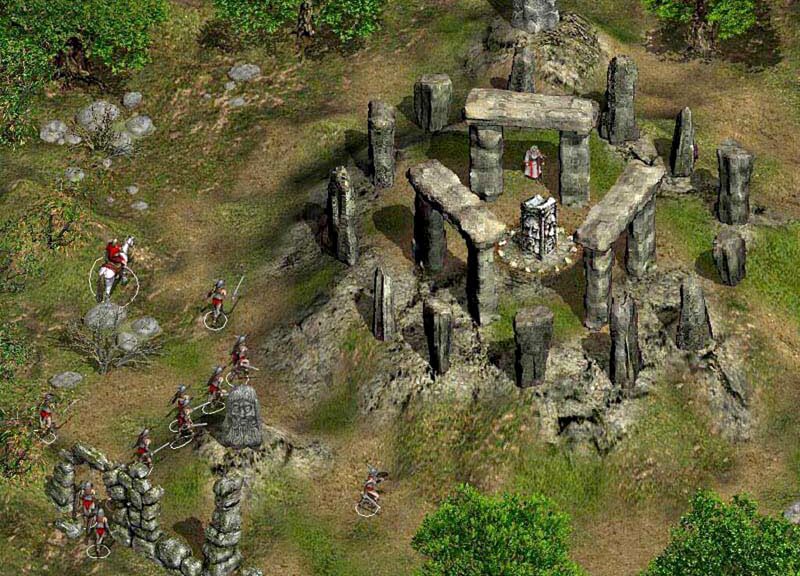
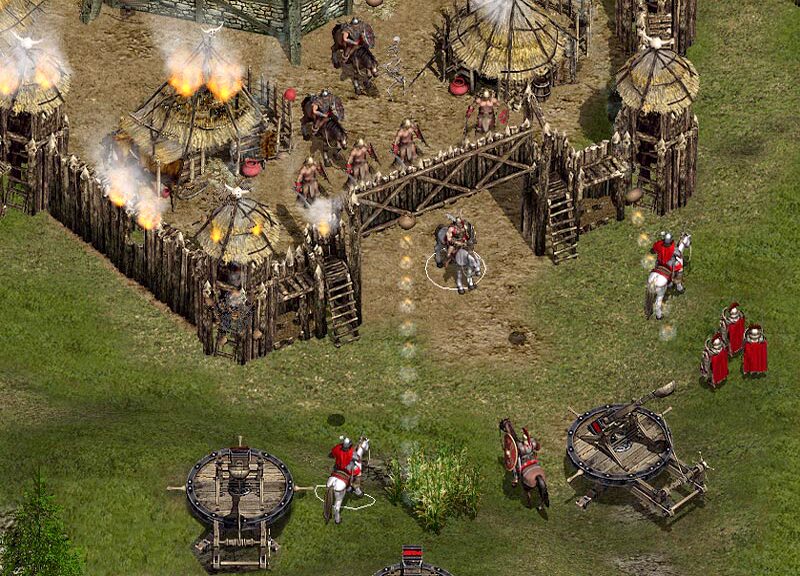
There are no villagers chopping wood here and no foundations to lay. When the game starts, the Gallic and Roman cities are already standing, and the job is to take them from your rival, feed your troops and move your heroes wisely. Imperivm: La Guerra de las Galias (Imperivm: The Gallic War) is the Spanish edition of Celtic Kings: Rage of War, the game that the Bulgarian studio Haemimont Games released in 2002 and that FX Interactive turned into a phenomenon in Spain.
Gauls against Rome
We are in the thick of the Gallic Wars, with Julius Caesar’s legions determined to subdue the tribes. There are two playable sides, very different from each other: the Gauls stake their fortunes on numbers, drive and their druids; the Romans, on discipline and superior weaponry. Between them prowls a third force you cannot control: the Teutons, with their own camps and no loyalty other than plunder.
The game offers two very different modes. In Adventure you follow Lárax, a Gaul who loses everything in a Teutonic raid and pledges himself to the goddess of war in order to take revenge: he starts alone, as in a role-playing game, with experience, magic items and conversations, and ends up at the head of armies besieging fortresses. In Strategy you pick a side and face up to eight computer-controlled rivals, with adjustable rules and behaviors.
How it plays
The economy fits into three words: food, gold and population. Villages produce food, cities collect gold and supply peasants to recruit soldiers, and everything travels by mule or trading ship along routes the enemy can cut. Food is no ornament: if your army goes hungry, the soldiers steadily lose health until they are almost defenseless.
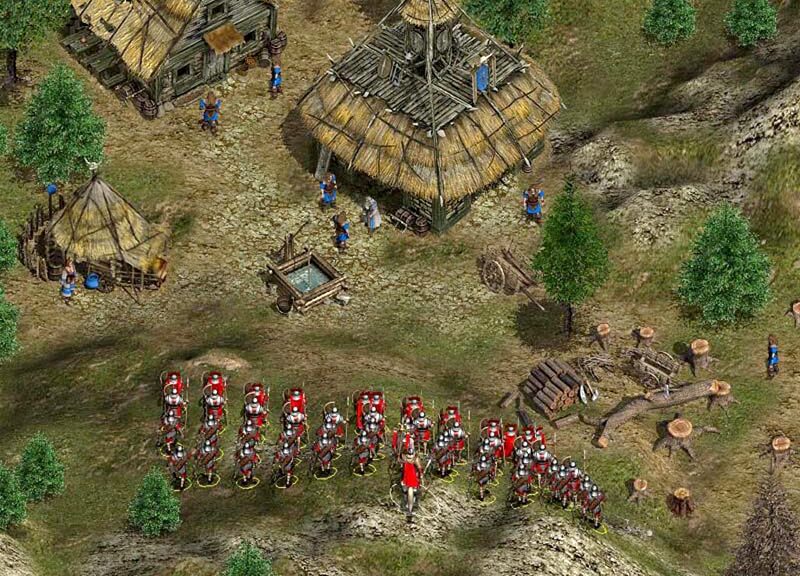
The heart of the system is the heroes. Each hero can carry attached units, arrange them in formation and share part of his experience with them, so that a green troop with a good leader performs far better than on its own. Buildings are not constructed, because they are already on the map: they are damaged with catapults, which your own warriors operate, and captured when their resistance reaches zero. Priests and druids heal and cast magic at the cost of their own blood.
Why it worked
The press received it as an unusual mix that came off well: GameSpot summed it up as a cross between Diablo and Kohan, although it criticized the somewhat pompous music and the English voices. In Spain, FX published it translated and dubbed, with an extra campaign, and it became the best-selling game of the week in November 2002. It was the start of a series that the studio already knew from before: Haemimont had come from making Tzar.
The edition we offer
This is the Spanish edition from FX Interactive, with Spanish text and voices. In Downloads you have two options: a repack to install and play, marked as compatible with Windows XP, 7 and 10, which according to its label corresponds to versions 1.13/1.16; and the CD ISO image, which includes the 1.16 update and is intended for Windows XP. On a current machine the easy route is the repack; if you opt for the CD, our tutorial on Windows XP classics on Windows 10 and 11 will help you with compatibility.
In Guides you will find the first launch, the basic controls and how to get started without losing Lárax; in Tips & tricks, the documented console commands and some advice. If you are left wanting more legions, try Praetorians, Age of Empires II or, to rule rather than conquer, Caesar III.
EVERY PIXEL COUNTS
The game in pictures.
Explore the screenshots and open every detail at full size.
GET READY FOR YOUR NEXT GAME
Choose your download.
Format, compatibility and server. All in view.
Download Repack
COMPATIBILITYWindows XP / 7 / 10 ✓ At no cost✓ No sign-up Download www.mediafire.com · New tab MediaFire02 ISODownload ISO
COMPATIBILITYWindows XP ✓ At no cost✓ No sign-up Download www.mediafire.com · New tabClicking opens the CLABA loading area and, in a few seconds, your download. If a link fails, let us know via Contact or in the forum.
THE SECRET SIDE OF THE GAME
Tips, tricks and secrets.
A hint at the right time. A code that changes everything.
How to enter them
During the game press Enter, type the command and confirm with Enter. These commands are documented for Celtic Kings: Rage of War, the international version of the same program; we have not tested them on our copy of FX’s edition, so if one does not respond, do not insist.
Remove the fog of war
togglefog: turns the fog of war on or off and lets you see the whole map. One player notes that the minimap does not change.
Clear the view
togglevis: hides or shows the buildings. removedecors: removes the vegetation from the scenery. flatterrain: flattens the terrain. They are mainly useful for seeing your troops better.
Switch sides
setplayer: changes the player you control. PC Games magazine specifies that it only works in multiplayer mode.
Tip · speed up the walks
The official adventure guide recommends pressing + to speed up the game when all you have to do is wait for a slow character to reach his destination.
Tip · food before attacking
The larger the army, the more food it consumes. Build up reserves and secure the supply route before a long campaign: without food, your soldiers gradually weaken.
No matches. Try another effect or code.
THE NEXT STEP, CLEARER
Guides to move forward.
From the first installation to that mission that won't give in.
Start here · first launch
- Download the repack from Downloads: it is the option prepared for Windows XP, 7 and 10.
- Install it in a short path and outside
Program Files, for exampleC:\Juegos\Imperivm, to avoid permission problems when saving. - Launch the game and start with the tutorial mode before the adventure.
- If you prefer the CD ISO, which includes the 1.16 update, mount or burn it and install it on Windows XP or in a virtual machine; on modern systems, see our tutorial on compatibility with Windows 10 and 11.
Before reinstalling or changing computers, back up your saves by following the tutorial on copying and restoring save games.
Controls
- Mouse: you use it to select units and give orders.
- Heroes: attach units to a hero so that he commands them. Only heroes can place the troops in formation and keep them that way in combat.
- Formations: each one distributes the units into vanguard, wings and center; the hold position order keeps the formation and its bonus.
- Strategic map: it replaces the classic minimap and is used to study the battle and move troops at a distance.
- Tactical pause: in the adventure you can stop the action to think.
- + speeds up the game and Enter opens the command line.
First steps
- Learn first how to assign units to a hero: it is what gives a small army the most strength.
- Secure villages, which provide food, and cities, which provide gold and peasants to recruit.
- Use mules, or ships on the coast, to carry resources to the forts you attack from.
- Facing a fortress, have your warriors man catapults and lower its resistance; then surround it to capture it.
- Keep priests and druids behind the line: they heal, but they are fragile.
- In the adventure, look after Lárax: the official guide insists on not losing him, advises keeping weak characters away from combat and using the inns to travel between maps you have already discovered.
Technical notes
Haemimont asked for Windows 98, ME, 2000 or XP, a 400 MHz Pentium II, 64 MB of RAM, DirectX 8.1 and a card able to display 1024×768 in thousands of colors. Patch 1.10 added twenty maps (the European versions already shipped with it) and 1.15 added two minigames, Defenders and Invaders, which are opened from the adventure screen.
The official online servers closed years ago: today only the local network or a direct IP connection remains. The current Steam and GOG versions are the international one, without Spanish. PCGamingWiki records a community method for forcing widescreen resolutions by editing a game file; it warns that four-digit vertical resolutions can make it crash, so make a backup before touching anything.
Sources
- FX Interactive · official Imperivm page (Wayback Machine) (in Spanish): modes, features, extra campaign, dubbing and online play.
- Haemimont Games · Gameplay: sides, heroes, formations, food, magic and ships.
- Haemimont Games · news and downloads: number one in Spain, a million copies, patches 1.10 and 1.15.
- Haemimont Games · requirements: minimum and recommended requirements.
- Strategy First · August 2002 press release: North American launch and modes.
- GameSpot · review: Lárax’s adventure, economy, buildings and criticisms.
- Meristation · September 2003 (in Spanish): more than 100,000 units in Spain and the FX Premium line.
- Vandal · FX gives away Imperivm (in Spanish): tenth-anniversary promotion.
- Official FX guides (Internet Archive): walkthrough of Lárax’s adventure, the + key and inns.
- GameFAQs and PC Games: console commands.
- GOG and PCGamingWiki: current online play and widescreen resolutions.
Something wrong?
Give us a hint.
A broken link, a detail to correct or a game that won't start. Your report helps keep this game page up to date.
Get in touchReport an issue with this game Discuss it in the forumCLABA ARCADE ROOM
251 classics
without installing anything.
Don't feel like installing? These play right in your browser.
Enter the roomTHE CLABA APP1.0 RC 1
Take the archive
with you.

Game pages, online play and your shelf on Android. Free, no sign-up.
ARCHIVE SECRETS
Did you know?
Two names for the same game. Outside Spain and Italy it was sold as Celtic Kings: Rage of War, published in North America by Strategy First; here it was Imperivm thanks to FX Interactive.
Number one in Spain. Haemimont celebrated in November 2002 that it was the best-selling game of the week in Spain, and in September 2003 Meristation reported more than 100,000 units sold in our country.
A million copies and a tournament. In May 2006 FX announced that the Imperivm series had passed a million copies across Spain, Italy and Latin America, and celebrated with a tournament whose winner took home a 42-inch plasma TV.
Magic paid for in blood. According to the studio itself, priests and druids work miracles by sacrificing their blood: the longer the sacrifice lasts, the stronger the effect, and the priest ends up at death’s door.
An anniversary gift. To celebrate the series’ tenth anniversary, FX gave it away in its digital store from December 2012 until the following January 14.