MECC · Strategy
Dinopark Tycoon
Educational management simulator from MECC (1993): buy land, choose dinosaurs and pay off the loan before the bank forecloses on your park.
Strategy game by MECC (1993) for PC, in English. Available to download.
— no rating yet
THE CLABA ARCHIVE
Inside the game.
Its history, its ideas and the reasons to come back.
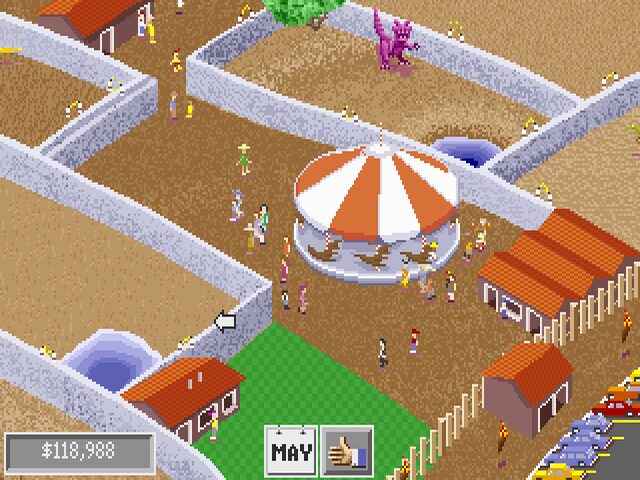
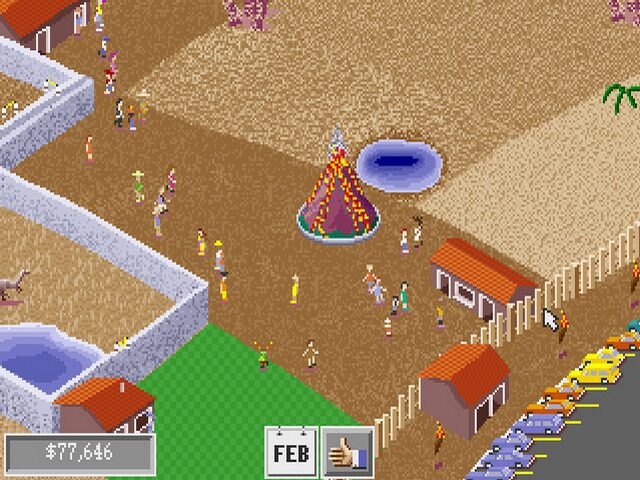
A $5,000 loan, a plot of land, some fences and a very hungry tyrannosaurus. That is all you need to get started in DinoPark Tycoon, a management simulator that MECC published in 1993 for MS-DOS and Macintosh and that taught thousands of children in the United States and Canada the fundamentals of accounting without their noticing. It was developed by Manley & Associates, and in 1994 there was even a 3DO version.
Running a park, not hunting dinosaurs
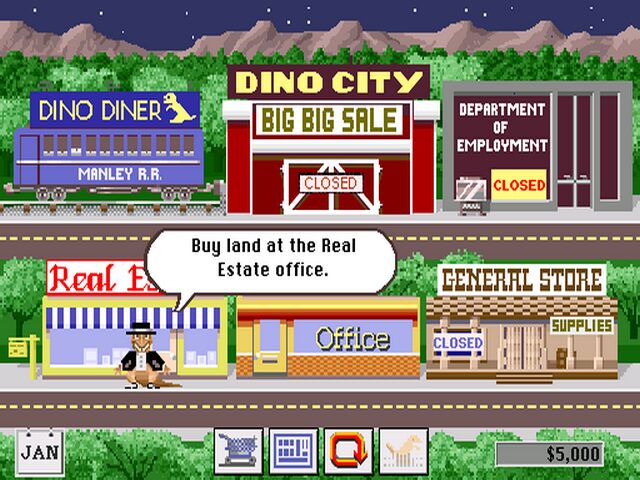
Don’t think of the park from the movie. MECC’s Dean Kephardt told COMPUTE! that the project had been under way for some time before the release of Jurassic Park, and that here there is no combat between man and dinosaur. The enemy is the banker, who will foreclose on your business if you miss a payment. You start by buying land at the real estate office: the cheaper it is, the more money you have left for animals, but the farther it is from the city and the fewer visitors you get. Each species, moreover, prefers a certain climate, so the site is not chosen on price alone. After that you need fences, a guide and the dinosaurs, which you buy at Dino City, the biggest giant-reptile store on the planet, from the vegetarian 54,000-pound Diplodocus to the 65-pound Coelophysis.
How it plays
The controls are very simple and use only the mouse. A storefront screen gives access to all the shops: the employment office, the food warehouse (meat for carnivores, plants for herbivores, seeds), the stores with restrooms, gift shops and parking lots, and advertising, which is bought by season. When you press the Park button, the park opens and you see it from above with the dinosaurs animated. From there on, the game is management: you adjust the ticket price, look at the income charts in the office and react to unexpected events such as an escaped dinosaur, a sick employee or a closed road. And be careful about buying a T. rex too soon: it may start eating the rest.
What makes the game special is that the economy has depth. Demand rises and falls with the seasons, expenses include feed, annual taxes and loan interest, and there are employees who seem superfluous, such as vets or guards, and you only find out whether they are by trial and error. When the park is profitable you can sell it, which ends the game; if you did very well, you receive a best park award and make the high score list.
Two versions, a school and a tyrannosaurus
MECC released a commercial version and a school version that included classroom activities and support sheets for teachers. For those who got stuck, the game includes a save game with $20,000 and two dinosaurs already purchased. COMPUTE! recommended it without reservation for its colorful graphics, its humorous digitized sounds and its mix of fun and math, although it criticized that the manual does not explain what is a «good deal» in this world. There is even a hidden minigame in the Dino Diner: swatting flies on the menu.
The edition we offer
This is the English version for PC. In Downloads there is a repack prepared for Windows XP, 7 and 10, so you don’t need DOSBox. The original required MS-DOS 5.0, a 386, 1 MB of RAM, VGA and a mouse. If you like the genre, on our site you have Theme Park, Theme Park World, Zoo Tycoon 2, Transport Tycoon Deluxe or Monopoly Tycoon; and if dinosaurs are your thing without so much bookkeeping, Jurassic Park and Turok: Dinosaur Hunter.
EVERY PIXEL COUNTS
The game in pictures.
Explore the screenshots and open every detail at full size.
GET READY FOR YOUR NEXT GAME
Choose your download.
Format, compatibility and server. All in view.
Clicking opens the CLABA loading area and, in a few seconds, your download. If a link fails, let us know via Contact or in the forum.
THE SECRET SIDE OF THE GAME
Tips, tricks and secrets.
A hint at the right time. A code that changes everything.
Tip · no codes here
We know of no documented cheat codes for DinoPark Tycoon: they appear neither in the documentation nor in the period press we have consulted. The tips below come from the analysis COMPUTE! published in March 1994 and from the game’s own description.
Tip · buy land wisely
At the real estate office, cheap land leaves you more money for dinosaurs but is farther from the city and gets fewer visitors. Also, each species has a preferred climate: check each animal’s entry in Dino City before deciding.
Tip · consult the dinosaur guide
In Dino City you can see data on each animal before buying it: diet, climate, habitat and size. Some eat much more than others and cost more to maintain.
Tip · follow the seasons
Attendance rises and falls with the seasons. Adjust the ticket price and buy advertising (paid by season) to reinforce the busy months and cushion the slow ones.
Tip · beware of the T. rex
Buying a tyrannosaurus is tempting, but according to COMPUTE! it can devour the rest of the dinosaurs. Make sure you have the right enclosures and fences before acquiring a predator.
Tip · think about staff
There are many jobs available, including vets, security guards and stall managers. Not all of them are essential, and finding out which are surplus takes trial and error. Start with the basics and expand when the park is making money.
Tip · don't overextend your debt
If you miss a loan payment, the bank will foreclose on the park. Don’t spend it all at once: always keep a margin for payments and the unexpected.
No matches. Try another effect or code.
THE NEXT STEP, CLEARER
Guides to move forward.
From the first installation to that mission that won't give in.
Start here · first launch on a current PC
- In Downloads, download the repack (prepared for Windows XP, 7 and 10; the game is in English).
- Unzip the file into a short path, outside
Program Files, for exampleC:\Juegos\DinoPark. - Launch the shortcut. If it doesn’t start or runs in fits and starts, try compatibility mode and see the tutorial on Windows XP classics on Windows 10 and 11 (in Spanish).
- The game is played with the mouse alone, so you don’t need to configure anything else.
- To copy your park to another PC, see how to copy and restore your save games (in Spanish).
Controls
Everything is done with the mouse (COMPUTE!). The main screen is a street of shops: click each storefront to buy or hire. The Park button opens the park and shows you the aerial view; the office shows the charts and reports. If you get lost at the start, an animated dinosaur appears and guides you step by step.
First steps · your first park
- Start at the real estate office: the land determines how many people come and which dinosaurs live comfortably.
- Buy the fences before the dinosaurs; they come in different strengths and prices.
- Hire a guide at the employment office.
- Start with one or two dinosaurs that eat little: some cost much more to maintain than others.
- Open the park with the Park button, watch the charts and don’t expand until income covers expenses and interest.
- Once the business is profitable, expand with enclosures, restrooms, shops and more expensive animals.
Technical notes
Requirements of the original (according to Eli’s Software Encyclopedia): MS-DOS 5.0, a 386 processor, 1 MB of RAM, VGA, a mouse and an optional sound card. It came out for PC (MS-DOS) and Macintosh, and in 1994 for 3DO.
It is a lightweight game, so the repack runs effortlessly on any modern computer. If you prefer the original MS-DOS version, you can try it in the browser at Internet Archive, which has it available with emulation.
Sources
- COMPUTE! No. 162 (March 1994): David Gerding’s review with the mechanics, the school version and MECC’s statements.
- Eli’s Software Encyclopedia: packaging text and requirements.
- Internet Archive: MS-DOS version playable in the browser.
- Wikipedia: overview (developer, 3DO).
Something wrong?
Give us a hint.
A broken link, a detail to correct or a game that won't start. Your report helps keep this game page up to date.
Get in touchReport an issue with this game Discuss it in the forumCLABA ARCADE ROOM
251 classics
without installing anything.
Don't feel like installing? These play right in your browser.
Enter the roomTHE CLABA APP1.0 RC 1
Take the archive
with you.

Game pages, online play and your shelf on Android. Free, no sign-up.
ARCHIVE SECRETS
Did you know?
It is not a Jurassic Park game. MECC’s Dean Kephardt assured COMPUTE! that the program had been in development long before the movie reached theaters.
A version for classrooms. MECC released two versions: the commercial one and a school one, distributed to elementary schools in the United States and Canada, with support material and activities for teachers.
For anyone who gets stuck. After classroom testing, MECC added a save game with $20,000 and a park with two dinosaurs, and an animated guide who teaches kids how to start.
Flies on the menu. In the Dino Diner, the menu hides a small minigame in which you swat flies with the mouse; COMPUTE! called it the game’s only arcade touch.
It also came out on 3DO. In 1994 a 3DO version appeared with minor changes, according to Wikipedia.