GameTek · Strategy
Dark Colony
Humans versus Taar on a terraformed Mars: a 1997 RTS with a day-night cycle, ranks and medals. Spanish repack with The Council Wars.
Strategy game by GameTek (1997) for PC, in Spanish. Available to download.
5.0 5 votes
THE CLABA ARCHIVE
Inside the game.
Its history, its ideas and the reasons to come back.
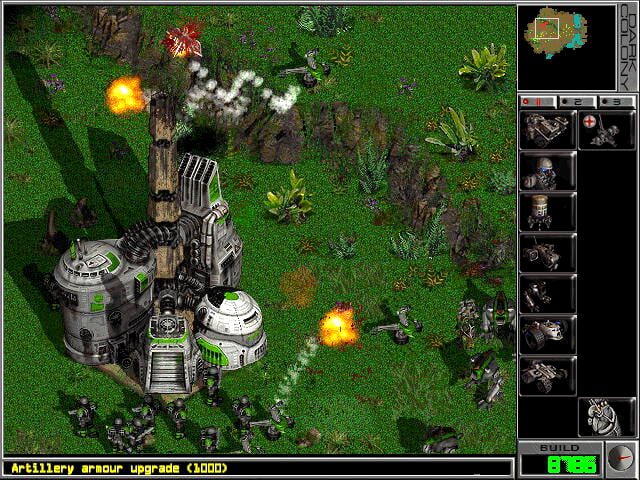
Mars has already been terraformed, there are jungles and deserts where you can breathe, and a new energy source, Petra-7, wells up from fissures in the ground. Then the Taar land, aliens of familiar appearance who are fleeing a plague and have set their eyes on the same planet. Dark Colony (1997) is a real-time strategy game from Alternative Reality Technologies, published by Strategic Simulations (SSI), which came out in the middle of the avalanche of RTS games after Warcraft II and before StarCraft took all the attention.
Two sides, two campaigns
You can play as the humans, commanding a colonization force from Pan Luma Industries, or as the Taar, who want to wipe the intruders off Mars. Each side has its own campaign, with missions that are almost always resolved as in the genre: destroy the enemy and its bases, although every so often you have to hunt for artifacts left behind by an ancient race, which, once found, provide extra firepower.
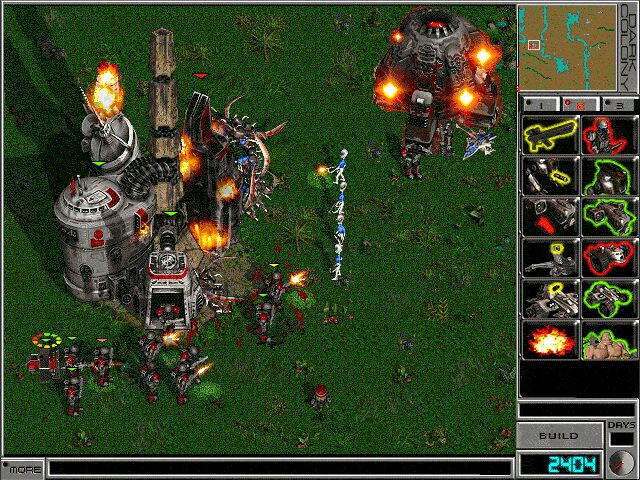
The units on both sides are equivalent: human artillery fires explosive shells and its Taar counterpart, sacs of explosive mucus. The look changes (machines and walkers versus biological creatures) and little else. There are small differences in range in some units and in the defense turrets.
What made it different
- Day and night. A cycle of about ten minutes for each phase. The Taar see better and hit somewhat harder at night; the humans, by day. The screen darkens and you know the alien attack is about to come.
- An economy on the move. Petra-7 is extracted by units that plant themselves over the fissures, and those fissures run dry and appear somewhere else, so you have to relocate.
- Veterancy. Units rise in rank and can earn medals for their performance, something more typical of Panzer General than of an ordinary RTS. There are also indoor and underground battles.
- Fixed-platform base. You don’t build structures wherever you like: each mission gives you a platform of fixed size with predefined slots, which makes some games comfortable and others a headache.
Critics at the time saw it as a solid but unoriginal game, and sales left it in the shadows. Today it has a reputation as an underrated RTS that is friendly to beginners, with a sparse manual but a quick learning curve. If you like the genre, also check out Command & Conquer or Dark Reign.
The edition we offer
This is a Spanish-language edition and the repack includes the expansion The Council Wars (January 1998, single-player only) and an improved translation. In Downloads there are three files: the repack, prepared for Windows XP onward; the game’s CD image; and the expansion CD image, which comes in several languages. The original installer is 16-bit, so on 64-bit Windows it won’t start: that is why the repack is the most convenient route. For compatibility, our tutorial on Windows XP classics on Windows 10 and 11 solves almost everything. In Guides and Tips & tricks you will find gameplay advice.
EVERY PIXEL COUNTS
The game in pictures.
Explore the screenshots and open every detail at full size.
GET READY FOR YOUR NEXT GAME
Choose your download.
Format, compatibility and server. All in view.
Download Repack
COMPATIBILITYWindows XP / 7 / 10 ✓ At no cost✓ No sign-up Download www.mediafire.com · New tab MediaFire02 ISODownload ISO
COMPATIBILITYWindows XP ✓ At no cost✓ No sign-up Download www.mediafire.com · New tab MediaFire03 ISODOWNLOAD CD
COMPATIBILITYWindows XP ✓ At no cost✓ No sign-up Download www.mediafire.com · New tabClicking opens the CLABA loading area and, in a few seconds, your download. If a link fails, let us know via Contact or in the forum.
THE SECRET SIDE OF THE GAME
Tips, tricks and secrets.
A hint at the right time. A code that changes everything.
About the codes
We have not been able to confirm any cheat code with two independent sources, so we are not publishing any. This tab collects tips checked against the manual and the reviews from the time.
Tip · watch the clock
The Taar see better and attack with somewhat more damage at night; the humans, by day. With the humans, prepare your offensives at dawn and dig in as the evening falls. With the Taar, do the opposite.
Tip · Petra-7 runs out
Petra-7 fissures run dry and others open up. Keep an eye on your extractors and have a plan to relocate them before you run out of income.
Tip · look after your veterans
Units that survive gain rank and medals and fight better. Pull back wounded ones instead of spending them, especially artillery and long-range units.
Tip · mobile defenses
The human Firestorms and the Taar Xeno-Worts work as fire emplacements that, once deployed, don’t move for the rest of the mission. Place them near the entrance to your platform, not in the center.
Tip · look for the artifacts
In the missions where they appear, artifacts provide considerable firepower. Explore before launching an attack.
No matches. Try another effect or code.
THE NEXT STEP, CLEARER
Guides to move forward.
From the first installation to that mission that won't give in.
Start here · first launch on a current PC
- Download the repack from Downloads: it includes the expansion and the improved translation and is set up to install without going through the original installer.
- Extract and run it from a short path outside
Program Files, for exampleC:\Juegos\DarkColony. - If the game won’t start, right-click the executable, Properties, Compatibility, and choose Windows XP or Windows 95. Our tutorial on Windows XP classics on Windows 10 and 11 explains more options.
- The CD images are for preserving the game as it was. Their installer is 16-bit and needs a replacement installer on 64-bit systems.
Save games are stored in the save folder inside the game, according to PCGamingWiki; copy it before updating anything. See how in our tutorial on copying and restoring save games.
Controls
Dark Colony is played with the mouse: you select by clicking or dragging a box, and give orders on the map. PCGamingWiki states that the game doesn’t allow key remapping, so the best thing is to go over the options and shortcuts that the game itself shows in the first mission (the tutorial).
A practical detail: in this version Alt+Tab closes the game instead of minimizing it, according to PCGamingWiki. Save before switching windows.
First steps · a simple strategy
- Play the training missions first: Home of the Underdogs’ review highlights that the game is among the easiest in the genre to learn.
- Explore the map to locate the Petra-7 fissures and place your extractors there.
- You have a fixed construction platform: get it producing early, because you won’t be able to expand it as you please.
- Don’t send out units one by one. With short ranges, the battle tends to be a melee: better to go in a group and with artillery support.
- Check the time of day before attacking.
Technical notes
According to PCGamingWiki, the game runs only at 640×480, offers no windowed or widescreen mode and checks the game disc using a file in the folder, HBNFUFL.A01, which indicates the drive to read from. The original requirements were Windows 95, a Pentium at 166 MHz, 16 MB of RAM and 60 MB of disk space.
There is multiplayer over a local network and by direct IP; we have not tested network games with this edition. A fan translation into Czech exists, which is not relevant to this edition.
Sources
- PCGamingWiki: 16-bit installer, resolution, saving, requirements and expansion.
- ATPM, Dark Colony review (July 1998): day-night cycle, economy, units and Mac version.
- Home of the Underdogs: rating, ranks and medals, difficulty.
- Gamepressure: units per side, day-night cycle and recommended requirements.
- Internet Archive · demo: demo available at no cost, linked from PCGamingWiki.
- Wikipedia: setting and release details (for orientation only).
Something wrong?
Give us a hint.
A broken link, a detail to correct or a game that won't start. Your report helps keep this game page up to date.
Get in touchReport an issue with this game Discuss it in the forumCLABA ARCADE ROOM
251 classics
without installing anything.
Don't feel like installing? These play right in your browser.
Enter the roomTHE CLABA APP1.0 RC 1
Take the archive
with you.
Game pages, online play and your shelf on Android. Free, no sign-up.
ARCHIVE SECRETS
Did you know?
A ten-minute clock. The day-night cycle lasts around ten minutes per phase, according to ATPM’s review, and it affects each side’s vision and damage.
Soldiers with medals. Units rise in rank and receive decorations for their combat performance, a detail that Home of the Underdogs compares to Fantasy General.
A Mac with two games. The 1998 Macintosh version sold at a lower price and included the Windows 95 CD in the box so you could play matches between Mac and PC, according to ATPM.
The expansion, for one player. The Council Wars arrived in January 1998 and, according to PCGamingWiki, was only released for Windows and without multiplayer.
An installer from another era. Although the game is 32-bit, its InstallShield installer is 16-bit and doesn’t work on 64-bit Windows, a problem documented on PCGamingWiki.