Westwood Studios · Strategy
Command & Conquer: Red Alert
Einstein erases Hitler from history and Stalin invades Europe. Two very different sides, Tesla coils and the Chronosphere in Westwood's 1996 RTS.
Strategy game by Westwood Studios (1996) for PC, in Spanish and other languages. Available to download.
4.6 15 votes
THE CLABA ARCHIVE
Inside the game.
Its history, its ideas and the reasons to come back.
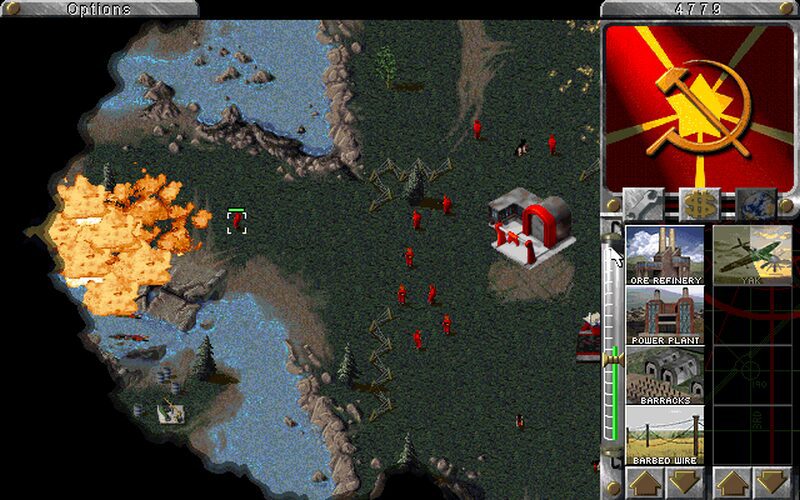
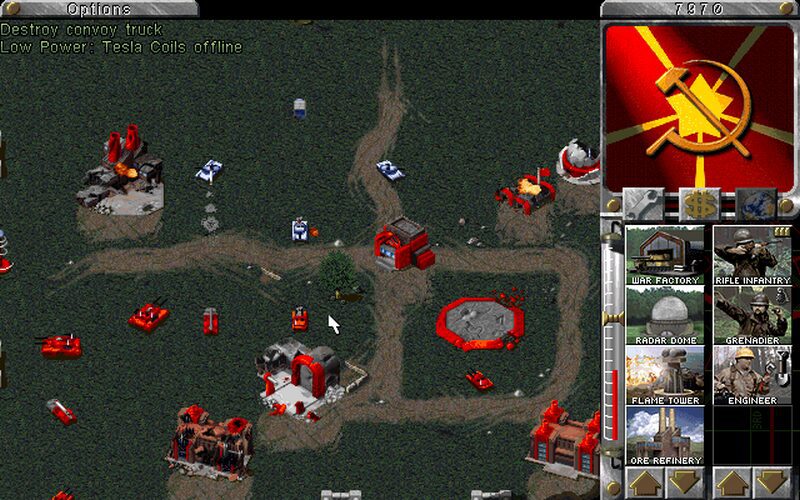
Build the power plant, put up the refinery and send the first truck off for ore. From there on, every second counts. Command & Conquer: Red Alert is the game with which Westwood showed that its real-time strategy formula had plenty of life left, and it did so with one of the wildest premises in the genre.
A World War II that never happened
Albert Einstein travels to the past and, by shaking Hitler’s hand in 1924, erases him from history. Without Nazi Germany, Stalin’s Soviet Union grows unchecked and ends up invading Europe. The Allies hold out as best they can and the continent becomes the board of an alternate war with tanks, submarines, spies and experimental weapons.
Red Alert came out in November 1996 and, although it arrived after Command & Conquer, it is set up as its prequel. The story is told with live-action videos between missions, and Frank Klepacki’s soundtrack was named the best of 1996 by magazines such as PC Gamer.
How it plays
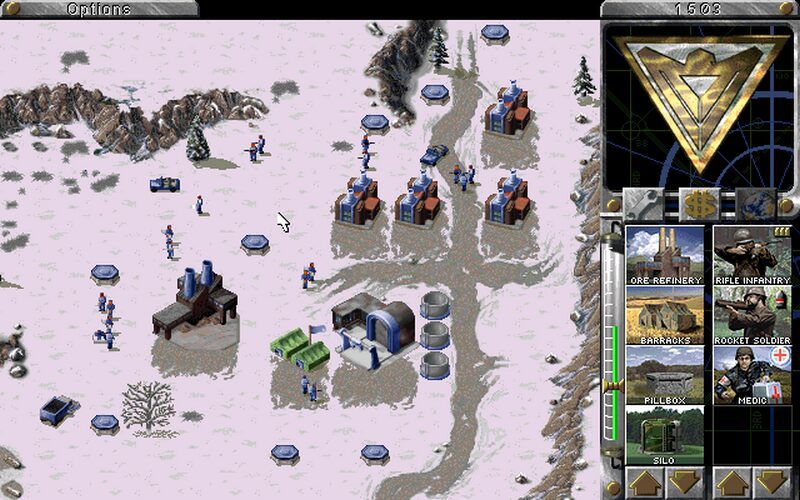
The basis of everything is the economy: you gather ore, turn it into credits and spend them on buildings and units from the sidebar. You need power for everything to work, defenses to withstand the first attacks and an army able to take down the enemy base. The campaign missions mix base assaults with smaller operations, in which a special unit changes everything.
What made Red Alert special was the difference between the two sides. The Allies have cheaper, faster units, dominate the sea with destroyers and cruisers, have spies and thieves, and their secret weapon is the Chronosphere, which teleports a unit to any point on the map. The Soviets have tougher, slower armor, the fearsome Tesla coils, submarines to make up for their naval weakness, and the Iron Curtain, which makes a unit invulnerable for a while. Playing one side or the other forces you to think differently.
Freeware since 2008
Electronic Arts released the base game as freeware on August 31, 2008, to promote Red Alert 3. A remastered version arrived in 2020 and in February 2025 EA published its original source code for preservation purposes. The community maintains an unofficial patch, 3.03p, which fixes the compatibility problems with current versions of Windows and allows higher resolutions and online games through CnCNet.
The version on this page
Here you have three downloads. The main one is a repack for Windows (XP, 7 and 10, according to the label) that this page marks as multilingual. The other two are the ISO images of the two original CDs in English: the Allied disc and the Soviet one, each with its own campaign. The ISOs are for anyone who wants to install from the discs; the original installer is 16-bit and doesn’t work on 64-bit Windows, so in Guides we explain how to do it.
In Tips & tricks you’ll find advice for each side. If you want to follow the series or its roots, the archive has Dune II, Dune 2000 and Command & Conquer: Generals. And to talk strategy or remember your first Tesla coil, drop by the Red Alert thread on the forum (in Spanish).
EVERY PIXEL COUNTS
The game in pictures.
Explore the screenshots and open every detail at full size.
GET READY FOR YOUR NEXT GAME
Choose your download.
Format, compatibility and server. All in view.
Download Repack
COMPATIBILITYWindows XP / 7 / 10 ✓ At no cost✓ No sign-up Download www.mediafire.com · New tab MediaFire02 ISODOWNLOAD CD1
COMPATIBILITYWindows XP ✓ At no cost✓ No sign-up Download www.mediafire.com · New tab MediaFire03 ISODOWNLOAD CD2
COMPATIBILITYWindows XP ✓ At no cost✓ No sign-up Download www.mediafire.com · New tabClicking opens the CLABA loading area and, in a few seconds, your download. If a link fails, let us know via Contact or in the forum.
THE SECRET SIDE OF THE GAME
Tips, tricks and secrets.
A hint at the right time. A code that changes everything.
Tip · Economy first
A second refinery and an extra truck at the start pay off more than any unit. Protect your harvesters: if the enemy cuts off your ore, he cuts off your army.
Soviets · Look after the Tesla coils' power
Tesla coils are a devastating defense against ground units, but they need a constant supply of power. Build plenty of power plants and protect them: if they fall, your base is left toothless.
Allies · Make use of the sea
The Allies have a naval advantage with destroyers and cruisers. On maps with water, a well-protected fleet can punish the enemy coast while your ground army gets ready.
Skirmish · Choose your country well
In skirmish and multiplayer, each country has its own advantage: Germany, England and France on the Allied side, Russia and Ukraine on the Soviet side. Try several before settling on one.
Secret weapons · Use them with a plan
The Allied Chronosphere teleports a unit and the Soviet Iron Curtain makes it invulnerable for a while. Both take time to recharge: save them for the decisive moment of an assault instead of spending them as soon as they’re ready.
No matches. Try another effect or code.
THE NEXT STEP, CLEARER
Guides to move forward.
From the first installation to that mission that won't give in.
Start here · the repack on a current PC
- In the Downloads tab, choose the repack; MediaFire opens in a new tab.
- Unzip it into a folder of its own where your user can write: save games are stored in the game folder as
savegame.***. - Run the game and choose a side. The Allies and the Soviets have separate campaigns.
- If the picture fails or the game won’t start, check the executable’s compatibility tab: with the 3.03p patch it is recommended to turn off all the compatibility options except, if needed, running as administrator.
Installing from the two CD ISOs
The ISOs of the Allied CD and the Soviet CD are copies of the original discs in English. Their installer is 16-bit, like that of many mid-nineties games, and doesn’t run on 64-bit Windows.
- Mount the ISO with Windows itself (double-click) or with your usual program.
- Instead of the disc’s installer, use the community installer «RA1 Installer», which can install from a CD or ISO and then apply the 3.03p patch.
- The patch adds higher resolutions, several video modes, an option to run without the disc and online games through CnCNet.
All Red Alert discs include the DOS version and the Windows one. Today the Windows one is the one to play.
Controls and first steps
Everything is done with the mouse: you select units, order them to move or attack and build from the right-hand sidebar, where the icons of available buildings and units appear.
- Place a power plant and then a refinery: the truck that comes with it starts gathering ore.
- Build a barracks and a few defenses before launching an attack.
- Group your troops and attack with a clear objective: the rival’s refineries and power plants are weak points.
- Save the game at the start of each long mission.
Technical notes
- DOS and Windows: all editions combined the two versions; the Windows one also had online play through Westwood Online.
- Online play today: the official service was redirected to XWIS in 2005, but the community plays mostly on CnCNet, integrated into the 3.03p patch.
- Expansions: Counterstrike (April 1997) and The Aftermath (October 1997) added missions, maps and units. The 3.03p patch can add their missions if you don’t have them installed.
- Configuration:
redalert.inistores the game settings; with the patch,ddraw.iniandcncnet.iniappear as well.
Sources
- PCGamingWiki · Command & Conquer: Red Alert: DOS/Windows editions, 16-bit installer, 3.03p patch, CnCNet, freeware, save games and configuration.
- CnCNet · Red Alert: community downloads, online play and a guide to playing the campaigns.
- Official Red Alert source code (Electronic Arts, GitHub): GPL v3 license and the 2025 preservation archive.
- Wikipedia (English): dates, premise, sides, music, expansions and sales.
Something wrong?
Give us a hint.
A broken link, a detail to correct or a game that won't start. Your report helps keep this game page up to date.
Get in touchReport an issue with this game Discuss it in the forumCLABA ARCADE ROOM
251 classics
without installing anything.
Don't feel like installing? These play right in your browser.
Enter the roomTHE CLABA APP1.0 RC 1
Take the archive
with you.

Game pages, online play and your shelf on Android. Free, no sign-up.
ARCHIVE SECRETS
Did you know?
A prequel that came out later. Red Alert arrived in 1996, a year after Command & Conquer, but Westwood set it up as a prequel to that game.
Given away to advertise its grandchild. EA released the base game on August 31, 2008 to promote the launch of Red Alert 3.
Giant ants. The 1997 Counterstrike expansion hid a secret campaign of giant ants, «It Came from Red Alert», a nod to It Came from the Desert.
A big debut. It sold around 1.5 million copies worldwide in its first month and almost two million by mid-February 1997.
The code, for posterity. On February 27, 2025, EA published Red Alert’s original source code under the GPL v3 license, for preservation purposes and without support.