
Sega-AM2 · Shooter
Virtua Cop
Sega AM2's arcade game that brought polygons to light guns, in its 1996 Windows conversion. Hidden codes and fixes for current PCs.
Shooter by Sega-AM2 (1995) for PC, in English. Available to download.
4.7 6 votes
THE CLABA ARCHIVE
Inside the game.
Its history, its ideas and the reasons to come back.
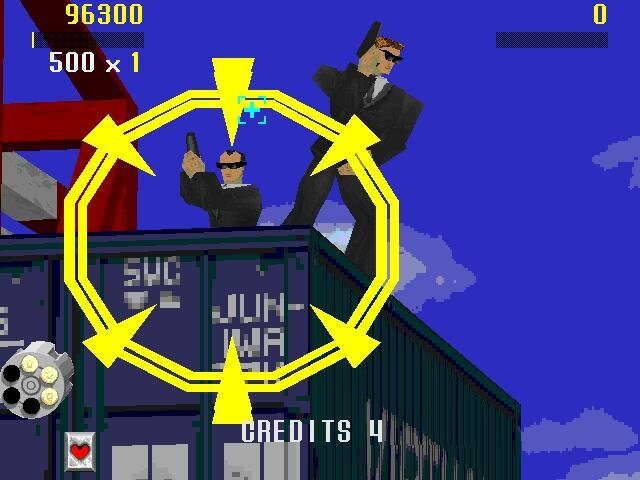
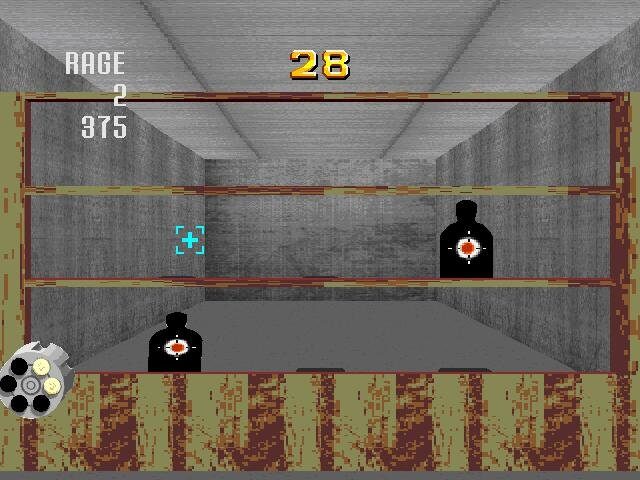
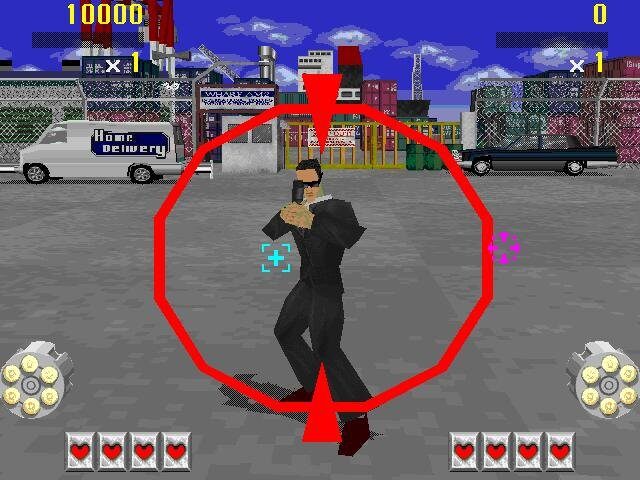
An arms-trafficking ring, a detective murdered just as he was about to close the case, and two cops who are left to finish the job with gunfire. Virtua Cop was born as a Sega AM2 arcade game in 1994, and two years later it reached Windows computers; in North America it was called Virtua Squad. It is the game that showed arcades that a light-gun shooter could be made with polygons instead of digitized actors.
Michael Hardy and James Cools versus E.V.I.L. Inc.
You control Michael “Rage” Hardy or his partner James “Smarty” Cools, in first person and on rails: the game takes you through the scenery and you only aim and shoot. It all starts when the detective discovers illegal arms trafficking and follows the trail to E.V.I.L. Inc., a crime syndicate led by Joe Fang, with Kong, the King and the Boss as lieutenants. Part of the evidence reaches the police station and a special squad is formed for the case. Along the way civilians also appear who must not be shot: if you hit one, you lose a life.
What made it special
You start with a six-bullet magazine that has to be reloaded, and the enemies react differently depending on where you hit them. There are bonus points for justice shots, which consist of disarming an enemy by shooting him in the hand instead of killing him, and for bullseyes, which are earned by hitting the center of the aiming circle. Some objects can be shot to get a special weapon or an extra life; the special weapon is lost when you take damage.
Sega itself boasted of “the first action game with polygons and textures”. It was a commercial and critical success: in Japan it became the highest-grossing dedicated arcade game of 1995, according to Wikipedia. Among its novelties was shooting through glass, and the camera moves in on the action with a zoom that gives it a cinematic air. It also marked the path for The House of the Dead and The House of the Dead 2, and, from there, the rest of the 3D light-gun shooters. The name “Virtua” comes from the 3D graphic style debuted with Virtua Racing and Virtua Fighter. The series continued with Virtua Cop 2.
The edition we offer
This is the Windows conversion made by Sega PC from the arcade game. It runs at 640×480 and 30 frames per second, and instead of a light gun it is played with the mouse (or the keyboard). In Downloads there is an English repack ready for Windows XP or later. It is a Windows 95 program that does not get along with modern systems, so check the notes in Guides and our tutorial on Windows XP classics on Windows 10 and 11. In Tips & tricks you have the codes for ranking mode and the hidden options.
EVERY PIXEL COUNTS
The game in pictures.
Explore the screenshots and open every detail at full size.
GET READY FOR YOUR NEXT GAME
Choose your download.
Format, compatibility and server. All in view.
Clicking opens the CLABA loading area and, in a few seconds, your download. If a link fails, let us know via Contact or in the forum.
THE SECRET SIDE OF THE GAME
Tips, tricks and secrets.
A hint at the right time. A code that changes everything.
How to enter them (PC)
The codes assume that player 1’s control is set to Keyboard in the configuration menu (F5), with the default keys: G reload, W A S D move the crosshair, V fire and F3 pause. If you play with the mouse, switch it to keyboard or joystick first and put it back afterward. They are typed on the logo screens when the game starts. A gunshot confirms that you got it right.
Cheat mode: ranking, difficulties and unlimited credits
When the SEGA logo appears, hold down Reload (G) and quickly press Up (W), Down (S), Left (A), Right (D). You will hear a gunshot. This unlocks Ranking mode (finishing the game on a single credit), the Very Easy and Very Hard difficulties with their intermediate ones, and the option to keep playing without spending credits.
Weapon selection (Gun Select)
On the next logo screen (the AM2 one, according to Cyberly), hold Reload (G) and press Down, Up, Right, Left, Up, Up, Left, Right (S, W, D, A, W, W, A, D). With Gun Select on, in the game press F3 to pause and G to switch weapons, including a new secret weapon.
Options plus menu
After cheat mode, go into the options and look at the three arrows next to EXIT: press Down until they are highlighted and fire (V). There you can change the language (English or Japanese), turn on mirror mode, the weapon selector and view usage statistics (“Book Keep”). The codes stay unlocked: you do not need to enter them all in the same session.
Resetting the timer when entering your name
On the initials entry screen, by shooting the “B S” (backspace) key several times the counter goes back to 99 seconds; when a “death” sound effect plays, the time has been reset.
Tip · do not shoot civilians
Hitting a single civilian costs you a life, although the special weapon is not lost in that case. Prioritize aiming at whoever has a weapon in hand, and look for justice shots (to the hand) and bullseyes to improve your score.
No matches. Try another effect or code.
THE NEXT STEP, CLEARER
Guides to move forward.
From the first installation to that mission that won't give in.
Start here · first launch on a current PC
- Download the repack from Downloads and unzip it to a short path, for example
C:\Juegos\VirtuaCop. - It is a Windows 95 game: run the shortcut with Windows 95 or XP compatibility mode. Our tutorial on Windows XP classics on Windows 10 and 11 explains it.
- If a
DPLAY.dllerror appears, turn on DirectPlay in the Windows features. If it fails with “DirectDraw Init FAILED SetDisplayMode”, PCGamingWiki suggests using dgVoodoo 2. - With an Nvidia card, if you install from the original disc, run
NATIVE.EXEso that the NV1 chip version is not installed.
Before you start, learn how to copy and restore your save games; the configuration is stored in VCOP.ini, in the Windows folder.
Controls
- Mouse: aim and fire. You can also play with the keyboard or a controller.
- Default keyboard: W A S D move the crosshair, V fires, G reloads, F3 pauses and F5 opens the controls configuration.
- Pointer sensitivity has three levels: Slow, Normal and Fast.
Quitting the game and the graphics and control settings require a keyboard even if you play with a controller.
First steps · how to get a good score
- Reload often: you have only six bullets per magazine.
- Shoot the hand of armed enemies to disarm them (justice shot) and earn extra points.
- Hit the center of the bullseyes to earn bonuses.
- Objects that can be shot give a special weapon or an extra life; be careful, the special weapon is lost when you take damage.
- Enemies react according to where you hit them: use that to your advantage.
Technical notes
According to PCGamingWiki, the game required Windows 95, a 90 MHz Pentium, 8 MB of RAM, 60 MB of disk space, 256-color SVGA, DirectX 3, a Sound Blaster 16-compatible card and a 2x CD drive. It only runs at 640×480 and 30 frames per second, and it is a 32-bit application. The intro video uses the Indeo codec, which recent Windows no longer includes: if you see a black screen with sound, install the codec or try DDrawCompat (it is not compatible with dgVoodoo 2’s graphics options). The original disc contained all the music tracks.
Sources
- PCGamingWiki: PC version, dates, requirements, known bugs, NV1 and controls.
- Sega Retro · hidden content: default keys and codes.
- Cyberly · Virtua Squad 1: the same codes and what they unlock.
- StrategyWiki: overview and modes.
- Wikipedia (for orientation only): plot, development, reception and influence.
Something wrong?
Give us a hint.
A broken link, a detail to correct or a game that won't start. Your report helps keep this game page up to date.
Get in touchReport an issue with this game Discuss it in the forumCLABA ARCADE ROOM
251 classics
without installing anything.
Don't feel like installing? These play right in your browser.
Enter the roomTHE CLABA APP1.0 RC 1
Take the archive
with you.

Game pages, online play and your shelf on Android. Free, no sign-up.
ARCHIVE SECRETS
Did you know?
A coffee commercial. According to Wikipedia, the game’s closing-in crosshairs and zooming camera were inspired by a Pokka Kilimanjaro coffee commercial.
Two names, a shifting date. In North America the PC port was called Virtua Squad. It came out in Japan in October 1996 and in North America and Europe in January and February 1997, according to PCGamingWiki, which also records re-releases by MediaKite and Expert Software.
A port that never arrived. In 2004 a version was developed for the Nokia N-Gage handheld, but quality control cancelled it before release; only a few beta units were made.
A PC shooter with an unusual chip. The original PC disc included a version optimized for the Nvidia NV1 graphics chip, and PCGamingWiki warns that, if the installer detects an Nvidia card, it may install that version, which is incompatible with DirectX.
Influence beyond the genre. Wikipedia notes that its polygons and its body-part aiming system inspired Time Crisis, The House of the Dead and even the first-person shooter GoldenEye 007.


