Monolith Productions · Shooter
Tron 2.0
First-person shooter inside the Tron film's universe: identity disc, subroutines and light cycle races. Spanish edition with a repack and both CDs.
Shooter by Monolith Productions (2003) for PC, in Spanish. Available to download.
4.6 5 votes
THE CLABA ARCHIVE
Inside the game.
Its history, its ideas and the reasons to come back.
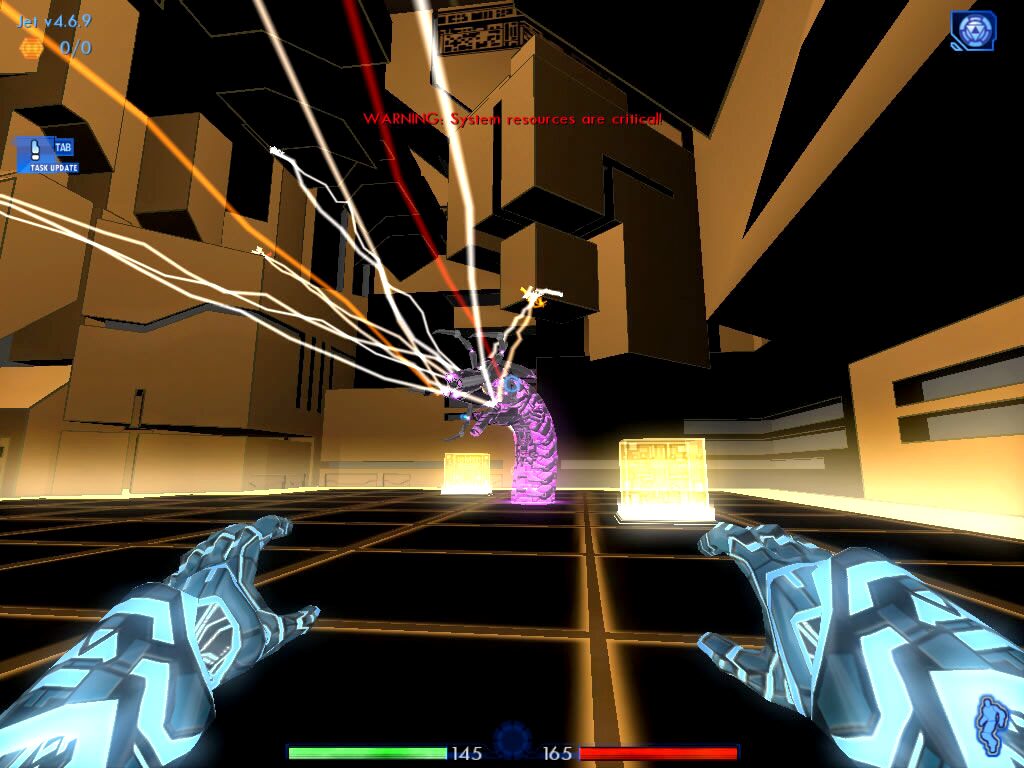
Twenty-one years after Kevin Flynn was absorbed by a laser, his neon universe opened up again, this time from inside a shooter. Tron 2.0 is the official sequel to Disney’s 1982 film, made by Monolith Productions and published by Buena Vista Interactive for Windows on August 26, 2003. Although it was not a sales hit, critics received it very well, above all for its art direction.
Inside the computer
You control Jet Bradley, son of Alan Bradley, the ENCOM programmer. After the company is bought by the FCon corporation, Alan disappears and Ma3a, an artificial intelligence he designed, digitizes Jet inside the system. The culprit is J.D. Thorne, an FCon executive turned virus. The plot picks up the pieces of the film and even explains where the Tron arcade game came from. Jason Cottle voices Jet, Bruce Boxleitner returns as Alan, Cindy Morgan is back as Ma3a and Rebecca Romijn lends her voice to Mercury.
Shooting, subroutines and light cycles
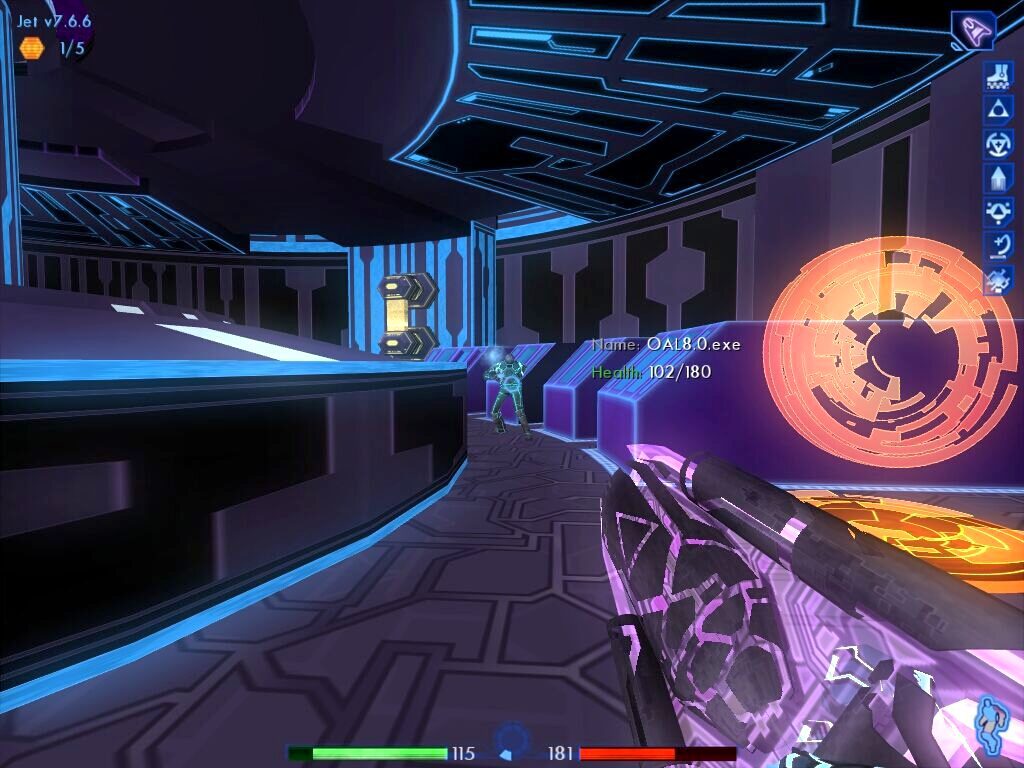
It is a first-person shooter with a touch of RPG. The levels are linear and are completed by finishing tasks and finding the “permission bits” that open the next one. Your main weapon is the identity disc, which you throw and which returns to your hand, and to it you add computerized versions of a shotgun, submachine gun, sniper rifle or grenades, which use up energy rather than conventional ammunition.
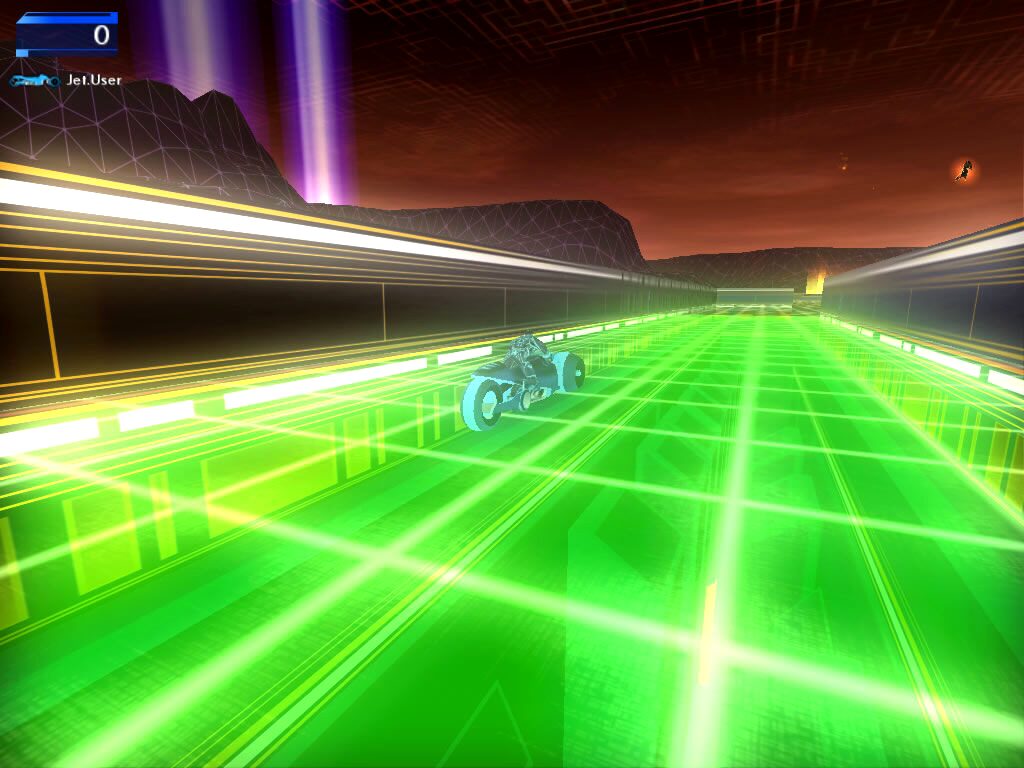
The most curious part is the customization: Jet upgrades his version (from 0.0.0 to 0.0.1, and so on) and gains abilities and weapons as subroutines that he installs in a limited number of memory slots. They can be upgraded from alpha to beta to gold, just like software, and they take up less space as they improve; if a virus infects or fragments them, they have to be repaired. Between stages come the light cycle races, arena duels where the aim is to trap your rivals with the light wall, with power-ups scattered around the arena and a faster “super” light cycle. The game also debuts a light cycle design by Syd Mead.
Why it still appeals
It still holds up on its looks: neon colors that change according to the type of system, from the red of a firewall to the white of a PDA, and a constant computer-themed humor (programs called Brian.exe, the LOL rifle…). Computer Games Magazine named it the fourth-best PC game of 2003 and gave it the awards for best sound and best art direction. The commercial side fared worse: according to Wikipedia, it sold below expectations and Buena Vista dropped its support two years later. The same creators went on to make F.E.A.R., No One Lives Forever and Blood II: The Chosen.
The edition we offer
This is the Spanish-language edition, with translated interface, voices and subtitles. In Downloads there is a repack ready to install on Windows XP or later and the images of the two original CDs (CD1 and CD2) for anyone who prefers the classic installation. If something fails on your current system, our tutorial on playing Windows XP classics on Windows 10 and 11 is the first place to look. You will find the first launch and the controls in Guides, and the PC version’s codes in Tips & tricks.
EVERY PIXEL COUNTS
The game in pictures.
Explore the screenshots and open every detail at full size.
GET READY FOR YOUR NEXT GAME
Choose your download.
Format, compatibility and server. All in view.
Download Repack
COMPATIBILITYWindows XP / 7 / 10 ✓ At no cost✓ No sign-up Download www.mediafire.com · New tab MediaFire02 ISODOWNLOAD CD1
COMPATIBILITYWindows XP / 7 / 10 ✓ At no cost✓ No sign-up Download www.mediafire.com · New tab MediaFire03 ISODOWNLOAD CD2
COMPATIBILITYWindows XP / 7 / 10 ✓ At no cost✓ No sign-up Download www.mediafire.com · New tabClicking opens the CLABA loading area and, in a few seconds, your download. If a link fails, let us know via Contact or in the forum.
THE SECRET SIDE OF THE GAME
Tips, tricks and secrets.
A hint at the right time. A code that changes everything.
How to enter them
During the game press T to open the text window, type the code without spaces and press Enter. The sources give them for the PC version and in English; we have not been able to test them on the Spanish edition.
Health and energy
mpgod: god mode. mphealth: full health. mpkfa: all weapons, full health and energy.
Ammo
mpammo: full ammo. mptears: infinite ammo.
Skipping levels
mpmaphole: skips to the next level. Use it with care: you skip the permission bits and whatever there is to collect in that level.
Tip · codes that only one source mentions
Some lists add other codes, such as mpguns, mparmor, mpnextmission or mppos. Since we have only seen them in one source, we do not vouch for them: try them at your own risk.
Tip · decide which subroutines to install
Memory has a limited number of slots and part of them is taken up by fixed base code, which changes from one level to another. Upgrade (alpha, beta, gold) before adding: an upgraded subroutine performs better and takes up less space.
No matches. Try another effect or code.
THE NEXT STEP, CLEARER
Guides to move forward.
From the first installation to that mission that won't give in.
Start here · first launch on a current PC
- Download the repack from Downloads, designed for Windows XP or later. If you prefer the original discs, you need the CD1 and CD2 images.
- Install it in a short path outside
Program Files, for exampleC:\Juegos\Tron2. - Start the game launcher. If it goes into an installation loop or does not open, try running it as administrator (properties, Compatibility tab).
- On modern Windows the game needs a DirectX 9-compatible graphics card; if no picture appears, see the Technical notes tab.
- Save games are stored in the game’s
Savefolder; to keep them, see how to copy and restore them. More help in the tutorial on playing Windows XP classics on Windows 10 and 11.
Controls
- The game lets you remap all the keys from the controls menu, as well as adjust mouse sensitivity and invert the vertical axis.
- T opens the text window, the same one used to type codes.
- A controller works, but according to PCGamingWiki you have to assign the controls by hand and movement is digital, not analog.
- The disc is thrown and returns on its own; remember that it bounces off enemies and walls.
First steps · how to survive
- In every level look for the permission bits and the archive containers: they hold subroutines and information about the story.
- Jet upgrades his version as he gains levels, and so obtains new abilities.
- With memory slots limited, choose what helps you most in each level and do not spend slots on subroutines you will hardly use.
- Enemies usually come in groups: use the disc calmly and do not drain the energy of the firearms.
- Viruses can fragment or infect your subroutines: repair them as soon as possible.
- In the light cycle races, space is your weapon: cut off your rivals’ paths without boxing yourself in.
Technical notes
Minimum requirements of the original disc, according to PCGamingWiki: a 500 MHz Pentium III or Athlon, 256 MB of RAM, 2.5 GB of disk space, a card with hardware T&L (GeForce 2 or equivalent) and DirectX 9.0. The engine is a variant of Lithtech.
- Patches: the last official one is 1.030 (2003) and there is an unofficial 1.042 patch that improves on it.
- Widescreen: by default the game is limited to 4:3 resolutions and on a widescreen display it falls back to 640×480; the community mod Killer App adds 16:9 and 16:10, and a DxWrapper option improves performance.
- Black screen on launch in Windows Vista or 7: disable desktop composition in the properties of
Lithtech.exe. - Invisible mouse pointer: tick “Disable Hardware Cursor” in the launcher options.
- Multiplayer: up to 16 players over a local network (light cycles, disc arena and derez). GameSpy no longer exists; the Killer App mod redirects to another master server.
Sources
- PCGamingWiki: requirements, patches, known bugs, languages and multiplayer.
- PC Games (Germany) (in German): list of codes and the 2003 release date.
- GameRevolution: PC version codes.
- Wikipedia: plot, gameplay, awards and versions. For orientation only.
Something wrong?
Give us a hint.
A broken link, a detail to correct or a game that won't start. Your report helps keep this game page up to date.
Get in touchReport an issue with this game Discuss it in the forumCLABA ARCADE ROOM
251 classics
without installing anything.
Don't feel like installing? These play right in your browser.
Enter the roomTHE CLABA APP1.0 RC 1
Take the archive
with you.

Game pages, online play and your shelf on Android. Free, no sign-up.
ARCHIVE SECRETS
Did you know?
A disc that always comes back. Jet’s starting weapon is his identity disc: it is used to store data and to fight, it bounces off enemies and walls and always returns to its owner, as in the film.
Actors from the film. Bruce Boxleitner reprises his role as Alan Bradley and Cindy Morgan, who was already in the 1982 film, voices Ma3a; Rebecca Romijn is Mercury.
A tribute to Marathon. Among the programs in the game there are viruses named Durandal and (Ra*mpa^ncy), references to the Marathon series.
A new light cycle by Syd Mead. The game introduces a new light cycle design by Syd Mead and, besides the original cycle, offers the more modern and faster Super Light Cycle.
A second life under another name. In 2004 it came to Xbox and Game Boy Advance as Tron 2.0: Killer App, two games with major differences between them; the GBA version even has a different story and an isometric perspective.