Navarro · Shooter
Robocop 3D
Titus takes OCP's cyborg cop to a first-person shooter through Neo Detroit: nine levels, hostages and arrests. Repack in Spanish.
Choose your version 2 platforms
No computer handy? Play one of the 251 classics online right now
4.0 7 votes
THE CLABA ARCHIVE
Inside the game.
Its history, its ideas and the reasons to come back.
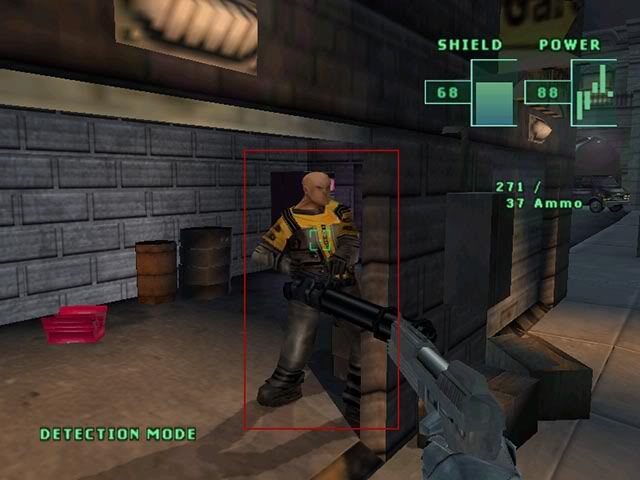
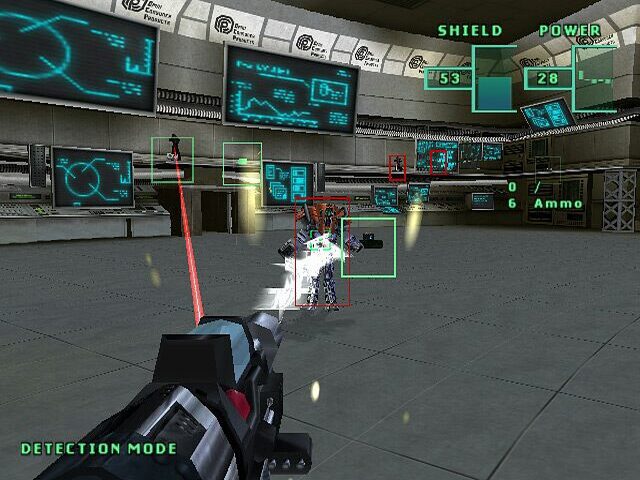
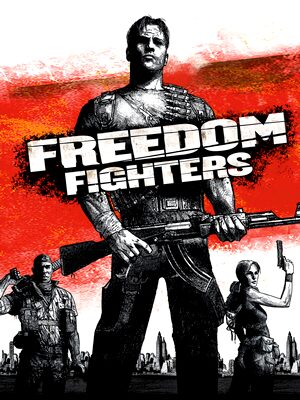
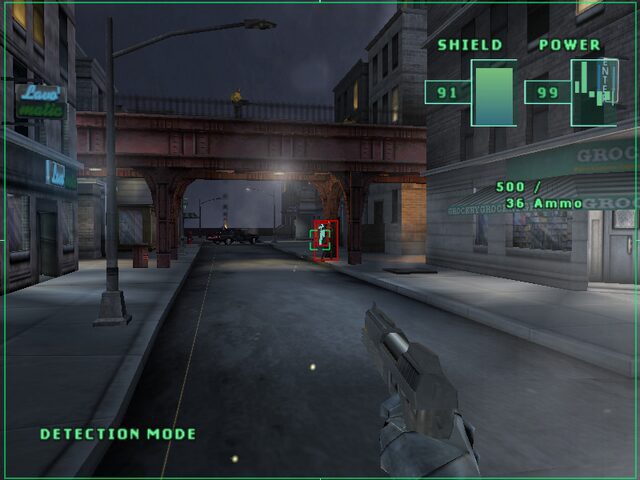
«Dead or alive, you’re coming with me.» Sixteen years after Paul Verhoeven’s film, RoboCop returned to computers in the form of a first-person shooter. It was made by the French company Titus Interactive, which had bought the rights to the character from MGM in June 1999, and it reached Windows in the spring of 2003. A warning: on this page it appears as «Robocop 3D», but the title of the game is simply RoboCop. It is not the adaptation of the third film nor the Ocean game from the nineties, but a new production from 2003.
Neo Detroit, once again
You control the OCP cyborg cop through a futuristic Detroit. The plot revolves around a new synthetic drug, the links between a mayoral candidate and OCP itself, and a cyborg known only as MIND. The game has nine large levels divided into sections, and each one has a main objective, essential to advance, and several secondary and extra ones that add points.
How it plays
RoboCop uses a pistol, a machine gun, a grenade launcher and a missile launcher. But it is not all shooting: he can rescue hostages and arrest enemies who surrender, as befits a law enforcement officer. Progress is saved when each level is completed, and if you fall, the level restarts from the beginning. It is a demanding design, with no safety net, which according to the reviews of the time became tedious: plenty of enemies, scarce ammunition and an imprecise cursor-based aiming system.
A much-criticized game
The press was harsh. On Metacritic, the Xbox version, the only one released in North America, stands at 30 out of 100; GameSpot gave it a 2.2 out of 10 and PC Gamer UK 22%. Some salvaged the setting, which captures the look and tone of the films, and fans of the character saw it as a curious rental. Even so, the appeal for the nostalgic is walking through a Detroit that captures the look and tone of the films. Behind it lay a long and troubled development: it was announced in 1999 with Xatrix as developer, passed through the hands of Infogrames, kept slipping and ended up at Titus’s in-house studio, with the RenderWare engine. If you like action games based on movies, another example is Die Hard Trilogy.
The edition we offer
In Downloads there is a repack in Spanish, set up for Windows XP and later. We do not offer disc images of this edition. To play on a current system, our tutorial on Windows XP classics on Windows 10 and 11 will serve you if something does not start. In Guides you will find advice and controls, and in Tips & tricks, practical recommendations: we have not found reliable codes for this version.
ONE GAME, 2 PLATFORMS
Versions.
2 platforms1992
Pick a platform: the screenshots, downloads and online game on this page switch with it.
- Year
- 2003
- Developer
- Navarro
- Downloads
- 1
- Screenshots
- 3
The PC version is the one this page covers: the information, review and main screenshots are from this platform.

- Year
- 1992
- Port by
- Digital Image Design
- Downloads
- 2
- Screenshots
- 1
The Amiga edition of RoboCop 3D links several action challenges in polygonal settings: car chase, first-person shooting, hand-to-hand combat and flight with the gyropack. Adventure mode arranges them following the story of the film, while Arcade mode lets you pick them separately. This version was developed by Digital Image Design and published by Ocean.
EVERY PIXEL COUNTS
The game in pictures.
Explore the screenshots and open every detail at full size.
GET READY FOR YOUR NEXT GAME
Choose your download.
Format, compatibility and server. All in view.
Version
SELECTED VERSIONPC1 archivo
SELECTED VERSIONAmiga1992 · 2 files
Download for hard disk
COMPATIBILITYRequires an emulator ✓ At no cost✓ No sign-up Download BoxSharer server · New tab BoxSharer02 Amiga · Floppy disksDownload original floppy disks
COMPATIBILITYRequires an emulator ✓ At no cost✓ No sign-up Download BoxSharer server · New tabClicking opens the CLABA loading area and, in a few seconds, your download. If a link fails, let us know via Contact or in the forum.
HIT PLAY
The game in motion.
Trailers and videos to see it in action.
-
Amiga · How it plays
Robocop 3D gameplay on Amiga.
THE SECRET SIDE OF THE GAME
Tips, tricks and secrets.
A hint at the right time. A code that changes everything.
How these tips work
We have not found reliable cheat codes or passwords for this version of RoboCop. The entries below are tips drawn from how the game is designed, not codes.
Tip · arrest and rescue
Each level has a main objective and several secondary ones that add points. Rescuing hostages and arresting enemies who surrender are part of those extras: don’t shoot anyone who raises their hands.
Tip · saving is per level
The game saves when you complete a level, and if you die you restart it from the beginning. Plan each stretch calmly and don’t waste ammunition: it is scarce.
Tip · weapon and distance
You have a pistol, a machine gun, a grenade launcher and a missile launcher. Save the heavy weapons for big groups and use the pistol when there are few enemies.
Tip · mind your aim
Several reviews criticized the cursor aiming. Shoot patiently, advance using cover and let the enemies come to you instead of running toward them.
No matches. Try another effect or code.
THE NEXT STEP, CLEARER
Guides to move forward.
From the first installation to that mission that won't give in.
Start here · first launch
- Download the repack from Downloads.
- Install it outside
Program Files, in a short path such asC:\Juegos\RoboCop. - Launch the game, open the options and check video and controls before you start.
- If something fails, try Windows XP compatibility mode: you have the recipe in our tutorial on Windows XP classics on Windows 10 and 11.
Back up your save games with our tutorial on backing up and restoring save games.
Controls
We have not been able to consult the manual for this edition. Check the controls section in Options and remap the keys to your liking. Reviews of the time point to cursor-based aiming as one of the game’s weakest points.
First steps · strategy
- Read the objectives of each level: the main one is mandatory and the others add to your score.
- Rescue the hostages and arrest anyone who surrenders.
- Conserve ammunition: it is limited and there is no mid-level save.
- Advance slowly through the sections, because dying sends you back to the start of the level.
Technical notes
The game uses the RenderWare engine and came out in 2003 for Windows. We have not been able to verify official requirements or patches for this version, so we do not state any. If the repack does not start, try Windows XP compatibility or run it as administrator.
Sources
- Metacritic: developer, premise, Xbox score and reviews.
- GameSpot: review (2.2 out of 10), with complaints about saving and aiming.
- GameFAQs: existence of the PC version and its guide.
- Internet Archive: confirms the Windows edition.
- Wikipedia: development, levels, weapons and dates.
Something wrong?
Give us a hint.
A broken link, a detail to correct or a game that won't start. Your report helps keep this game page up to date.
Get in touchReport an issue with this game Discuss it in the forumCLABA ARCADE ROOM
251 classics
without installing anything.
Don't feel like installing? These play right in your browser.
Enter the roomTHE CLABA APP1.0 RC 1
Take the archive
with you.
Game pages, online play and your shelf on Android. Free, no sign-up.
ARCHIVE SECRETS
Did you know?
Rights bought in 1999. Titus obtained the RoboCop video game rights from MGM in June 1999, but the game did not reach Windows until the spring of 2003.
A development with several owners. It was announced with Xatrix as developer in 1999, shown with Infogrames in 2001 and ended up at Titus’s in-house studio. Neither Xatrix nor Infogrames ever released it.
Xbox only in North America. Only the Xbox version came out there, in late July 2003; the Windows version appeared in Germany and France on April 30, 2003 and in the United Kingdom in May, and the GameCube one stayed in Japan in 2004.
A 30 out of 100. Metacritic records that result for the Xbox version, with nine reviews, eight of them negative. The press criticized mainly the aiming, the difficulty and the AI.
Arresting adds up. Besides the main objective of each level, the secondary ones, such as rescuing hostages or arresting those who surrender, count toward the final score.