
ID Software · Shooter
Quake II
A lone marine on the Strogg planet, missions chained across units and the railgun. With The Reckoning, Ground Zero and, by repack, Capture the Flag or six mods.
Shooter by ID Software (1997) for PC (in Spanish and English) and Nintendo 64. Playable in your browser (PC and Nintendo 64) or downloadable.
Choose your version 2 platforms
4.4 62 votes
THE CLABA ARCHIVE
Inside the game.
Its history, its ideas and the reasons to come back.


Your drop pod collides with another marine’s as soon as you leave the ship, falls far from the planned zone and, by the time you manage to get to your feet, the rest of the invasion is already dead or in enemy hands. That is how Quake II begins: a lone soldier on the Strogg planet, a list of objectives ahead of you and no way back. id Software finished it for Activision and it reached stores on December 9, 1997.
Alone on Stroggos
The Strogg are a race that blends flesh and machine and turns its prisoners into parts of its army. Humanity has decided to attack them on their own world, and it falls to you to sabotage what you find on the way to their capital: warehouses, mines, a factory, a power station, the great cannon that defends the planet and, at the end, the Makron, their leader. Along the way you come across captured comrades who have lost their minds, a hint of what awaits the defeated.
Missions instead of mazes
The change from the first Quake goes beyond the setting. Levels are grouped into interconnected units, and you often have to go back and forth between them because what you do in one opens the way in another. Each unit has specific objectives, such as destroying a reactor or cutting the power, which you can check at any time on the mission computer with F1. You can now also crouch, and you carry an inventory with items such as the rebreather, the environment suit or the power shield.
The arsenal is one of those you remember: from the blaster with infinite ammo to the shotgun, the machinegun, the rocket launcher, the hyperblaster, the railgun and the BFG10K. With the Quad Damage, any of them multiplies damage by four.
A Quake that did not want to be called Quake
It is not really a sequel: id was looking for a new name, but the lawyers shot down every proposal over trademark problems, and in the end the working title stuck. Tim Willits said that one of the candidates was WOR. In May 1997 Activision took over worldwide distribution; their previous hits, such as Quake and Doom II, had been published by GT Interactive.
It shipped with OpenGL 3D acceleration out of the box, supported games of up to 32 players and, according to id, passed a million copies sold. The metal music is by Sonic Mayhem, with a track by Rob Zombie. In addition, the game logic lived in a separate library whose code id published, and that set off a wave of mods; in December 2001 it also released the engine’s code under the GPL license.
The edition we offer
It is the Windows version with its expansions. In Downloads there are two repacks prepared for Windows XP, 7 and 10. The first includes the official expansions The Reckoning, by Xatrix, and Ground Zero, by Rogue, and the Capture the Flag mode. The second brings the two expansions and six single-player mods: Citadel, Juggernaut, Oblivion, Roots, Unseen and Zaero. Both are offered in English and Spanish; keep in mind that id never published an official Spanish translation. This game page has no browser-playable version.
In Guides you will find the installation, the controls and fixes for current screens, and in Tips & tricks, the console commands. If you are left wanting more id, try Doom, Doom 2 or Doom 3; from the same era, Unreal and Half-Life, and with its technology, Return to Castle Wolfenstein. If something resists on a current machine, check our tutorial on Windows XP classics on Windows 10 and 11 (in Spanish).
ONE GAME, 2 PLATFORMS
Versions.
2 platforms19992 playable online
Pick a platform: the screenshots, downloads and online game on this page switch with it.

- Year
- 1997
- Developer
- ID Software
- Downloads
- 2
- Screenshots
- 3
The PC version is the one this page covers: the information, review and main screenshots are from this platform.
- Year
- 1999
- Port by
- Raster Productions / Activision
- Downloads
- 2
- Screenshots
- 1
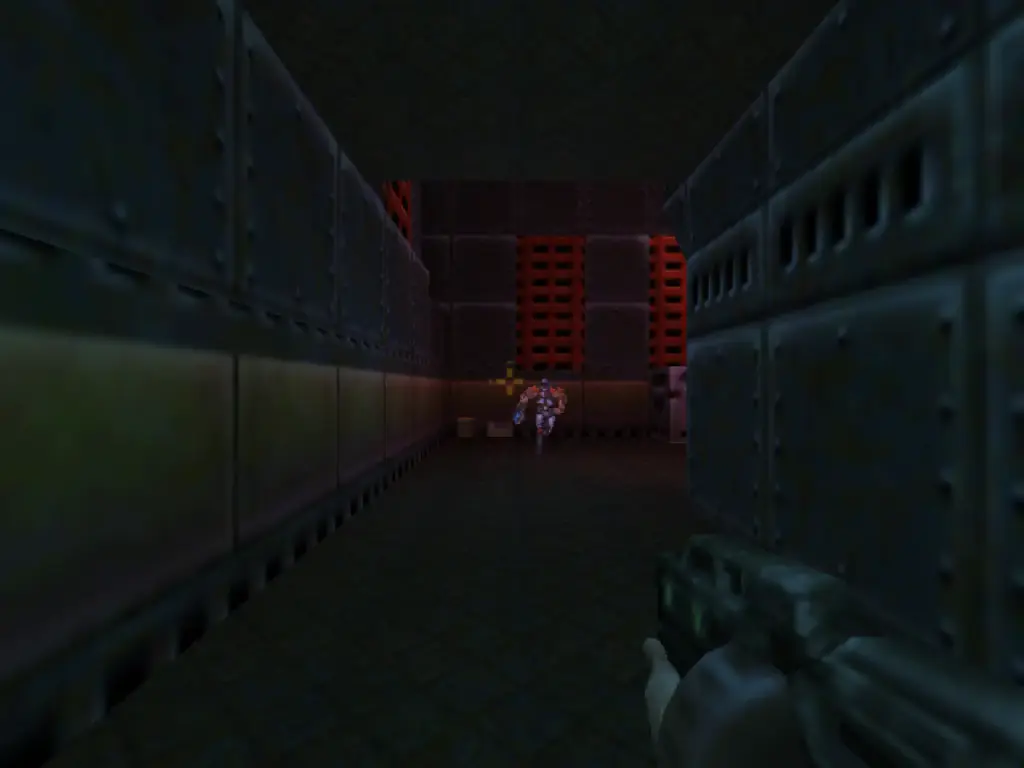
Quake II for Nintendo 64 appeared in Europe in 1999, ported by Raster Productions and published by Activision. It shares the original's story of the marine's war against the Strogg, but this edition does not simply reproduce its maps: its campaign comprises 19 levels designed for the console, with their own structure and routes. Group play changes too: it offers local matches for two to four players and ten multiplayer maps built for split screen. The European cartridge included here uses English text; the set also keeps the US game image as an alternate download. That way you can choose between the two regions, while the online player uses the European version selected as the main one.
EVERY PIXEL COUNTS
The game in pictures.
Explore the screenshots and open every detail at full size.

GET READY FOR YOUR NEXT GAME
Choose your download.
Format, compatibility and server. All in view.
Version
SELECTED VERSIONPC2 files · also playable online
SELECTED VERSIONNintendo 641999 · 2 files · also playable online
Download game image
COMPATIBILITYRequires an emulator ✓ At no cost✓ No sign-up Download BoxSharer server · New tab BoxSharer02 Nintendo 64 · OriginalDownload alternate version
COMPATIBILITYRequires an emulator ✓ At no cost✓ No sign-up Download BoxSharer server · New tabClicking opens the CLABA loading area and, in a few seconds, your download. If a link fails, let us know via Contact or in the forum.
Your game starts here
Play in your browser.
There are 2 versions ready to play. Pick one and click.
Version

PC · INGLÉS · CLABA PLAYER 1.1
Quake II
Your next game starts here.
Play nowThe game opens in its own screen. It needs a computer with WebGPU and a 991 MB first download. Saved games stay in this browser.
Nintendo 64In your browser
Quake II
Nintendo 64 version. Your next game starts here.
- 11 MB · downloads on click
- Save states in this browser
- Controller, keyboard or touch
Controls
Click the game to use the keyboardOn mobile, play with the on-screen controller- Enter
- menu and pause
- X
- confirm
- TFGH
- move and turn
- Tab
- fire
Use Controls to view or change the keys.
- Full screen
Use the button on the bar. Esc returns to the game page; “Exit” closes the game.
- Saves
Save State, in the game's menu, keeps the exact moment. Load brings it back when you return.
- Mobile and tablet
Press Controls during the game to show buttons and keyboard. Gamepad support depends on the browser.
Saves live in this browser and device. Clearing the site data deletes them too.
HIT PLAY
The game in motion.
Trailers and videos to see it in action.
-
Nintendo 64 · Gameplay
Quake II gameplay on Nintendo 64.
THE SECRET SIDE OF THE GAME
Tips, tricks and secrets.
A hint at the right time. A code that changes everything.
How to enter them
Press the console key (~; on a Spanish keyboard, the one below Esc), type the command and press Enter. In the campaign they work directly. In a multiplayer game they only work if the server was started with +set cheats 1; otherwise, the game replies that this parameter is required. Commands are typed in English.
Invulnerability
god: god mode. Type it again to turn it off.
The whole arsenal
give all: all weapons, ammo, armor and items. If you prefer something specific: give weapons (weapons), give ammo (ammo), give armor (the best armor) or give health (health to the maximum).
A specific item
give followed by the name of the item as it appears in the game, in English. For example, give Railgun, give BFG10K, give Quad Damage or give Power Shield.
Walk through walls
noclip: you fly and pass through walls. Useful if you get stuck in a corner of the map.
Go unnoticed
notarget: enemies do not detect you.
Jump to a level
map followed by the level name loads it directly. The first is base1 (Outer Base); others are jail1, mine1, fact1, power1, city1 or boss1. The deathmatch maps run from q2dm1 to q2dm8.
No matches. Try another effect or code.
THE NEXT STEP, CLEARER
Guides to move forward.
From the first installation to that mission that won't give in.
Start here · first launch on a current PC
- Choose in Downloads: repack 1 includes the two official expansions and Capture the Flag; repack 2, the expansions and six single-player mods.
- Unzip it outside
Program Files, in a short path such asC:\Juegos\Quake2. That way you will not have permission problems when saving. - Save games are stored in
baseq2\saveand the configuration in the.cfgfiles inbaseq2. - Each expansion has its own folder:
xatrixfor The Reckoning androguefor Ground Zero. If the repack does not include its own shortcut, they are started by adding+set game xatrixor+set game rogueto the game’s shortcut.
Before touching files or patches, back up your save games by following our tutorial on copying and restoring save games (in Spanish).
Controls
This is the configuration that id included with the game’s source code. All keys can be changed in the options.
- Move: W, A, S and D or the arrow keys. Jump: space bar. Crouch: C.
- Fire: Ctrl or left mouse button.
- Weapons: from 1 (blaster) to 9 (railgun), and 0 for the BFG10K. G uses hand grenades.
- Inventory: Tab opens it, [ and ] cycle through the items and Enter uses the selected one.
- F1: mission computer, with the unit’s objectives.
- ~: console.
If you want to switch weapons with the mouse wheel, type bind MWHEELUP "weapnext" and bind MWHEELDOWN "weapprev" in the console.
First steps · surviving the first unit
- Open the mission computer with F1 each time you reach a new area: it tells you your current objective and what the next one is.
- Do not worry if a door will not open: in Quake II it is normal to go back to an earlier level once you have completed an objective in another.
- The blaster uses no ammo. Use it on weak enemies and save the shells and bullets for the big ones.
- Pick up the rebreather and the environment suit; you will need them underwater and in waste zones.
- Save the Quad Damage for a room full of enemies or a boss: it multiplies damage by four for a few seconds.
- Save often from the menu.
Technical notes
The game required Windows 95 or NT 4.0, a Pentium at 90 MHz and 16 MB of RAM (24 recommended). It supports software rendering and OpenGL acceleration; the last official update is 3.20. On current machines there are several things worth knowing, collected by PCGamingWiki:
- Widescreen and modern resolutions: the original engine does not offer them. The community recommends Yamagi Quake II, faithful to the original, or KMQuake II, with more enhancements. The unofficial 3.24 patch fixes bugs and adds widescreen without changing engines.
- Blurry textures in OpenGL: type
gl_round_down 0in the console and thenvid_restart. - Software rendering: it does not cap the frame rate and can run too fast on a modern PC; on Windows Vista and 7 it can also display colors incorrectly. Use OpenGL mode.
- Network games: use UDP port 27910.
Apply patches and new engines to a copy of the game folder.
Sources
- Quake II source code (id Software, GitHub): cheat commands and their multiplayer condition, weapon and item names, key configuration and the version 3.19 readme.
- The Unofficial Quake II FAQ (PlanetQuake, archive): official requirements, units and objectives, map names, cheats, Paul Jaquays’s explanation of the name, and credits (Sonic Mayhem, Rob Zombie, Zoid in Capture the Flag).
- GameSpot · Activision Gets Quake II (May 1997): distribution rights and previous publisher.
- Polygon · Quake 2 turns 15: the WOR name, the three artists and the jumps in The Edge.
- id Software · company history: more than a million copies and games of up to 32 players.
- OSNews · source code release: the date of the GPL release.
- Bethesda · Quake II enhanced: the 2023 edition, Sonic Mayhem and Call of the Machine.
- PCGamingWiki: dates, expansion developers, patch 3.20, community engines, save game folders, gl_round_down, software rendering bugs, network port and the Spanish fan translation.
Something wrong?
Give us a hint.
A broken link, a detail to correct or a game that won't start. Your report helps keep this game page up to date.
Get in touchReport an issue with this game Discuss it in the forumCLABA ARCADE ROOM
This one and 250 more
play here.
When you finish your game, the room has other machines switched on.
Enter the roomTHE CLABA APP1.0 RC 1
Take the archive
with you.

Game pages, online play and your shelf on Android. Free, no sign-up.
ARCHIVE SECRETS
Did you know?
It was going to be called something else. id wanted a new brand, but its lawyers ruled out one name after another over the risk of conflict. Tim Willits recalled that one of the candidates was WOR; in the end the working title, Quake II, prevailed.
A change of publisher. Activision announced in May 1997 that it was taking over worldwide distribution of the game. id’s previous hits, such as Quake or Doom II, had been published by GT Interactive.
Three artists for everything. According to Willits, only three artists made all of the game’s 2D and 3D art. His favorite map, The Edge, supports more than 50 tricky jumps; he designed only two himself, and the rest were discovered by the community.
Open source for Christmas. On December 22, 2001 id released the source code of version 3.19 under the GPL license. John Carmack encouraged people in the readme to «live with the GPL» rather than negotiate a paid license.
Rob Zombie in the credits. The soundtrack is by Sonic Mayhem, but the main theme carries Rob Zombie’s signature. The 2023 enhanced edition, made with Nightdive, keeps that soundtrack and adds the Call of the Machine expansion, by MachineGames, with 28 new levels.


