Destineer · Shooter
Close Combat: First to Fight
2005 tactical shooter built with Marines back from Iraq: lead a four-man fire team through a fictional Beirut. Spanish edition with a repack and three CDs.
Shooter by Destineer (2005) for PC, in Spanish. Available to download.
4.4 5 votes
THE CLABA ARCHIVE
Inside the game.
Its history, its ideas and the reasons to come back.
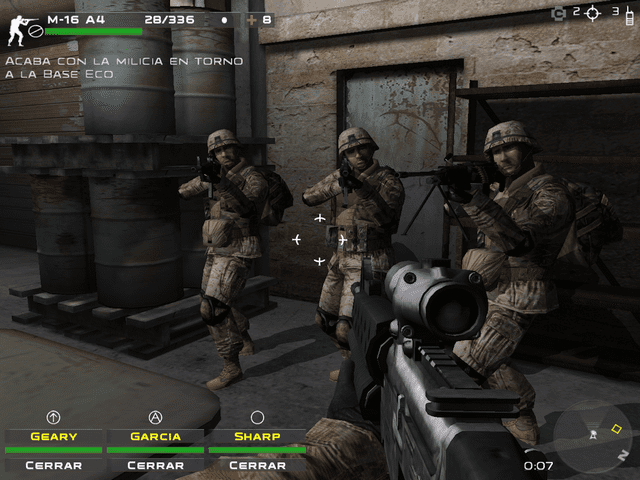
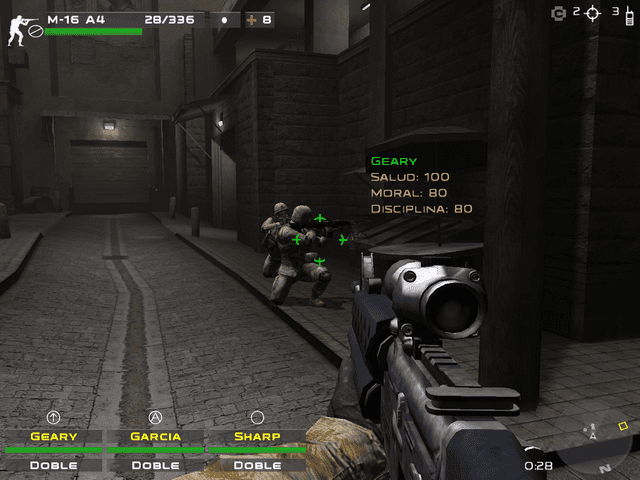
Four Marines pressed against a corner, one watching the windows across the way, another covering the rear, and you deciding whether to go in through the door or call in a mortar first. Close Combat: First to Fight is a first-person shooter, but it is more like leading a small team than running around alone. It was made by Destineer Studios with advice from some forty U.S. Marines fresh from Iraq, and came out in April 2005 for PC, Xbox and Mac.
Beirut, in the near future
The campaign is set in a fictional, destabilized Beirut: insurgent groups have taken up arms, forces from neighboring countries add fuel to the fire, and the United States sends a Marine unit as part of a United Nations peacekeeping mission. You are a corporal in command of a four-man fire team. There are six missions, divided into levels and checkpoints, alternating patrols, hostage rescues and the capture of high-value targets, moving back and forth between open streets and apartment-block interiors where everything is decided within a couple of yards.
How it plays
You do the shooting, but you have a gunner with a SAW light machine gun, his assistant and a rifleman. With the radial menu you tell them where to go, which door or flank to cover and whom to hit with suppressing fire; inside buildings you can order them to stack up beside a door and enter, with or without a grenade, in the style of SWAT 4. Over the radio come snipers, mortars and Cobra helicopters to deal with a machine-gun nest or an armored vehicle without throwing your team away in a frontal assault. A few shots are enough to take anyone down, and if you or two of your men fall, the mission ends.
The name Close Combat is no accident. As in Atomic Games’ veteran strategy series, every soldier has simulated morale and discipline: enemies duck, hesitate or retreat when they take enough fire, and you can exploit that psychology by flanking or covering a position while the rest advance.
Made with Marines
The project began when Atomic Games, which made strategy simulations for the Marine Corps, realized that the Corps needed first-person training. Destineer, a new studio with veterans from Atari, Bungie and Electronic Arts, contributed its 3D engine, and the commission grew into a commercial game. The Marines who advised them, many from the 3rd Battalion, 1st Marines at Camp Pendleton, taught the team the fire team techniques they used in Iraq to maintain 360-degree security at intersections, stairwells and rooms.
Reviews were decent. They liked its four-player co-op, which lets you complete the entire campaign, and the intelligence of your teammates in open ground, although they faulted it because your teammates sometimes got disoriented indoors and the enemy made blunders. With other tactical classics of the era, such as Rainbow Six 3: Raven Shield or Ghost Recon, it shares the idea that thinking before you shoot is the best weapon.
The edition we offer
This is the Spanish edition for Windows. In Downloads there are two routes: a repack ready to install and play (version 1.0/1.02 according to its label) and the images of the original three CDs, for anyone who wants to keep the edition exactly as it was. Both are marked as compatible with Windows XP, 7 and 10. On a current machine, the convenient route is the repack; if you feel like tackling the discs, our tutorial on Windows XP classics on Windows 10 and 11 will give you a hand. In Guides you have the first launch, the controls and how to approach the first firefights, and in Tips & tricks, tactical advice so your team comes back in one piece.
EVERY PIXEL COUNTS
The game in pictures.
Explore the screenshots and open every detail at full size.
GET READY FOR YOUR NEXT GAME
Choose your download.
Format, compatibility and server. All in view.
Download Repack
COMPATIBILITYWindows XP / 7 / 10 ✓ At no cost✓ No sign-up Download www.mediafire.com · New tab MediaFire02 ISODOWNLOAD CD1
COMPATIBILITYWindows XP / 7 / 10 ✓ At no cost✓ No sign-up Download www.mediafire.com · New tab MediaFire03 ISODOWNLOAD CD2
COMPATIBILITYWindows XP / 7 / 10 ✓ At no cost✓ No sign-up Download www.mediafire.com · New tab MediaFire04 ISODOWNLOAD CD3
COMPATIBILITYWindows XP / 7 / 10 ✓ At no cost✓ No sign-up Download www.mediafire.com · New tabClicking opens the CLABA loading area and, in a few seconds, your download. If a link fails, let us know via Contact or in the forum.
THE SECRET SIDE OF THE GAME
Tips, tricks and secrets.
A hint at the right time. A code that changes everything.
Tip · before you start
We have not found verified cheat codes for the PC version, so we are not publishing any. Instead, we gathered tactical tips taken from the manual and from reviews of the time.
Tip · use the radial menu
With the right button you open the radial command menu. In addition, F groups the team or makes it hold position, H toggles between holding and opening fire, and G sends it to a point. With the keys 7, 8 and 9 you select the SAW gunner, his assistant or the rifleman, and with 0, the whole team.
Tip · call for support before attacking
Faced with a machine-gun nest or an armored vehicle, do not charge head-on: call in snipers, mortars or Cobra helicopters over the radio. It is faster and does not cost you men.
Tip · take care of the wounded
If you or two of your Marines fall, the mission is lost. Use the medkit with B and call the medic with M as soon as someone is out of action, before moving on.
Tip · fixed machine guns
When you take down the gunner of a mounted machine gun, another enemy usually runs to take his place. From a covered position and using the sights, you can pick off a whole group this way.
Tip · enter rooms in an orderly way
Group the team beside the door and order them to enter, preferably with a grenade going in first. Avoid sending them blindly through an open door: in the middle of a room they tend to become disoriented and take a while to locate the enemy.
No matches. Try another effect or code.
THE NEXT STEP, CLEARER
Guides to move forward.
From the first installation to that mission that won't give in.
Start here · first launch
- Download the repack from Downloads: it is the Spanish edition, prepared to install and play, and marked for Windows XP, 7 and 10.
- Install it in a short path, such as
C:\Juegos\FirstToFight, outsideProgram Files. - The images of the three CDs are for preserving the edition or using it on Windows XP or a virtual machine: the original discs carry SecuROM protection.
- Adjust resolution and controls in the options before the first mission.
Save games are stored in Documents\Destineer\FirstToFight\Dossiers and the configuration in Documents\Destineer\FirstToFight\global. Make a backup before reinstalling with our tutorial on copying and restoring save games.
Controls · keyboard and mouse
- W, A, S, D: move. Q and E: lean left and right.
- Shift (held): run. Caps Lock: advance slowly. C: crouch. X: go prone.
- Left click: fire or throw a grenade. Right click: radial command menu. Wheel click: sights or scope; turning it adjusts the zoom.
- 1 to 5: primary weapon, grenade launcher, secondary weapon, grenade and smoke grenade. Pressing again changes the fire or throwing mode.
- R: reload. Z: melee strike. B: medkit. M: call the medic. N: night-vision goggles. Space: action. P: pause.
- 7, 8, 9 and 0: select the SAW gunner, assistant, rifleman or the whole team. F: group up or hold position. H: hold or open fire. G: go to a point.
This is the default layout from the original manual; all keys can be changed in the options.
First steps · how to approach a firefight
- Advance with the team behind you: in open ground, your Marines split up the angles and watch the rear on their own.
- When you see the enemy, look for cover (a car, some barrels, a corner) and order the team to take position behind it.
- Pin the enemy down with the SAW’s suppressing fire while you look for a better angle; the pressure lowers their morale and makes them duck.
- Lean out with Q or E and aim through the sights instead of exposing your whole body.
- Against tough defenses, call for support over the radio.
- Indoors, go room by room and make sure no one is left behind your back.
The complete campaign can be played in co-op with up to four people over a local network.
Technical notes
It called for Windows ME, 2000 or XP, a 1.3 GHz processor, 256 MB of RAM, a 32 MB card at the level of a GeForce2 MX or a Radeon 7500, DirectX 9.0c and about 2.8 GB of disk space.
- It supports widescreen resolutions, but has no windowed mode.
- If aiming feels sluggish with an NVIDIA graphics card, PCGamingWiki recommends setting vertical sync to “Fast” in the NVIDIA control panel.
- Internet multiplayer depended on GameSpy, which shut down years ago; what remains is the local network and direct IP connection, also for co-op.
Sources
- Internet Archive · PC manual (default controls): key layout and functions.
- GameSpot · interview with Peter Tamte (2004): origin with Atomic Games and the Marines, Destineer’s team, Ready-Team-Fire-Assist, morale and discipline.
- GameSpot · PC review (2005): plot, six missions, commands, fire support, defeat condition, multiplayer and AI flaws.
- Marine Corps Times · Wii combat game features Marines (2009): the forty Marines, the 3rd Battalion, 1st Marines and the Wii version.
- MobyGames · releases and specifications: dates, publishers (2K Games, MacSoft) and requirements.
- PCGamingWiki: SecuROM, save and configuration paths, video, GameSpy and requirements.
Something wrong?
Give us a hint.
A broken link, a detail to correct or a game that won't start. Your report helps keep this game page up to date.
Get in touchReport an issue with this game Discuss it in the forumCLABA ARCADE ROOM
541 classics
without installing anything.
Don't feel like installing? These play right in your browser.
Enter the roomTHE CLABA APP1.0 RC 1
Take the archive
with you.

Game pages, online play and your shelf on Android. Free, no sign-up.
ARCHIVE SECRETS
Did you know?
It started as training. Atomic Games, creator of the original Close Combat series, detected that the Marine Corps needed first-person shooter training; Destineer showed them its 3D engine and the project ended up becoming a commercial game.
Forty advisors in uniform. The Marines made available to the studio some forty soldiers with combat experience, many from the 3rd Battalion, 1st Marines, based at Camp Pendleton (California).
Ready, Team, Fire, Assist. Destineer president Peter Tamte said that the most valuable thing the Marines taught them was those fire team procedures, the same ones they used in Iraq to cover every angle.
A studio of veterans. Destineer was then a newly created studio, with people from Atari, Bungie and Electronic Arts, and had spent two years building its own graphics engine.
It reappeared on Wii. In late 2009 Destineer adapted it to the Wii as “Marines: Modern Urban Combat”, with the same story in Beirut and compatible with the Wii Zapper accessory.