Techland · Shooter
Chrome
Futuristic shooter by Techland (2003): mercenary Bolt Logan between corporations and settlers, 14 missions, vehicles, implants and three endings.
Shooter by Techland (2003) for PC (in Spanish and English) and Amiga. Available to download.
Choose your version 2 platforms
No computer handy? Play one of the 251 classics online right now
4.7 6 votes
THE CLABA ARCHIVE
Inside the game.
Its history, its ideas and the reasons to come back.
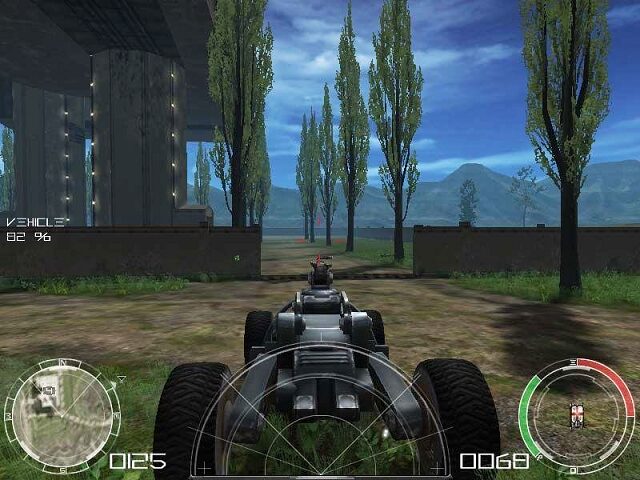
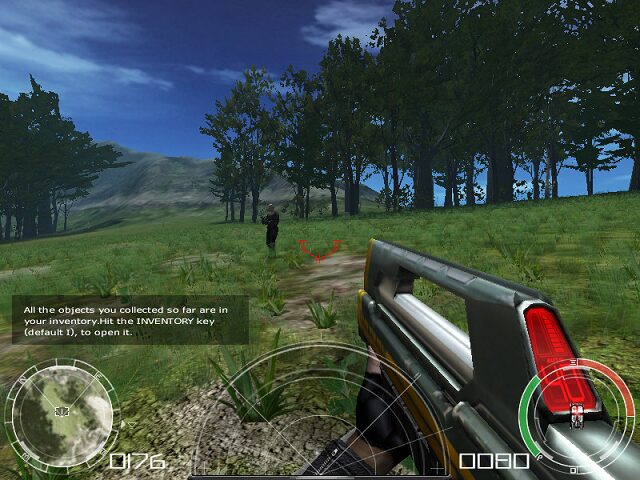
Meadows swaying in the wind, a mercenary with implants and a resource, chrome, that three factions fight over. Chrome is a 2003 first-person shooter and the first action game developed in Poland to get a top-tier international release. It was made by Techland, the Polish studio that would later sign Call of Juarez, and published by Strategy First in North America and Gathering in Europe. Don’t confuse it with the Amiga namesake: that Chrome was a game hidden inside Switchblade 2; this is Bolt Logan’s.
Bolt Logan, mercenary without a flag
It is the late 22nd century. Logan, a former special forces member, freelances alongside his partner Ron «Pointer» Hertz. On a routine mission on the planet Zorg, Pointer betrays him; a year later, Logan and his new partner Carrie take jobs from the mining company SPACON, and soon find themselves in a war between corporations (Coretech and Zetrox) and settlers over the chrome-rich lands of Terbon. Toward the end you pick a side among Zetrox, Coretech or the settlers, and each choice leads to a different final mission and outcome: allying with Zetrox, with Coretech or defending the settlers.
How it plays
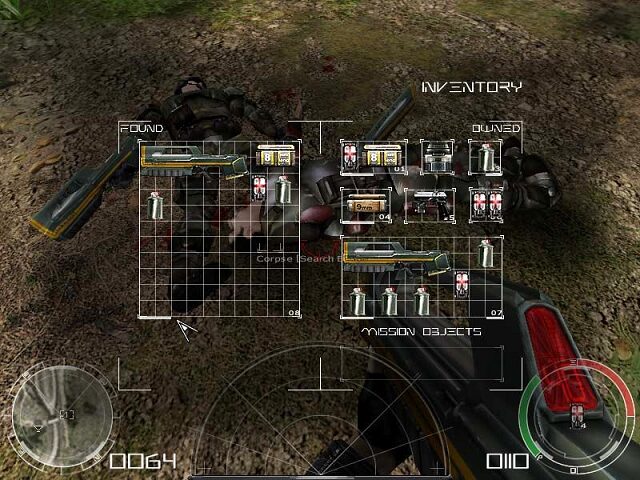
There are 14 levels of objective-based missions: stealing documents, rescuing hostages, downloading data from an enemy computer, demolishing buildings or assassinating a target. IGN estimated about twelve hours on normal difficulty. You go from an open-terrain shooter, halfway between Unreal and Battlefield 1942, to piloting vehicles (armored cars, air transports and humanoid robots), operating turrets or playing sniper. Aiming well requires steadying yourself with the right mouse button, which slows you down. The inventory is a grid where you drag items, and the implants (more speed, better vision, steadier aim or less damage) overload your nervous system if you abuse them, so they are used in bursts. Multiplayer offers six modes, from Deathmatch to Capture the Flag.
Between applause and yawns
Critics landed somewhere in the middle. Eurogamer, which compared it to other well-known shooters, praised its impressive landscapes but found it lackluster in gameplay and with very long loading times. GameSpot saw a good game weighed down by weak artificial intelligence and little replayability. Metacritic left it at «mixed or average reviews». Even so, it gave rise to a small series: an expanded edition in 2004, Advanced Battlegrounds (the «Gold Edition» in Europe), and the prequel Chrome SpecForce in 2005, both standalone.
The edition we offer
We offer a bilingual English and Spanish edition, in two formats: a repack ready to play and the image of the original CDs, both in Downloads. In Guides you have how to install without errors, patches and widescreen, and in Tips & tricks, the game’s cheat console. If you are looking for more shooters with character, try Painkiller or Far Cry. To run it on recent systems, see our tutorial on Windows XP classics on Windows 10 and 11.
ONE GAME, 2 PLATFORMS
Versions.
2 platforms
Pick a platform: the screenshots, downloads and online game on this page switch with it.
- Year
- 2003
- Developer
- Techland
- Downloads
- 2
- Screenshots
- 3
The PC version is the one this page covers: the information, review and main screenshots are from this platform.

- Port by
- Gremlin Graphics Software
- Downloads
- 1
- Screenshots
- 1
Chrome is a secret platform game hidden inside Switchblade II: you access it by typing CHROME on the title screen. This edition expands the small extra into its full twenty levels and keeps the Amiga's platform style. It was also distributed as a standalone game on disk 35 of the magazine CU Amiga, published in June 1992; the sources consulted do not assign the game a year of its own.
EVERY PIXEL COUNTS
The game in pictures.
Explore the screenshots and open every detail at full size.
GET READY FOR YOUR NEXT GAME
Choose your download.
Format, compatibility and server. All in view.
Version
SELECTED VERSIONPC2 archivos
Clicking opens the CLABA loading area and, in a few seconds, your download. If a link fails, let us know via Contact or in the forum.
HIT PLAY
The game in motion.
Trailers and videos to see it in action.
-
Amiga · Gameplay
Chrome gameplay on Amiga.
THE SECRET SIDE OF THE GAME
Tips, tricks and secrets.
A hint at the right time. A code that changes everything.
How to enter them
During the game open the console with the grave accent or tilde key (` or ~) and type the code exactly as it appears, with upper and lower case, the period and the parentheses. The cheats are listed on CheatBook and Cheat Happens; we have not tested them on this edition.
Health and ammo
Cheat.GodMode();: god mode. Cheat.FullHealth();: full health. Cheat.AddAmmo();: extra ammo. Ammo types have their own code: Cheat.GiveAmmo9mmShort();, Cheat.GiveAmmo12mmShort();, Cheat.GiveAmmo14mmLong();, Cheat.GiveAmmo8mmLong();, Cheat.GiveAmmoRockets();, Cheat.GiveAmmoEnergy(); and Cheat.GiveAmmoShotgun();.
Weapons and implants
Cheat.TuneWeapons();: upgrades weapons. Cheat.TuneImplants();: upgrades implants. Cheat.ClearOverload();: removes implant overload. Specific weapons: Cheat.GiveOCICrom(); (.50 sniper rifle), Cheat.GiveMatsonACC(); (4x sniper rifle) and Cheat.GiveNoNFrager(); (shotgun).
Skip a mission
Cheat.NextMission(); takes you to the next mission. Use it if you get stuck, but save first.
Tip · learn to steady your aim
Hold down the right mouse button to aim precisely. According to IGN, shooting while running is almost impossible and you cannot shoot while leaning around a corner: that lean is for scouting.
Tip · implants in bursts
Implants boost your speed, aim or resilience, but they overload the nervous system; use them at key moments and wait for them to cool down, according to Eurogamer.
No matches. Try another effect or code.
THE NEXT STEP, CLEARER
Guides to move forward.
From the first installation to that mission that won't give in.
Start here · first launch on a current PC
- Download from Downloads the repack (ready to play) or the CD image.
- Install it in a short path outside
Program Files, for exampleC:\Juegos\Chrome. - If you install from the CD images, mount only disc 1; when it finishes, unmount it and mount disc 2 on the same drive. With two drives or both discs at once you get the error 1309 that PCGamingWiki cites.
- If you use the repack, follow the instructions it includes.
- General help in our tutorial on playing Windows XP classics on Windows 10 and 11.
Controls · the basics
- Remappable keys in the options menu; there is no controller support.
- Right mouse button: steady your aim.
- There is an option to invert the mouse’s vertical axis and adjust its sensitivity.
- You can assign a key to drop the weapon; it is useful because of a known bug (see Technical notes).
First steps · how to survive
- Reorganize the inventory before each mission: each accessory takes up space and limits ammo and medkits.
- Pick up medkits, weapons and ammo from downed enemies.
- Plan your shots: when aiming you move slower and are exposed.
- Try the vehicles and turrets when they are available; some missions can be solved in several ways.
- Save often, although there are only 4 quicksave slots and 10 manual ones.
Technical notes
Requirements according to PCGamingWiki: Windows 98, ME, 2000 or XP, an 800 MHz Pentium III, 256 MB of RAM, 2 GB of disk space and a card with 32 MB (GeForce 2 MX or Radeon 7000), with DirectX 8.1.
Patches. Install patch 1.1.3.0 v2 and then the 1.1.3.0 to 1.2.0.0 one. The Advanced Battlegrounds edition comes already patched.
Widescreen. There is an unofficial community patch that adds widescreen resolutions, field of view and HUD, and disables mouse acceleration.
Frame rate. Limit it to 60 per second: above that, movement can slide.
Known bugs. If the ambient sound (rain) cuts out, save and reload; if you can no longer shoot or jump, drop the weapon and pick it up again. Save games are in the game’s Save folder, with several files per save.
Sources
- PCGamingWiki: requirements, patches, saves, bugs and input.
- CheatBook and Cheat Happens: console and codes.
- IGN review: 14 levels, hours, aiming, vehicles and final choice.
- Eurogamer review: inventory, implants, environments and loading times.
- GameSpot review: plot, weapons, AI.
- Wikipedia: plot, endings, expansions and reception.
Something wrong?
Give us a hint.
A broken link, a detail to correct or a game that won't start. Your report helps keep this game page up to date.
Get in touchReport an issue with this game Discuss it in the forumCLABA ARCADE ROOM
251 classics
without installing anything.
Don't feel like installing? These play right in your browser.
Enter the roomTHE CLABA APP1.0 RC 1
Take the archive
with you.

Game pages, online play and your shelf on Android. Free, no sign-up.
ARCHIVE SECRETS
Did you know?
Polish pioneer. Chrome is considered the first action game developed in Poland to arrive with major international distribution, according to Wikipedia.
Three endings. Before the last missions you decide whether to help Zetrox, Coretech or the settlers, and each choice leads to a different final mission and outcome.
A console with functions. The game’s cheat commands are typed in code syntax, with parentheses and a semicolon, like Cheat.GodMode();, and are case-sensitive.
A prequel and a phantom sequel. Chrome SpecForce (2005) tells what Logan and Pointer were like when they were still soldiers; in March 2006 Techland announced a sequel with the latest version of the engine, but it was soon reported to be «on hold».
One name, two games. On the Amiga there is a much earlier «Chrome», a game hidden inside Switchblade 2 that is activated by typing CHROME on the title screen; it has no relation to this one.