Konami · Sports
Pro Evolution Soccer 6
The 2006 PC edition of PES: Master League, International Challenge, quick restarts and PES-Shop. Spanish repack, original DVD and a PSP version to play online.
Sports game by Konami (2006) for PC, in Spanish and other languages. Playable in your browser (PSP) or downloadable.
4.5 23 votes
THE CLABA ARCHIVE
Inside the game.
Its history, its ideas and the reasons to come back.
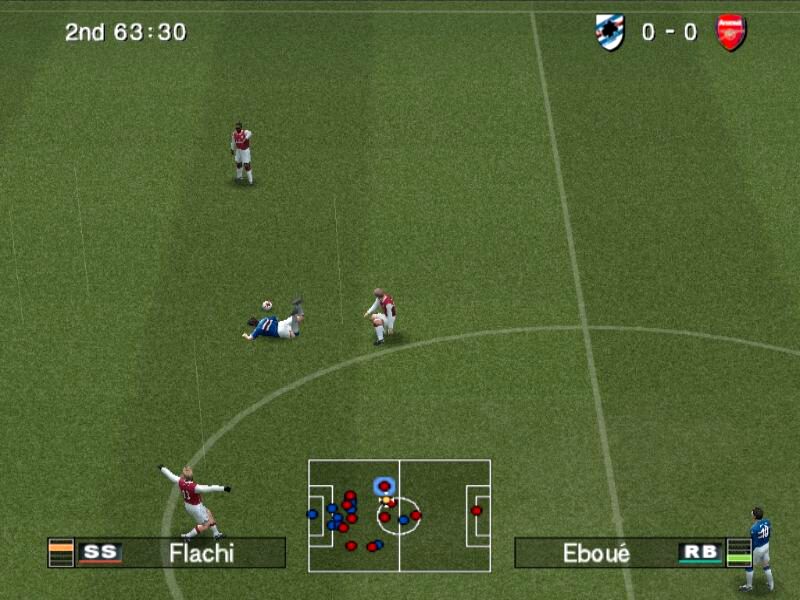

Adriano in an Inter shirt, Cesc Fàbregas in the national-team kit and, underneath, a huge 6. For a lot of people, that cover marked their last great Pro: Pro Evolution Soccer 6, the game Konami closed out 2006 with, which reached European stores in late October on PlayStation 2, Xbox 360 and PC. Konami announced three million units shipped in Europe over the launch weekend.
Passing soccer, not running soccer
It was made by Konami’s Tokyo team under Shingo “Seabass” Takatsuka, and it shows in every move. Here the winner is not whoever runs the most but whoever moves the ball best: the short pass rules, pressure is felt all over the field and teammates make intelligent runs. Shots come off with a welcome punch and the ball does not stick to a player’s foot, so a rebound or a long first touch can change a match.
The big novelty on the field was the quick restart after a foul, which catches the defense while it is still getting into position. The referee also felt more sensible, with fewer absurd fouls and cards that better matched the severity of the tackle.
Modes, licenses and voices
The Master League is still the heart of the game: you start with a modest team, win matches, get paid and sign players until you are fighting for Europe. Two new additions join it: the International Challenge, which takes a national team through the qualifying phase and the final tournament, and the random selection match, in which you pick a few clubs or a league and the game puts the squad together at random. Every match earns 50 PES points, the currency of the PES-Shop, where you unlock hidden players, classic national teams, stadiums and the odd ridiculous costume.
On licenses, the Spanish league arrived with the LFP license, Ligue 1 made its debut and, from the Premier League, only Manchester United and Arsenal showed their real crests and kits; the rest went by made-up names, as always in the series. The Spanish commentary was by Juan Carlos Rivero and Iñaki Cano, and the Spanish press was not exactly kind to them.
The PC version has the same modes as the PlayStation 2 one. The Xbox 360 version, on the other hand, came without the International Challenge, without the random match and with a cut-down editor, something critics held against it. Years later, FourFourTwo ranked it the second-best soccer game of all time, behind only Sensible World of Soccer.
The edition we offer
This game page covers the PC version. In Downloads you have two options: a Spanish-language repack, recommended and ready for Windows XP, 7 and 10, and the original DVD image, multilingual, for anyone who wants to keep the disc exactly as it was.
In addition, in Play online you can try it without installing anything, although what runs there is the PSP version, the European one, released in December 2006. It is a different port: it keeps the Master League, the PES-Shop and the editor, but it has no commentary (just a shout when you score), no International Challenge and no random match, and every match is played in the same stadium. In return it introduces a “Wide” camera designed for the handheld’s widescreen display.
In Guides we explain how to get started with each version, and in Tips & tricks you will find what is worth buying in the PES-Shop. If you want more, the series continues with Pro Evolution Soccer 2008, and its eternal rival is FIFA 09. And if the dugout is more your thing, try PC Fútbol 2000.
EVERY PIXEL COUNTS
The game in pictures.
Explore the screenshots and open every detail at full size.
GET READY FOR YOUR NEXT GAME
Choose your download.
Format, compatibility and server. All in view.
Download Repack
COMPATIBILITYWindows XP / 7 / 10 ✓ At no cost✓ No sign-up Download www.mediafire.com · New tab MediaFire02 ISODOWNLOAD DVD
COMPATIBILITYWindows XP / 7 / 10 ✓ At no cost✓ No sign-up Download www.mediafire.com · New tabClicking opens the CLABA loading area and, in a few seconds, your download. If a link fails, let us know via Contact or in the forum.
Your game starts here
Play in your browser.
Pick, press and go back to the classics without leaving the game page.
RetrogamingRight in your browserNo installation
PSPIn your browser
Pro Evolution Soccer 6
Online play uses the PSP version; the game page and main download remain the PC one.
- 1.2 GB · downloads on click
- Save states in this browser
- Controller, keyboard or touch
Controls
Click the game to use the keyboardOn mobile, play with the on-screen controllerUse the game menu, with the gamepad icon, to view and change the buttons.
- Full screen
Use the button on the bar. Esc returns to the game page; “Exit” closes the game.
- Saves
Save State, in the game's menu, keeps the exact moment. Load brings it back when you return.
- Mobile and tablet
Press Controls during the game to show buttons and keyboard. Gamepad support depends on the browser.
Saves live in this browser and device. Clearing the site data deletes them too.
THE SECRET SIDE OF THE GAME
Tips, tricks and secrets.
A hint at the right time. A code that changes everything.
How it works: PES points and the PES-Shop
PES 6 for PC has no cheat codes: whatever there is gets unlocked with PES points. You earn 50 at the end of every match, whatever the result, and a larger amount the first time you win each competition (the Master League, the leagues, the cups or the International Challenge). They are spent in the PES-Shop, inside the options menu.
Hidden players and classic national teams
The PES-Shop has 160 hidden players, at 150 points each, which you can then put into any club or national team from Edit mode. It also sells seven classic national teams (Italy, England, the Netherlands, Germany, France, Argentina and Brazil), at 1,000 points each. If you want to see them in the Master League, buy them before starting the campaign and turn on the hidden or classic players option.
A Master League made to measure
Three purchases change the Master League. ML composition (500 points) lets you choose the teams and start straight in the top division. ML starting points (5,000) lets you set the initial budget between 1,500 and 50,000. And game speed (2,000) adds a double-speed option to the pause menu, handy for getting through routine matches.
Cameras, stadiums and extras
For 500 points each there are two new cameras: the very high bird’s-eye view and the player camera, third-person and for one player only. Each of the three extra stadiums for friendlies costs 2,000 points. For fewer points you unlock the colored ball trail in replays or the music and the stadium tour in the PES Museum.
Costumes
The three costumes cost 5,000 points each and dress the whole team the same way. You pick them on the kit selection screen with the start button, the one that works as pause. If both teams wear the same one, the match turns into chaos.
Tip · the quick restart after a foul
It is the big novelty of this installment: taking the set piece right away, before the defense gets into position. The timing is hard to catch and, if you are late, the game falls back to the usual restart. Practice it in training mode before using it in the Master League.
No matches. Try another effect or code.
THE NEXT STEP, CLEARER
Guides to move forward.
From the first installation to that mission that won't give in.
Start here · first launch
On your PC (Windows 10 and 11):
- Download the Spanish-language repack from Downloads: it is the recommended option and it is ready for Windows XP, 7 and 10.
- Install it in a short path, outside
Program Files, for exampleC:\Juegos\PES6. - Before playing, open
Settings.exe, in the game folder. The game has no graphics options of its own: resolution, windowed mode and controls are chosen from there. - Your options and save data are stored in
Documents\KONAMI\Pro Evolution Soccer 6\save. Back that folder up from time to time; our tutorial on copying and restoring save games explains how.
The original DVD image is for anyone who wants to keep the disc exactly as it was. It carries SecuROM 7 copy protection and has to be mounted as a virtual drive to install. If a modern machine gives you trouble, our tutorial on Windows XP classics on Windows 10 and 11 helps with compatibility.
In the browser: the Play online tab loads the PSP version. Press Play now: about 1.2 GB is downloaded, and only then. Choose a language (Spanish is available), get past the startup notices and you will be at the main menu. It works best in Chromium-based browsers, such as Chrome or Edge. Saves stay in that browser and on that device.
Controls
On PC, the game is meant to be played with a gamepad: guides from the time recommended an Xbox 360 pad or a DualShock 2 with an adapter, because the keyboard falls short for all the moves. Keys and buttons are changed in Settings.exe. With a generic gamepad, the factory configuration is this:
- Button 1: long pass and cross.
- Button 2: short pass.
- Button 3: shot.
- Button 4: through pass.
- Button 5: player switch.
- Button 6: sprint.
- Button 7: strategy (attack or defense).
- Button 8: special controls.
- Button 9: help.
In the browser, click on the game so the keyboard responds. The player menu, with the gamepad icon, shows which key matches each PSP button and lets you change them. On mobile, tap Controls to bring up the on-screen gamepad.
First steps
- Start with a friendly using a strong team and low difficulty. The first thing is to master the short pass, the through pass and player switching.
- Do not keep sprint held down all the time: the player loses control of the ball and tires sooner. Run when there is space.
- Move the ball until a gap opens. One-twos and changes of direction do more damage than a run down the wing.
- Defend smartly: press with one player and close down the lanes with the rest. Desperate tackles end in a foul or a card.
- In the Master League, play the first matches with what you have and save up. The PES points from each match also count toward the PES-Shop: see the tips tab.
- Take a look at the training menu: that is where the dribbling moves and the set pieces are, including the quick restart after a foul.
Technical notes
Original requirements: Windows 2000 or XP, Pentium III at 800 MHz, 256 MB of RAM, GeForce 3 or Radeon 8500, DirectX 9.0c and 1.5 GB of available space. A Pentium 4 at 1.4 GHz, 512 MB and a GeForce 4 Ti or Radeon 9600 were recommended.
- All graphics configuration is in
Settings.exe. Full-screen mode is actually a borderless window, and the game runs at 60 frames per second at most. - On Windows 10, vertical sync may not work. According to PCGamingWiki, it is fixed with dgVoodoo 2 (copying its
D3D8.DLLand its control panel into the game folder). - The official online server shut down in 2008. Today only community-run servers remain.
- The PSP version in the browser is the European one (UMD ULES00476). It is a real PSP game, with its limits: no commentary, a single stadium and none of the modes the handheld lacked.
Sources
- GamesIndustry.biz · Konami press release (2006): European launch, three million copies and licenses, including the LFP’s.
- FourFourTwo · the best editions of PES and FIFA: Seabass, Premier League licenses, quick restarts and second-best soccer game.
- 3DJuegos · Xbox 360 review (in Spanish) and VidaExtra (2006) (in Spanish): Spanish-language commentators, quick restart, referee and Xbox 360 cutbacks.
- 3DJuegos · PSP review and Eurogamer · PSP review: missing modes, Master League, single stadium, wide camera and lack of commentary.
- Guide des Pros de PES 6, a French strategy guide (Internet Archive): PES points, the PES-Shop with prices, recommended gamepad on PC and Master League options.
- PC demo readme (download.fi): requirements and default gamepad buttons.
- PCGamingWiki: Settings.exe, save paths, SecuROM 7, languages, vsync on Windows 10 and the server shutdown.
Something wrong?
Give us a hint.
A broken link, a detail to correct or a game that won't start. Your report helps keep this game page up to date.
Get in touchReport an issue with this game Discuss it in the forumCLABA ARCADE ROOM
This one and 540 more
play here.
When you finish your game, the room has other machines switched on.
Enter the roomTHE CLABA APP1.0 RC 1
Take the archive
with you.

Game pages, online play and your shelf on Android. Free, no sign-up.
ARCHIVE SECRETS
Did you know?
A 19-year-old on the cover. The Spanish edition paired Adriano, in an Inter shirt, with Cesc Fàbregas, in the national-team kit. Fàbregas, then at Arsenal, was 19 when the game reached stores.
Three million in a weekend. Konami announced it had shipped more than three million copies to European stores over its launch weekend, counting PlayStation 2, Xbox 360 and PC.
Silver medal in history. In 2016, FourFourTwo magazine picked it as the second-best soccer game ever made, behind only Sensible World of Soccer.
The last numbered one. It was the last numbered entry in the series: the next one was already called Pro Evolution Soccer 2008.
Dog heads and costumes. The PES-Shop sold eleven dog heads for your players and three costumes, including an ostrich and a penguin. The costumes cost 5,000 points each.