Dinamic Multimedia · Sports
PC Soccer Colección
The first six PC Fútbol versions (1.0 to 4.5) from Dinamic Multimedia in a single menu: manager, promanager and the league of the nineties.
Sports game by Dinamic Multimedia for PC, in Spanish. Available to download.
4.0 21 votes
THE CLABA ARCHIVE
Inside the game.
Its history, its ideas and the reasons to come back.
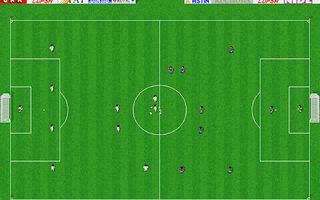
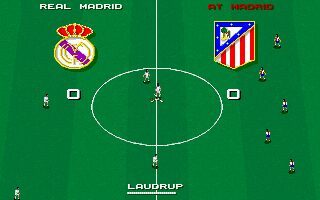
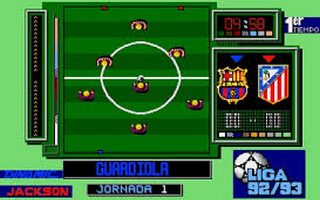
Anyone who grew up in Spain with a PC in the nineties knows what it was like to wait for the newsstand: a cheap box, a floppy disk or a CD with Michael Robinson’s face on it and, behind it, a whole weekend of signing, selling and moving up the divisions with your hometown team. PC Fútbol Colección brings together in a single menu the first six versions of that Dinamic Multimedia series: 1.0, 2.0, 3.0, 3.5, 4.0 and 4.5.
From Michel Fútbol Máster to the newsstand
Dinamic was founded in 1984 by the brothers Víctor, Nacho and Pablo Ruiz. After Michel Fútbol Máster and the Simulador Profesional de Fútbol (1992), a deal with José Ignacio Gómez-Centurión of Hobby Press gave rise to Dinamic Multimedia. What came next was a very Spanish formula: modestly priced games, sold at newsstands, with an entire league, its squads and its results packed into the box.
How it played
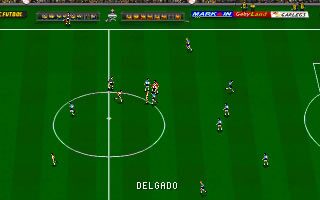
The heart of the series is management. In manager mode you choose a club from among the available leagues and handle the accounts, the squad, the line-ups, the tactics and even the stadium. In promanager you start with no team, with offers from the lowest division, and gradually earn the board’s trust and the reputation needed for bigger clubs to call you. From 2.0 on, the series also added a playable arcade-style match section, although the simulation was always its weakest point compared with the database. Every footballer had his ratings, such as speed, stamina, aggression and quality, and almost everything depended on them.
A series that belonged to everyone
Robinson, a former player for Brighton, Liverpool and Osasuna and a commentator on Canal+, was the face of the game from autumn 1993, that is, from 2.0, and wrote many of the analyses. His signing opened the series up to the general public. Over the years came version 5.0 and the 2000 edition, but these first, simpler installments have their charm: few screens, plenty of text and a 1995-96 season league frozen in time.
The edition we offer
In Downloads you will find a Spanish-language repack, marked as compatible with Windows XP and later, that brings the six versions together under a menu already configured so you can play without installing each one separately. If you prefer to go in order, each has its own page: the Simulador Profesional de Fútbol (1.0), PC Fútbol 2.0, PC Fútbol 3.0 / 3.5 and PC Fútbol 4.0 / 4.5.
In Guides you will find how to launch it on a current PC and some guidelines for starting your career on the right foot; in Tips & tricks, manager advice. If you enjoyed sports management, also try PC Básket 4.0.
EVERY PIXEL COUNTS
The game in pictures.
Explore the screenshots and open every detail at full size.
GET READY FOR YOUR NEXT GAME
Choose your download.
Format, compatibility and server. All in view.
Clicking opens the CLABA loading area and, in a few seconds, your download. If a link fails, let us know via Contact or in the forum.
THE SECRET SIDE OF THE GAME
Tips, tricks and secrets.
A hint at the right time. A code that changes everything.
Tip · how to get started
This collection has no cheat codes that we can confirm with reliable sources, so instead of making them up we leave you management advice. First choose the version in the collection menu and, within it, manager or promanager mode.
Tip · start as a promanager
If you want to live the full career, promanager leaves you with no team and with offers from the lowest division. Meeting the goals set by the board raises your reputation and opens the door to bigger clubs.
Tip · look at the ratings
Every player has ratings for speed, stamina, aggression and quality. Before signing someone, compare those four numbers with your squad’s instead of relying on the name alone.
Tip · watch the accounts
In manager mode you run the club’s finances. An expensive signing is not worth it if the budget ends up in the red; split the spending between the squad and the stadium.
Tip · try other versions
The six versions share the idea, but not the menus or the squads. If one feels slow, open another: each edition captures a different season.
No matches. Try another effect or code.
THE NEXT STEP, CLEARER
Guides to move forward.
From the first installation to that mission that won't give in.
Start here · first launch on a current PC
- Download the repack from Downloads. It is in Spanish and marked as compatible with Windows XP and later.
- Extract it to a short path, for example
C:\Juegos\PCFutbol, outsideProgram Files, to avoid permission problems when saving. - Open the collection menu and choose the version you want to play.
- If one does not start, try Windows compatibility mode; it is explained step by step in this tutorial (in Spanish).
Which version to choose
- 1.0 (1992): the Simulador Profesional de Fútbol, the origin of it all.
- 2.0 (1993): Michael Robinson arrives as the face of the game.
- 3.0 / 3.5 (1994) and 4.0 / 4.5 (1995): expansions of leagues and data; 4.0 introduced the Argentine league.
- For a jump in quality, look at 5.0 or 2000, which have their own pages.
First steps · a manager's career
- Start with a modest club: the pressure is lower and the goals more realistic.
- Review the squad and note who is surplus and which position is short.
- Set a line-up and a tactic before the first matchday and do not change them every week.
- Check the accounts before every signing.
- If you play as a promanager, focus on the board’s goals: your move up to a bigger club depends on them.
Technical notes
These are games from 1992 to 1996, designed for small screens and old systems. The data are those of each version’s season: the squads are not updated. The monthly updates through Dinamic’s servers, which the series offered, no longer exist. To save your progress and move it from one PC to another, see this save game tutorial (in Spanish); if any version asks for a DOS environment, the DOSBox tutorial (in Spanish) explains the basics.
Sources
- El Independiente (in Spanish): origins of Dinamic, Hobby Press, Robinson in 1993, modes and sales of PC Fútbol 7.
- 421.news: history of Dinamic Multimedia, the Argentine league in 4.0, the founders’ departure in 1999.
- Vida Extra: overview of the series’ versions.
- Wikipedia (es): only to orient the chronology and the team.
Something wrong?
Give us a hint.
A broken link, a detail to correct or a game that won't start. Your report helps keep this game page up to date.
Get in touchReport an issue with this game Discuss it in the forumCLABA ARCADE ROOM
251 classics
without installing anything.
Don't feel like installing? These play right in your browser.
Enter the roomTHE CLABA APP1.0 RC 1
Take the archive
with you.

Game pages, online play and your shelf on Android. Free, no sign-up.
ARCHIVE SECRETS
Did you know?
First came Michel. Dinamic, founded in 1984 by the Ruiz brothers, had earlier made Michel Fútbol Máster; the Simulador Profesional de Fútbol, the origin of PC Fútbol, blended an English Football Manager with Carlos Abril’s databases.
The face of the series. Michael Robinson appears as the image of PC Fútbol from autumn 1993. According to Pablo Ruiz, signing him was key to reaching the general public.
From the newsstand to everywhere. The series was sold at newsstands and at a low price. PC Fútbol 7 reached 360,000 copies in Spain, according to El Independiente.
A new league every year. Version 4.0 included a playable Argentine league for the first time, in November 1995; the series ended up exporting its engine to Italy with PC Calcio.
The creators left. In 1999 Carlos Abril and the Ruiz brothers left Dinamic and founded FX Interactive; Dinamic Multimedia went bankrupt in 2001.