EA Canada · Sports
FIFA 09
FIFA 09 for PC, with its own engine for 2008 computers, mouse control, 61 tournaments and Manager mode. Spanish commentary by Lama and González. Multilingual repack and DVD.
Sports game by EA Canada (2008) for PC, in Spanish and other languages. Available to download.
4.1 46 votes
THE CLABA ARCHIVE
Inside the game.
Its history, its ideas and the reasons to come back.
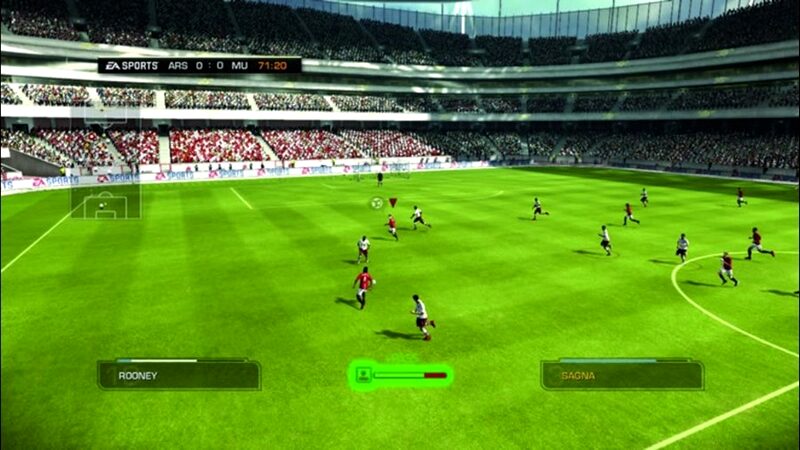
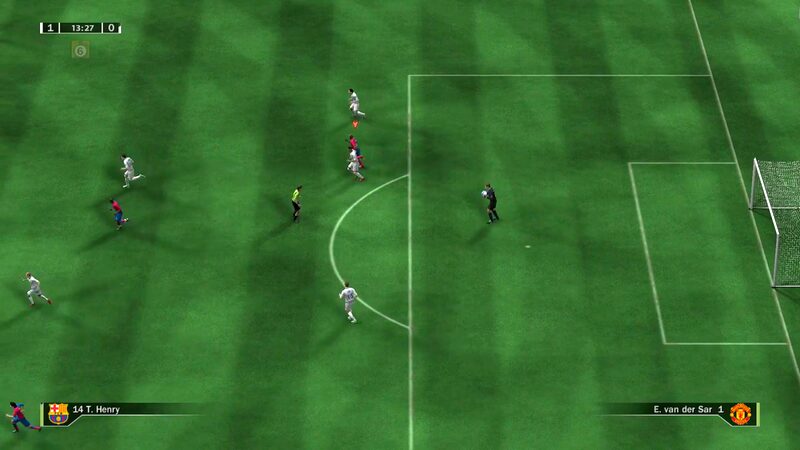
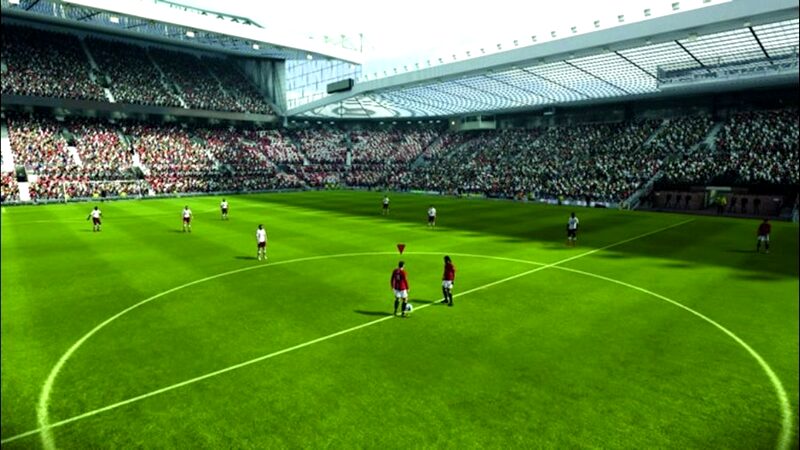
In the fall of 2008 there wasn't just one FIFA 09, but several. Electronic Arts prepared a different version for each machine: the PlayStation 3 and Xbox 360 one boasted new physics, the Wii one put Miis on the pitch, and the PC one, the one you have here, went its own way. It had its own graphics engine, controls designed for the mouse and a Tournament mode with 61 competitions.
A FIFA made to measure for the 2008 PC
The question back then was why the PC wasn't getting the game from the new consoles. EA explained at the time that most computers didn't have the processing power to run that architecture: had the PC version been identical to the Xbox 360 and PlayStation 3 ones, it would only have run on 1-3% of the machines on the market. The solution was a separate FIFA, with shaders and player models redone for the graphics cards of the day, 3D grass and hair that at last didn't look painted on.
Beneath that facelift, the game was a lot like the previous year's. Gameswelt made it clear in its review: the footballers looked better than ever, but the way of playing hardly changed. The novelty most noticeable on the pitch was physical: height and weight count for more in collisions, and shielding the ball with your body works better.
Mouse, tournaments and the Liga BBVA
The most distinctive thing about this version is the control. Besides keyboard and pad, there is a mouse and keyboard scheme: you click where you want the pass to go, send a teammate on a run with the same logic and draw your dribbles with the mouse. In all there are 32 skill moves, four of them new: scoop turn, rainbow flick, heel-to-heel and ball roll.
Among the modes, the Tournament mode stands out: 61 competitions, 42 of them officially licensed, and the option to create your own. The Manager mode adds preseason friendlies and tailor-made formations for each opponent, and there are challenges with tough scenarios that give rewards. In all, more than 500 teams and 30 leagues with their kits and crests, from the Liga BBVA and the Liga Adelante to the Premier League or the Bundesliga. In Spanish, the commentary is by Manolo Lama and Paco González, although the Spanish press missed new lines.
What stayed on the consoles
FIFA 09 is also the game where Ultimate Team was born, the collectible-card mode that would end up as the heart of the series. It arrived in March 2009 as downloadable content, but only for PlayStation 3 and Xbox 360. In exchange, the PC got its widgets in the menus, with standings, Interactive Leagues and real-world football news.
The edition we offer
This is the 2008 PC version, multilingual and with Spanish among its languages. In Downloads there are two options: a repack set up for Windows XP, 7 and 10, which is the recommended route, and the image of the original DVD, for anyone who wants to preserve the disc. That DVD used SecuROM with online activation, so on a current machine the repack is the simple choice. The official online service has shut down, but matches on the same PC and over a local network still work. If something won't cooperate, our tutorial on Windows XP classics on Windows 10 and 11 will help.
In Guides you have the first launch and the fixes for Windows 10; in Tips & tricks, advice for getting the most out of the mouse and the Manager mode. Its eternal rival is in Pro Evolution Soccer 6 and Pro Evolution Soccer 2008, and if you prefer the dugout, in PC Fútbol 2000.
EVERY PIXEL COUNTS
The game in pictures.
Explore the screenshots and open every detail at full size.
GET READY FOR YOUR NEXT GAME
Choose your download.
Format, compatibility and server. All in view.
Download Repack
COMPATIBILITYWindows XP / 7 / 10 ✓ At no cost✓ No sign-up Download www.mediafire.com · New tab MediaFire02 ISODownload ISO
COMPATIBILITYWindows XP / 7 / 10 ✓ At no cost✓ No sign-up Download www.mediafire.com · New tabClicking opens the CLABA loading area and, in a few seconds, your download. If a link fails, let us know via Contact or in the forum.
THE SECRET SIDE OF THE GAME
Tips, tricks and secrets.
A hint at the right time. A code that changes everything.
How this tab works
We don't know of any reliable cheat codes for the PC version of FIFA 09, and we won't make them up. Instead you have tips for making the most of what sets this version apart. To change the control scheme (keyboard, mouse and keyboard, or pad), go into the game's controls options.
Tip · pass with the mouse
With the mouse and keyboard scheme, the click marks the exact point where you want the ball to go, and the same system works for sending a teammate on a run. Practice it in a friendly: a through ball into the empty space, rather than to the feet, opens up packed defenses.
Tip · draw your dribbles
The 32 skill moves, including the four new ones, can be performed by drawing the gesture with the mouse. Don't overdo it: in a one-on-one a well-timed dribble is enough, and stringing together tricks in front of two defenders usually ends in a lost ball.
Tip · use your body
In this installment height, weight and strength decide more collisions than before, and shielding the ball works. With a burly striker, hold the ball with your back to goal and wait for support; with a light winger, don't look for the collision and play first time. Set pieces after fouls can be taken quickly to catch the defense out of position.
Tip · the Manager mode
Use the preseason friendlies to try out line-ups without risking points, and create tailor-made formations for the tough rivals: this version's Manager mode lets you prepare one per opponent.
Tip · tournaments your way
The Tournament mode has 61 competitions, 42 of them officially licensed, but it also lets you create your own. It is the best way to set up a championship with friends on the same PC or over a local network, now that the official online service has shut down.
No matches. Try another effect or code.
THE NEXT STEP, CLEARER
Guides to move forward.
From the first installation to that mission that won't give in.
Start here · first launch
- Download the repack from Downloads: it is the recommended option and is set up for Windows XP, 7 and 10.
- Install it outside
Program Files, in a short path such asC:\Juegos\FIFA09. - On first launch, choose the language; the resolution is adjusted in the video options.
- If the game hangs on the loading screen, open the executable's properties and enable compatibility mode for Windows XP (Service Pack 3).
- Your settings and save games are stored in
Documentos\FIFA 09. Back that folder up now and then: our tutorial on copying and restoring save games explains how.
The DVD image is for preserving the original: it carries SecuROM with online activation, which can cause problems on a modern machine. For the rest of the compatibility, see our tutorial on Windows XP classics on Windows 10 and 11.
Controls
FIFA 09 for PC offers three ways to play, and all of them can be reconfigured in the options:
- Keyboard: all actions on keys.
- Mouse and keyboard: the PC's own scheme. You click where you want the pass or the run, and dribbles are drawn with the mouse.
- Pad: XInput pads, such as those for Xbox 360, Xbox One or Series, work and can be remapped. Be aware, though, that generic button icons are shown on screen and rumble doesn't seem to work with them.
Before your first match, go into the controls configuration and check what each button does with the scheme you're going to use.
First steps
- Start with a friendly using a strong team on low difficulty, just to get the feel of the controls.
- Don't hold sprint down all the time: you lose control of the ball and tire the player. Run when there is space.
- Try shielding the ball with a strong player before releasing it: in this installment the body counts.
- When you feel comfortable, move on to the Manager mode and play the preseason to try out formations.
- To play with friends, set up your own tournament in the Tournament mode or a local network game, with up to eight players.
Technical notes
Original requirements: Windows XP SP2 or Vista, a 2.4 GHz processor (single core), 512 MB of RAM (1 GB on Vista), a 128 MB DirectX 9.0c graphics card with Shader Model 2.0 (GeForce 6600 or Radeon 9800 Pro and up) and about 4.2 GB of disk space. It doesn't support 16-bit color.
- Windowed mode: add
-windowedto the end of the shortcut's target. - Vertical sync on Windows 10: it may not work. PCGamingWiki records a community fix that consists of copying some DLLs into the game folder. Use it on a copy of the installation.
- Hang on loading: Windows XP SP3 compatibility mode solves it, according to PCGamingWiki.
- Online: EA's official multiplayer service is closed. Matches on the same PC and over a local network remain.
- It is a 32-bit executable using Direct3D 9.
Sources
- EA · FIFA 09 features for PC (archived official site): mouse control, drawn dribbles, widgets, Manager mode, 61 tournaments, challenges, more than 500 teams and 30 leagues.
- GamesIndustry.biz · EA press release (July 2008): different versions per platform, graphics and mouse on PC, Wii All-Play, four new dribbles and 32 in all.
- TweakPC · EA statement on the PC version: why the PC didn't use the PS3 and Xbox 360 architecture (1-3% of machines).
- Gameswelt · review of the PC version: renewed graphics, 3D grass and hair, stadiums, gameplay similar to the previous year's and a greater weight given to physique.
- EA UK forum · PC demo readme and EA · demo announcement: minimum requirements, date and teams in the demo.
- EA · FIFA 09 Ultimate Team (archived official site): launch on March 19, 2009, PS3 and Xbox 360 only, more than 4,000 players and 30 types of cards.
- 3DJuegos · review (PS3) (in Spanish) and 3DJuegos · Wii review: Lama and González, recycled lines, Liga BBVA and Adelante, Footii Party.
- PCGamingWiki: SecuROM with activation, paths, -windowed, XInput pads, local network, online shutdown, Windows 10 fixes and requirements.
Something wrong?
Give us a hint.
A broken link, a detail to correct or a game that won't start. Your report helps keep this game page up to date.
Get in touchReport an issue with this game Discuss it in the forumCLABA ARCADE ROOM
251 classics
without installing anything.
Don't feel like installing? These play right in your browser.
Enter the roomTHE CLABA APP1.0 RC 1
Take the archive
with you.

Game pages, online play and your shelf on Android. Free, no sign-up.
ARCHIVE SECRETS
Did you know?
Only for 1-3% of PCs. EA explained that, had the PC version used the same architecture as the Xbox 360 and PlayStation 3 ones, it could only have run on 1-3% of the computers on the market. That is why the PC got its own FIFA.
Ultimate Team was born here. The collectible-card mode debuted on March 19, 2009 as a download for FIFA 09, but only on PlayStation 3 and Xbox 360. It promised more than 4,000 footballers and 30 types of cards.
Mii football. The Wii version, FIFA 09 All-Play, included an over-the-top 8-on-8 mode, the Footii Match, with Mii versions of stars like Ronaldinho or Wayne Rooney.
A demo with Toronto FC. The PC demo, from September 2008, let you choose among six teams: Chelsea, AC Milan, Real Madrid, Schalke 04, Olympique de Marseille and Toronto FC, from MLS. Matches lasted two halves of two minutes.
The same voices as ever. Manolo Lama and Paco González once again did the commentary in Spanish. The press praised their delivery, but also pointed out that there were hardly any new lines compared with earlier installments.