PZK Development · Racing
Street Rod (SE)
Buy a used car, tune it in the garage and challenge the drivers at Bob’s Drive-In. Street Rod combines mechanics, budgeting and races from the driver's seat.
Racing game by PZK Development (1989) for MS-DOS, in English. Playable in your browser or downloadable.
4.4 5 votes
THE CLABA ARCHIVE
Inside the game.
Its history, its ideas and the reasons to come back.
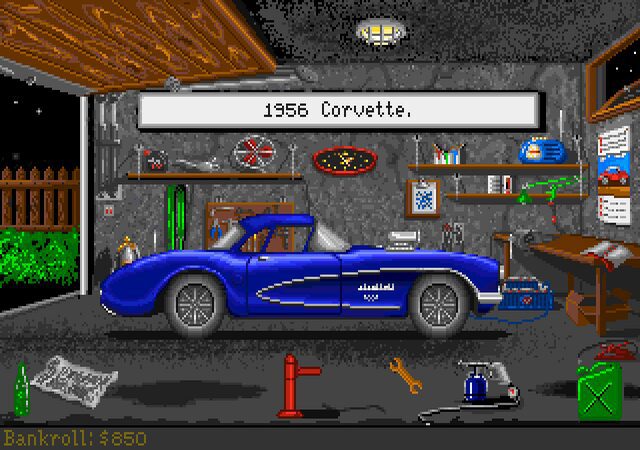
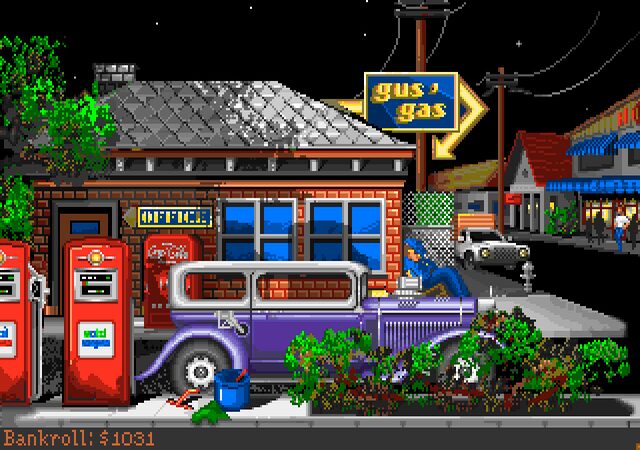
Street Rod begins with a newspaper, a modest budget and an empty garage. Buying a used car is the first step; then come the parts, the repairs and the races against the regulars at the restaurant. Its mix of management and driving turns every duel into a decision that also affects your wallet.
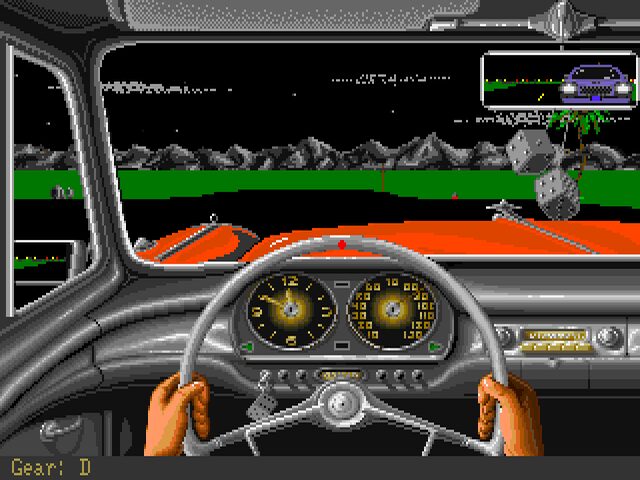
The garage works like a small interactive stage: you can browse the ads, lift the hood and inspect the vehicle before heading out. On the road, the perspective switches to the driver’s seat. The speedometer, the gearshift and the movement of the road make visible what you were preparing among the tools.
A Car of Your Own and Rivals to Challenge
At Bob’s Drive-In you will find drivers ready to compete. You can start with a race with no bet to learn how to launch from the light and keep the car on the road. A crash may force you to pay for a repair: holding on to money is as important as buying a faster machine.
The Online Edition on This Page
The browser offers the original Street Rod for MS-DOS, in English, with mouse control. This game page keeps its existing downloads, including the special edition; the online game corresponds to the base game. The purchase of a 1940 Chevrolet, a race, the damage, and the recovery of the saved car and money have been tested. The background is an editorial illustration inspired by its road duels.
EVERY PIXEL COUNTS
The game in pictures.
Explore the screenshots and open every detail at full size.
GET READY FOR YOUR NEXT GAME
Choose your download.
Format, compatibility and server. All in view.
Download Repack
COMPATIBILITYWindows XP / 7 / 10 ✓ At no cost✓ No sign-up Download www.mediafire.com · New tab MediaFire02 OriginalDownload Original
COMPATIBILITYMS-DOS 6.22+ ✓ At no cost✓ No sign-up Download www.mediafire.com · New tabClicking opens the CLABA loading area and, in a few seconds, your download. If a link fails, let us know via Contact or in the forum.
Your game starts here
Play in your browser.
Pick, press and go back to the classics without leaving the game page.
RetrogamingRight in your browserNo installation
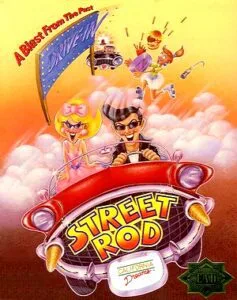
MS-DOSIn your browser
Street Rod (SE)
Your next game starts here.
- 582 KB · downloads on click
- Save the game's files
- Keyboard, controller or touch
Controls
Click the game to use the keyboardOn mobile, play with the on-screen controller- Esc
- release cursor
Mouse: select and drive. Right button: accelerate. Left: shift gear. Move down: brake. Read the start guide.
- Full screen
Use the button on the bar. Esc returns to the game page; “Exit” closes the game.
- Saves
Save keeps the files the game creates, not the exact moment. Save inside the game, then press Save.
- Mobile and tablet
Press Controls during the game to show buttons and keyboard. Gamepad support depends on the browser.
Saves live in this browser and device. Clearing the site data deletes them too.
THE SECRET SIDE OF THE GAME
Tips, tricks and secrets.
A hint at the right time. A code that changes everything.
Tip: start without betting
In your first challenge, choose Drag Race and Just for kicks. You will learn the launch without risking a bet, although damage to the car can still cost you money.
Tip: keep money for repairs
Do not spend everything when buying your first vehicle. In the test of this edition, a crash meant a repair of 122 dollars. It is an example from one game, not a fixed price for any bump.
Tip: try an automatic car
The 1940 two-door Chevrolet lets you start with an automatic transmission. At launch, you have to shift from N to D; after that you can concentrate on accelerating and keeping the steering straight.
Tip: slow down in time
In this page’s mouse profile, move the mouse down to brake. Do it before you run out of road; sharp corrections at too high a speed can end in a crash.
Tip: save from the garage
Before a challenge, use the clock and Save Game. Then press Save on the ClaBa bar to keep the game files in this browser.
No matches. Try another effect or code.
THE NEXT STEP, CLEARER
Guides to move forward.
From the first installation to that mission that won't give in.
First launch and buying the car
- Press Play now and wait for the opening screens. Enter lets you advance.
- If the manual’s color question appears, this copy lets you continue by entering 9. There is no need to change any files.
- Type a name for the license and confirm with OK.
- Click in the game to capture the mouse; the first click only activates it. In the newspaper, go into Used Cars and choose a vehicle.
- The 1940 two-door Chevrolet costs 400 dollars in the starting game that was tested. Confirm the purchase and go back to the garage.
Mouse: selection, accelerator and shifting
The left button selects options. During the race, hold the right button to accelerate and move the mouse horizontally to steer. Moving it down brakes. The left button shifts gears depending on acceleration or deceleration; with the automatic Chevrolet, use it at launch to shift from N to D. Wait for green. Esc releases the cursor so you can reach the ClaBa bar; the key does not mean quitting the game.
Getting to the first race
- Leave through the door on the left of the garage and wait for the trip to Bob’s Drive-In.
- Select a driver and call them over. Then click on their car window to issue the challenge.
- To begin, choose Drag Race, Just for kicks and confirm the start.
- When the light turns green, accelerate and engage the gear. Practice steering and braking before chasing speed.
- Rivals may leave while you wait in the restaurant. Use Pause on the bar if you need to consult the guide.
Saving and restoring your car and budget
- In the garage, click the clock and select Save Game.
- Choose a slot and confirm with the notebook’s Save button. This creates a save game of the game itself.
- Release the cursor with Esc and press Save on the browser bar.
- To restore it, press Load on the bar; the game starts up again. Advance to the license and choose Old Game.
- Select your name and press Load. The Chevrolet and the 228 dollars from the test were recovered. The bar keeps files; it does not freeze a race in the middle of a curve.
Edition and sources
This game page keeps its previous identity and downloads. The online version uses the DOS base game and its mouse controls, tested in a real race. The files needed for compatibility come from the Street Rod Online distribution. Credits, driving and garage functions were checked against the original manual. The shortcuts from the Commodore card have not been carried over to this DOS edition.
Something wrong?
Give us a hint.
A broken link, a detail to correct or a game that won't start. Your report helps keep this game page up to date.
Get in touchReport an issue with this game Discuss it in the forumCLABA ARCADE ROOM
This one and 250 more
play here.
When you finish your game, the room has other machines switched on.
Enter the roomTHE CLABA APP1.0 RC 1
Take the archive
with you.

Game pages, online play and your shelf on Android. Free, no sign-up.
ARCHIVE SECRETS
Did you know?
- The manual credits the development and programming to PZK Development Co., and the original concept to Magic Partners.
- The garage clock opens the options for saving and restoring games.
- The newspaper ads let you buy your first car before going out to look for rivals.
- The price of a repair comes out of the same budget with which you buy and upgrade the vehicle.