

Gremlin Interactive · Action-adventure
Litil Divil
Mutt faces a labyrinth of traps and challenges with comic animations, contextual actions and a mission as absurd as fetching a pizza.
Action-adventure game by Gremlin Interactive (1993) for MS-DOS (in English), Amiga CD32 and CD-i. Playable in your browser (MS-DOS) or downloadable.
Choose your version 3 platforms
— no rating yet
THE CLABA ARCHIVE
Inside the game.
Its history, its ideas and the reasons to come back.


Mutt has been given an errand he would rather avoid: going into a labyrinth to get a pizza. Litil Divil turns that excuse into an adventure of slapstick humor, traps and rooms that force you to work out what the little devil can do in each situation.
One room, one problem
Walking straight ahead isn't enough. The tunnels connect challenges and the rooms change the context of the actions. The start of the bridge already makes this clear: a guardian keeps you from moving on calmly, and combinations of direction with the action keys matter.
The animation exaggerates every movement and every blow. Learn the space available, test the jump and avoid walking up to the enemy without thinking. A single key doesn't solve every room by itself; recognizing the problem is part of the game.
The online copy
It uses the DOS version with the included keyboard configuration: arrow keys and Z/X actions. Movement and directional jumping in the first room have been checked. The full run through the labyrinth and the victory over its guardian have not been tried for this game page.
ONE GAME, 3 PLATFORMS
Versions.
3 platforms1993–19941 playable online
Pick a platform: the screenshots, downloads and online game on this page switch with it.

- Year
- 1993
- Port by
- Gremlin Graphics
- Downloads
- 2
- Screenshots
- 3
The PC version is the original: Gremlin started the game for the Super Famicom CD and, when that peripheral was canceled, finished it for PC with 4 MB of RAM as a minimum. When walking toward the screen the camera doesn't reorient behind Mutt, an oddity it shares with the CD-i version. PC Gamer gave it 86%.

- Year
- 1994
- Port by
- Gremlin Graphics
- Downloads
- 1
- Screenshots
- 1
CD32 conversion published in August 1994. The console's small amount of RAM complicated the work compared with the 4 MB the PC required. It is the only version in which the camera turns to stay behind Mutt when he walks toward the screen, which makes it less frustrating, and like the other CD editions it has higher-quality music. The One gave it 74% and criticized that you could not save at any time.
- Year
- 1994
- Port by
- Gremlin Graphics / Philips Media
- Downloads
- 1
- Screenshots
- —
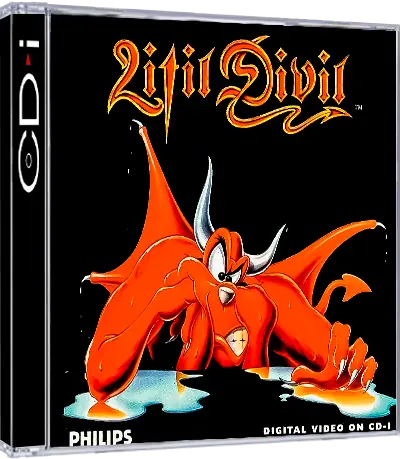
Edition for Philips's CD-i, published by Philips under its Philips Media label. Its big addition is an animated introduction and ending, making it the only version that tells the story within the game itself; it also has the highest-quality music of the CD versions. Reception was lukewarm: Electronic Gaming Monthly gave it 6.5 out of 10 and criticized the control lag.
EVERY PIXEL COUNTS
The game in pictures.
Explore the screenshots and open every detail at full size.
GET READY FOR YOUR NEXT GAME
Choose your download.
Format, compatibility and server. All in view.
Version
SELECTED VERSIONMS-DOS1993 · 2 files · also playable online
SELECTED VERSIONAmiga CD321994 · 1 file
Clicking opens the CLABA loading area and, in a few seconds, your download. If a link fails, let us know via Contact or in the forum.
Your game starts here
Play in your browser.
Pick, press and go back to the classics without leaving the game page.
Version

MS-DOSIn your browser
Litil Divil
MS-DOS version. Your next game starts here.
- 8 MB · downloads on click
- Save the game's files
- Keyboard, controller or touch
Controls
Click the game to use the keyboardOn mobile, play with the on-screen controller- ↑←↓→
- move
- ZX
- actions depending on the room
- Enter
- advance the intro
X with a direction: jump, confirmed on the bridge.
- Full screen
Use the button on the bar. Esc returns to the game page; “Exit” closes the game.
- Saves
Save keeps the files the game creates, not the exact moment. Save inside the game, then press Save.
- Mobile and tablet
Press Controls during the game to show buttons and keyboard. Gamepad support depends on the browser.
Saves live in this browser and device. Clearing the site data deletes them too.
The Amiga CD32 version can't be played in the browser yet.
You can download it or play another version now:
The CD-i version can't be played in the browser yet.
You can download it or play another version now:
HIT PLAY
The game in motion.
Trailers and videos to see it in action.
-
Amiga CD32 · How it plays
A game of Litil Divil on Amiga CD32.
-
CD-i · How it plays
A game of Litil Divil on CD-i.
THE SECRET SIDE OF THE GAME
Tips, tricks and secrets.
A hint at the right time. A code that changes everything.
Tip: combine direction and action
In the first room, X together with a direction produces a jump. Pressing an action without orienting Mutt doesn't always equal the same movement.
Tip: measure the distance
Don't press up against the guardian before you know its reach. The blow can knock Mutt down; the jump needs to be prepared with room to spare.
Tip: experiment in each room
Test the actions when you enter a new challenge. The behavior is contextual; don't automatically carry over the movement from another room.
Tip: look for the real save
The manual points out the save rooms. Saving in the player doesn't by itself create a native save game or freeze a blow.
No matches. Try another effect or code.
THE NEXT STEP, CLEARER
Guides to move forward.
From the first installation to that mission that won't give in.
Startup and first room
Open Play online and press Play now. Advance the intro with Enter and wait for the bridge scene. Mutt’s controlled movement, not the logo, is the start of the test.
Keyboard for this copy
The arrow keys move Mutt. Z and X are contextual actions; the directional jump with an arrow key and X has been confirmed on the bridge. The included configuration shouldn't be confused with the default numeric values in other manuals.
The bridge guardian
Practice short moves and jumping before approaching the enemy. Watch the space and the timing of its blow. The test confirms that Mutt responds and jumps, but it doesn't present a complete solution for this room.
Tunnels and saving
According to the PC manual, F3 opens options in the tunnels, not in every room. Saving is initiated in the rooms meant for it; afterward the player's Save keeps the DOS files. The data is local to the browser.
PC manual
The manual for the ZOO PC re-release explains tunnels, rooms and saving. This game page keeps the controls of the DOS copy that was tested and doesn't certify every room, the full campaign or physical devices.
Something wrong?
Give us a hint.
A broken link, a detail to correct or a game that won't start. Your report helps keep this game page up to date.
Get in touchReport an issue with this game Discuss it in the forumCLABA ARCADE ROOM
This one and 250 more
play here.
When you finish your game, the room has other machines switched on.
Enter the roomTHE CLABA APP1.0 RC 1
Take the archive
with you.

Game pages, online play and your shelf on Android. Free, no sign-up.
ARCHIVE SECRETS
Did you know?
- The pizza mission appears in the PC manual.
- The game distinguishes connecting tunnels from challenge rooms.
- Actions depend on the room and on the direction used.
- Native saving takes place in specific rooms, not simply when you open the menu.


