
Cryo Interactive · Action-adventure
The Shadow of Zorro
Cryo Interactive brings the 1822 Zorro to 3D action and stealth: seven chapters, 28 stages and two ways to play. Spanish-language edition for Windows.
Action-adventure game by Cryo Interactive (2001) for PC, in Spanish. Available to download.
4.6 5 votes
THE CLABA ARCHIVE
Inside the game.
Its history, its ideas and the reasons to come back.
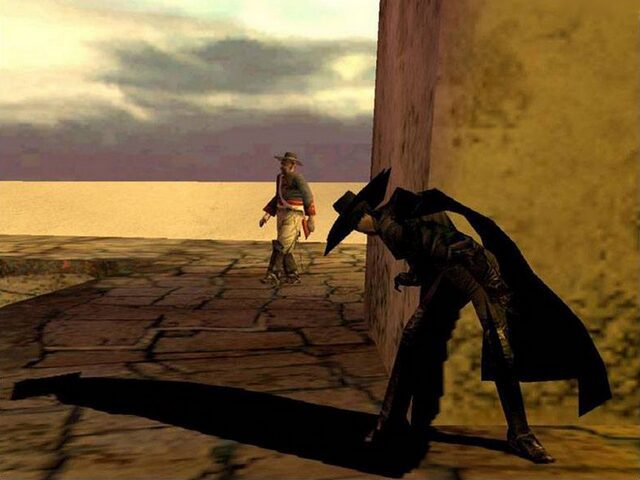
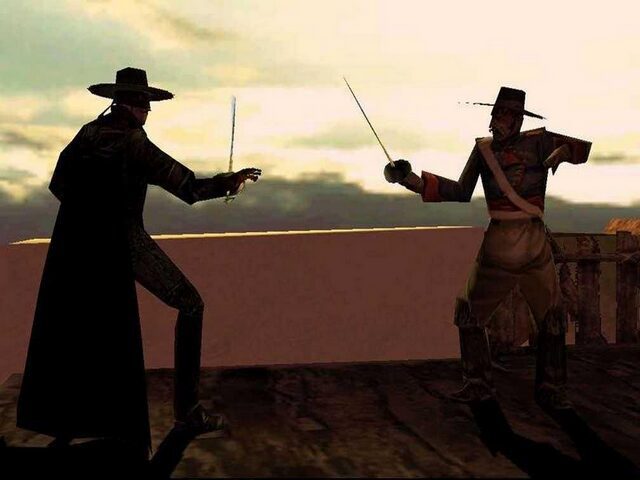
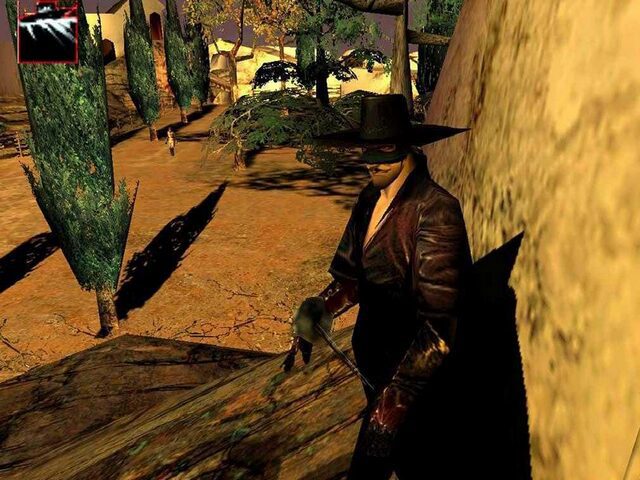
California, 1822. A newly arrived captain commands the garrison, and Don Alejandro de la Vega suspects that the man is really a war criminal who fled Spain. His son Diego has a discreet way of finding out: put on the mask, grab the sword and go out at night. The Shadow of Zorro (La Sombra del Zorro in Spanish) is Cryo Interactive’s bid for the masked hero, a third-person action and stealth game that reached the PC in late 2001.
Seven chapters, your choice of how to fight
The adventure is divided into seven chapters with 28 stages in total, and it can be played on two difficulty levels. The most interesting part is that the game lets you decide the style: you can cut your way through with the character’s own sword moves, or resolve each situation by hiding, dodging the guards and making use of the shadows. There are espionage and rescue missions, so it is not all about confronting the soldiers.
A European Zorro
According to the press of the time, it was Cryo’s first Zorro game; the company held the exclusive rights to the name for five more years and planned to make other titles. It was developed by the studio In Utero, announced with an official website in mid-2001, and released on PC in November, a few weeks before the PlayStation 2 version, which was planned for December.
The plot puts Zorro on the trail of a secret: according to Gameswelt’s preview, the garrison’s new commander could be a traitor and murderer who was believed dead, and a mysterious woman has appeared with him whom Diego will also want to identify. Intrigue, rescues and espionage replace the simple hunting of bandits here.
If you are looking for something similar in the catalog, Indiana Jones and the Infernal Machine shares the mix of action and 3D exploration, Hitman: Codename 47 takes stealth to another extreme, and another title from the same company, The Secret of the Nautilus, shows Cryo’s more leisurely side. You can also find Zorro, a platformer take on the character.
The edition we offer
This is the Spanish-language edition of the game (the original release also had localizations into other languages, such as Czech or Portuguese, according to PCGamingWiki), in a repack ready to install on Windows XP or later from Downloads. In Guides you will see how to install it on a modern PC, the technical notes (the game is limited to 1024×768 and a low frame rate, but community patches exist) and the sources for this text; in Tips & tricks we have gathered gameplay advice, because we have not found reliable codes for this version. If you want to keep your progress, the tutorial on copying and restoring your save games will come in handy.
EVERY PIXEL COUNTS
The game in pictures.
Explore the screenshots and open every detail at full size.
GET READY FOR YOUR NEXT GAME
Choose your download.
Format, compatibility and server. All in view.
Clicking opens the CLABA loading area and, in a few seconds, your download. If a link fails, let us know via Contact or in the forum.
THE SECRET SIDE OF THE GAME
Tips, tricks and secrets.
A hint at the right time. A code that changes everything.
Tip · no documented codes
We have not found a reliable list of keyboard cheats for this version, and we are not going to copy codes from other Zorro games. What follows is gameplay advice based on how the game is set up: chapters, stealth or sword, and two difficulty levels.
Tip · choose your style before going in
The game lets you either fight or hide. If you get stuck fighting several guards at once, pull back and try going around. Try it in the espionage missions, where staying discreet is supposed to rule.
Tip · start on low difficulty
There are two levels. For a first playthrough, the easier one lets you learn the moves and the camera without frustration; you can start over later on the harder one.
Tip · use the control presets
According to PCGamingWiki, you cannot remap keys one by one, but you can switch between several keyboard or controller schemes. If the default one feels awkward, try the others before giving up.
Tip · save often
Save before every dangerous situation so you do not have to repeat long sequences, and back up the save-game folder with our tutorial.
No matches. Try another effect or code.
THE NEXT STEP, CLEARER
Guides to move forward.
From the first installation to that mission that won't give in.
Start here · first launch on a modern PC
- Download the repack from Downloads and unzip it into a short path such as
C:\Juegos\Zorro, outsideProgram Files. - Run it in compatibility mode for Windows 98/Me or XP, depending on your system; the game was written for Windows 95, 98 and Me.
- The game uses Direct3D 7 and its maximum resolution is 1024×768.
- If your screen is widescreen and you want a different resolution, PCGamingWiki links a community widescreen and field-of-view patch; to go beyond 1024×768 it is best to combine it with dgVoodoo 2.
- More help in the tutorial how to play your Windows XP classics on Windows 10 and 11.
Controls · keyboard and controller schemes
- The game is played with keyboard, mouse or controller, and it comes with several predefined schemes that you switch from the menu.
- Individual keys cannot be assigned; the official recommendation includes an analog controller.
- The sound options separate voices, music and effects, and there are subtitles.
First steps · how to approach the chapters
- Watch the patrol patterns before you move: stealth works if you wait for the right moment.
- Do not get into an open fight if there are more than two enemies.
- Since the game lets you choose between stealth and fighting, try both styles in the first chapter to see which suits you better.
- With 28 stages spread over seven chapters, take it slowly and save after finishing each one.
Technical notes
Original minimum requirements (according to PCGamingWiki): Windows 95/98/Me, Pentium II at 400 MHz, 64 MB of RAM, 150 MB of disk space, an Nvidia TNT card with 8 MB and a 4x CD drive. Recommended: Pentium III at 600 MHz, 128 MB, GeForce and an analog controller.
The game is capped at 35 FPS in menus and 20 in play. The configuration data is in the game’s config folder and in the registry, at HKCU\SOFTWARE\Cryo\Zorro. There is a 1.005 patch and a community widescreen and FOV fix, as well as a demo.
Sources
- PCGamingWiki: The Shadow of Zorro: developer, date, requirements, resolution, FPS, patches and configuration paths.
- Gameswelt, 2001 preview: PC and PS2 dates, seven chapters, 28 stages, two difficulties, Cryo’s rights.
- GRYOnline, July 19, 2001: Cryo’s official website and the plot (California, 1822).
- Internet Archive: The Shadow of Zorro: CD image and 2001 update.
Something wrong?
Give us a hint.
A broken link, a detail to correct or a game that won't start. Your report helps keep this game page up to date.
Get in touchReport an issue with this game Discuss it in the forumCLABA ARCADE ROOM
251 classics
without installing anything.
Don't feel like installing? These play right in your browser.
Enter the roomTHE CLABA APP1.0 RC 1
Take the archive
with you.

Game pages, online play and your shelf on Android. Free, no sign-up.
ARCHIVE SECRETS
Did you know?
Cryo’s first Zorro. The German press in 2001 presented it as the company’s first Zorro game; Cryo held the exclusive rights to the name for five more years and planned other titles.
Two release dates for the PC. The sources do not agree: Gameswelt announced the PC version for November 23, 2001 and PlayStation 2 for December 7; PCGamingWiki gives November 14 for Windows.
Seven chapters, 28 stages. The design offered two difficulty levels and the freedom to go in with the sword or by stealth, according to the game’s presentation.
A game that runs at 20 frames per second. PCGamingWiki notes that the game is capped at 35 FPS in the menus and 20 during play, and that without patches it only reaches 1024×768.
Demo and patch. There is a demo of the game and patch 1.005, which PCGamingWiki links from its community; the Internet Archive also preserves an update executable (ZorroUpdate1105.exe) alongside a CD image.


