LucasArts · Action-adventure
Indiana Jones and his Desktop Adventures
LucasArts' pocket adventure (1996): random games in a window, 1930s Mexico and Professor Brody. Repack and two original copies.
Action-adventure game by LucasArts (1996) for PC, in Spanish and English. Available to download.
4.6 8 votes
THE CLABA ARCHIVE
Inside the game.
Its history, its ideas and the reasons to come back.
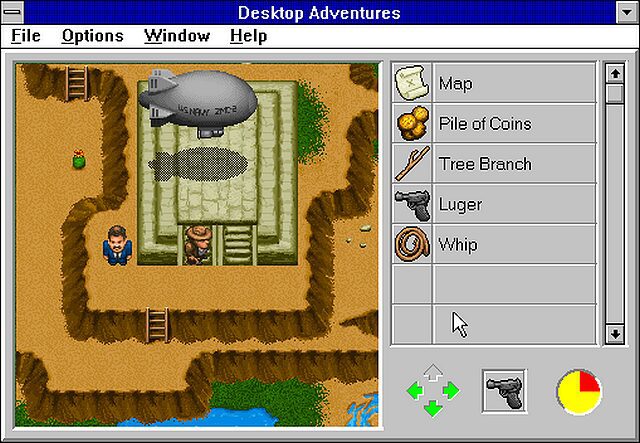
A small window in a corner of the desktop, an Indy made of fat pixels and ten spare minutes between two tasks. That was Indiana Jones and his Desktop Adventures, LucasArts’ 1996 experiment that gave up the graphical splendor of its classic adventures to offer something different: short, randomly generated games meant to be played without stopping work. Its creator, Hal Barwood, described it years later as a “casual” game before the word existed.
A randomly drawn Indy
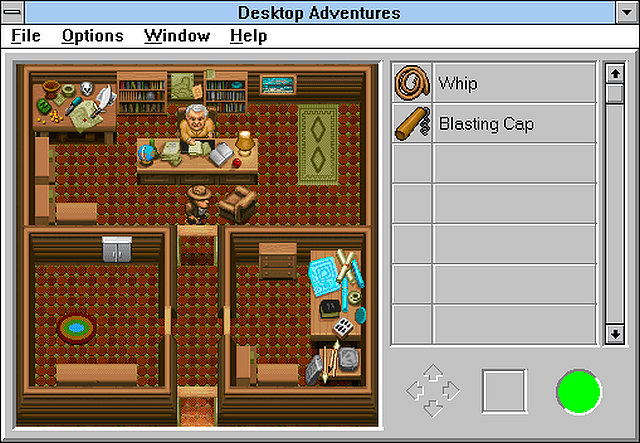
The box promised “literally billions of games” set in 1930s Mexico, with colorful characters, puzzles and different endings, each lasting less than an hour on average. The trick is in the generator: the game combines settings, objects and villains from fifteen types of adventure, always with a solution prepared in advance. Almost all of them start in Professor Marcus Brody’s office, who asks you to recover a piece such as the Aztec Sword, the Eagle Dagger or the Idol of Coatlicue. Then you have to find it in temples and catacombs, dodge snakes, spiders and Nazis, and hand it over.
How it plays
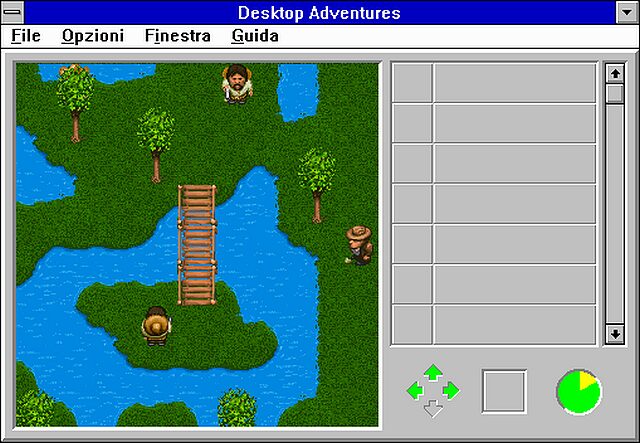
The view is top-down, as in the first Zelda games, and Indy moves in the four directions with the keyboard arrow keys or with the mouse, which is also used to manage the inventory and use weapons. Most puzzles consist of picking up an object and giving it to the right person. At the end a random boss awaits and, when you win, a score in “IQ,” the Indy Quotient. Afterward you can keep wandering around the level.
Forgotten, but charming
The press was harsh. Computer Gaming World singled it out as one of the worst releases of the year and other critics faulted the repetition and the crude graphics, although PC Zone magazine called it “very, very addictive.” Over time it has become a cherished curiosity, thanks to details such as one of the Strange Idol missions ending with the head of C-3PO, a nod that Barwood says the Lucasfilm bosses approved. There was a little sister, Star Wars: Yoda Stories (1997), with the same formula. If you prefer Indy in real adventures, we have Indiana Jones and the Fate of Atlantis, Indiana Jones and the Last Crusade, Indiana Jones and the Infernal Machine or Indiana Jones and the Emperor’s Tomb; and for another LucasArts classic, Maniac Mansion.
The edition we offer
In Downloads there are three options. A bilingual repack (English and Spanish) set up, according to its label, for Windows XP, 7 and 10; and the two original copies, one in Spanish and one in English, compatible with Windows XP. The game was born for Windows 3.1 and Windows 95 and always runs in a fixed-size window, so don’t expect full screen or widescreen resolutions. You will find the launch steps, the controls and the technical notes in Guides, and useful advice in Tips & tricks. For any trouble with modern systems, see our tutorial on playing Windows XP classics on Windows 10 and 11.
EVERY PIXEL COUNTS
The game in pictures.
Explore the screenshots and open every detail at full size.
GET READY FOR YOUR NEXT GAME
Choose your download.
Format, compatibility and server. All in view.
DOWNLOAD REPACK
COMPATIBILITYWindows XP / 7 / 10 ✓ At no cost✓ No sign-up Download www.mediafire.com · New tab MediaFire02 OriginalDOWNLOAD ORIGINAL
COMPATIBILITYWindows XP ✓ At no cost✓ No sign-up Download www.mediafire.com · New tab MediaFire03 OriginalDOWNLOAD ORIGINAL
COMPATIBILITYWindows XP ✓ At no cost✓ No sign-up Download www.mediafire.com · New tabClicking opens the CLABA loading area and, in a few seconds, your download. If a link fails, let us know via Contact or in the forum.
THE SECRET SIDE OF THE GAME
Tips, tricks and secrets.
A hint at the right time. A code that changes everything.
Tip · there are no reliable cheats
We have not found any cheat code published in a reliable source, neither on the box nor in the available documentation, and that is why we list none. What follows is gameplay advice.
Tip · always start with Brody
Almost every adventure begins in Professor Marcus Brody’s office, where he explains which object you must recover and where it comes from. Read it carefully: that description hints at the type of area and enemies awaiting you.
Tip · explore before fighting
Games are short, but the levels hide objects for other characters. Go through every room before heading to the boss: most puzzles are solved by picking up an object and delivering it to whoever asks for it.
Tip · watch out for diagonals
According to reviews from the time (Next Generation and PC Zone), Indy cannot shoot diagonally, but enemies can. Always line up in a straight line with them.
Tip · use the mouse for the inventory
The keyboard is enough for walking, but the inventory and weapons are handled with the mouse. It’s best to choose your weapon before entering a room with enemies.
Tip · play again
Each game mixes setting, object and villains, and there are fifteen types of adventure. If one gets you stuck, start another: the next one will be different and is usually shorter than the last.
No matches. Try another effect or code.
THE NEXT STEP, CLEARER
Guides to move forward.
From the first installation to that mission that won't give in.
Start here · first launch
- In Downloads, choose the repack (English and Spanish, for Windows XP, 7 and 10) if you want to play right away. The original copies (Spanish or English) are for preserving the game exactly as it was released.
- Install it in a short path such as
C:\Juegos\Indy, outsideProgram Files. - If you use an original copy, the installer is the classic one from 1996 (
SETUP.EXE). If it gives errors during installation, the community preserves an installation patch from LucasArts that replaces that file and only fixes installation problems. - If something doesn’t start on Windows 10 or 11, go through the tutorial on Windows XP classics or try DREAMM, which PCGamingWiki recommends for running the retail version on current systems.
Controls
- Arrow keys: move Indy in the four directions.
- Mouse: you can also move with it; it is also used for the inventory and weapons.
- Help menu: the game’s manual comes on the disc itself, and you consult it from the help menu.
The game always runs in a fixed-size window, so you can keep it open alongside other programs.
First steps · how to win
- Talk to Brody and note the object he assigns you.
- Explore the adventure area: temples, catacombs and caves. Make a note of where there are people asking for something.
- Pick up everything you can: the puzzle chain is almost always “object A for character B, who gives you object C.”
- Don’t take on snakes, spiders and soldiers unnecessarily: remember that they can shoot diagonally and you cannot.
- Once you have gathered what you need, go after the final boss and hand the object to Brody. When you win you receive your IQ score.
Technical notes
Requirements on the box: PC compatible, Windows 3.1 or later, 486/33 processor, 8 MB of RAM and graphics of at least 256 colors. LucasArts warned that on slow machines performance depends heavily on the video card. It came out for Windows 3.x on April 27, 1996 and for Mac OS that same year, according to PCGamingWiki.
It does not support full screen or change resolution. If you copy your save games to another machine, see how to copy and restore your save games.
Sources
- Installation sheet and original box (MOCAGH): installation, requirements and “billions of games in 1930s Mexico.”
- Inverse, interview with Hal Barwood: C-3PO, crystal skull, alien abduction, critical reception.
- PCGamingWiki: date, fixed window, installation patch and DREAMM.
- Internet Archive, installation patch: what the new SETUP.EXE fixes.
- Digital Game Museum: original floppy disk format for Windows 3.1.
- Wikipedia: fifteen scenario types, controls and reviews from the time.
Something wrong?
Give us a hint.
A broken link, a detail to correct or a game that won't start. Your report helps keep this game page up to date.
Get in touchReport an issue with this game Discuss it in the forumCLABA ARCADE ROOM
251 classics
without installing anything.
Don't feel like installing? These play right in your browser.
Enter the roomTHE CLABA APP1.0 RC 1
Take the archive
with you.

Game pages, online play and your shelf on Android. Free, no sign-up.
ARCHIVE SECRETS
Did you know?
C-3PO’s head. In one of the missions, the “Strange Idol” that frightens the locals turns out to be the head of the golden Star Wars droid. Hal Barwood told Inverse it was the team’s idea and that Lucasfilm gave permission.
Abducted by aliens. If you wait in a certain room of that same mission, a hidden level appears in which you cross a lake by boat and aliens carry Indy off. Barwood confirmed that it existed and that George Lucas inspired it.
A crystal skull that predates the movie. One of the objects Brody is looking for is the “Toltec Crystal Skull.” Crystal skulls had been appearing in Indiana Jones novels since 1993, so the fourth film did not come out of this game.
Billions of games. That is how the original box advertised it. In reality there are fifteen types of adventure, but the elements of each are drawn at random and you almost never play the same one twice.
Designed to live alongside other windows. It was designed to run in a window and use little memory, so the player could do other things at the same time. It asked for a 486/33, 8 MB of RAM and Windows 3.1 or later.