Eurocom · Action-adventure
Ice Age 2: The Meltdown
Eurocom's 3D platformer (2006) starring Scrat and his golden acorn, based on the movie. Spanish-language edition, with repack and disc image.
Action-adventure game by Eurocom (2006) for PC, in Spanish. Available to download.
4.3 11 votes
THE CLABA ARCHIVE
Inside the game.
Its history, its ideas and the reasons to come back.
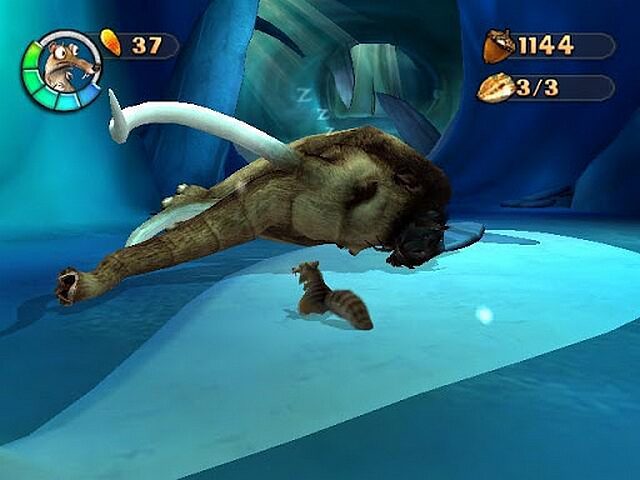
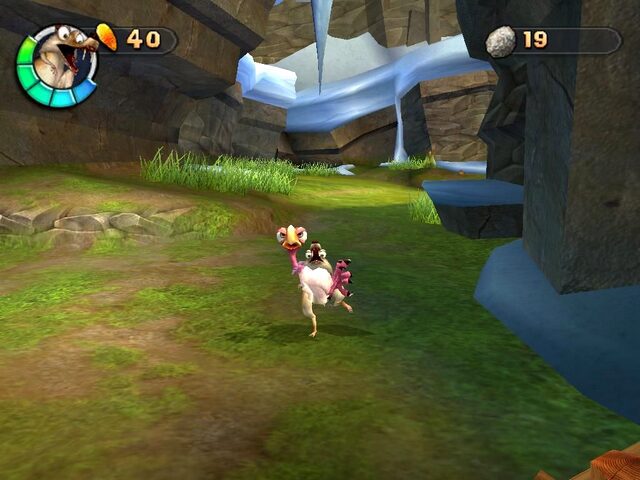
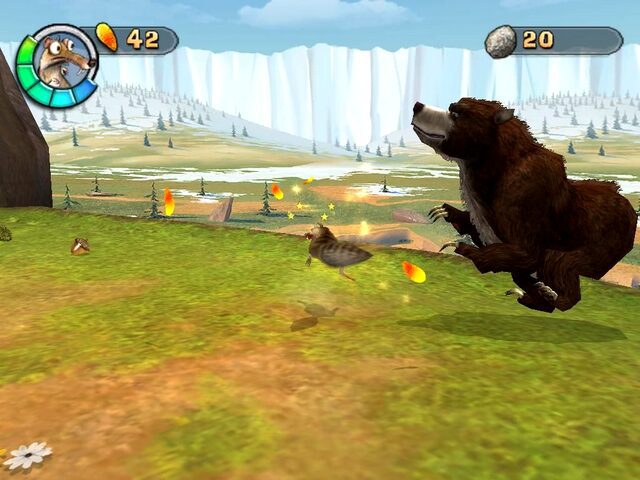
If the movie began with Scrat chasing his acorn, the video game decided to stay right there: Ice Age 2: The Meltdown (in Spain, La Edad de Hielo 2: El Deshielo) makes the unluckiest rodent in animated film its protagonist. It was developed by Eurocom and published by Vivendi Universal Games, through Sierra, in March 2006, to accompany the movie’s release, and it reached Windows at the same time as PlayStation 2, Xbox and GameCube, among other platforms.
A 3D platformer for younger players
This is a third-person collect-‘em-all platformer: brown acorns worth one, green ones worth five, spiky chestnuts worth more and, at the end of each world, a golden acorn that is always just a little out of reach. Scrat jumps, rolls, digs to unearth fruit and sniffs to locate hidden treasure, and at certain moments he has context-sensitive actions, such as playing dead so an enemy won’t see him. According to WorthPlaying’s review of the PS2 version, the feel is reminiscent of a slightly easier Spyro. Enemies don’t die, they are just stunned, and instead of a health bar you lose the petals of a flower. There are no lives or continues: if you fall or lose your petals, the game sends you back a few yards.
With Manny, Sid and Diego in the background
The story loosely follows that of the movie: the meltdown threatens the valley with a great flood and Manny’s herd tries to save itself. In the console versions there are also extra levels in which you control Manny, Sid or Diego. The game draws on the humor of the movies, especially in Scrat’s gestures, and WorthPlaying points out that in the versions they reviewed the actors from the movie lent their voices (we cannot confirm the voice cast of our Spanish-language edition).
Critics found it decent without getting excited: GameSpot spoke of a platformer «with more heart than the average adaptation» but too short, and on Metacritic the console versions hover around 66-68 points out of 100. Despite that, according to Wikipedia, by 2008 it had sold close to two million copies.
The edition we offer
This is the Spanish-language edition for PC. In Downloads there is a repack ready to install on Windows and the game’s disc image (the retail release had SecuROM protection and shipped on two CDs). Like almost everything from 2006, it is a game that resists today’s Windows: according to PCGamingWiki, you need to apply a community patch, the New Life Patch, for it to start, and it also fixes the widescreen format and applies a configurable frame rate cap (60 by default). We explain this in the Guides, and in Tips & tricks you will find gameplay advice. If you like the series, continue with Ice Age: Dawn of the Dinosaurs, and for the old-Windows side of things, our tutorial on Windows XP classics on Windows 10 and 11 (in Spanish).
EVERY PIXEL COUNTS
The game in pictures.
Explore the screenshots and open every detail at full size.
GET READY FOR YOUR NEXT GAME
Choose your download.
Format, compatibility and server. All in view.
Download Repack
COMPATIBILITYWindows XP / 7 / 10 ✓ At no cost✓ No sign-up Download www.mediafire.com · New tab MediaFire02 ISODOWNLOAD DVD
FORMATISO ✓ At no cost✓ No sign-up Download www.mediafire.com · New tabClicking opens the CLABA loading area and, in a few seconds, your download. If a link fails, let us know via Contact or in the forum.
THE SECRET SIDE OF THE GAME
Tips, tricks and secrets.
A hint at the right time. A code that changes everything.
How these tips work
We have not found any cheat codes for the PC version that we can confirm with two sources, so we list none. What you get are tips, each with its source.
Tip · collect everything to unlock extras
If you gather enough acorns in a world, an extra is unlocked, usually a making-of video. Brown ones are worth one, green ones five and spiky chestnuts more. Source: WorthPlaying (review of the PS2 version).
Tip · sniff and dig
Scrat can sniff to locate hidden treasure and dig to pull fruit out of the ground. If you think the scenery is hiding something, try both abilities. Source: WorthPlaying.
Tip · don't be afraid of falling
There are no lives or continues: if you lose your petals or fall, the game sends you back a few yards. It is a good game for little ones to practice on. Source: WorthPlaying.
Tip · get rid of the logo screens
If you don’t want to see the intro screens, go to the game’s Data\Mov\ folder and rename the videos BlueSky.bik, Eurocom.bik and Sierra.bik. Source: PCGamingWiki.
Tip · more frames
The New Life Patch applies a configurable frame rate cap out of the box (60 by default), with no need for Cheat Engine tweaks. Source: PCGamingWiki.
No matches. Try another effect or code.
THE NEXT STEP, CLEARER
Guides to move forward.
From the first installation to that mission that won't give in.
Start here · first launch on a modern PC
- Download the repack from Downloads (Spanish, for Windows).
- Install it in a short path with no accents or special letters like ñ, such as
C:\Juegos\IceAge2: PCGamingWiki’s resolution tool requires the path to contain only English letters. - Apply the community New Life Patch (download at PCGamingWiki), which according to that wiki is essential on modern systems: without it, the game does not start.
- If you see a white screen at startup, right-click
iceage2pc.exe, Properties, Compatibility, and check «Disable fullscreen optimizations» (according to the wiki, sometimes the videos play only sound).
About save games: they are stored in %APPDATA%\Ice Age 2\. To back them up, see how to copy and restore them.
Controls · keyboard and gamepad
PCGamingWiki indicates that the game lets you remap the keys and gamepad buttons, has mouse-driven menus and Y-axis inversion. The New Life Patch adds support for Xbox controllers. We have not found an official table of default keys, so check the controls configuration screen inside the game.
First steps · how to play
- Advance through the worlds: the goal is to reach the end, but collecting acorns unlocks extras.
- Use sniffing and digging when you see something suspicious.
- Don’t fight for the sake of it: enemies are only stunned, so it often pays to dodge them.
- Pay attention to the moments with context-sensitive actions (playing dead, for example).
It is a short, easy game aimed at a young audience; according to Wikipedia, GameSpot said it was over in a few hours.
Technical notes
The game dates from 2006 and uses DirectX 9 with the EngineX engine. The official requirements called for Windows 2000, a 1.4 GHz Pentium 4, 256 MB of RAM, 1.4 GB of disk space and a GeForce4 Ti or equivalent. By default it supports only 640×480, 800×600 and 1024×768, plus an anamorphic 16:9 option; for other resolutions, PCGamingWiki suggests the FOV patch with the uniws.exe tool, although the New Life Patch is the most complete solution. The configuration is in %APPDATA%\Ice Age 2\Ice Age 2.ini. The original disc used SecuROM 7, which is why the repack is advisable.
Sources
- PCGamingWiki · Ice Age 2: The Meltdown: requirements, New Life Patch, FOV, videos, paths, controls and DRM.
- WorthPlaying · review (PS2): gameplay, collectibles, lives and voices.
- The game’s official website (Internet Archive, 2006): confirms the platforms and the rights held by Twentieth Century Fox and Sierra.
- Wikipedia · Ice Age 2: The Meltdown (video game): developer, publisher, platforms, reception and sales.
Something wrong?
Give us a hint.
A broken link, a detail to correct or a game that won't start. Your report helps keep this game page up to date.
Get in touchReport an issue with this game Discuss it in the forumCLABA ARCADE ROOM
541 classics
without installing anything.
Don't feel like installing? These play right in your browser.
Enter the roomTHE CLABA APP1.0 RC 1
Take the archive
with you.

Game pages, online play and your shelf on Android. Free, no sign-up.
ARCHIVE SECRETS
Did you know?
The star is Scrat. The game does not follow the movie’s main characters: it centers on Scrat and his acorn; Manny, Sid and Diego appear in bonus levels.
Movie voices. WorthPlaying highlighted in its review of the PS2 version that the movie’s actors voiced the game, something uncommon in adaptations of the time.
It came out before the movie. The game arrived on March 14, 2006, before the movie opened in theaters, and WorthPlaying’s review of the PS2 version joked that its manual had fewer pages than a bus leaflet.
Two million, almost. According to Wikipedia, by 2008 the game had sold close to two million units worldwide.
A patch that saved the game. Over time, the community has created a patch that makes it start on modern Windows, adds Xbox controller support and sets the cap at 60 fps, according to PCGamingWiki.