EA Bright Light · Action-adventure
Harry Potter and the Half-Blood Prince
Sixth year with Slughorn: sixteen potions, six-spell duels, Quidditch as captain and 150 hidden crests at Hogwarts. Spanish repack and multilingual DVD.
Action-adventure game by EA Bright Light (2009) for PC, in Spanish and other languages. Available to download.
4.8 13 votes
THE CLABA ARCHIVE
Inside the game.
Its history, its ideas and the reasons to come back.
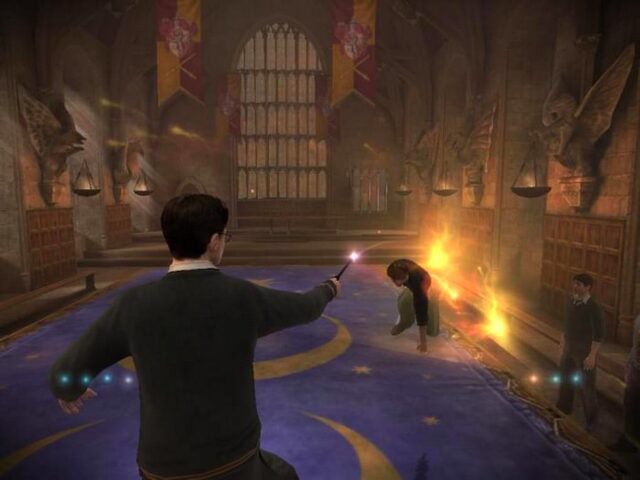
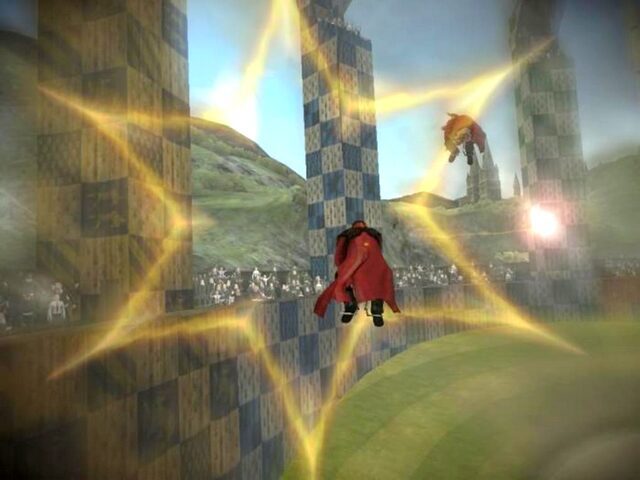
A bubbling cauldron, a jar of leeches in your hand and the clock ticking while Slughorn waits for the result. In Harry Potter and the Half-Blood Prince, magic feels less like a level-based adventure and more like the daily life of a sixth-year student: Potions classes, duels in the club, Quidditch practice and an entire castle to explore. It was developed by EA Bright Light, the British Electronic Arts studio that was home to the series, and came out for Windows on June 30, 2009 in the United States and July 3 in Europe.
Sixth year at Hogwarts
The story is that of the sixth book and its film: Dumbledore prepares Harry for what is to come, Draco is up to something and Ron gets caught up in romantic entanglements. The game does not tell it step by step, but uses the key moments as milestones between which you live through the school year. At the start, part of the castle is closed off because of the new security measures, and it opens up as you progress. Designer Chris Roberts promised before launch a Hogwarts even bigger than in Order of the Phoenix, from the boathouse to the Astronomy Tower, plus the Burrow and the horcrux cave.
Potions, duels and Quidditch
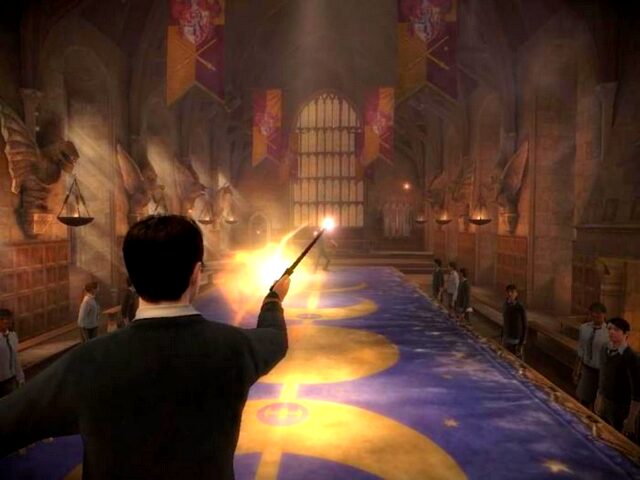
The school year is split into three activities. The potions, sixteen in all, are brewed in first person: the steps appear on screen and you pick the ingredient with the mouse, pour it with the keyboard, heat, shake and stir until you hit the right color before time runs out. The duels use six spells cast with the mouse, among them Stupefy, Protego, Expelliarmus and Levicorpus, and a health bar that the previous installment did not have. And Quidditch, now that Harry is Gryffindor captain, is a chase for the Snitch in which you have to fly through stars so you do not run out of time.
In between, the castle hides 150 Hogwarts crests. According to IGN, 125 are on walls, in bushes or in corners that can only be reached with the right spell, and the other 25 have to be earned, for example by gathering the mini-crests that fall from lamps and shining objects. Collecting them unlocks new opponents in the dueling club and recipes such as the love potion. To find your way around there are no longer footprints on the floor: Nearly Headless Nick appears and takes you to whatever place you choose.
How it was received
IGN gave the PC version a 7.5: it praised the mouse controls, simpler than in the previous installment, the recreation of the school and the music, and criticized the characters’ faces when they talk and a story that is hard to follow if you have not read the book. The main part takes about four or five hours to finish, although completing the crests and badges takes quite a bit longer. James Hannigan’s soundtrack, recorded with the Philharmonia orchestra, is one of its strong points.
The edition we offer
In Downloads you have two options: a Spanish-language repack that is ready to install and play, the most direct route on a current computer, and the original DVD image, multilingual and including Spanish, to preserve the edition as it was. Both are marked as compatible with Windows XP. If you have problems on Windows 10 or 11, our tutorial (in Spanish) on Windows XP classics on Windows 10 and 11 can help. In Guides you will find the installation, the controls and the community fixes for widescreen displays; in Tips & tricks, advice for duels, potions and crests.
The whole series is on ClasicosBasicos: Sorcerer’s Stone, Chamber of Secrets, Prisoner of Azkaban, Goblet of Fire and Order of the Phoenix.
EVERY PIXEL COUNTS
The game in pictures.
Explore the screenshots and open every detail at full size.
GET READY FOR YOUR NEXT GAME
Choose your download.
Format, compatibility and server. All in view.
Download Repack
COMPATIBILITYWindows XP / 7 / 10 ✓ At no cost✓ No sign-up Download www.mediafire.com · New tab MediaFire02 ISODOWNLOAD DVD
COMPATIBILITYWindows XP / 7 / 10 ✓ At no cost✓ No sign-up Download www.mediafire.com · New tabClicking opens the CLABA loading area and, in a few seconds, your download. If a link fails, let us know via Contact or in the forum.
THE SECRET SIDE OF THE GAME
Tips, tricks and secrets.
A hint at the right time. A code that changes everything.
No codes: tips
The PC version has no cheat codes documented in reliable sources, so we list none. These are tips drawn from reviews of the time and from the game’s technical documentation.
Tip · Levicorpus and go for him
In duels, IGN found that once you master Levicorpus, you can lift your opponent into the air and chain Stupefy while he is helpless. Getting five stars on the duel score takes a bit more planning.
Tip · one star is enough
A badly made potion does not block you: as long as you finish it, even with one star, you can move on. If you want a better grade, redo it as many times as you like. Each mistake, such as spilling something on the table, takes seconds off the clock.
Tip · Quidditch against the clock
In matches you do not steer the broom toward the Snitch: the camera follows it on its own and you move Harry around the screen. Fly through the stars to recharge time; if you miss several, they turn red and you will end up replaying the match.
Tip · look for the glow
Lamps, birds and objects that glow with a colored halo release mini-crests when you cast a spell at them. Collecting them fills a meter and, when it is full, you earn a whole crest. Some crests can only be reached once you learn the right spell.
Tip · let Nick guide you
If you do not know how to get to a classroom or a courtyard, choose the destination and Nearly Headless Nick will appear to accompany you. The names of each area also help; you can read them on the walls as you approach.
No matches. Try another effect or code.
THE NEXT STEP, CLEARER
Guides to move forward.
From the first installation to that mission that won't give in.
Start here · first launch
- In Downloads, pick the ready-to-install Spanish repack if you want the quick route; the multilingual DVD image is for preserving the original.
- Install to a short path, such as
C:\Juegos\HP6, outsideProgram Files. - The executable is
hp6.exe. If it closes on startup, try compatibility mode for Windows XP (Service Pack 3) or Windows 7, as explained in our tutorial (in Spanish) on Windows XP classics on Windows 10 and 11. - The repack is already in Spanish; the DVD includes several languages and, according to PCGamingWiki, the game has Spanish interface, voices and subtitles.
The original DVD uses SecuROM protection, according to PCGamingWiki. Your save games are stored in %LOCALAPPDATA%\Electronic Arts\Harry Potter and the Half Blood Prince\HPHBP0; copy them before reinstalling by following our tutorial (in Spanish) on copying and restoring save games. For questions about the download, there is the forum thread (in Spanish).
Controls
- Keyboard: Harry’s movement, running and jumping; in duels, dodging to the sides.
- Mouse: spells and combat. In potions you pick the ingredient with the mouse and pour it with the keyboard.
- Controller: the game supports XInput controllers (such as the Xbox one) with full control and their on-screen icons.
According to PCGamingWiki, you cannot remap the keys or adjust mouse sensitivity, but you can invert the camera axes, on both mouse and controller.
First steps
- Follow the first missions: they open up areas of the castle that are closed at the start.
- Do the potions even if they come out so-so: progressing only requires finishing them. You can go back for the five stars later.
- Join the dueling club as soon as possible and practice Levicorpus and Protego, which are the basis of victory.
- In Quidditch practice, focus on flying through the stars to gain time.
- Cast spells at everything that glows: mini-crests pile up and unlock opponents and recipes.
- When you get lost, let Nearly Headless Nick guide you to your destination.
Technical notes
According to PCGamingWiki, the game asked for Windows XP with Service Pack 2, a 1.8 GHz Pentium 4, 256 MB of RAM, 5 GB of disk space and DirectX 9.0c; it recommended Windows Vista, a Core 2 Duo and 1 GB of RAM. It is a 32-bit executable using DirectX 9.
- It is limited to 30 frames per second, with vertical sync always on, and its maximum resolution is 1920 × 1080.
- The community released fixes for higher resolutions, widescreen displays, field of view, windowed mode and 60 frames per second, such as the Fix Enhancers Fix and Razorn7’s Resolution Fix (which uses Ultimate ASI Loader). Apply them to a copy of the installation.
- On modern machines there is a known crash when you reach the bridge area if you play at 1920 × 1080: lower to 1600 × 900 to get past that part.
- If it closes on startup, PCGamingWiki suggests DxWnd configured as a d3d9 proxy.
Sources
- PCGamingWiki: Windows release date, EA Bright Light, SecuROM, languages, save game path, controller, 30 FPS limit, fixes, bridge crash, DxWnd and requirements.
- IGN · PC version review (July 2, 2009): potions, duels, Quidditch, 150 crests, Nearly Headless Nick, what is missing on PC, length and the 7.5 score.
- Yahoo! Games · interview with Chris Roberts (2008): castle locations, cast voices and freedom to explore.
- IGN · EA announcement (April 22, 2008): EA’s casual label, planned 2008 release date and statements by Harvey Elliott.
- Kotaku · I Beat Harry Potter’s Executive Producer In A Wand Duel (June 27, 2008): the duel with Jonathan Bunney.
- BBC News · James Hannigan (2009): Hedwig’s Theme and the recording with the Philharmonia at Air Studios.
- StrategyWiki: release dates in North America, Australia and Europe.
Something wrong?
Give us a hint.
A broken link, a detail to correct or a game that won't start. Your report helps keep this game page up to date.
Get in touchReport an issue with this game Discuss it in the forumCLABA ARCADE ROOM
251 classics
without installing anything.
Don't feel like installing? These play right in your browser.
Enter the roomTHE CLABA APP1.0 RC 1
Take the archive
with you.

Game pages, online play and your shelf on Android. Free, no sign-up.
ARCHIVE SECRETS
Did you know?
Hedwig’s theme in the background. Composer James Hannigan told the BBC that he wove fragments of the famous Hedwig’s Theme into his music so that it would be identified as Harry Potter: «it’s very much the film game.» The soundtrack was recorded with the Philharmonia orchestra at Air Studios in London.
Delayed along with the film. EA announced it in April 2008 for release that same year, alongside the film. When the premiere moved to summer 2009, the game went with it and reached stores on June 30, two weeks before the film.
Casual label. The announcement was signed by EA’s casual entertainment label, and the head of EA Bright Light, Harvey Elliott, explained that the team had focused especially on the Wii controller.
A journalist won the duel. In a June 2008 demo, Kotaku journalist Leigh Alexander faced executive producer Jonathan Bunney, who played Draco, in a wand duel with the Wii controller, and beat him.
What the PC lacks. According to IGN, the PC version is almost identical to the PS3 and Xbox 360 ones, but it lacks the two-player duels of the consoles and has no achievement system.