Inc. · Point-and-click adventure
The Neverhood
Doug TenNapel and DreamWorks' clay adventure (1996): everything is real claymation. English edition, with a Windows repack and the original CD.
Point-and-click adventure by The Neverhood (1996) for PC, in English. Available to download.
4.8 8 votes
THE CLABA ARCHIVE
Inside the game.
Its history, its ideas and the reasons to come back.
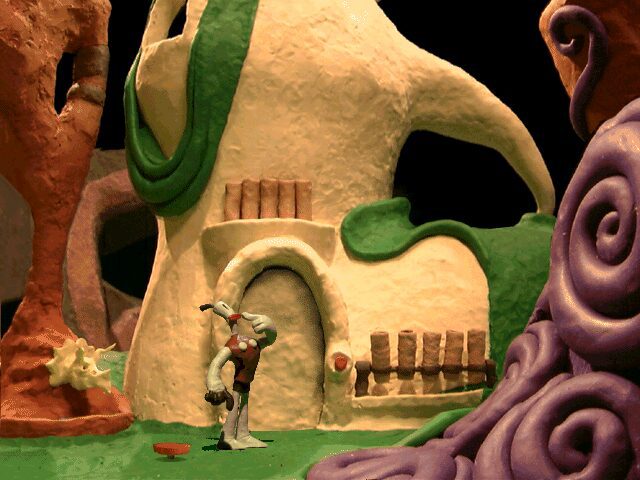
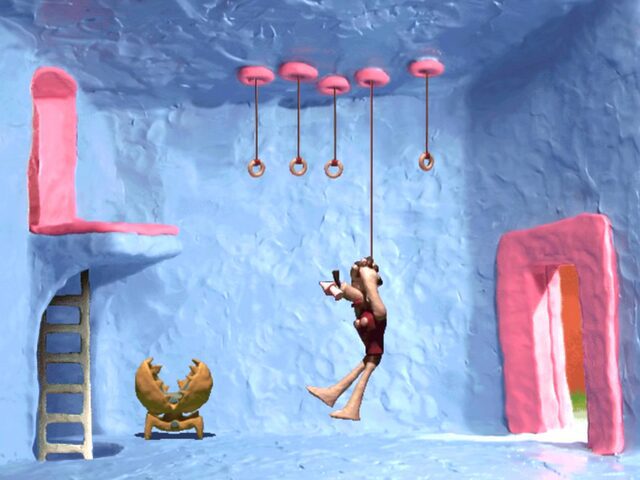
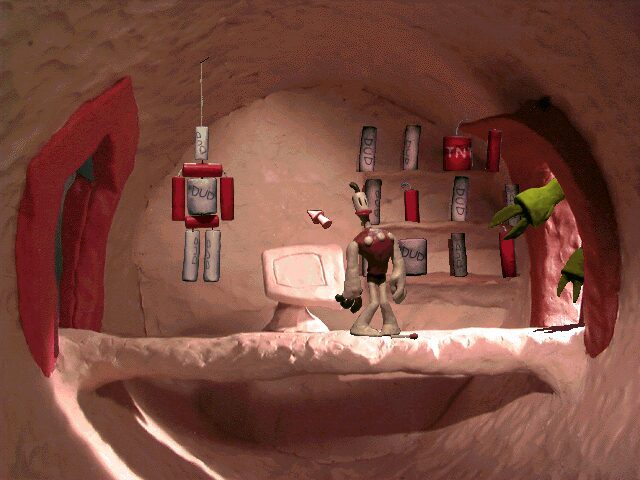
You wake up on the floor of a clay room, not knowing who you are or where you are. Above you, a city of plasticine floats over an endless void. That is how The Neverhood begins, the adventure that Doug TenNapel and his team, coming from Earthworm Jim, made in 1996 for DreamWorks Interactive with an unusual trick: everything you see, from the buildings to every tree, is genuinely clay, hand-modeled and photographed frame by frame.
A world made of klay
You control Klaymen, a little clay man. With the help of Willie Trombone and the giant robot Big Robot Bil, you gradually discover, through video discs scattered around the world, the story of Hoborg, the being who created the Neverhood out of a magical substance called klay, and of Klogg, the seed that turned out twisted on him and who stole his crown. All wrapped in absurd humor and an extravagant soundtrack that gets stuck in your head.
How it plays
It is a point and click adventure with a single tool: an arrow. Click on whatever you want to pick up, use or walk through and Klaymen takes care of the rest; whatever he picks up he stores in his chest. There is almost no inventory: the important objects usually serve in the puzzle in front of you, and the rest are video discs and keys. The puzzles recall toys of old: sliding puzzles, memory, symbol patterns, water pipes. Several are generated at random in each game, so a solution from the internet may not work for you as is.
What made it special
In an era of digitized video and pre-rendered worlds, The Neverhood bet on something handcrafted. According to the official guide Inside Moves, about three tons of clay were needed to build Klaymen and his world. It is a quiet game, for thinking and looking, unhurried and with very few ways to die. It was also the starting point of a small family: it came to PlayStation as Klaymen Klaymen in Japan, got a sequel that changed genre, the platformer Skullmonkeys, and its spirit returned with Armikrog, from the same creative team.
If you enjoyed the wacky humor and the careful animation, try Toonstruck, Day of the Tentacle, Sam & Max Hit the Road or Grim Fandango.
The edition we offer
The 1996 PC version in English. In Downloads there is a repack ready to install on Windows XP or later and the original CD image, designed for XP. This adventure runs at 640×480 and 20 frames per second, a pace typical of stop-motion animation, so don’t expect widescreen. To play it on a current PC, our tutorial on Windows XP classics on Windows 10 and 11 will help. In Guides you will find the launch, the controls and the known bugs, and in Tips & tricks, advice so you don’t get stuck.
EVERY PIXEL COUNTS
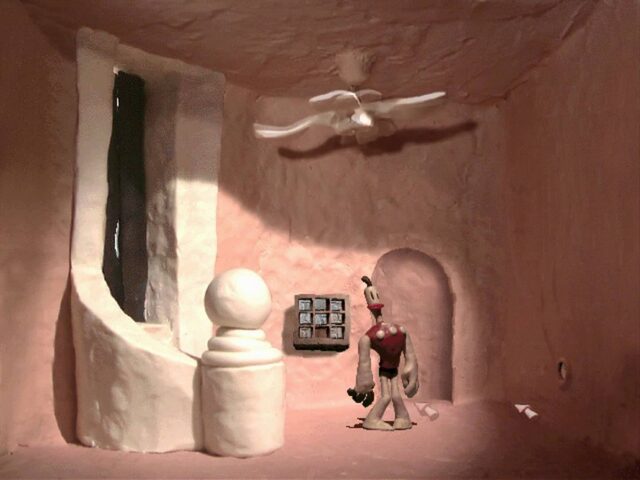
The game in pictures.
Explore the screenshots and open every detail at full size.
GET READY FOR YOUR NEXT GAME
Choose your download.
Format, compatibility and server. All in view.
Download Repack
COMPATIBILITYWindows XP / 7 / 10 ✓ At no cost✓ No sign-up Download www.mediafire.com · New tab MediaFire02 ISODownload ISO
COMPATIBILITYWindows XP ✓ At no cost✓ No sign-up Download www.mediafire.com · New tabClicking opens the CLABA loading area and, in a few seconds, your download. If a link fails, let us know via Contact or in the forum.
THE SECRET SIDE OF THE GAME
Tips, tricks and secrets.
A hint at the right time. A code that changes everything.
Tip · there are no cheat codes
We know of no reliable cheat codes for The Neverhood: neither the manuals nor the guides of the time list them, and the official book itself recommends playing on your own and consulting it only when you are stuck. That is why here you have tips that do work.
Tip · save often
The official guide recommends saving about every 15 minutes. Some puzzles force you to backtrack and it is easy to lose a clue you don’t recognize until later. Press Esc at any time to open the options menu and save.
Tip · the only serious danger
You can die, though rarely. According to GameBoomers’ guide, the clearest case is draining the lake and falling through the bottom. Save before doing anything irreversible. If you place the bridge block wrong, the model collapses, and on the memory panel a wrong pair covers the whole board again.
Tip · write down the symbols
Several puzzles are randomized: the starting position of the H sliding puzzle and the order of the twelve symbols on the bridge viewer change in each game, and are fixed the first time you consult them. Write down or draw the symbols, the colors and the position of the repeated symbol: you will need them in very different places. If you load a game before having seen them, the order will be different.
Tip · skipping the opening screens
Press the space bar to shorten the three credit screens at the start and Esc in the first clay scene to go straight to the menu. There is no key to skip everything at once, according to the official guide.
Tip · if nothing happens, flip switches
Lights, buttons and levers change the room. If the room seems to have no exit, switch on and off whatever you see. And reread Willie’s notes in the mailbox at the start, which work as hints.
No matches. Try another effect or code.
THE NEXT STEP, CLEARER
Guides to move forward.
From the first installation to that mission that won't give in.
Start here · first launch on a current PC
- Download the repack from Downloads (English). If you use the CD image, bear in mind that its original installer dates from the Windows 95 era.
- Install it in a short path, for example
C:\Juegos\Neverhood. If you install by hand, copynhc.exe,smackw32.dlland theDATAfolder from the CD into that folder and launch withnhc.exe. - To fix the stuttering of the opening video and the odd colors or lost music after Alt+Tab, apply the unofficial community patch (see «Technical notes»).
- Back up your save games with our tutorial on copying and restoring save games; in the original version they are stored in the Windows registry.
More help in the tutorial on Windows XP classics on Windows 10 and 11.
Controls · one button and an arrow
- A single mouse button controls everything: clicking an object, door or screen is enough for Klaymen to pick it up, use it or walk over.
- The arrow does not change shape; in side-scrolling scenes, move the cursor to the edge and click to go to the next screen. In first-person ones, the arrow curves when you can turn.
- Esc: opens the options menu (save, load, music, «making of» videos). There are no other hotkeys.
- Space bar: shortens the opening credit screens.
First steps · how to approach the game
- Explore without rushing: Klaymen only moves forward and backward, with no diagonals; there is no on-screen map, so write down whatever is useful.
- Pick up everything you see: the only fixed inventory objects are the video discs and the keys; everything else is almost always used in the puzzle at hand.
- Go and watch the video discs at the terminals: they tell the story and give context.
- Draw the symbols and colors as you see them.
- Save before irreversible actions and every few minutes.
Technical notes
Original requirements: Windows 95, a 75 MHz Pentium, 8 MB of RAM and an SVGA display with 256 colors. It runs at 640×480 and does not support widescreen; the videos use Smacker. It is a 32-bit application that uses DirectDraw 3.
According to PCGamingWiki, RangerKoc’s unofficial patch fixes the opening video, the colors and the music after Alt+Tab and lets you save to a saves folder instead of the registry; to use it you have to install by hand and disable the compatibility mode on nhc.exe. In the original, you can only turn the music off or on; ScummVM (compatible with the Windows version since 1.7.0) adds separate volume control, though not for the videos.
Sources
- The Neverhood: Inside Moves, 1997 official guide (Internet Archive): controls, saving, tons of clay, rating and hints.
- PCGamingWiki · The Neverhood: requirements, 20 FPS, unofficial patch, installer, saves.
- GameBoomers · Dan Kennedy’s walkthrough: randomized puzzles, death risks and tips.
- ScummVM Wiki: compatibility, Japanese title and platforms.
Something wrong?
Give us a hint.
A broken link, a detail to correct or a game that won't start. Your report helps keep this game page up to date.
Get in touchReport an issue with this game Discuss it in the forumCLABA ARCADE ROOM
541 classics
without installing anything.
Don't feel like installing? These play right in your browser.
Enter the roomTHE CLABA APP1.0 RC 1
Take the archive
with you.

Game pages, online play and your shelf on Android. Free, no sign-up.
ARCHIVE SECRETS
Did you know?
Three tons of clay. The official guide «Inside Moves» (1997) says that about three tons were needed to build Klaymen and his world, animated with stop-motion photography.
Rated 17 and up, says the box. The box advertised «17 and up», but the official ESRB rating was T (13 years). Not even the creators knew why, according to that same guide.
20 frames per second. PCGamingWiki notes that the game is capped at 20 FPS, which is common in clay animation.
Real clay. The guide compares it with Interplay’s fighting game: there, clay figures stood against an ordinary background; in The Neverhood, every house and every tree is clay.
Another name in Japan. ScummVM also lists it as «Klaymen Klaymen», the title under which it appeared on the Japanese market.